0.96-inch OLED display driver for STM32F103 (4-pin I2C interface), supporting both hardware and software I2C.
This driver is quite complete; it can display English, integers, floats, Chinese characters, images, binary and hexadecimal numbers, and supports drawing points, lines, rectangles, circles, ellipses, triangles, etc. With multiple fonts included, it’s almost a mini graphics library.
The program is a secondary modification based on Jiangxie Technology’s code. The original only supported software I2C; I added hardware I2C support and you can switch back to software I2C by changing a macro.
Written with the ST Standard Peripheral Library.
Tested on STM32F103C8T6 and AIR32F103CBT6; both run fine. With hardware I2C, STM32 reaches up to 1.3 Mbit/s, while AIR32 tops out at 600 kbit/s.
For OLED driving principles and a usage tutorial, see Jiangxie Technology’s video: https://url.zeruns.com/L7j6y
STM32 reading SHTC3 temp/humidity via hardware I2C: https://blog.zeruns.com/archives/692.html
STM32F407 Standard Peripheral Library project template with U8g2 graphics lib ported: https://blog.zeruns.com/archives/722.html
Electronics / MCU discussion group: 2169025065
Demo
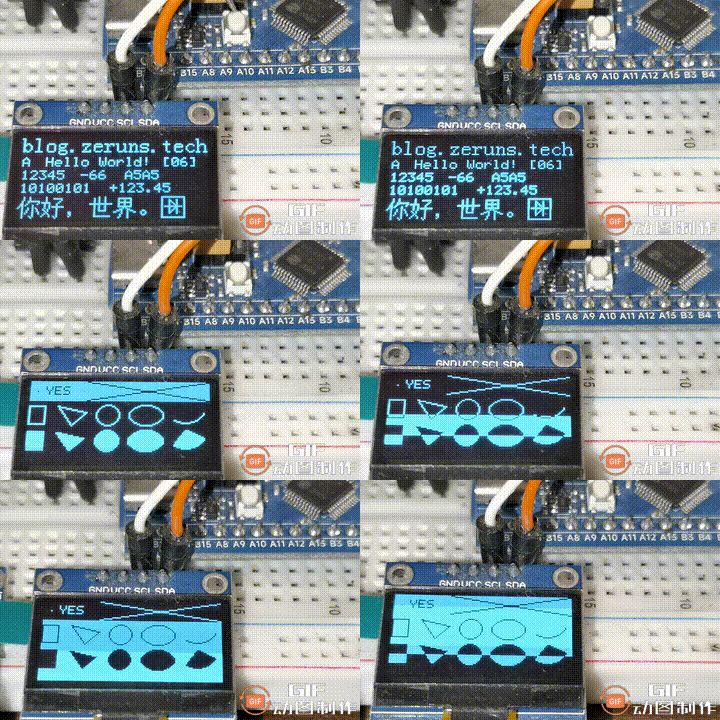
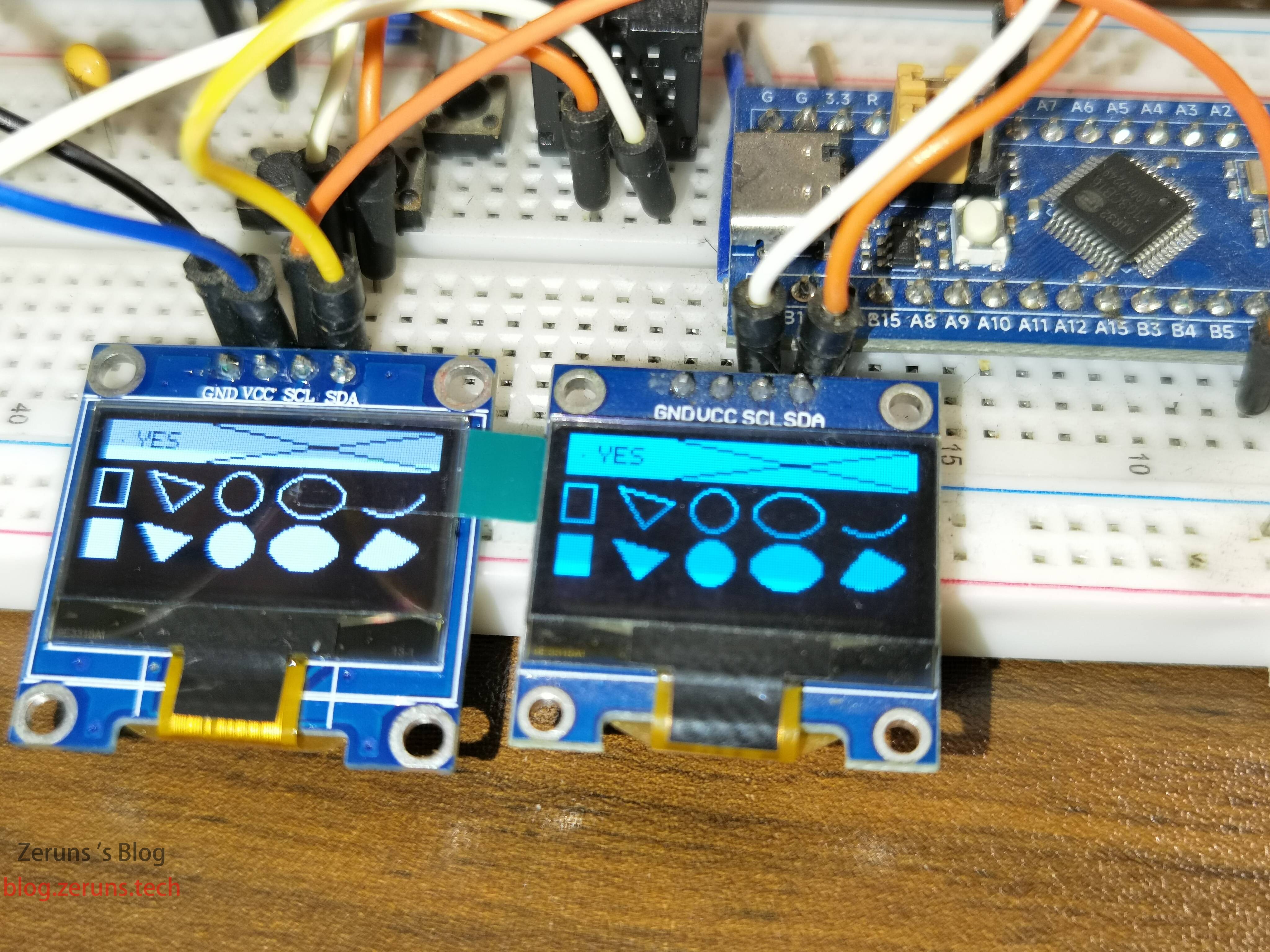
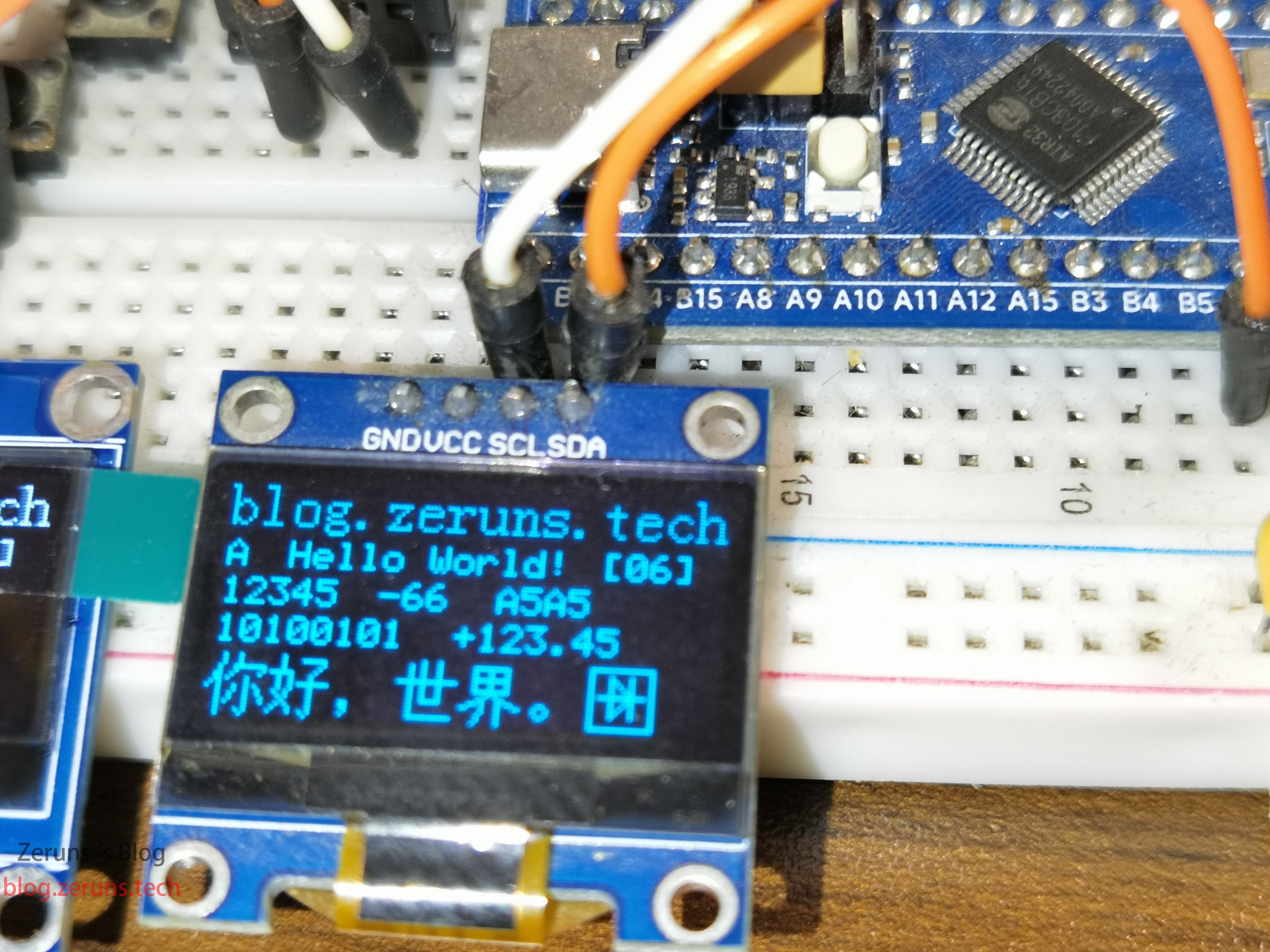
I2C Protocol Brief
The I2C (Inter-Integrated Circuit) protocol was developed by Philips. With few pins, simple hardware, good scalability, and no need for external transceivers like USART or CAN (level-shifters), it’s now widely used for on-board IC communication.
I2C has only one data line, SDA (Serial Data Line), sending data bit by bit—serial, half-duplex.
Half-duplex: bidirectional but not simultaneous; direction must alternate. Essentially a switchable single-direction link; only one direction at a time, so one wire suffices.
We divide I2C into physical layer and protocol layer: the physical layer defines mechanical/electrical characteristics (hardware), ensuring raw data transmission; the protocol layer defines communication logic, unifying data packaging/unpacking rules (software).
I2C Physical Layer
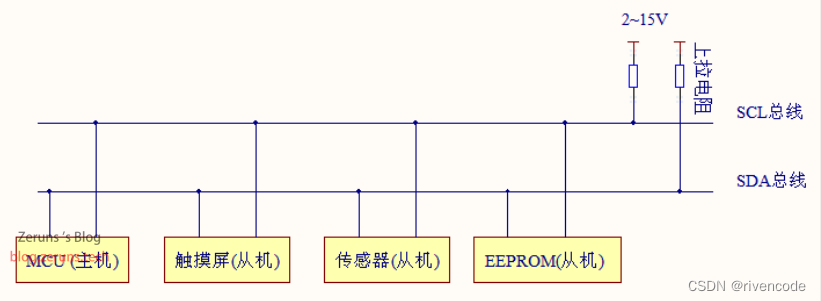
Typical I2C device connection
-
Multi-device bus: “bus” means shared signal lines. One I2C bus can connect multiple devices, supporting multiple masters and slaves.
-
Only two lines: bidirectional serial data SDA and serial clock SCL. Data line carries data; clock line synchronizes.
-
Pull-up resistors to VCC. When idle, I2C devices output high-impedance. When all devices are idle and high-impedance, pull-ups hold the bus high.
For I2C, MCU GPIO must be configured as open-drain; otherwise short-circuits may occur.
More STM32 I2C info and usage: https://url.zeruns.com/JC0Ah
Jiangxie’s STM32 beginner course: https://www.bilibili.com/video/BV1th411z7sn?p=31
I won’t repeat the details here.
Required Parts
- STM32 dev-board starter kit: https://u.jd.com/fQS0YAe
- STM32F103 minimum system board: https://s.click.taobao.com/TsFFvwt
- OLED module: https://s.click.taobao.com/EF0Evwt
- Jumper wires: https://s.click.taobao.com/VMkDvwt
- Breadboard: https://s.click.taobao.com/bhg8Txt
- DAPLink (ST-Link alternative, includes VCP): https://s.click.taobao.com/QVQ8Txt
Jiangxie STM32 starter kit: https://s.click.taobao.com/NTn9Txt
Code
Full project download:
Baidu Netdisk: https://url.zeruns.com/kSxoe Code: wgc3
123 Netdisk (no speed limit): https://www.123pan.com/s/2Y9Djv-HGcvH.html Code: m7sp
Project created in Keil5, developed with VSCode + EIDE; both IDEs can open it.
All source files are UTF-8; if garbled, set your editor to UTF-8.
main.c:
#include "stm32f10x.h"                  // Device header
#include "Delay.h"
#include "OLED.h"

/**
 * @brief Toggle the level of a specified GPIO pin.
 *
 * @param GPIOx Pointer to GPIO port, e.g. GPIOA, GPIOB.
 * @param GPIO_Pin Pin(s) to toggle, single pin like GPIO_Pin_0 or combined like GPIO_Pin_0 | GPIO_Pin_1.
 *
 * Reads the current output level of the specified pin. If low (Bit_RESET), sets it high (Bit_SET);
 * if high, sets it low. Achieves level toggling.
 */
void GPIO_TogglePin(GPIO_TypeDef* GPIOx, uint16_t GPIO_Pin)
{
    // Read current pin level
    if (GPIO_ReadOutputDataBit(GPIOx, GPIO_Pin) == Bit_RESET)
    {
        // Low -> High
        GPIO_SetBits(GPIOx, GPIO_Pin);
    }
    else
    {
        // High -> Low
        GPIO_ResetBits(GPIOx, GPIO_Pin);
    }
}
``````c
int main(void)
{
    RCC_APB2PeriphClockCmd(RCC_APB2Periph_GPIOC, ENABLE); // Enable GPIOC clock
    // Initialize GPIO pins
    GPIO_InitTypeDef GPIO_InitStructure;                // Define structure to configure GPIO
    GPIO_InitStructure.GPIO_Mode  = GPIO_Mode_Out_PP;   // Set GPIO mode to push-pull output
    GPIO_InitStructure.GPIO_Speed = GPIO_Speed_50MHz;   // Set GPIO speed to 50 MHz
    GPIO_InitStructure.GPIO_Pin   = GPIO_Pin_13;        // Set pin to OLED_SCL and OLED_SDA
    GPIO_Init(GPIOC, &GPIO_InitStructure);              // Initialize GPIO

    GPIO_TogglePin(GPIOC, GPIO_Pin_13); // LED blink

    /*OLED initialization*/
    OLED_Init();

    /*Display character 'A' at (0, 0) with 8*16 dot matrix font*/
    //OLED_ShowChar(0, 0, 'A', OLED_8X16);

    /*Display string "Hello World!" at (16, 0) with 8*16 dot matrix font*/
    OLED_ShowString(0, 0, "blog.zeruns.com", OLED_8X16);

    /*Display character 'A' at (0, 18) with 6*8 dot matrix font*/
    OLED_ShowChar(0, 18, 'A', OLED_6X8);

    /*Display string "Hello World!" at (16, 18) with 6*8 dot matrix font*/
    OLED_ShowString(16, 18, "Hello World!", OLED_6X8);

    /*Display number 12345 at (0, 28) with length 5 and 6*8 dot matrix font*/
    OLED_ShowNum(0, 28, 12345, 5, OLED_6X8);

    /*Display signed number -66 at (40, 28) with length 2 and 6*8 dot matrix font*/
    OLED_ShowSignedNum(40, 28, -66, 2, OLED_6X8);

    /*Display hexadecimal number 0xA5A5 at (70, 28) with length 4 and 6*8 dot matrix font*/
    OLED_ShowHexNum(70, 28, 0xA5A5, 4, OLED_6X8);

    /*Display binary number 0xA5 at (0, 38) with length 8 and 6*8 dot matrix font*/
    OLED_ShowBinNum(0, 38, 0xA5, 8, OLED_6X8);

    /*Display floating-point number 123.45 at (60, 38) with integer length 3, fractional length 2, and 6*8 dot matrix font*/
    OLED_ShowFloatNum(60, 38, 123.45, 3, 2, OLED_6X8);

    /*Display Chinese string "你好,世界。" at (0, 48) with fixed 16*16 dot matrix font*/
    OLED_ShowChinese(0, 48, "你好,世界。");

    /*Display image at (96, 48) with width 16 pixels, height 16 pixels, and image data from Diode array*/
    OLED_ShowImage(96, 48, 16, 16, Diode);

    /*Print formatted string at (96, 18) with 6*8 dot matrix font, formatted string "[%02d]"*/
    OLED_Printf(96, 18, OLED_6X8, "[%02d]", 6);

    /*Call OLED_Update function to update OLED display buffer to OLED hardware*/
    OLED_Update();

    /*Delay 3000 ms to observe the display*/
    Delay_ms(3000);

    GPIO_TogglePin(GPIOC, GPIO_Pin_13); // LED blink

    /*Clear OLED display buffer*/
    OLED_Clear();

    /*Draw point at (5, 8)*/
    OLED_DrawPoint(5, 8);

    /*Get point at (5, 8)*/
    if (OLED_GetPoint(5, 8))
    {
        /*If the specified point is lit, display string "YES" at (10, 4) with 6*8 dot matrix font*/
        OLED_ShowString(10, 4, "YES", OLED_6X8);
    }
    else
    {
        /*If the specified point is not lit, display string "NO " at (10, 4) with 6*8 dot matrix font*/
        OLED_ShowString(10, 4, "NO ", OLED_6X8);
    }

    /*Draw line between (40, 0) and (127, 15)*/
    OLED_DrawLine(40, 0, 127, 15);

    /*Draw line between (40, 15) and (127, 0)*/
    OLED_DrawLine(40, 15, 127, 0);

    /*Draw rectangle at (0, 20) with width 12 pixels, height 15 pixels, unfilled*/
    OLED_DrawRectangle(0, 20, 12, 15, OLED_UNFILLED);

    /*Draw rectangle at (0, 40) with width 12 pixels, height 15 pixels, filled*/
    OLED_DrawRectangle(0, 40, 12, 15, OLED_FILLED);

    /*Draw triangle between (20, 20), (40, 25), and (30, 35), unfilled*/
    OLED_DrawTriangle(20, 20, 40, 25, 30, 35, OLED_UNFILLED);

    /*Draw triangle between (20, 40), (40, 45), and (30, 55), filled*/
    OLED_DrawTriangle(20, 40, 40, 45, 30, 55, OLED_FILLED);

    /*Draw circle at (55, 27) with radius 8 pixels, unfilled*/
    OLED_DrawCircle(55, 27, 8, OLED_UNFILLED);

    /*Draw circle at (55, 47) with radius 8 pixels, filled*/
    OLED_DrawCircle(55, 47, 8, OLED_FILLED);

    /*Draw ellipse at (82, 27) with horizontal semi-axis 12 pixels, vertical semi-axis 8 pixels, unfilled*/
    OLED_DrawEllipse(82, 27, 12, 8, OLED_UNFILLED);
    // https://blog.zeruns.com
    /*Draw ellipse at (82, 47) with horizontal semi-axis 12 pixels, vertical semi-axis 8 pixels, filled*/
    OLED_DrawEllipse(82, 47, 12, 8, OLED_FILLED);

    /*Draw arc at (110, 18) with radius 15 pixels, start angle 25 degrees, end angle 125 degrees, unfilled*/
    OLED_DrawArc(110, 18, 15, 25, 125, OLED_UNFILLED);

    /*Draw arc at (110, 38) with radius 15 pixels, start angle 25 degrees, end angle 125 degrees, filled*/
    OLED_DrawArc(110, 38, 15, 25, 125, OLED_FILLED);

    /*Call OLED_Update function to update OLED display buffer to OLED hardware*/
    OLED_Update();

    /*Delay 1500 ms to observe the display*/
    Delay_ms(1500);

    GPIO_TogglePin(GPIOC, GPIO_Pin_13); // LED blink

    while (1)
    {
        for (uint8_t i = 0; i < 4; i ++)
        {
            /*Invert partial data in OLED display buffer from (0, i * 16), width 128 pixels, height 16 pixels*/
            OLED_ReverseArea(0, i * 16, 128, 16);

            /*Call OLED_Update function to update OLED display buffer to OLED hardware*/
            OLED_Update();

            /*Delay 1000 ms to observe the display*/
            Delay_ms(1000);

            /*Revert the inverted content*/
            OLED_ReverseArea(0, i * 16, 128, 16);

            GPIO_TogglePin(GPIOC, GPIO_Pin_13); // LED blink
        }
        // https://blog.zeruns.com
        /*Invert all data in OLED display buffer*/
        OLED_Reverse();

        /*Call OLED_Update function to update OLED display buffer to OLED hardware*/
        OLED_Update();

        /*Delay 1000 ms to observe the display*/
        Delay_ms(1000);

        GPIO_TogglePin(GPIOC, GPIO_Pin_13); // LED blink
    }
}
OLED.c file:
/***************************************************************************************
* This program was created by Jiangxie Technology and is freely open-sourced
* You may view, use, and modify it freely and apply it to your own projects
* The copyright of this program belongs to Jiangxie Technology, and no individual or organization may claim it as their own
*
* Program Name: 0.96-inch OLED Display Driver (4-pin I2C interface)
* Program Creation Date: 2023.10.24
* Current Program Version: V1.1
* Current Version Release Date: 2023.12.8
*
* Jiangxie Technology Official Website: jiangxiekeji.com
* Jiangxie Technology Official Taobao Store: jiangxiekeji.taobao.com
* Program Introduction and Updates: jiangxiekeji.com/tutorial/oled.html
*
* If you find any bugs or typos in the program, please report them via email: [email protected]
* Before sending an email, you may check the updates page for the latest version; if the issue has already been fixed, no need to send the email
***************************************************************************************
*/
/*
* This program has been modified by zeruns
* Modification: Added support for hardware I2C, selectable via macro definition
* Modification Date: 2024.2.25
* Blog: https://blog.zeruns.com
* Bilibili Homepage: https://space.bilibili.com/8320520
*/
#include "stm32f10x.h"
#include "OLED.h"
#include <string.h>
```.h>
#include <math.h>
#include <stdio.h>
#include <stdarg.h>
// If Chinese characters are used, the compiler must be given the option --no-multibyte-chars
/*
Choose the OLED driver method; hardware I2C is used by default.
If you want to use software I2C, comment out the macro definition for hardware I2C and uncomment the line for software I2C.
Do NOT uncomment both at the same time!
*/
#define OLED_USE_HW_I2C // Hardware I2C
//#define OLED_USE_SW_I2C // Software I2C
/*Pin definitions; I2C communication pins can be modified here*/
#define OLED_SCL GPIO_Pin_6 // SCL
#define OLED_SDA GPIO_Pin_7 // SDA
#define OLED_GPIO GPIOB
#define OLED_RCC RCC_APB2Periph_GPIOB
/*STM32F103 on-chip hardware I2C1: PB6 -- SCL; PB7 -- SDA */
/*I2C interface: define which I2C peripheral the OLED screen uses*/
#define OLED_I2C I2C1
#define OLED_I2C_RCC RCC_APB1Periph_I2C1
/*OLED slave address*/
#define OLED_ADDRESS 0x3C << 1 // 0x3C is the 7-bit OLED address; shifted left by 1 bit, the LSB becomes the R/W bit, resulting in 0x78
/*I2C timeout duration*/
#define OLED_I2C_TIMEOUT 1000
/**
* Data storage format:
* 8 vertical pixels, MSB at bottom, left-to-right first, then top-to-bottom
* Each bit corresponds to one pixel
*
* B0 B0 B0 B0
* B1 B1 B1 B1
* B2 B2 B2 B2
* B3 B3 -------------> B3 B3 --
* B4 B4 B4 B4 |
* B5 B5 B5 B5 |
* B6 B6 B6 B6 |
* B7 B7 B7 B7 |
* |
* -----------------------------------
* |
* | B0 B0 B0 B0
* | B1 B1 B1 B1
* | B2 B2 B2 B2
* --> B3 B3 -------------> B3 B3
* B4 B4 B4 B4
* B5 B5 B5 B5
* B6 B6 B6 B6
* B7 B7 B7 B7
*
* Coordinate system definition:
* Top-left corner is point (0, 0)
* Horizontal rightward is X-axis, range: 0~127
* Vertical downward is Y-axis, range: 0~63
*
* 0 X-axis 127
* .------------------------------->
* 0 |
* |
* |
* |
* Y-axis |
* |
* |
* |
* 63 |
* v
*
*/
/*Global variables*********************/
/**
* OLED display-buffer array
* All display functions only read/write this buffer array
* Afterwards call OLED_Update or OLED_UpdateArea
* to send the buffer data to the OLED hardware for display
*/
uint8_t OLED_DisplayBuf[8][128];
/*********************Global variables*/
#ifdef OLED_USE_SW_I2C
/**
* Function: OLED write SCL high/low
* Parameter: logic level to write to SCL, range: 0/1
* Return : none
* Note : Called by upper-layer functions when SCL needs to be written
* User must set SCL high or low according to the parameter
* Parameter 0 -> low, 1 -> high
*/
void OLED_W_SCL(uint8_t BitValue)
{
/*Set SCL high or low according to BitValue*/
GPIO_WriteBit(OLED_GPIO, OLED_SCL, (BitAction)BitValue);
/*If the MCU is too fast, add a suitable delay here to avoid exceeding the maximum I2C speed*/
//...
}
/**
* Function: OLED write SDA high/low
* Parameter: logic level to write to SDA, range: 0/1
* Return : none
* Note : Called by upper-layer functions when SDA needs to be written
* User must set SDA high or low according to the parameter
* Parameter 0 -> low, 1 -> high
*/
void OLED_W_SDA(uint8_t BitValue)
{
/*Set SDA high or low according to BitValue*/
GPIO_WriteBit(OLED_GPIO, OLED_SDA, (BitAction)BitValue);
/*If the MCU is too fast, add a suitable delay here to avoid exceeding the maximum I2C speed*/
//...
}
#endif
/**
* Function: OLED pin initialization
* Parameter: none
* Return : none
* Note : Called by upper-layer functions when initialization is needed
* User must configure SCL and SDA as open-drain and release the pins
*/
void OLED_GPIO_Init(void)
{
uint32_t i, j;
/*Add a delay before initialization to let OLED power stabilize*/
for (i = 0; i < 1000; i++) {
for (j = 0; j < 1000; j++)
;
}
#ifdef OLED_USE_HW_I2C
RCC_APB1PeriphClockCmd(OLED_I2C_RCC, ENABLE); // Enable I2C1 clock
#endif
RCC_APB2PeriphClockCmd(OLED_RCC, ENABLE); // Enable GPIO clock
GPIO_InitTypeDef GPIO_InitStructure; // Define struct to configure GPIO
#ifdef OLED_USE_HW_I2C
GPIO_InitStructure.GPIO_Mode = GPIO_Mode_AF_OD; // Set GPIO to alternate-function open-drain, external pull-up required
GPIO_InitStructure.GPIO_Speed = GPIO_Speed_50MHz; // Set GPIO speed to 50 MHz
GPIO_InitStructure.GPIO_Pin = OLED_SCL | OLED_SDA; // Configure OLED_SCL and OLED_SDA pins
GPIO_Init(OLED_GPIO, &GPIO_InitStructure); // Initialize GPIO
#elif defined(OLED_USE_SW_I2C)
GPIO_InitStructure.GPIO_Mode = GPIO_Mode_Out_OD; // Set GPIO to open-drain output, external pull-up required
GPIO_InitStructure.GPIO_Speed = GPIO_Speed_50MHz;
GPIO_InitStructure.GPIO_Pin = OLED_SCL | OLED_SDA;// Configure OLED_SCL and OLED_SDA pins
GPIO_Init(OLED_GPIO, &GPIO_InitStructure);
/*Release SCL and SDA*/
OLED_W_SCL(1);
OLED_W_SDA(1);
#endif
#ifdef OLED_USE_HW_I2C
I2C_DeInit(OLED_I2C); // Reset I2C peripheral registers to default
I2C_InitTypeDef I2C_InitStructure; // Define struct to configure I2C
I2C_InitStructure.I2C_Mode = I2C_Mode_I2C; // Operating mode
I2C_InitStructure.I2C_DutyCycle = I2C_DutyCycle_2; // Clock duty cycle, Tlow/Thigh = 2
I2C_InitStructure.I2C_OwnAddress1 = 0x30; // Master I2C address, unused so any value is OK
I2C_InitStructure.I2C_Ack = I2C_Ack_Enable; // Enable acknowledge
I2C_InitStructure.I2C_AcknowledgedAddress = I2C_AcknowledgedAddress_7bit; // 7-bit address
I2C_InitStructure.I2C_ClockSpeed = 600000;// I2C clock frequency, 600 kHz. 400 kHz recommended for stability. Tested up to 1.3 MHz on STM32F103 and 600 kHz on AIR32F103.
I2C_Init(OLED_I2C, &I2C_InitStructure); // Initialize I2C
I2C_Cmd(OLED_I2C, ENABLE); // Enable I2C
#endif
}
// https://blog.zeruns.com
/*Communication protocol*********************/
/**
* Function: I2C start
* Parameter: none
* Return : none
*/
void OLED_I2C_Start(void)
{
#ifdef OLED_USE_HW_I2C
for(uint16_t i = 0; I2C_GetFlagStatus(OLED_I2C, I2C_FLAG_BUSY) && i < OLED_I2C_TIMEOUT; i++); // Wait while I2C bus is busy
I2C_GenerateSTART(OLED_I2C, ENABLE); // Send START condition
// Check EV5 (Master mode) event until it occurs, indicating I2C has switched to Master mode.
for(uint16_t i = 0; !I2C_CheckEvent(OLED_I2C, I2C_EVENT_MASTER_MODE_SELECT) && i < OLED_I2C_TIMEOUT; i++);
I2C_Send7bitAddress(OLED_I2C, OLED_ADDRESS, I2C_Direction_Transmitter); // Send 7-bit address, enter transmitter mode
for(uint16_t i = 0; !I2C_CheckEvent(OLED_I2C, I2C_EVENT_MASTER_TRANSMITTER_MODE_SELECTED) && i < OLED_I2C_TIMEOUT; i++); // Check EV6, verify transmitter mode
#elif defined(OLED_USE_SW_I2C)
OLED_W_SDA(1); // Release SDA, ensure high
OLED_W_SCL(1); // Release SCL, ensure high
OLED_W_SDA(0); // Pull SDA low while SCL high, generate START
OLED_W_SCL(0); // Pull SCL low after START to hold bus and ease timing
#endif
}
/**
* Function: I2C stop
* Parameter: none
* Return : none
*/
void OLED_I2C_Stop(void)
{
#ifdef OLED_USE_HW_I2C
I2C_GenerateSTOP(OLED_I2C, ENABLE); // Release I2C bus
#elif defined(OLED_USE_SW_I2C)
OLED_W_SDA(0); // Ensure SDA low
OLED_W_SCL(1); // Release SCL, let it go high
OLED_W_SDA(1); // Release SDA while SCL high, generate STOP
#endif
}
/**
* Function: I2C send one byte
* Parameter: Byte – data to send, range 0x00~0xFF
* Return : none
*/
void OLED_I2C_SendByte(uint8_t Byte)
{
#ifdef OLED_USE_HW_I2C
I2C_SendData(OLED_I2C, Byte); // Send one byte
// Check EV8_2 to verify transmission complete
for(uint16_t i = 0; I2C_CheckEvent(I2C1, I2C_EVENT_MASTER_BYTE_TRANSMITTED) != 1 && i < OLED_I2C_TIMEOUT; i++);
#elif defined(OLED_USE_SW_I2C)
uint8_t i;
/*Loop 8 times, master sends each bit*/
for (i = 0; i < 8; i++)
{
/*Use masking to extract each bit and write to SDA*/
/*Double ! turns any non-zero value into 1*/
OLED_W_SDA(!!(Byte & (0x80 >> i)));
OLED_W_SCL(1); // Release SCL, slave reads SDA while high
OLED_W_SCL(0); // Pull SCL low, master prepares next bit
}
OLED_W_SCL(1); // Extra clock, ignore ACK
OLED_W_SCL(0);
#endif
}
/**
* Function: OLED write command
* Parameter: Command – command byte to write, range 0x00~0xFF
* Return : none
*/
void OLED_WriteCommand(uint8_t Command)
{
OLED_I2C_Start(); // I2C start
#ifdef OLED_USE_SW_I2C
OLED_I2C_SendByte(0x78); // Send OLED I2C slave address
#endif
OLED_I2C_SendByte(0x00); // Control byte 0x00: next byte is command
OLED_I2C_SendByte(Command); // Write specified command
OLED_I2C_Stop(); // I2C stop
}
/**
* Function: OLED write data
* Parameter: Data – pointer to data to write
* Parameter: Count – number of bytes to write
* Return : none
*/
void OLED_WriteData(uint8_t *Data, uint8_t Count)
{
uint8_t i;
OLED_I2C_Start(); // I2C start
#ifdef OLED_USE_SW_I2C
OLED_I2C_SendByte(0x78); // Send OLED I2C slave address
#endif
OLED_I2C_SendByte(0x40); // Control byte 0x40: next bytes are data
/*Loop Count times for continuous data write*/
for (i = 0; i < Count; i++) {
OLED_I2C_SendByte(Data[i]); // Send each byte in Data
}
OLED_I2C_Stop(); // I2C stop
}
/*********************Communication protocol*/
/*Hardware configuration*********************/
/**
* Function: OLED initialization
* Parameter: none
* Return : none
* Note : Call this init function before use
*/
void OLED_Init(void)
{
OLED_GPIO_Init(); // Call low-level port init first
/*Send a series of commands to initialize the OLED*/
OLED_WriteCommand(0xAE); // Display ON/OFF: 0xAE OFF, 0xAF ON
OLED_WriteCommand(0xD5); // Set display clock divide ratio / oscillator frequency
OLED_WriteCommand(0x80); // 0x00~0xFF
OLED_WriteCommand(0xA8); // Set multiplex ratio
OLED_WriteCommand(0x3F); // 0x0E~0x3F
OLED_WriteCommand(0xD3); // Set display offset
OLED_WriteCommand(0x00); // 0x00~0x7F
OLED_WriteCommand(0x40); // Set display start line, 0x40~0x7FOLED_WriteCommand(0xA1); // Set left/right orientation, 0xA1 normal, 0xA1 reversed
OLED_WriteCommand(0xC8); // Set top/bottom orientation, 0xC8 normal, 0xC0 reversed
OLED_WriteCommand(0xDA); // Set COM pin hardware configuration
OLED_WriteCommand(0x12);
OLED_WriteCommand(0x81); // Set contrast
OLED_WriteCommand(0xCF); // 0x00~0xFF
OLED_WriteCommand(0xD9); // Set pre-charge period
OLED_WriteCommand(0xF1);
OLED_WriteCommand(0xDB); // Set VCOMH deselect level
OLED_WriteCommand(0x30);
OLED_WriteCommand(0xA4); // Set entire display on/off
OLED_WriteCommand(0xA6); // Set normal/inverse display, 0xA6 normal, 0xA7 inverse
OLED_WriteCommand(0x8D); // Set charge pump
OLED_WriteCommand(0x14);
OLED_WriteCommand(0xAF); // Turn on display
OLED_Clear(); // Clear display buffer
OLED_Update(); // Update display, clear screen, prevent garbled screen after init without content
}
/**
* Function: OLED set cursor position
* Parameters: Page specifies the page where the cursor is located, range: 0~7
* Parameters: X specifies the X-axis coordinate where the cursor is located, range: 0~127
* Return value: none
* Description: OLED default Y-axis, can only be written in 8-bit groups, i.e. 1 page equals 8 Y-axis coordinates
*/
void OLED_SetCursor(uint8_t Page, uint8_t X)
{
/*If using this program to drive 1.3-inch OLED display, uncomment this*/
/*Because 1.3-inch OLED driver chip (SH1106) has 132 columns*/
/*The starting column of the screen is connected to column 2, not column 0*/
/*So X needs to be increased by 2 to display normally*/
// X += 2;
/*Set page address and column address through commands*/
OLED_WriteCommand(0xB0 | Page); // Set page position
OLED_WriteCommand(0x10 | ((X & 0xF0) >> 4)); // Set X position high 4 bits
OLED_WriteCommand(0x00 | (X & 0x0F)); // Set X position low 4 bits
}
/*********************Hardware Configuration*/
/*Utility Functions*********************/
/*Utility functions are only used internally by some functions*/
/**
* Function: Power function
* Parameters: X base
* Parameters: Y exponent
* Return value: equals X to the power of Y
*/
uint32_t OLED_Pow(uint32_t X, uint32_t Y)
{
uint32_t Result = 1; // Result defaults to 1
while (Y--) // Multiply Y times
{
Result *= X; // Multiply X to result each time
}
return Result;
}
/**
* Function: Determine if a specified point is inside a specified polygon
* Parameters: nvert number of polygon vertices
* Parameters: vertx verty arrays containing x and y coordinates of polygon vertices
* Parameters: testx testy X and y coordinates of test point
* Return value: whether the specified point is inside the specified polygon, 1: inside, 0: outside
*/
uint8_t OLED_pnpoly(uint8_t nvert, int16_t *vertx, int16_t *verty, int16_t testx, int16_t testy)
{
int16_t i, j, c = 0;
/*This algorithm was proposed by W. Randolph Franklin*/
/*Reference link: https://wrfranklin.org/Research/Short_Notes/pnpoly.html*/
for (i = 0, j = nvert - 1; i < nvert; j = i++) {
if (((verty[i] > testy) != (verty[j] > testy)) &&
(testx < (vertx[j] - vertx[i]) * (testy - verty[i]) / (verty[j] - verty[i]) + vertx[i])) {
c = !c;
}
}
return c;
}
/**
* Function: Determine if a specified point is within a specified angle
* Parameters: X Y coordinates of specified point
* Parameters: StartAngle EndAngle start and end angles, range: -180~180
* 0 degrees is horizontal right, 180 or -180 degrees is horizontal left, positive is below, negative is above, clockwise rotation
* Return value: whether the specified point is within the specified angle, 1: inside, 0: outside
*/
uint8_t OLED_IsInAngle(int16_t X, int16_t Y, int16_t StartAngle, int16_t EndAngle)
{
int16_t PointAngle;
PointAngle = atan2(Y, X) / 3.14 * 180; // Calculate the radian of the specified point and convert to degrees
if (StartAngle < EndAngle) // Start angle less than end angle
{
/*If the specified angle is between start and end angles, determine the point is within the angle*/
if (PointAngle >= StartAngle && PointAngle <= EndAngle) {
return 1;
}
} else // Start angle greater than end angle
{
/*If the specified angle is greater than start angle or less than end angle, determine the point is within the angle*/
if (PointAngle >= StartAngle || PointAngle <= EndAngle) {
return 1;
}
}
return 0; // If none of the above conditions are met, determine the point is not within the angle
}
/*********************Utility Functions*/
/*Function Functions*********************/
/**
* Function: Update OLED display buffer to OLED screen
* Parameters: none
* Return value: none
* Description: All display functions only read and write the OLED display buffer
* Then call OLED_Update function or OLED_UpdateArea function
* to send the buffer data to OLED hardware for display
* So after calling display functions, you need to call update function to actually display on screen
*/
void OLED_Update(void)
{
uint8_t j;
/*Iterate through each page*/
for (j = 0; j < 8; j++) {
/*Set cursor position to first column of each page*/
OLED_SetCursor(j, 0);
/*Continuously write 128 data, write buffer data to OLED hardware*/
OLED_WriteData(OLED_DisplayBuf[j], 128);
}
}
/**
* Function: Update part of OLED display buffer to OLED screen
* Parameters: X specifies the top-left corner X coordinate of the area, range: 0~127
* Parameters: Y specifies the top-left corner Y coordinate of the area, range: 0~63
* Parameters: Width specifies the width of the area, range: 0~128
* Parameters: Height specifies the height of the area, range: 0~64
* Return value: none
* Description: This function will update at least the specified area
* If the update area Y-axis only contains partial pages, the remaining parts of the same page will be updated together
* Description: All display functions only read and write the OLED display buffer
* Then call OLED_Update function or OLED_UpdateArea function
* to send the buffer data to OLED hardware for display
* So after calling display functions, you need to call update function to actually display on screen
*/
void OLED_UpdateArea(uint8_t X, uint8_t Y, uint8_t Width, uint8_t Height)
{
uint8_t j;
/*Parameter check to ensure specified area does not exceed screen range*/
if (X > 127) { return; }
if (Y > 63) { return; }
if (X + Width > 128) { Width = 128 - X; }
if (Y + Height > 64) { Height = 64 - Y; }
/*Iterate through relevant pages involved in the specified area*/
/*(Y + Height - 1) / 8 + 1 is to (Y + Height) / 8 and round up*/
for (j = Y / 8; j < (Y + Height - 1) / 8 + 1; j++) {
/*Set cursor position to specified column of relevant page*/
OLED_SetCursor(j, X);
/*Continuously write Width data, write buffer data to OLED hardware*/
OLED_WriteData(&OLED_DisplayBuf[j][X], Width);
}
}
/**
* Function: Clear all OLED display buffer
* Parameters: none
* Return value: none
* Description: After calling this function, you need to call update function to actually display on screen
*/
void OLED_Clear(void)
{
uint8_t i, j;
for (j = 0; j < 8; j++) // Iterate through 8 pages
{
for (i = 0; i < 128; i++) // Iterate through 128 columns
{
OLED_DisplayBuf[j][i] = 0x00; // Clear all buffer data
}
}
}
/**
* Function: Clear part of OLED display buffer
* Parameters: X specifies the top-left corner X coordinate of the area, range: 0~127
* Parameters: Y specifies the top-left corner Y coordinate of the area, range: 0~63
* Parameters: Width specifies the width of the area, range: 0~128
* Parameters: Height specifies the height of the area, range: 0~64
* Return value: none
* Description: After calling this function, you need to call update function to actually display on screen
*/
void OLED_ClearArea(uint8_t X, uint8_t Y, uint8_t Width, uint8_t Height)
{
uint8_t i, j;
/*Parameter check to ensure specified area does not exceed screen range*/
if (X > 127) { return; }
if (Y > 63) { return; }
if (X + Width > 128) { Width = 128 - X; }
if (Y + Height > 64) { Height = 64 - Y; }
for (j = Y; j < Y + Height; j++) // Iterate through specified pages
{
for (i = X; i < X + Width; i++) // Iterate through specified columns
{
OLED_DisplayBuf[j / 8][i] &= ~(0x01 << (j % 8)); // Clear specified buffer data
}
}
}
/**
* Function: Invert all OLED display buffer
* Parameters: none
* Return value: none
* Description: After calling this function, you need to call update function to actually display on screen
*/
void OLED_Reverse(void)
{
uint8_t i, j;
for (j = 0; j < 8; j++) // Iterate through 8 pages
{
for (i = 0; i < 128; i++) // Iterate through 128 columns
{
OLED_DisplayBuf[j][i] ^= 0xFF; // Invert all buffer data
}
}
}
/**
* Function: Invert part of OLED display buffer
* Parameters: X specifies the top-left corner X coordinate of the area, range: 0~127
* Parameters: Y specifies the top-left corner Y coordinate of the area, range: 0~63
* Parameters: Width specifies the width of the area, range: 0~128
* Parameters: Height specifies the height of the area, range: 0~64
* Return value: none
* Description: After calling this function, you need to call update function to actually display on screen
*/
void OLED_ReverseArea(uint8_t X, uint8_t Y, uint8_t Width, uint8_t Height)
{
uint8_t i, j;
/*Parameter check to ensure specified area does not exceed screen range*/
if (X > 127) { return; }
if (Y > 63) { return; }
if (X + Width > 128) { Width = 128 - X; }
if (Y + Height > 64) { Height = 64 - Y; }
for (j = Y; j < Y + Height; j++) // Iterate through specified pages
{
for (i = X; i < X + Width; i++) // Iterate through specified columns
{
OLED_DisplayBuf[j / 8][i] ^= 0x01 << (j % 8); // Invert specified buffer data
}
}
}
/**
* Function: OLED display a character
* Parameters: X specifies the top-left corner X coordinate of the character, range: 0~127
* Parameters: Y specifies the top-left corner Y coordinate of the character, range: 0~63
* Parameters: Char specifies the character to display, range: ASCII visible characters
* Parameters: FontSize specifies the font size
* Range: OLED_8X16 width 8 pixels, height 16 pixels
* OLED_6X8 width 6 pixels, height 8 pixels
* Return value: none
* Description: After calling this function, you need to call update function to actually display on screen
*/
void OLED_ShowChar(uint8_t X, uint8_t Y, char Char, uint8_t FontSize)
{
if (FontSize == OLED_8X16) // Font is width 8 pixels, height 16 pixels
{
/*Display specified data from ASCII font library OLED_F8x16 in 8*16 image format*/
OLED_ShowImage(X, Y, 8, 16, OLED_F8x16[Char - ' ']);
} else if (FontSize == OLED_6X8) // Font is width 6 pixels, height 8 pixels
{
/*Display specified data from ASCII font library OLED_F6x8 in 6*8 image format*/
OLED_ShowImage(X, Y, 6, 8, OLED_F6x8[Char - ' ']);
}
}
/**
* Function: OLED display string
* Parameters: X specifies the top-left corner X coordinate of the string, range: 0~127
* Parameters: Y specifies the top-left corner Y coordinate of the string, range: 0~63
* Parameters: String specifies the string to display, range: string composed of ASCII visible characters
* Parameters: FontSize specifies the font size
* Range: OLED_8X16 width 8 pixels, height 16 pixels
* OLED_6X8 width 6 pixels, height 8 pixels
* Return value: none
* Description: After calling this function, you need to call update function to actually display on screen
*/
void OLED_ShowString(uint8_t X, uint8_t Y, char *String, uint8_t FontSize)
{
uint8_t i;
for (i = 0; String[i] != '\0'; i++) // Iterate through each character of the string
{
/*Call OLED_ShowChar function to display each character in turn*/
OLED_ShowChar(X + i * FontSize, Y, String[i], FontSize);
}
}/**
* Function: OLED display number (decimal, positive integer)
* Parameters: X specifies the x-coordinate of the top-left corner of the number, range: 0~127
* Parameters: Y specifies the y-coordinate of the top-left corner of the number, range: 0~63
* Parameters: Number specifies the number to display, range: 0~4294967295
* Parameters: Length specifies the length of the number, range: 0~10
* Parameters: FontSize specifies the font size
* Range: OLED_8X16 width 8 pixels, height 16 pixels
* OLED_6X8 width 6 pixels, height 8 pixels
* Return value: None
* Description: After calling this function, to actually display it on the screen, you need to call the update function
*/
void OLED_ShowNum(uint8_t X, uint8_t Y, uint32_t Number, uint8_t Length, uint8_t FontSize)
{
uint8_t i;
for (i = 0; i < Length; i++) // Iterate through each digit of the number
{
/*Call OLED_ShowChar function to display each digit in turn*/
/*Number / OLED_Pow(10, Length - i - 1) % 10 can extract each digit in decimal*/
/*+ '0' converts the digit to character format*/
OLED_ShowChar(X + i * FontSize, Y, Number / OLED_Pow(10, Length - i - 1) % 10 + '0', FontSize);
}
}
/**
* Function: OLED display signed number (decimal, integer)
* Parameters: X specifies the x-coordinate of the top-left corner of the number, range: 0~127
* Parameters: Y specifies the y-coordinate of the top-left corner of the number, range: 0~63
* Parameters: Number specifies the number to display, range: -2147483648~2147483647
* Parameters: Length specifies the length of the number, range: 0~10
* Parameters: FontSize specifies the font size
* Range: OLED_8X16 width 8 pixels, height 16 pixels
* OLED_6X8 width 6 pixels, height 8 pixels
* Return value: None
* Description: After calling this function, to actually display it on the screen, you need to call the update function
*/
void OLED_ShowSignedNum(uint8_t X, uint8_t Y, int32_t Number, uint8_t Length, uint8_t FontSize)
{
uint8_t i;
uint32_t Number1;
if (Number >= 0) // Number is greater than or equal to 0
{
OLED_ShowChar(X, Y, '+', FontSize); // Display + sign
Number1 = Number; // Number1 equals Number directly
} else // Number is less than 0
{
OLED_ShowChar(X, Y, '-', FontSize); // Display - sign
Number1 = -Number; // Number1 equals negative of Number
}
for (i = 0; i < Length; i++) // Iterate through each digit of the number
{
/*Call OLED_ShowChar function to display each digit in turn*/
/*Number1 / OLED_Pow(10, Length - i - 1) % 10 can extract each digit in decimal*/
/*+ '0' converts the digit to character format*/
OLED_ShowChar(X + (i + 1) * FontSize, Y, Number1 / OLED_Pow(10, Length - i - 1) % 10 + '0', FontSize);
}
}
/**
* Function: OLED display hexadecimal number (hexadecimal, positive integer)
* Parameters: X specifies the x-coordinate of the top-left corner of the number, range: 0~127
* Parameters: Y specifies the y-coordinate of the top-left corner of the number, range: 0~63
* Parameters: Number specifies the number to display, range: 0x00000000~0xFFFFFFFF
* Parameters: Length specifies the length of the number, range: 0~8
* Parameters: FontSize specifies the font size
* Range: OLED_8X16 width 8 pixels, height 16 pixels
* OLED_6X8 width 6 pixels, height 8 pixels
* Return value: None
* Description: After calling this function, to actually display it on the screen, you need to call the update function
*/
void OLED_ShowHexNum(uint8_t X, uint8_t Y, uint32_t Number, uint8_t Length, uint8_t FontSize)
{
uint8_t i, SingleNumber;
for (i = 0; i < Length; i++) // Iterate through each digit of the number
{
/*Extract each digit in hexadecimal*/
SingleNumber = Number / OLED_Pow(16, Length - i - 1) % 16;
if (SingleNumber < 10) // Single digit is less than 10
{
/*Call OLED_ShowChar function to display this digit*/
/*+ '0' converts the digit to character format*/
OLED_ShowChar(X + i * FontSize, Y, SingleNumber + '0', FontSize);
} else // Single digit is greater than or equal to 10
{
/*Call OLED_ShowChar function to display this digit*/
/*+ 'A' converts the digit to hexadecimal character starting from A*/
OLED_ShowChar(X + i * FontSize, Y, SingleNumber - 10 + 'A', FontSize);
}
}
}
/**
* Function: OLED display binary number (binary, positive integer)
* Parameters: X specifies the x-coordinate of the top-left corner of the number, range: 0~127
* Parameters: Y specifies the y-coordinate of the top-left corner of the number, range: 0~63
* Parameters: Number specifies the number to display, range: 0x00000000~0xFFFFFFFF
* Parameters: Length specifies the length of the number, range: 0~16
* Parameters: FontSize specifies the font size
* Range: OLED_8X16 width 8 pixels, height 16 pixels
* OLED_6X8 width 6 pixels, height 8 pixels
* Return value: None
* Description: After calling this function, to actually display it on the screen, you need to call the update function
*/
void OLED_ShowBinNum(uint8_t X, uint8_t Y, uint32_t Number, uint8_t Length, uint8_t FontSize)
{
uint8_t i;
for (i = 0; i < Length; i++) // Iterate through each digit of the number
{
/*Call OLED_ShowChar function to display each digit in turn*/
/*Number / OLED_Pow(2, Length - i - 1) % 2 can extract each digit in binary*/
/*+ '0' converts the digit to character format*/
OLED_ShowChar(X + i * FontSize, Y, Number / OLED_Pow(2, Length - i - 1) % 2 + '0', FontSize);
}
}
/**
* Function: OLED display floating-point number (decimal, fractional)
* Parameters: X specifies the x-coordinate of the top-left corner of the number, range: 0~127
* Parameters: Y specifies the y-coordinate of the top-left corner of the number, range: 0~63
* Parameters: Number specifies the number to display, range: -4294967295.0~4294967295.0
* Parameters: IntLength specifies the length of the integer part, range: 0~10
* Parameters: FraLength specifies the length of the fractional part, range: 0~9, fractional part is rounded for display
* Parameters: FontSize specifies the font size
* Range: OLED_8X16 width 8 pixels, height 16 pixels
* OLED_6X8 width 6 pixels, height 8 pixels
* Return value: None
* Description: After calling this function, to actually display it on the screen, you need to call the update function
*/
void OLED_ShowFloatNum(uint8_t X, uint8_t Y, double Number, uint8_t IntLength, uint8_t FraLength, uint8_t FontSize)
{
uint32_t PowNum, IntNum, FraNum;
if (Number >= 0) // Number is greater than or equal to 0
{
OLED_ShowChar(X, Y, '+', FontSize); // Display + sign
} else // Number is less than 0
{
OLED_ShowChar(X, Y, '-', FontSize); // Display - sign
Number = -Number; // Negate Number
}
/*Extract integer and fractional parts*/
IntNum = Number; // Directly assign to integer variable to extract integer
Number -= IntNum; // Subtract integer part from Number to avoid errors when multiplying fractional part later
PowNum = OLED_Pow(10, FraLength); // Determine multiplier based on specified fractional digits
FraNum = round(Number * PowNum); // Multiply fractional part to integer and round to avoid display errors
IntNum += FraNum / PowNum; // If rounding caused carry, add to integer part
/*Display integer part*/
OLED_ShowNum(X + FontSize, Y, IntNum, IntLength, FontSize);
/*Display decimal point*/
OLED_ShowChar(X + (IntLength + 1) * FontSize, Y, '.', FontSize);
/*Display fractional part*/
OLED_ShowNum(X + (IntLength + 2) * FontSize, Y, FraNum, FraLength, FontSize);
}
/**
* Function: OLED display Chinese character string
* Parameters: X specifies the x-coordinate of the top-left corner of the string, range: 0~127
* Parameters: Y specifies the y-coordinate of the top-left corner of the string, range: 0~63
* Parameters: Chinese specifies the Chinese character string to display, range: must be all Chinese characters or full-width characters, do not include any half-width characters
* Displayed Chinese characters need to be defined in the OLED_CF16x16 array in OLED_Data.c
* If specified Chinese character is not found, default graphic (a box with a question mark inside) will be displayed
* Return value: None
* Description: After calling this function, to actually display it on the screen, you need to call the update function
*/
void OLED_ShowChinese(uint8_t X, uint8_t Y, char *Chinese)
{
uint8_t pChinese = 0;
uint8_t pIndex;
uint8_t i;
char SingleChinese[OLED_CHN_CHAR_WIDTH + 1] = {0}; // UTF8 encoding is 3 bytes, +1 is for \0 terminator
for (i = 0; Chinese[i] != '\0'; i++) // Iterate through Chinese string
{
SingleChinese[pChinese] = Chinese[i]; // Extract Chinese string data to single character array
pChinese++; // Increment counter
/*When extraction count reaches OLED_CHN_CHAR_WIDTH, it means a complete Chinese character has been extracted*/
if (pChinese >= OLED_CHN_CHAR_WIDTH) {
SingleChinese[pChinese + 1] = '\0'; // Add null string after Chinese character to indicate end
pChinese = 0; // Reset counter
/*Traverse entire Chinese character font library to find matching character*/
/*If last character (defined as empty string) is found, it means character is not defined in font library, stop searching*/
for (pIndex = 0; strcmp(OLED_CF16x16[pIndex].Index, "") != 0; pIndex++) {
/*Found matching Chinese character*/
if (strcmp(OLED_CF16x16[pIndex].Index, SingleChinese) == 0) {
break; // Exit loop, pIndex value is the index of specified Chinese character
}
}
/*Display specified data from Chinese character font library OLED_CF16x16 in 16*16 image format*/
OLED_ShowImage(X + ((i + 1) / OLED_CHN_CHAR_WIDTH - 1) * 16, Y, 16, 16, OLED_CF16x16[pIndex].Data);
}
}
}
/**
* Function: OLED display image
* Parameters: X specifies the x-coordinate of the top-left corner of the image, range: 0~127
* Parameters: Y specifies the y-coordinate of the top-left corner of the image, range: 0~63
* Parameters: Width specifies the width of the image, range: 0~128
* Parameters: Height specifies the height of the image, range: 0~64
* Parameters: Image specifies the image to display
* Return value: None
* Description: After calling this function, to actually display it on the screen, you need to call the update function
*/
void OLED_ShowImage(uint8_t X, uint8_t Y, uint8_t Width, uint8_t Height, const uint8_t *Image)
{
uint8_t i, j;
/*Parameter check to ensure specified image won't exceed screen bounds*/
if (X > 127) { return; }
if (Y > 63) { return; }
/*Clear the area where image will be displayed*/
OLED_ClearArea(X, Y, Width, Height);
/*Iterate through relevant pages involved in specified image*/
/*(Height - 1) / 8 + 1 is equivalent to Height / 8 rounded up*/
for (j = 0; j < (Height - 1) / 8 + 1; j++) {
/*Iterate through relevant columns involved in specified image*/
for (i = 0; i < Width; i++) {
/*Skip display if out of bounds*/
if (X + i > 127) { break; }
if (Y / 8 + j > 7) { return; }
/*Display image content in current page*/
OLED_DisplayBuf[Y / 8 + j][X + i] |= Image[j * Width + i] << (Y % 8);
/*Skip display if out of bounds*/
/*Use continue so that subsequent content in previous page continues to display when next page is out of bounds*/
if (Y / 8 + j + 1 > 7) { continue; }
/*Display image content in next page*/
OLED_DisplayBuf[Y / 8 + j + 1][X + i] |= Image[j * Width + i] >> (8 - Y % 8);
}
}
}/**
* Function: OLED uses printf function to print formatted strings
* Parameters: X specifies the x-coordinate of the top-left corner of the formatted string, range: 0~127
* Parameters: Y specifies the y-coordinate of the top-left corner of the formatted string, range: 0~63
* Parameters: FontSize specifies the font size
* Range: OLED_8X16 8 pixels wide, 16 pixels high
* OLED_6X8 6 pixels wide, 8 pixels high
* Parameters: format specifies the formatted string to display, range: string composed of ASCII visible characters
* Parameters: ... formatted string parameter list
* Return value: None
* Description: After calling this function, to actually display on the screen, you need to call the update function
*/
void OLED_Printf(uint8_t X, uint8_t Y, uint8_t FontSize, char *format, ...)
{
char String[30]; // Define character array
va_list arg; // Define variable argument list variable arg
va_start(arg, format); // Receive parameter list from format into arg variable
vsprintf(String, format, arg); // Use vsprintf to print formatted string and parameter list into character array
va_end(arg); // End variable arg
OLED_ShowString(X, Y, String, FontSize); // OLED display character array (string)
}
/**
* Function: OLED draws a point at specified position
* Parameters: X specifies the x-coordinate of the point, range: 0~127
* Parameters: Y specifies the y-coordinate of the point, range: 0~63
* Return value: None
* Description: After calling this function, to actually display on the screen, you need to call the update function
*/
void OLED_DrawPoint(uint8_t X, uint8_t Y)
{
/*Parameter check to ensure specified position doesn't exceed screen range*/
if (X > 127) { return; }
if (Y > 63) { return; }
/*Set one Bit data at specified position in display buffer array to 1*/
OLED_DisplayBuf[Y / 8][X] |= 0x01 << (Y % 8);
}
/**
* Function: OLED gets the value of a point at specified position
* Parameters: X specifies the x-coordinate of the point, range: 0~127
* Parameters: Y specifies the y-coordinate of the point, range: 0~63
* Return value: Whether the specified position point is lit, 1: lit, 0: off
*/
uint8_t OLED_GetPoint(uint8_t X, uint8_t Y)
{
/*Parameter check to ensure specified position doesn't exceed screen range*/
if (X > 127) { return 0; }
if (Y > 63) { return 0; }
/*Check data at specified position*/
if (OLED_DisplayBuf[Y / 8][X] & 0x01 << (Y % 8)) {
return 1; // If 1, return 1
}
return 0; // Otherwise, return 0
}
/**
* Function: OLED draw line
* Parameters: X0 specifies the x-coordinate of one endpoint, range: 0~127
* Parameters: Y0 specifies the y-coordinate of one endpoint, range: 0~63
* Parameters: X1 specifies the x-coordinate of another endpoint, range: 0~127
* Parameters: Y1 specifies the y-coordinate of another endpoint, range: 0~63
* Return value: None
* Description: After calling this function, to actually display on the screen, you need to call the update function
*/
void OLED_DrawLine(uint8_t X0, uint8_t Y0, uint8_t X1, uint8_t Y1)
{
int16_t x, y, dx, dy, d, incrE, incrNE, temp;
int16_t x0 = X0, y0 = Y0, x1 = X1, y1 = Y1;
uint8_t yflag = 0, xyflag = 0;
if (y0 == y1) // Horizontal line handled separately
{
/*If point 0 X coordinate is greater than point 1 X coordinate, swap X coordinates*/
if (x0 > x1) {
temp = x0;
x0 = x1;
x1 = temp;
}
/*Traverse X coordinate*/
for (x = x0; x <= x1; x++) {
OLED_DrawPoint(x, y0); // Draw points sequentially
}
} else if (x0 == x1) // Vertical line handled separately
{
/*If point 0 Y coordinate is greater than point 1 Y coordinate, swap Y coordinates*/
if (y0 > y1) {
temp = y0;
y0 = y1;
y1 = temp;
}
/*Traverse Y coordinate*/
for (y = y0; y <= y1; y++) {
OLED_DrawPoint(x0, y); // Draw points sequentially
}
} else // Diagonal line
{
/*Use Bresenham algorithm to draw straight line, avoiding time-consuming floating-point operations, higher efficiency*/
/*Reference document: https://www.cs.montana.edu/courses/spring2009/425/dslectures/Bresenham.pdf*/
/*Reference tutorial: https://www.bilibili.com/video/BV1364y1d7Lo*/
if (x0 > x1) // Point 0 X coordinate greater than point 1 X coordinate
{
/*Swap coordinates of two points*/
/*After swapping, drawing line is not affected, but line direction changes from first, second, third, fourth quadrants to first, fourth quadrants*/
temp = x0;
x0 = x1;
x1 = temp;
temp = y0;
y0 = y1;
y1 = temp;
}
if (y0 > y1) // Point 0 Y coordinate greater than point 1 Y coordinate
{
/*Negate Y coordinate*/
/*After negation, affects line drawing, but line direction changes from first, fourth quadrants to first quadrant*/
y0 = -y0;
y1 = -y1;
/*Set flag yflag, remember current transformation, restore coordinates when actually drawing line later*/
yflag = 1;
}
if (y1 - y0 > x1 - x0) // Line slope greater than 1
{
/*Swap X and Y coordinates*/
/*After swapping, affects line drawing, but line direction changes from first quadrant 0~90 degree range to first quadrant 0~45 degree range*/
temp = x0;
x0 = y0;
y0 = temp;
temp = x1;
x1 = y1;
y1 = temp;
/*Set flag xyflag, remember current transformation, restore coordinates when actually drawing line later*/
xyflag = 1;
}
/*Following is Bresenham algorithm to draw straight line*/
/*Algorithm requires line direction must be first quadrant 0~45 degree range*/
dx = x1 - x0;
dy = y1 - y0;
incrE = 2 * dy;
incrNE = 2 * (dy - dx);
d = 2 * dy - dx;
x = x0;
y = y0;
/*Draw starting point, check flags, restore coordinates*/
if (yflag && xyflag) {
OLED_DrawPoint(y, -x);
} else if (yflag) {
OLED_DrawPoint(x, -y);
} else if (xyflag) {
OLED_DrawPoint(y, x);
} else {
OLED_DrawPoint(x, y);
}
while (x < x1) // Traverse each point on X axis
{
x++;
if (d < 0) // Next point is east of current point
{
d += incrE;
} else // Next point is northeast of current point
{
y++;
d += incrNE;
}
/*Draw each point, check flags, restore coordinates*/
if (yflag && xyflag) {
OLED_DrawPoint(y, -x);
} else if (yflag) {
OLED_DrawPoint(x, -y);
} else if (xyflag) {
OLED_DrawPoint(y, x);
} else {
OLED_DrawPoint(x, y);
}
}
}
}
/**
* Function: OLED rectangle
* Parameters: X specifies the x-coordinate of the top-left corner of rectangle, range: 0~127
* Parameters: Y specifies the y-coordinate of the top-left corner of rectangle, range: 0~63
* Parameters: Width specifies the width of rectangle, range: 0~128
* Parameters: Height specifies the height of rectangle, range: 0~64
* Parameters: IsFilled specifies whether rectangle is filled
* Range: OLED_UNFILLED Not filled
* OLED_FILLED Filled
* Return value: None
* Description: After calling this function, to actually display on the screen, you need to call the update function
*/
void OLED_DrawRectangle(uint8_t X, uint8_t Y, uint8_t Width, uint8_t Height, uint8_t IsFilled)
{
uint8_t i, j;
if (!IsFilled) // Specify rectangle not filled
{
/*Traverse upper and lower X coordinates, draw upper and lower lines of rectangle*/
for (i = X; i < X + Width; i++) {
OLED_DrawPoint(i, Y);
OLED_DrawPoint(i, Y + Height - 1);
}
/*Traverse left and right Y coordinates, draw left and right lines of rectangle*/
for (i = Y; i < Y + Height; i++) {
OLED_DrawPoint(X, i);
OLED_DrawPoint(X + Width - 1, i);
}
} else // Specify rectangle filled
{
/*Traverse X coordinate*/
for (i = X; i < X + Width; i++) {
/*Traverse Y coordinate*/
for (j = Y; j < Y + Height; j++) {
/*Draw point in specified area, fill rectangle*/
OLED_DrawPoint(i, j);
}
}
}
}
/**
* Function: OLED triangle
* Parameters: X0 specifies the x-coordinate of first endpoint, range: 0~127
* Parameters: Y0 specifies the y-coordinate of first endpoint, range: 0~63
* Parameters: X1 specifies the x-coordinate of second endpoint, range: 0~127
* Parameters: Y1 specifies the y-coordinate of second endpoint, range: 0~63
* Parameters: X2 specifies the x-coordinate of third endpoint, range: 0~127
* Parameters: Y2 specifies the y-coordinate of third endpoint, range: 0~63
* Parameters: IsFilled specifies whether triangle is filled
* Range: OLED_UNFILLED Not filled
* OLED_FILLED Filled
* Return value: None
* Description: After calling this function, to actually display on the screen, you need to call the update function
*/
void OLED_DrawTriangle(uint8_t X0, uint8_t Y0, uint8_t X1, uint8_t Y1, uint8_t X2, uint8_t Y2, uint8_t IsFilled)
{
uint8_t minx = X0, miny = Y0, maxx = X0, maxy = Y0;
uint8_t i, j;
int16_t vx[] = {X0, X1, X2};
int16_t vy[] = {Y0, Y1, Y2};
if (!IsFilled) // Specify triangle not filled
{
/*Call line drawing function to connect three points with straight lines*/
OLED_DrawLine(X0, Y0, X1, Y1);
OLED_DrawLine(X0, Y0, X2, Y2);
OLED_DrawLine(X1, Y1, X2, Y2);
} else // Specify triangle filled
{
/*Find minimum X, Y coordinates of three points*/
if (X1 < minx) { minx = X1; }
if (X2 < minx) { minx = X2; }
if (Y1 < miny) { miny = Y1; }
if (Y2 < miny) { miny = Y2; }
/*Find maximum X, Y coordinates of three points*/
if (X1 > maxx) { maxx = X1; }
if (X2 > maxx) { maxx = X2; }
if (Y1 > maxy) { maxy = Y1; }
if (Y2 > maxy) { maxy = Y2; }
/*Rectangle between minimum and maximum coordinates is area that may need filling*/
/*Traverse all points in this area*/
/*Traverse X coordinate*/
for (i = minx; i <= maxx; i++) {
/*Traverse Y coordinate*/
for (j = miny; j <= maxy; j++) {
/*Call OLED_pnpoly to determine if specified point is inside specified triangle*/
/*If inside, draw point, if not, do nothing*/
if (OLED_pnpoly(3, vx, vy, i, j)) { OLED_DrawPoint(i, j); }
}
}
}
}
/**
* Function: OLED draw circle
* Parameters: X specifies the x-coordinate of circle center, range: 0~127
* Parameters: Y specifies the y-coordinate of circle center, range: 0~63
* Parameters: Radius specifies the radius of circle, range: 0~255
* Parameters: IsFilled specifies whether circle is filled
* Range: OLED_UNFILLED Not filled
* OLED_FILLED Filled
* Return value: None
* Description: After calling this function, to actually display on the screen, you need to call the update function
*/
void OLED_DrawCircle(uint8_t X, uint8_t Y, uint8_t Radius, uint8_t IsFilled)
{
int16_t x, y, d, j;
/*Use Bresenham algorithm to draw circle, avoiding time-consuming floating-point operations, higher efficiency*/
/*Reference document: https://www.cs.montana.edu/courses/spring2009/425/dslectures/Bresenham.pdf*/
/*Reference tutorial: https://www.bilibili.com/video/BV1VM4y1u7wJ*/
d = 1 - Radius;
x = 0;
y = Radius;
/*Draw starting points of each eighth arc*/
OLED_DrawPoint(X + x, Y + y);
OLED_DrawPoint(X - x, Y - y);
OLED_DrawPoint(X + y, Y + x);
OLED_DrawPoint(X - y, Y - x);if (IsFilled) // specify circle fill
{
/*traverse start point Y coordinate*/
for (j = -y; j < y; j++) {
/*draw point in specified area, fill partial circle*/
OLED_DrawPoint(X, Y + j);
}
}
while (x < y) // traverse every point on X axis
{
x++;
if (d < 0) // next point is east of current point
{
d += 2 * x + 1;
} else // next point is southeast of current point
{
y--;
d += 2 * (x - y) + 1;
}
/*draw points for each eighth-arc of circle*/
OLED_DrawPoint(X + x, Y + y);
OLED_DrawPoint(X + y, Y + x);
OLED_DrawPoint(X - x, Y - y);
OLED_DrawPoint(X - y, Y - x);
OLED_DrawPoint(X + x, Y - y);
OLED_DrawPoint(X + y, Y - x);
OLED_DrawPoint(X - x, Y + y);
OLED_DrawPoint(X - y, Y + x);
if (IsFilled) // specify circle fill
{
/*traverse middle part*/
for (j = -y; j < y; j++) {
/*draw point in specified area, fill partial circle*/
OLED_DrawPoint(X + x, Y + j);
OLED_DrawPoint(X - x, Y + j);
}
/*traverse side parts*/
for (j = -x; j < x; j++) {
/*draw point in specified area, fill partial circle*/
OLED_DrawPoint(X - y, Y + j);
OLED_DrawPoint(X + y, Y + j);
}
}
}
}
/**
* Function: OLED draw ellipse
* Parameters: X specifies ellipse center X coordinate, range: 0~127
* Parameters: Y specifies ellipse center Y coordinate, range: 0~63
* Parameters: A specifies ellipse horizontal semi-axis length, range: 0~255
* Parameters: B specifies ellipse vertical semi-axis length, range: 0~255
* Parameters: IsFilled specifies whether ellipse is filled
* Range: OLED_UNFILLED no fill
* OLED_FILLED fill
* Return: none
* Note: After calling this function, to actually display on screen, update function must be called
*/
void OLED_DrawEllipse(uint8_t X, uint8_t Y, uint8_t A, uint8_t B, uint8_t IsFilled)
{
int16_t x, y, j;
int16_t a = A, b = B;
float d1, d2;
/*Use Bresenham algorithm to draw ellipse, avoids some time-consuming float operations, higher efficiency*/
/*Reference link: https://blog.csdn.net/myf_666/article/details/128167392*/
x = 0;
y = b;
d1 = b * b + a * a * (-b + 0.5);
if (IsFilled) // specify ellipse fill
{
/*traverse start point Y coordinate*/
for (j = -y; j < y; j++) {
/*draw point in specified area, fill partial ellipse*/
OLED_DrawPoint(X, Y + j);
OLED_DrawPoint(X, Y + j);
}
}
/*draw ellipse arc start points*/
OLED_DrawPoint(X + x, Y + y);
OLED_DrawPoint(X - x, Y - y);
OLED_DrawPoint(X - x, Y + y);
OLED_DrawPoint(X + x, Y - y);
/*draw ellipse middle part*/
while (b * b * (x + 1) < a * a * (y - 0.5)) {
if (d1 <= 0) // next point is east of current point
{
d1 += b * b * (2 * x + 3);
} else // next point is southeast of current point
{
d1 += b * b * (2 * x + 3) + a * a * (-2 * y + 2);
y--;
}
x++;
if (IsFilled) // specify ellipse fill
{
/*traverse middle part*/
for (j = -y; j < y; j++) {
/*draw point in specified area, fill partial ellipse*/
OLED_DrawPoint(X + x, Y + j);
OLED_DrawPoint(X - x, Y + j);
}
}
/*draw ellipse middle part arc*/
OLED_DrawPoint(X + x, Y + y);
OLED_DrawPoint(X - x, Y - y);
OLED_DrawPoint(X - x, Y + y);
OLED_DrawPoint(X + x, Y - y);
}
/*draw ellipse side parts*/
d2 = b * b * (x + 0.5) * (x + 0.5) + a * a * (y - 1) * (y - 1) - a * a * b * b;
while (y > 0) {
if (d2 <= 0) // next point is east of current point
{
d2 += b * b * (2 * x + 2) + a * a * (-2 * y + 3);
x++;
} else // next point is southeast of current point
{
d2 += a * a * (-2 * y + 3);
}
y--;
if (IsFilled) // specify ellipse fill
{
/*traverse side parts*/
for (j = -y; j < y; j++) {
/*draw point in specified area, fill partial ellipse*/
OLED_DrawPoint(X + x, Y + j);
OLED_DrawPoint(X - x, Y + j);
}
}
/*draw ellipse side part arc*/
OLED_DrawPoint(X + x, Y + y);
OLED_DrawPoint(X - x, Y - y);
OLED_DrawPoint(X - x, Y + y);
OLED_DrawPoint(X + x, Y - y);
}
}
/**
* Function: OLED draw arc
* Parameters: X specifies arc center X coordinate, range: 0~127
* Parameters: Y specifies arc center Y coordinate, range: 0~63
* Parameters: Radius specifies arc radius, range: 0~255
* Parameters: StartAngle specifies arc start angle, range: -180~180
* Horizontal right is 0 degrees, horizontal left is 180 or -180 degrees, below is positive, above is negative, clockwise rotation
* Parameters: EndAngle specifies arc end angle, range: -180~180
* Horizontal right is 0 degrees, horizontal left is 180 or -180 degrees, below is positive, above is negative, clockwise rotation
* Parameters: IsFilled specifies whether arc is filled, filled becomes sector
* Range: OLED_UNFILLED no fill
* OLED_FILLED fill
* Return: none
* Note: After calling this function, to actually display on screen, update function must be called
*/
void OLED_DrawArc(uint8_t X, uint8_t Y, uint8_t Radius, int16_t StartAngle, int16_t EndAngle, uint8_t IsFilled)
{
int16_t x, y, d, j;
/*This function borrows Bresenham algorithm circle method*/
d = 1 - Radius;
x = 0;
y = Radius;
/*When drawing each circle point, judge if specified point is within specified angle, if yes draw point, if no do nothing*/
if (OLED_IsInAngle(x, y, StartAngle, EndAngle)) { OLED_DrawPoint(X + x, Y + y); }
if (OLED_IsInAngle(-x, -y, StartAngle, EndAngle)) { OLED_DrawPoint(X - x, Y - y); }
if (OLED_IsInAngle(y, x, StartAngle, EndAngle)) { OLED_DrawPoint(X + y, Y + x); }
if (OLED_IsInAngle(-y, -x, StartAngle, EndAngle)) { OLED_DrawPoint(X - y, Y - x); }
if (IsFilled) // specify arc fill
{
/*traverse start point Y coordinate*/
for (j = -y; j < y; j++) {
/*When filling each circle point, judge if specified point is within specified angle, if yes draw point, if no do nothing*/
if (OLED_IsInAngle(0, j, StartAngle, EndAngle)) { OLED_DrawPoint(X, Y + j); }
}
}
while (x < y) // traverse every point on X axis
{
x++;
if (d < 0) // next point is east of current point
{
d += 2 * x + 1;
} else // next point is southeast of current point
{
y--;
d += 2 * (x - y) + 1;
}
/*When drawing each circle point, judge if specified point is within specified angle, if yes draw point, if no do nothing*/
if (OLED_IsInAngle(x, y, StartAngle, EndAngle)) { OLED_DrawPoint(X + x, Y + y); }
if (OLED_IsInAngle(y, x, StartAngle, EndAngle)) { OLED_DrawPoint(X + y, Y + x); }
if (OLED_IsInAngle(-x, -y, StartAngle, EndAngle)) { OLED_DrawPoint(X - x, Y - y); }
if (OLED_IsInAngle(-y, -x, StartAngle, EndAngle)) { OLED_DrawPoint(X - y, Y - x); }
if (OLED_IsInAngle(x, -y, StartAngle, EndAngle)) { OLED_DrawPoint(X + x, Y - y); }
if (OLED_IsInAngle(y, -x, StartAngle, EndAngle)) { OLED_DrawPoint(X + y, Y - x); }
if (OLED_IsInAngle(-x, y, StartAngle, EndAngle)) { OLED_DrawPoint(X - x, Y + y); }
if (OLED_IsInAngle(-y, x, StartAngle, EndAngle)) { OLED_DrawPoint(X - y, Y + x); }
if (IsFilled) // specify arc fill
{
/*traverse middle part*/
for (j = -y; j < y; j++) {
/*When filling each circle point, judge if specified point is within specified angle, if yes draw point, if no do nothing*/
if (OLED_IsInAngle(x, j, StartAngle, EndAngle)) { OLED_DrawPoint(X + x, Y + j); }
if (OLED_IsInAngle(-x, j, StartAngle, EndAngle)) { OLED_DrawPoint(X - x, Y + j); }
}
/*traverse side parts*/
for (j = -x; j < x; j++) {
/*When filling each circle point, judge if specified point is within specified angle, if yes draw point, if no do nothing*/
if (OLED_IsInAngle(-y, j, StartAngle, EndAngle)) { OLED_DrawPoint(X - y, Y + j); }
if (OLED_IsInAngle(y, j, StartAngle, EndAngle)) { OLED_DrawPoint(X + y, Y + j); }
}
}
}
}
/*********************Utility Functions*/
/*****************Jiangxie Technology|All Rights Reserved****************/
/*****************jiangxiekeji.com*****************/
OLED.h file:
#ifndef __OLED_H
#define __OLED_H

#include <stdint.h>
#include "OLED_Data.h"

/*Parameter Macro Definitions*********************/\n\n/*FontSize parameter values*/\n/*This value is used not only for judgment but also for calculating horizontal character offset; the default is the pixel width of the font*/\n#define OLED_8X16\t\t\t\t8\n#define OLED_6X8\t\t\t\t6\n\n/*IsFilled parameter values*/\n#define OLED_UNFILLED\t\t\t0\n#define OLED_FILLED\t\t\t\t1\n\n/*********************Parameter macro definitions*/\n\n\n/*Function declarations*********************/\n\n/*Initialization functions*/\nvoid OLED_Init(void);\n\n/*Update functions*/\nvoid OLED_Update(void);\nvoid OLED_UpdateArea(uint8_t X, uint8_t Y, uint8_t Width, uint8_t Height);\n\n/*Frame-buffer control functions*/\nvoid OLED_Clear(void);\nvoid OLED_ClearArea(uint8_t X, uint8_t Y, uint8_t Width, uint8_t Height);\nvoid OLED_Reverse(void);\nvoid OLED_ReverseArea(uint8_t X, uint8_t Y, uint8_t Width, uint8_t Height);\n\n/*Display functions*/\nvoid OLED_ShowChar(uint8_t X, uint8_t Y, char Char, uint8_t FontSize);\nvoid OLED_ShowString(uint8_t X, uint8_t Y, char *String, uint8_t FontSize);\nvoid OLED_ShowNum(uint8_t X, uint8_t Y, uint32_t Number, uint8_t Length, uint8_t FontSize);\nvoid OLED_ShowSignedNum(uint8_t X, uint8_t Y, int32_t Number, uint8_t Length, uint8_t FontSize);\nvoid OLED_ShowHexNum(uint8_t X, uint8_t Y, uint32_t Number, uint8_t Length, uint8_t FontSize);\nvoid OLED_ShowBinNum(uint8_t X, uint8_t Y, uint32_t Number, uint8_t Length, uint8_t FontSize);\nvoid OLED_ShowFloatNum(uint8_t X, uint8_t Y, double Number, uint8_t IntLength, uint8_t FraLength, uint8_t FontSize);\nvoid OLED_ShowChinese(uint8_t X, uint8_t Y, char *Chinese);\nvoid OLED_ShowImage(uint8_t X, uint8_t Y, uint8_t Width, uint8_t Height, const uint8_t *Image);\nvoid OLED_Printf(uint8_t X, uint8_t Y, uint8_t FontSize, char *format, ...);\n\n/*Drawing functions*/\nvoid OLED_DrawPoint(uint8_t X, uint8_t Y);\nuint8_t OLED_GetPoint(uint8_t X, uint8_t Y);\nvoid OLED_DrawLine(uint8_t X0, uint8_t Y0, uint8_t X1, uint8_t Y1);\nvoid OLED_DrawRectangle(uint8_t X, uint8_t Y, uint8_t Width, uint8_t Height, uint8_t IsFilled);\nvoid OLED_DrawTriangle(uint8_t X0, uint8_t Y0, uint8_t X1, uint8_t Y1, uint8_t X2, uint8_t Y2, uint8_t IsFilled);\nvoid OLED_DrawCircle(uint8_t X, uint8_t Y, uint8_t Radius, uint8_t IsFilled);\nvoid OLED_DrawEllipse(uint8_t X, uint8_t Y, uint8_t A, uint8_t B, uint8_t IsFilled);\nvoid OLED_DrawArc(uint8_t X, uint8_t Y, uint8_t Radius, int16_t StartAngle, int16_t EndAngle, uint8_t IsFilled);\n\n/*********************Function declarations*/\n\n#endif\n\n\n/*****************Jiangxie Technology | All rights reserved****************/\n/*****************jiangxiekeji.com*****************/\n\n```\n\n**OLED_Data.c file:**\n\n```c
#include "OLED_Data.h"

/**
  * Data storage format:
  * 8 vertical dots, MSB at bottom, left-to-right first, then top-to-bottom
  * Each bit corresponds to one pixel
  *
  *      B0 B0                  B0 B0
  *      B1 B1                  B1 B1
  *      B2 B2                  B2 B2
  *      B3 B3  ------------->  B3 B3 --
  *      B4 B4                  B4 B4  |
  *      B5 B5                  B5 B5  |
  *      B6 B6                  B6 B6  |
  *      B7 B7                  B7 B7  |
  *                                    |
  *  -----------------------------------
  *  |
  *  |   B0 B0                  B0 B0
  *  |   B1 B1                  B1 B1
  *  |   B2 B2                  B2 B2
  *  --> B3 B3  ------------->  B3 B3
  *      B4 B4                  B4 B4
  *      B5 B5                  B5 B5
  *      B6 B6                  B6 B6
  *      B7 B7                  B7 B7
  *
  */

/*ASCII font pattern data*********************//*8 pixels wide, 16 pixels high*/
const uint8_t OLED_F8x16[][16] =
{
	0x00,0x00,0x00,0x00,0x00,0x00,0x00,0x00,
	0x00,0x00,0x00,0x00,0x00,0x00,0x00,0x00,//   0
	0x00,0x00,0x00,0xF8,0x00,0x00,0x00,0x00,
	0x00,0x00,0x00,0x33,0x30,0x00,0x00,0x00,// ! 1
	0x00,0x16,0x0E,0x00,0x16,0x0E,0x00,0x00,
	0x00,0x00,0x00,0x00,0x00,0x00,0x00,0x00,// " 2
	0x40,0xC0,0x78,0x40,0xC0,0x78,0x40,0x00,
	0x04,0x3F,0x04,0x04,0x3F,0x04,0x04,0x00,// # 3
	0x00,0x70,0x88,0xFC,0x08,0x30,0x00,0x00,
	0x00,0x18,0x20,0xFF,0x21,0x1E,0x00,0x00,// $ 4
	0xF0,0x08,0xF0,0x00,0xE0,0x18,0x00,0x00,
	0x00,0x21,0x1C,0x03,0x1E,0x21,0x1E,0x00,// % 5
	0x00,0xF0,0x08,0x88,0x70,0x00,0x00,0x00,
	0x1E,0x21,0x23,0x24,0x19,0x27,0x21,0x10,// & 6
	0x00,0x00,0x00,0x16,0x0E,0x00,0x00,0x00,
	0x00,0x00,0x00,0x00,0x00,0x00,0x00,0x00,// ' 7
	0x00,0x00,0x00,0xE0,0x18,0x04,0x02,0x00,
	0x00,0x00,0x00,0x07,0x18,0x20,0x40,0x00,// ( 8
	0x00,0x02,0x04,0x18,0xE0,0x00,0x00,0x00,
	0x00,0x40,0x20,0x18,0x07,0x00,0x00,0x00,// ) 9
	0x40,0x40,0x80,0xF0,0x80,0x40,0x40,0x00,
	0x02,0x02,0x01,0x0F,0x01,0x02,0x02,0x00,// * 10
	0x00,0x00,0x00,0xF0,0x00,0x00,0x00,0x00,
	0x01,0x01,0x01,0x1F,0x01,0x01,0x01,0x00,// + 11
	0x00,0x00,0x00,0x00,0x00,0x00,0x00,0x00,
	0x00,0xB0,0x70,0x00,0x00,0x00,0x00,0x00,// , 12
	0x00,0x00,0x00,0x00,0x00,0x00,0x00,0x00,
	0x00,0x01,0x01,0x01,0x01,0x01,0x01,0x01,// - 13
	0x00,0x00,0x00,0x00,0x00,0x00,0x00,0x00,
	0x00,0x30,0x30,0x00,0x00,0x00,0x00,0x00,// . 14
	0x00,0x00,0x00,0x00,0x80,0x60,0x18,0x04,
	0x00,0x60,0x18,0x06,0x01,0x00,0x00,0x00,// / 15
	0x00,0xE0,0x10,0x08,0x08,0x10,0xE0,0x00,
	0x00,0x0F,0x10,0x20,0x20,0x10,0x0F,0x00,// 0 16
	0x00,0x10,0x10,0xF8,0x00,0x00,0x00,0x00,
	0x00,0x20,0x20,0x3F,0x20,0x20,0x00,0x00,// 1 17
	0x00,0x70,0x08,0x08,0x08,0x88,0x70,0x00,
	0x00,0x30,0x28,0x24,0x22,0x21,0x30,0x00,// 2 18
	0x00,0x30,0x08,0x88,0x88,0x48,0x30,0x00,
	0x00,0x18,0x20,0x20,0x20,0x11,0x0E,0x00,// 3 19
	0x00,0x00,0xC0,0x20,0x10,0xF8,0x00,0x00,
	0x00,0x07,0x04,0x24,0x24,0x3F,0x24,0x00,// 4 20
	0x00,0xF8,0x08,0x88,0x88,0x08,0x08,0x00,
	0x00,0x19,0x21,0x20,0x20,0x11,0x0E,0x00,// 5 21
	0x00,0xE0,0x10,0x88,0x88,0x18,0x00,0x00,
	0x00,0x0F,0x11,0x20,0x20,0x11,0x0E,0x00,// 6 22
	0x00,0x38,0x08,0x08,0xC8,0x38,0x08,0x00,
	0x00,0x00,0x00,0x3F,0x00,0x00,0x00,0x00,// 7 23
	0x00,0x70,0x88,0x08,0x08,0x88,0x70,0x00,
	0x00,0x1C,0x22,0x21,0x21,0x22,0x1C,0x00,// 8 24
	0x00,0xE0,0x10,0x08,0x08,0x10,0xE0,0x00,
	0x00,0x00,0x31,0x22,0x22,0x11,0x0F,0x00,// 9 25
	0x00,0x00,0x00,0xC0,0xC0,0x00,0x00,0x00,
	0x00,0x00,0x00,0x30,0x30,0x00,0x00,0x00,// : 26
	0x00,0x00,0x00,0xC0,0xC0,0x00,0x00,0x00,
	0x00,0x00,0x80,0xB0,0x70,0x00,0x00,0x00,// ; 27
	0x00,0x00,0x80,0x40,0x20,0x10,0x08,0x00,
	0x00,0x01,0x02,0x04,0x08,0x10,0x20,0x00,// < 28
	0x40,0x40,0x40,0x40,0x40,0x40,0x40,0x00,
	0x04,0x04,0x04,0x04,0x04,0x04,0x04,0x00,// = 29
	0x00,0x08,0x10,0x20,0x40,0x80,0x00,0x00,
	0x00,0x20,0x10,0x08,0x04,0x02,0x01,0x00,// > 30
	0x00,0x70,0x48,0x08,0x08,0x08,0xF0,0x00,
	0x00,0x00,0x00,0x30,0x36,0x01,0x00,0x00,// ? 31? 31
	0xC0,0x30,0xC8,0x28,0xE8,0x10,0xE0,0x00,
	0x07,0x18,0x27,0x24,0x23,0x14,0x0B,0x00,// @ 32
	0x00,0x00,0xC0,0x38,0xE0,0x00,0x00,0x00,
	0x20,0x3C,0x23,0x02,0x02,0x27,0x38,0x20,// A 33
	0x08,0xF8,0x88,0x88,0x88,0x70,0x00,0x00,
	0x20,0x3F,0x20,0x20,0x20,0x11,0x0E,0x00,// B 34
	0xC0,0x30,0x08,0x08,0x08,0x08,0x38,0x00,
	0x07,0x18,0x20,0x20,0x20,0x10,0x08,0x00,// C 35
	0x08,0xF8,0x08,0x08,0x08,0x10,0xE0,0x00,
	0x20,0x3F,0x20,0x20,0x20,0x10,0x0F,0x00,// D 36
	0x08,0xF8,0x88,0x88,0xE8,0x08,0x10,0x00,
	0x20,0x3F,0x20,0x20,0x23,0x20,0x18,0x00,// E 37
	0x08,0xF8,0x88,0x88,0xE8,0x08,0x10,0x00,
	0x20,0x3F,0x20,0x00,0x03,0x00,0x00,0x00,// F 38
	0xC0,0x30,0x08,0x08,0x08,0x38,0x00,0x00,
	0x07,0x18,0x20,0x20,0x22,0x1E,0x02,0x00,// G 39
	0x08,0xF8,0x08,0x00,0x00,0x08,0xF8,0x08,
	0x20,0x3F,0x21,0x01,0x01,0x21,0x3F,0x20,// H 40
	0x00,0x08,0x08,0xF8,0x08,0x08,0x00,0x00,
	0x00,0x20,0x20,0x3F,0x20,0x20,0x00,0x00,// I 41
	0x00,0x00,0x08,0x08,0xF8,0x08,0x08,0x00,
	0xC0,0x80,0x80,0x80,0x7F,0x00,0x00,0x00,// J 42
	0x08,0xF8,0x88,0xC0,0x28,0x18,0x08,0x00,
	0x20,0x3F,0x20,0x01,0x26,0x38,0x20,0x00,// K 43
	0x08,0xF8,0x08,0x00,0x00,0x00,0x00,0x00,
	0x20,0x3F,0x20,0x20,0x20,0x20,0x30,0x00,// L 44
	0x08,0xF8,0xF8,0x00,0xF8,0xF8,0x08,0x00,
	0x20,0x3F,0x00,0x3F,0x00,0x3F,0x20,0x00,// M 45
	0x08,0xF8,0x30,0xC0,0x00,0x08,0xF8,0x08,
	0x20,0x3F,0x20,0x00,0x07,0x18,0x3F,0x00,// N 46
	0xE0,0x10,0x08,0x08,0x08,0x10,0xE0,0x00,
	0x0F,0x10,0x20,0x20,0x20,0x10,0x0F,0x00,// O 47
	0x08,0xF8,0x08,0x08,0x08,0x08,0xF0,0x00,
	0x20,0x3F,0x21,0x01,0x01,0x01,0x00,0x00,// P 48
	0xE0,0x10,0x08,0x08,0x08,0x10,0xE0,0x00,
	0x0F,0x18,0x24,0x24,0x38,0x50,0x4F,0x00,// Q 49
	0x08,0xF8,0x88,0x88,0x88,0x88,0x70,0x00,
	0x20,0x3F,0x20,0x00,0x03,0x0C,0x30,0x20,// R 50
	0x00,0x70,0x88,0x08,0x08,0x08,0x38,0x00,
	0x00,0x38,0x20,0x21,0x21,0x22,0x1C,0x00,// S 51
	0x18,0x08,0x08,0xF8,0x08,0x08,0x18,0x00,
	0x00,0x00,0x20,0x3F,0x20,0x00,0x00,0x00,// T 52
	0x08,0xF8,0x08,0x00,0x00,0x08,0xF8,0x08,
	0x00,0x1F,0x20,0x20,0x20,0x20,0x1F,0x00,// U 53
	0x08,0x78,0x88,0x00,0x00,0xC8,0x38,0x08,
	0x00,0x00,0x07,0x38,0x0E,0x01,0x00,0x00,// V 54
	0xF8,0x08,0x00,0xF8,0x00,0x08,0xF8,0x00,
	0x03,0x3C,0x07,0x00,0x07,0x3C,0x03,0x00,// W 55
	0x08,0x18,0x68,0x80,0x80,0x68,0x18,0x08,
	0x20,0x30,0x2C,0x03,0x03,0x2C,0x30,0x20,// X 56
	0x08,0x38,0xC8,0x00,0xC8,0x38,0x08,0x00,
	0x00,0x00,0x20,0x3F,0x20,0x00,0x00,0x00,// Y 57
	0x10,0x08,0x08,0x08,0xC8,0x38,0x08,0x00,
	0x20,0x38,0x26,0x21,0x20,0x20,0x18,0x00,// Z 58
	0x00,0x00,0x00,0xFE,0x02,0x02,0x02,0x00,
	0x00,0x00,0x00,0x7F,0x40,0x40,0x40,0x00,// [ 59
	0x00,0x0C,0x30,0xC0,0x00,0x00,0x00,0x00,
	0x00,0x00,0x00,0x01,0x06,0x38,0xC0,0x00,// \ 60
	0x00,0x02,0x02,0x02,0xFE,0x00,0x00,0x00,
	0x00,0x40,0x40,0x40,0x7F,0x00,0x00,0x00,// ] 61
	0x00,0x20,0x10,0x08,0x04,0x08,0x10,0x20,
	0x00,0x00,0x00,0x00,0x00,0x00,0x00,0x00,// ^ 62
	0x00,0x00,0x00,0x00,0x00,0x00,0x00,0x00,
	0x80,0x80,0x80,0x80,0x80,0x80,0x80,0x80,// _ 63
	0x00,0x02,0x04,0x08,0x00,0x00,0x00,0x00,
	0x00,0x00,0x00,0x00,0x00,0x00,0x00,0x00,// ` 64
	0x00,0x00,0x80,0x80,0x80,0x80,0x00,0x00,
	0x00,0x19,0x24,0x22,0x22,0x22,0x3F,0x20,// a 65
	0x08,0xF8,0x00,0x80,0x80,0x00,0x00,0x00,
	0x00,0x3F,0x11,0x20,0x20,0x11,0x0E,0x00,// b 66
	0x00,0x00,0x00,0x80,0x80,0x80,0x00,0x00,
	0x00,0x0E,0x11,0x20,0x20,0x20,0x11,0x00,// c 67
	0x00,0x00,0x00,0x80,0x80,0x88,0xF8,0x00,
	0x00,0x0E,0x11,0x20,0x20,0x10,0x3F,0x20,// d 68
	0x00,0x00,0x80,0x80,0x80,0x80,0x00,0x00,
	0x00,0x1F,0x22,0x22,0x22,0x22,0x13,0x00,// e 69
	0x00,0x80,0x80,0xF0,0x88,0x88,0x88,0x18,
	0x00,0x20,0x20,0x3F,0x20,0x20,0x00,0x00,// f 70
	0x00,0x00,0x80,0x80,0x80,0x80,0x80,0x00,
	0x00,0x6B,0x94,0x94,0x94,0x93,0x60,0x00,// g 71
	0x08,0xF8,0x00,0x80,0x80,0x80,0x00,0x00,
	0x20,0x3F,0x21,0x00,0x00,0x20,0x3F,0x20,// h 72
	0x00,0x80,0x98,0x98,0x00,0x00,0x00,0x00,
	0x00,0x20,0x20,0x3F,0x20,0x20,0x00,0x00,// i 73
	0x00,0x00,0x00,0x80,0x98,0x98,0x00,0x00,
	0x00,0xC0,0x80,0x80,0x80,0x7F,0x00,0x00,// j 74
	0x08,0xF8,0x00,0x00,0x80,0x80,0x80,0x00,
	0x20,0x3F,0x24,0x02,0x2D,0x30,0x20,0x00,// k 75
	0x00,0x08,0x08,0xF8,0x00,0x00,0x00,0x00,
	0x00,0x20,0x20,0x3F,0x20,0x20,0x00,0x00,// l 76
	0x80,0x80,0x80,0x80,0x80,0x80,0x80,0x00,
	0x20,0x3F,0x20,0x00,0x3F,0x20,0x00,0x3F,// m 77
	0x00,0x80,0x80,0x00,0x80,0x80,0x00,0x00,
	0x00,0x20,0x3F,0x21,0x00,0x20,0x3F,0x20,// n 78
	0x00,0x00,0x80,0x80,0x80,0x80,0x00,0x00,
	0x00,0x1F,0x20,0x20,0x20,0x20,0x1F,0x00,// o 79
	0x80,0x80,0x00,0x80,0x80,0x00,0x00,0x00,
	0x80,0xFF,0xA1,0x20,0x20,0x11,0x0E,0x00,// p 80
	0x00,0x00,0x00,0x80,0x80,0x80,0x80,0x00,
	0x00,0x0E,0x11,0x20,0x20,0xA0,0xFF,0x80,// q 81
	0x80,0x80,0x80,0x00,0x80,0x80,0x80,0x00,
	0x20,0x20,0x3F,0x21,0x20,0x00,0x01,0x00,// r 82
	0x00,0x00,0x80,0x80,0x80,0x80,0x80,0x00,
	0x00,0x33,0x24,0x24,0x24,0x24,0x19,0x00,// s 83
	0x00,0x80,0x80,0xE0,0x80,0x80,0x00,0x00,
	0x00,0x00,0x00,0x1F,0x20,0x20,0x00,0x00,// t 84
	0x80,0x80,0x00,0x00,0x00,0x80,0x80,0x00,
	0x00,0x1F,0x20,0x20,0x20,0x10,0x3F,0x20,// u 85
	0x80,0x80,0x80,0x00,0x00,0x80,0x80,0x80,
	0x00,0x01,0x0E,0x30,0x08,0x06,0x01,0x00,// v 86
	0x80,0x80,0x00,0x80,0x00,0x80,0x80,0x80,
	0x0F,0x30,0x0C,0x03,0x0C,0x30,0x0F,0x00,// w 87
	0x00,0x80,0x80,0x00,0x80,0x80,0x80,0x00,
	0x00,0x20,0x31,0x2E,0x0E,0x31,0x20,0x00,// x 88
	0x80,0x80,0x80,0x00,0x00,0x80,0x80,0x80,
	0x80,0x81,0x8E,0x70,0x18,0x06,0x01,0x00,// y 89
	0x00,0x80,0x80,0x80,0x80,0x80,0x80,0x00,
	0x00,0x21,0x30,0x2C,0x22,0x21,0x30,0x00,// z 90
	0x00,0x00,0x00,0x00,0x80,0x7C,0x02,0x02,
	0x00,0x00,0x00,0x00,0x00,0x3F,0x40,0x40,// { 91
	0x00,0x00,0x00,0x00,0xFF,0x00,0x00,0x00,
	0x00,0x00,0x00,0x00,0xFF,0x00,0x00,0x00,// | 92
	0x00,0x02,0x02,0x7C,0x80,0x00,0x00,0x00,
	0x00,0x40,0x40,0x3F,0x00,0x00,0x00,0x00,// } 93
	0x00,0x80,0x40,0x40,0x80,0x00,0x00,0x80,
	0x00,0x00,0x00,0x00,0x00,0x01,0x01,0x00,// ~ 94
};/*Width 6 pixels, height 8 pixels*/
const uint8_t OLED_F6x8[][6] =
{
	0x00,0x00,0x00,0x00,0x00,0x00,//   0
	0x00,0x00,0x00,0x2F,0x00,0x00,// ! 1
	0x00,0x00,0x07,0x00,0x07,0x00,// " 2
	0x00,0x14,0x7F,0x14,0x7F,0x14,// # 3
	0x00,0x24,0x2A,0x7F,0x2A,0x12,// $ 4
	0x00,0x23,0x13,0x08,0x64,0x62,// % 5
	0x00,0x36,0x49,0x55,0x22,0x50,// & 6
	0x00,0x00,0x00,0x07,0x00,0x00,// ' 7
	0x00,0x00,0x1C,0x22,0x41,0x00,// ( 8
	0x00,0x00,0x41,0x22,0x1C,0x00,// ) 9
	0x00,0x14,0x08,0x3E,0x08,0x14,// * 10
	0x00,0x08,0x08,0x3E,0x08,0x08,// + 11
	0x00,0x00,0x00,0xA0,0x60,0x00,// , 12
	0x00,0x08,0x08,0x08,0x08,0x08,// - 13
	0x00,0x00,0x60,0x60,0x00,0x00,// . 14
	0x00,0x20,0x10,0x08,0x04,0x02,// / 15
	0x00,0x3E,0x51,0x49,0x45,0x3E,// 0 16
	0x00,0x00,0x42,0x7F,0x40,0x00,// 1 17
	0x00,0x42,0x61,0x51,0x49,0x46,// 2 18
	0x00,0x21,0x41,0x45,0x4B,0x31,// 3 19
	0x00,0x18,0x14,0x12,0x7F,0x10,// 4 20
	0x00,0x27,0x45,0x45,0x45,0x39,// 5 21
	0x00,0x3C,0x4A,0x49,0x49,0x30,// 6 22
	0x00,0x01,0x71,0x09,0x05,0x03,// 7 23
	0x00,0x36,0x49,0x49,0x49,0x36,// 8 24
	0x00,0x06,0x49,0x49,0x29,0x1E,// 9 25
	0x00,0x00,0x36,0x36,0x00,0x00,// : 26
	0x00,0x00,0x56,0x36,0x00,0x00,// ; 27
	0x00,0x08,0x14,0x22,0x41,0x00,// < 28
	0x00,0x14,0x14,0x14,0x14,0x14,// = 29
	0x00,0x00,0x41,0x22,0x14,0x08,// > 30
	0x00,0x02,0x01,0x51,0x09,0x06,// ? 31
	0x00,0x3E,0x49,0x55,0x59,0x2E,// @ 32
	0x00,0x7C,0x12,0x11,0x12,0x7C,// A 33
	0x00,0x7F,0x49,0x49,0x49,0x36,// B 34
	0x00,0x3E,0x41,0x41,0x41,0x22,// C 35
	0x00,0x7F,0x41,0x41,0x22,0x1C,// D 36
	0x00,0x7F,0x49,0x49,0x49,0x41,// E 37
	0x00,0x7F,0x09,0x09,0x09,0x01,// F 38
	0x00,0x3E,0x41,0x49,0x49,0x7A,// G 39
	0x00,0x7F,0x08,0x08,0x08,0x7F,// H 40
	0x00,0x00,0x41,0x7F,0x41,0x00,// I 41
	0x00,0x20,0x40,0x41,0x3F,0x01,// J 42
	0x00,0x7F,0x08,0x14,0x22,0x41,// K 43
	0x00,0x7F,0x40,0x40,0x40,0x40,// L 44
	0x00,0x7F,0x02,0x0C,0x02,0x7F,// M 45
	0x00,0x7F,0x04,0x08,0x10,0x7F,// N 46
	0x00,0x3E,0x41,0x41,0x41,0x3E,// O 47
	0x00,0x7F,0x09,0x09,0x09,0x06,// P 48
	0x00,0x3E,0x41,0x51,0x21,0x5E,// Q 49
	0x00,0x7F,0x09,0x19,0x29,0x46,// R 50
	0x00,0x46,0x49,0x49,0x49,0x31,// S 51
	0x00,0x01,0x01,0x7F,0x01,0x01,// T 52
	0x00,0x3F,0x40,0x40,0x40,0x3F,// U 53
	0x00,0x1F,0x20,0x40,0x20,0x1F,// V 54
	0x00,0x3F,0x40,0x38,0x40,0x3F,// W 55
	0x00,0x63,0x14,0x08,0x14,0x63,// X 56
	0x00,0x07,0x08,0x70,0x08,0x07,// Y 57
	0x00,0x61,0x51,0x49,0x45,0x43,// Z 58
	0x00,0x00,0x7F,0x41,0x41,0x00,// [ 59
	0x00,0x02,0x04,0x08,0x10,0x20,// \ 60
	0x00,0x00,0x41,0x41,0x7F,0x00,// ] 61
	0x00,0x04,0x02,0x01,0x02,0x04,// ^ 62
	0x00,0x40,0x40,0x40,0x40,0x40,// _ 63
	0x00,0x00,0x01,0x02,0x04,0x00,// ` 64
	0x00,0x20,0x54,0x54,0x54,0x78,// a 65
	0x00,0x7F,0x48,0x44,0x44,0x38,// b 66
	0x00,0x38,0x44,0x44,0x44,0x20,// c 67
	0x00,0x38,0x44,0x44,0x48,0x7F,// d 68
	0x00,0x38,0x54,0x54,0x54,0x18,// e 69
	0x00,0x08,0x7E,0x09,0x01,0x02,// f 70
	0x00,0x18,0xA4,0xA4,0xA4,0x7C,// g 71
	0x00,0x7F,0x08,0x04,0x04,0x78,// h 72
	0x00,0x00,0x44,0x7D,0x40,0x00,// i 73
	0x00,0x40,0x80,0x84,0x7D,0x00,// j 74
	0x00,0x7F,0x10,0x28,0x44,0x00,// k 75
	0x00,0x00,0x41,0x7F,0x40,0x00,// l 76
	0x00,0x7C,0x04,0x18,0x04,0x78,// m 77
	0x00,0x7C,0x08,0x04,0x04,0x78,// n 78
	0x00,0x38,0x44,0x44,0x44,0x38,// o 79
	0x00,0xFC,0x24,0x24,0x24,0x18,// p 80
	0x00,0x18,0x24,0x24,0x18,0xFC,// q 81
	0x00,0x7C,0x08,0x04,0x04,0x08,// r 82
	0x00,0x48,0x54,0x54,0x54,0x20,// s 83
	0x00,0x04,0x3F,0x44,0x40,0x20,// t 84
	0x00,0x3C,0x40,0x40,0x20,0x7C,// u 85
	0x00,0x1C,0x20,0x40,0x20,0x1C,// v 86
	0x00,0x3C,0x40,0x30,0x40,0x3C,// w 87
	0x00,0x44,0x28,0x10,0x28,0x44,// x 88
	0x00,0x1C,0xA0,0xA0,0xA0,0x7C,// y 89
	0x00,0x44,0x64,0x54,0x4C,0x44,// z 90
	0x00,0x00,0x08,0x7F,0x41,0x00,// { 91
	0x00,0x00,0x00,0x7F,0x00,0x00,// | 92
	0x00,0x00,0x41,0x7F,0x08,0x00,// } 93
	0x00,0x08,0x04,0x08,0x10,0x08,// ~ 94
};
/*********************ASCII font data*/


/*Chinese font data*********************/

/*The same Chinese character only needs to be defined once; order is irrelevant*/
/*Must contain only Chinese characters or full-width symbols, no half-width characters*/

/*Width 16 pixels, height 16 pixels*/
const ChineseCell_t OLED_CF16x16[] = {
	",",
	0x00,0x00,0x00,0x00,0x00,0x00,0x00,0x00,0x00,0x00,0x00,0x00,0x00,0x00,0x00,0x00,
	0x00,0x00,0x58,0x38,0x00,0x00,0x00,0x00,0x00,0x00,0x00,0x00,0x00,0x00,0x00,0x00,

	"。",
	0x00,0x00,0x00,0x00,0x00,0x00,0x00,0x00,0x00,0x00,0x00,0x00,0x00,0x00,0x00,0x00,
	0x00,0x00,0x18,0x24,0x24,0x18,0x00,0x00,0x00,0x00,0x00,0x00,0x00,0x00,0x00,0x00,

	"你",
	0x00,0x80,0x60,0xF8,0x07,0x40,0x20,0x18,0x0F,0x08,0xC8,0x08,0x08,0x28,0x18,0x00,
	0x01,0x00,0x00,0xFF,0x00,0x10,0x0C,0x03,0x40,0x80,0x7F,0x00,0x01,0x06,0x18,0x00,

	"好",
	0x10,0x10,0xF0,0x1F,0x10,0xF0,0x00,0x80,0x82,0x82,0xE2,0x92,0x8A,0x86,0x80,0x00,
	0x40,0x22,0x15,0x08,0x16,0x61,0x00,0x00,0x40,0x80,0x7F,0x00,0x00,0x00,0x00,0x00,

	"世",
	0x20,0x20,0x20,0xFE,0x20,0x20,0xFF,0x20,0x20,0x20,0xFF,0x20,0x20,0x20,0x20,0x00,
	0x00,0x00,0x00,0x7F,0x40,0x40,0x47,0x44,0x44,0x44,0x47,0x40,0x40,0x40,0x00,0x00,

	"界",
	0x00,0x00,0x00,0xFE,0x92,0x92,0x92,0xFE,0x92,0x92,0x92,0xFE,0x00,0x00,0x00,0x00,
	0x08,0x08,0x04,0x84,0x62,0x1E,0x01,0x00,0x01,0xFE,0x02,0x04,0x04,0x08,0x08,0x00,
	/*Add new Chinese character data here in the same format*/
	//...

	/*Default graphic shown when the specified character is not found (a box with a question mark inside); place it at the very end of the array*/
	"",
	0xFF,0x01,0x01,0x01,0x31,0x09,0x09,0x09,0x09,0x89,0x71,0x01,0x01,0x01,0x01,0xFF,
	0xFF,0x80,0x80,0x80,0x80,0x80,0x80,0x96,0x81,0x80,0x80,0x80,0x80,0x80,0x80,0xFF,
};

/*********************Chinese font data*/


/*Image data*********************/

/*Test image (a box with a diode symbol inside), 16×16 pixels*/
const uint8_t Diode[] = {
	0xFF,0x01,0x81,0x81,0x81,0xFD,0x89,0x91,0xA1,0xC1,0xFD,0x81,0x81,0x81,0x01,0xFF,
	0xFF,0x80,0x80,0x80,0x80,0x9F,0x88,0x84,0x82,0x81,0x9F,0x80,0x80,0x80,0x80,0xFF,
};

/*Add new image data here in the same format*/
//...

/*********************Image data*/


/*****************Jiangxie Tech | All Rights Reserved****************/
/*****************jiangxiekeji.com*****************/
OLED_Data.h file:
#ifndef __OLED_DATA_H
#define __OLED_DATA_H

#include <stdint.h>

/*Chinese character byte width*/
#define OLED_CHN_CHAR_WIDTH			3		//3 for UTF-8, 2 for GB2312

/*Basic font cell*/
typedef struct
{
	char Index[OLED_CHN_CHAR_WIDTH + 1];	//Chinese character index
	uint8_t Data[32];						//Font data
} ChineseCell_t;

/*ASCII font data declarations*/
extern const uint8_t OLED_F8x16[][16];
extern const uint8_t OLED_F6x8[][6];

/*Chinese font data declarations*/
extern const ChineseCell_t OLED_CF16x16[];

/*Image data declarations*/
extern const uint8_t Diode[];
/*Add new image data declarations here in the same format*/
//...

#endif


/*****************Jiangxie Tech | All Rights Reserved****************/
/*****************jiangxiekeji.com*****************/
Recommended Reading
- Cost-effective and cheap VPS/Cloud server recommendations: https://blog.zeruns.com/archives/383.html
- Build a Typecho personal blog on a cloud server, step-by-step tutorial: https://blog.zeruns.com/archives/749.html
- Minecraft server setup tutorial: https://blog.zeruns.com/tag/mc/
- Palworld server setup tutorial: https://blog.zeruns.com/tag/PalWorld/
- Ruideng RD6012P CNC adjustable power supply quick unboxing review, 60 V 12 A CNC DC power supply: https://blog.zeruns.com/archives/740.html
- 3D printer Bambu Lab A1 Combo unboxing experience: https://blog.zeruns.com/archives/754.html
- Real-world comparison of capacitors and inductors of different brands and types (D, Q, ESR, X): https://blog.zeruns.com/archives/765.html