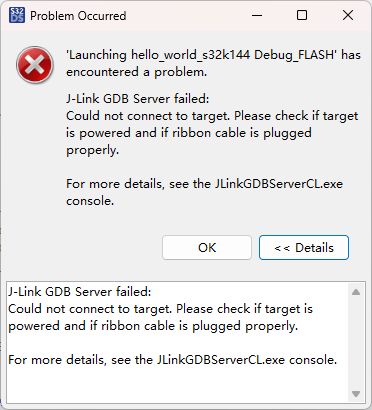
새 보드가 도착했는데 이번에는 플래싱이 안 됩니다. 아래는 로그입니다.
SEGGER J-Link GDB Server V9.72 Command Line Version
JLinkARM.dll V9.72 (DLL compiled Aug 26 2026 14:38:37)
WARNING: Unknown command line parameter -RestoreRAMOnDownload found.
WARNING: Unknown command line parameter 0 found.
Command line: -if swd -device S32K144 -endian little -speed 500 -port 2331 -swoport 2332 -telnetport 2333 -vd -ir -localhostonly 1 -singlerun -timeout 0 -nogui -RestoreRAMOnDownload 0
-----GDB Server start settings-----
GDBInit file: none
GDB Server Listening port: 2331
SWO raw output listening port: 2332
Terminal I/O port: 2333
Accept remote connection: localhost only
Generate logfile: off
Verify download: on
Init regs on start: on
Silent mode: off
Single run mode: on
Target connection timeout: 0 ms
------J-Link related settings------
J-Link Host interface: USB
J-Link script: none
J-Link settings file: none
------Target related settings------
Target device: S32K144
Target device parameters: none
Target interface: SWD
Target interface speed: 500kHz
Target endian: little
Connecting to J-Link…
J-Link is connected.
Firmware: J-Link LPCXpresso V2 compiled May 2 2023 17:39:56
Hardware: V1.00
S/N: 724304970
Checking target voltage…
Target voltage: 3.30 V
Listening on TCP/IP port 2331
Connecting to target…
ERROR: J-Link script file function InitTarget() returned with error code -1
ERROR: Could not connect to target.
Target connection failed. GDBServer will be closed…Restoring target state and closing J-Link connection…
Shutting down…
Could not connect to target.
Please check power, connection and settings.
Type “connect” to establish a target connection, ‘?’ for help
J-Link>connect
Please specify device / core. : S32K144
Type ‘?’ for selection dialog
Device>
Please specify target interface:
J) JTAG (Default)
S) SWD
T) cJTAG
TIF>S
Specify target interface speed [kHz]. : 4000 kHz
Speed>
Device “S32K144” selected.
Connecting to target via SWD
ConfigTargetSettings() start
ConfigTargetSettings() end - Took 15us
InitTarget() start
SWD selected. Executing JTAG → SWD switching sequence.
Connect Under Reset
SWD selected. Executing JTAG → SWD switching sequence.
Communication error while accessing MDM-AP.
Connect Under Reset
InitTarget() end - Took 409ms
Connect failed. Resetting via Reset pin and trying again.
ConfigTargetSettings() start
ConfigTargetSettings() end - Took 13us
InitTarget() start
SWD selected. Executing JTAG → SWD switching sequence.
Connect Under Reset
SWD selected. Executing JTAG → SWD switching sequence.
Communication error while accessing MDM-AP.
Connect Under Reset
InitTarget() end - Took 406ms
****** Error: J-Link script file function InitTarget() returned with error code -1
Error occurred: Could not connect to the target device.
For troubleshooting steps visit: https://kb.segger.com/J-Link_Troubleshooting
이번 로그는 이전 두 글과 비교하면 질적으로 달라졌습니다——이전 두 글에서는 그래도 통신이 되고 레지스터를 읽을 수 있었는데, 이번에는 MDM-AP 자체에 접근조차 못 합니다. 디버거가 칩 입구에서 막힌 셈입니다.
한 줄씩 해석해 보겠습니다:
Communication error while accessing MDM-AP —— S32K1 시리즈의 SWD 디버그 프로토콜은 MDM-AP(Memory Debug Access Port)로 핸드셰이크를 수행하며, 이 AP에 접근하는 것이 디버그 통신의 첫 단계입니다. MDM-AP 접근 실패 = 칩이 SWD 버스에 전혀 응답하지 않음을 의미합니다. 칩이 데드락에 빠졌거나, 물리 링크가 끊겼거나, 디버그 포트의 타이밍이 뒤죽박죽이 된 상태입니다.
Connect Under Reset 두 번 모두 실패 —— J-Link가 이미 리셋 상태에서 연결을 시도해 실행 중인 코드의 간섭을 피했는데도 실패했습니다. 이는 문제가 "프로그램이 폭주해서 디버거가 제어를 잃은 것"이 아니라, 칩과 디버거 사이의 물리/프로토콜 계층 연결 자체가 안 되는 것임을 보여줍니다.
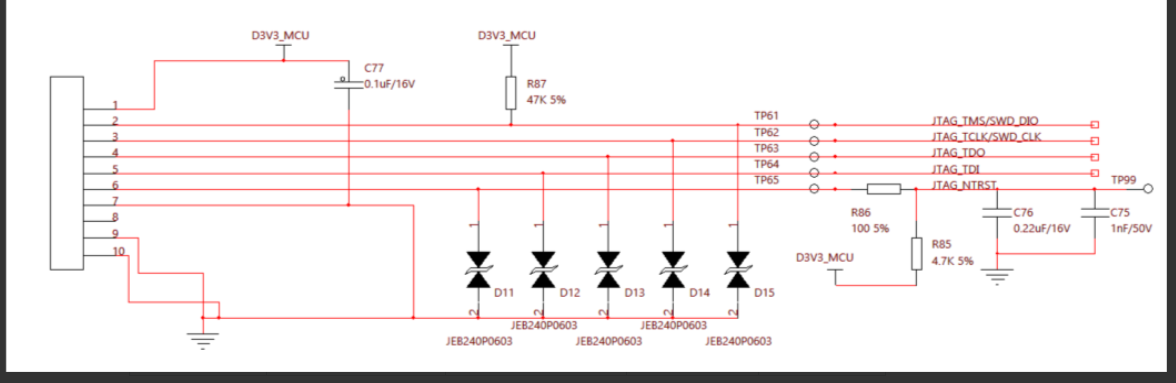
RESET 对地 0V —— 이번에는 411번 글의 1V와 다릅니다. 1V는 분압 이상이고, 0V는 RESET이 외부 회로에 의해 GND로 끌려 내려갔다는 뜻입니다. 회로도에서 TP65 NTRST는 R86 100Ω + C76 0.22μF + R85 4.7k가 D3V3_MCU로 풀업되는 리셋 경로를 따릅니다. J-Link는 Connect Under Reset 시 NTRST를 LOW로 당깁니다. 보드에서 NTRST와 RESET이 PCB상 같은 노드에 연결되어 있거나(또는 칩 내부에 NTRST→RESET 경로가 있다면), RESET이 현재 LOW가 된 것은 설명이 됩니다.
J-Link LPCXpresso V2 —— 주의할 점은 표준 J-Link가 아니라 LPCXpresso 보드에 내장된 V2 펌웨어라는 것입니다. LPCXpresso는 NXP 자체 칩과의 호환성이 가장 좋지만, S32K144는 그 “네이티브 지원” 목록에 없습니다. 디버그 스크립트가 완전하지 않을 수 있습니다.
추천 디버깅 순서:
디버거 USB를 뽑고 보드만 별도로 전원을 인가한 뒤 RESET 전압을 측정하세요(3.3V여야 하고 0V이면 안 됩니다). 그래도 0V라면 리셋 버튼 / R86 / C76 주변을 확인하세요.
SWDIO/SWCLK 트레이스가 MCU 핀까지 도통되는지 측정하세요(특히 ESD 다이오드 D11-D15가 거꾸로 납땜되지 않았는지 확인하세요——JEB240P0603이 반대로 장착되면 바로 쇼트가 납니다).
J-Link Commander에서 100kHz로 낮춰 시도해 보세요.
unlock Kinetis + mass erase(아직 connect에 들어갈 수 있다면)