基于STM32G474的0.96寸OLED(SSD1306)显示屏驱动程序(4针脚I2C接口),支持硬件IIC/软件IIC,HAL库版。
这款驱动程序比较完善,可以实现 英文、整数、浮点数、汉字、图像、二进制数、十六进制数 等内容显示,可以画点、直线、矩形、圆、椭圆、三角形等,支持多种字体,差不多相当于一个简易版图形库了。
该程序是基于江协科技的代码二次修改的,原版程序是基于STM32F103的,且只支持软件I2C,我修改后支持硬件I2C,也可以修改宏定义改成使用软件I2C。
测试硬件为NUCLEO-G474RE开发板
关于OLED的驱动原理,以及驱动程序的使用教程可以看江协科技的视频:https://url.zeruns.com/L7j6y
- STM32使用硬件I2C读取SHTC3温湿度传感器:https://blog.zeruns.com/archives/692.html
- 移植好U8g2图形库的STM32F407标准库工程模板:https://blog.zeruns.com/archives/722.html
- 基于STM32F1的0.96寸OLED显示屏驱动程序,支持硬件/软件I2C:https://blog.zeruns.com/archives/769.html
电子/单片机技术交流群:2169025065
效果图
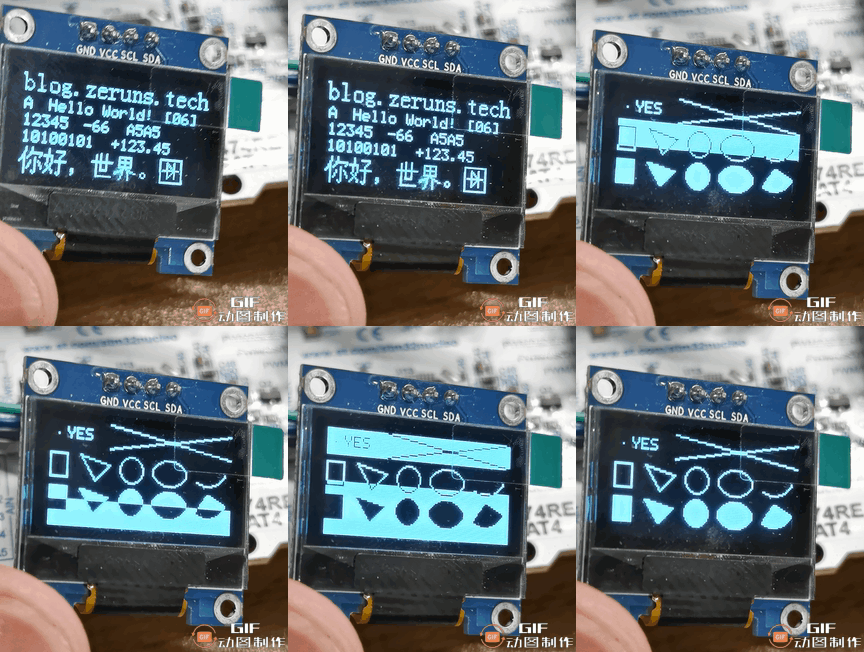
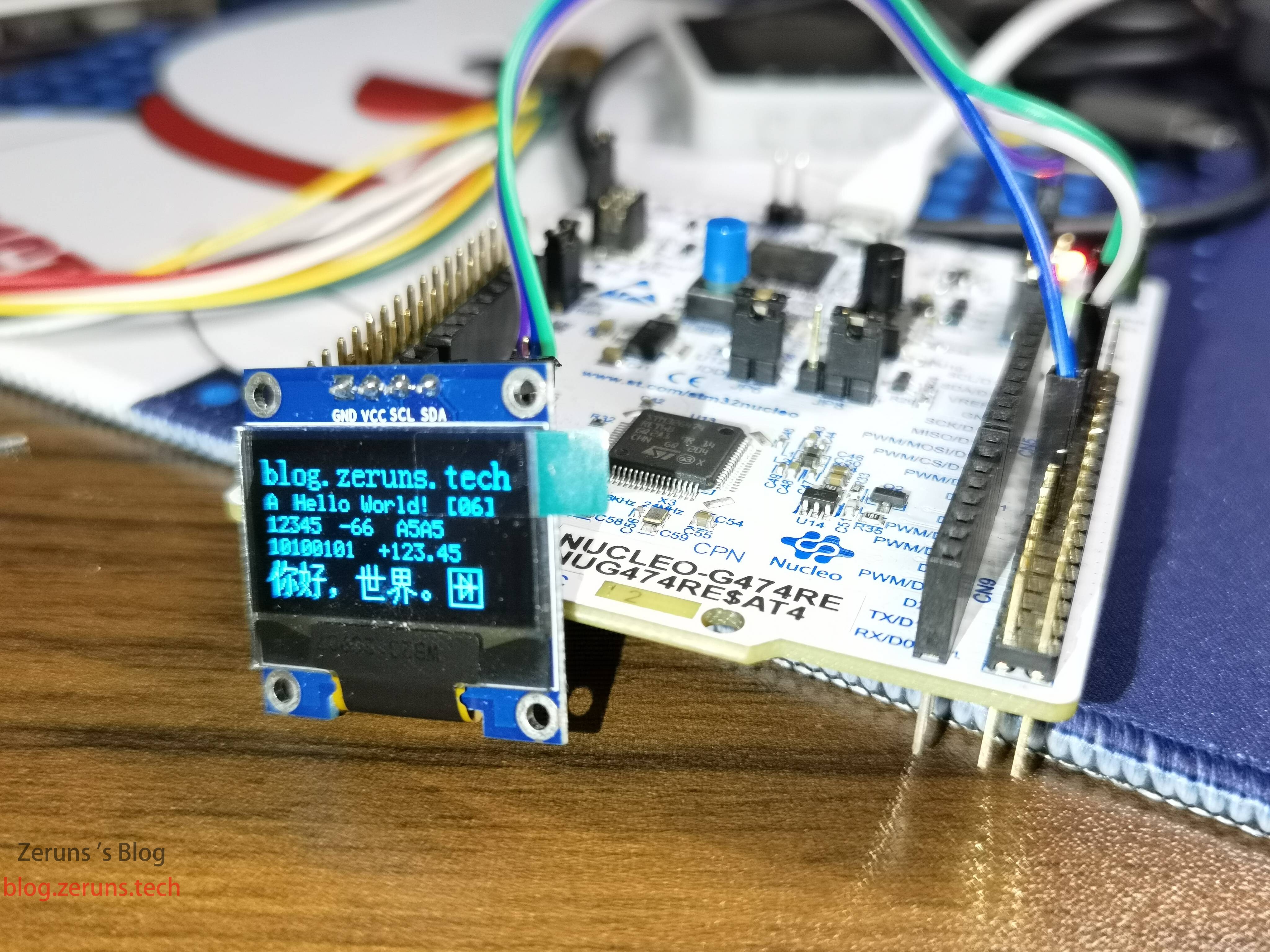
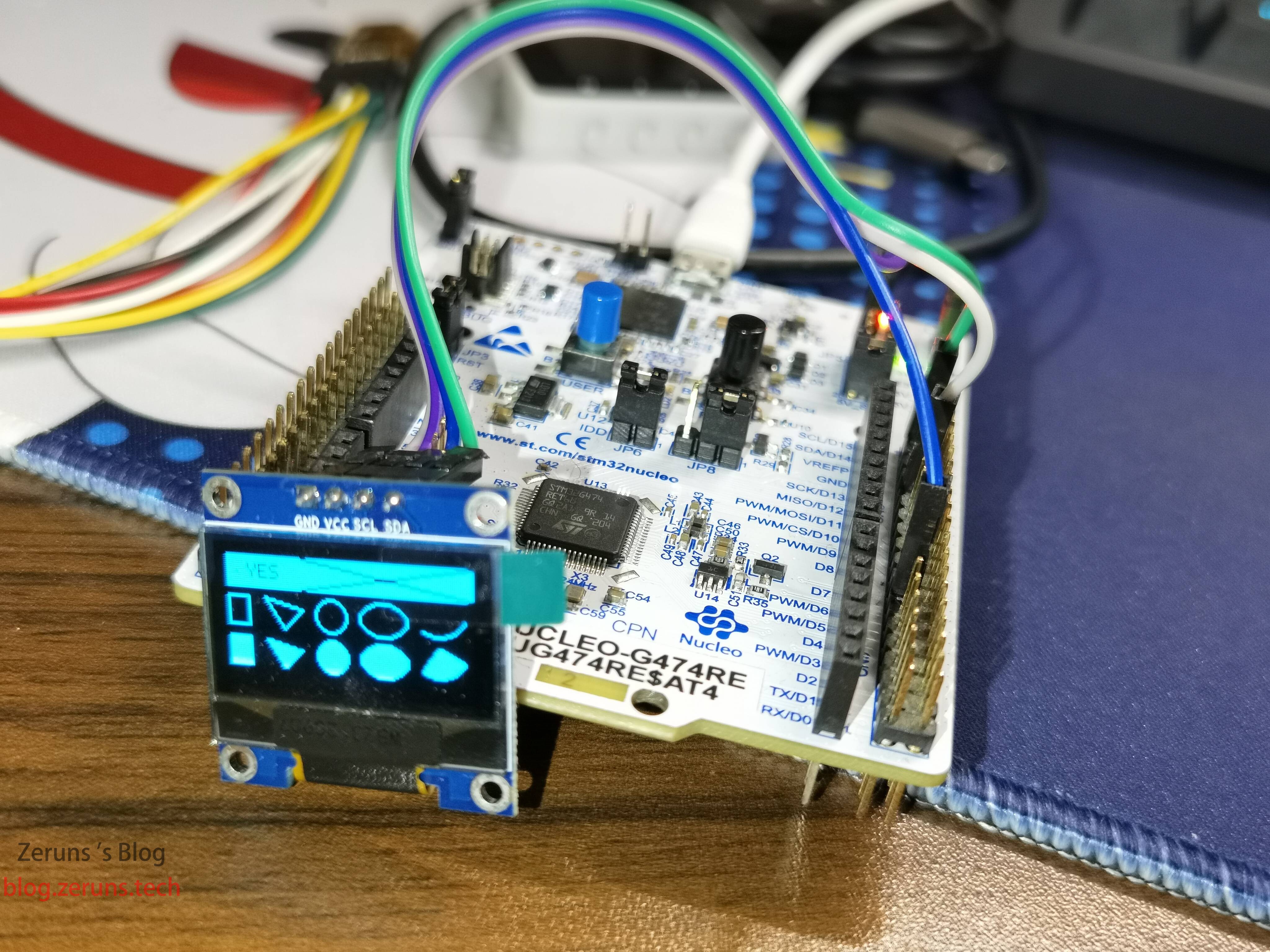
I2C协议简介
I2C 通讯协议(Inter-Integrated Circuit)是由 Phiilps 公司开发的,由于它引脚少,硬件实现简单,可扩展性强,不需要 USART、CAN 等通讯协议的外部收发设备(那些电平转化芯片),现在被广泛地使用在系统内多个集成电路(IC)间的通讯。
I2C只有一跟数据总线 SDA(Serial Data Line),串行数据总线,只能一位一位的发送数据,属于串行通信,采用半双工通信。
半双工通信:可以实现双向的通信,但不能在两个方向上同时进行,必须轮流交替进行,其实也可以理解成一种可以切换方向的单工通信,同一时刻必须只能一个方向传输,只需一根数据线。
对于I2C通讯协议把它分为物理层和协议层物理层规定通讯系统中具有机械、电子功能部分的特性(硬件部分),确保原始数据在物理媒体的传输。协议层主要规定通讯逻辑,统一收发双方的数据打包、解包标准(软件层面)。
I2C物理层
I2C 通讯设备之间的常用连接方式
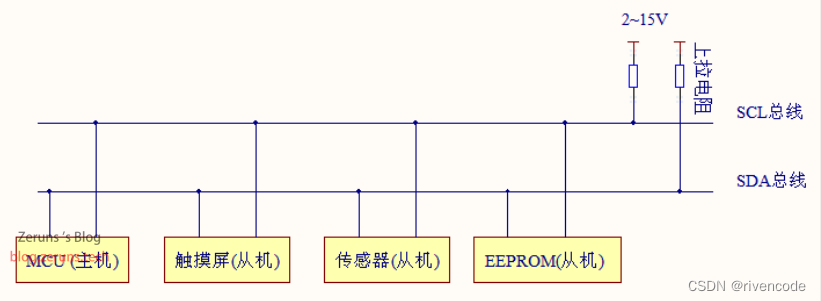
(1) 它是一个支持多设备的总线。“总线”指多个设备共用的信号线。在一个 I2C 通讯总线中,可连接多个 I2C 通讯设备,支持多个通讯主机及多个通讯从机。
(2) 一个 I2C 总线只使用两条总线线路,一条双向串行数据线SDA(Serial Data Line ),一条串行时钟线SCL(Serial Clock Line )。数据线即用来表示数据,时钟线用于数据收发同步
(3) 总线通过上拉电阻接到电源。当 I2C 设备空闲时会输出高阻态,而当所有设备都空闲,都输出高阻态时,由上拉电阻把总线拉成高电平。
I2C通信时单片机GPIO口必须设置为开漏输出,否则可能会造成短路。
关于更多STM32的I2C相关信息和使用方法可以看这篇文章:https://url.zeruns.com/JC0Ah
还有江协科技的STM32入门教程:https://www.bilibili.com/video/BV1th411z7sn?p=31
我这里就不详细讲解了。
使用说明
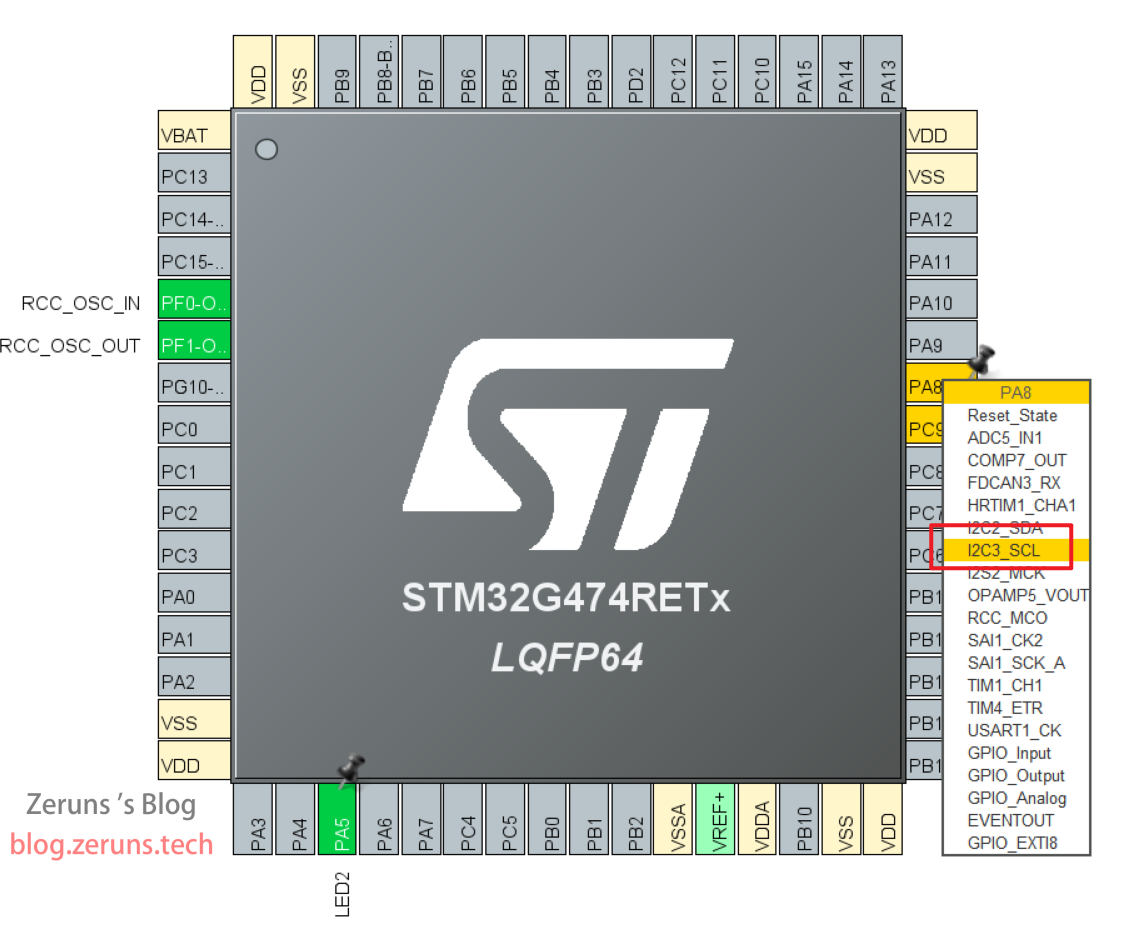
默认是使用硬件IIC的,用的I2C3,SCL是PA8,SDA是PC9。
硬件I2C
STM32CubeMX配置,找到你要用的I2C外设的引脚,并设置引脚功能为SCL和SDA,如下图所示是I2C3的SCL。
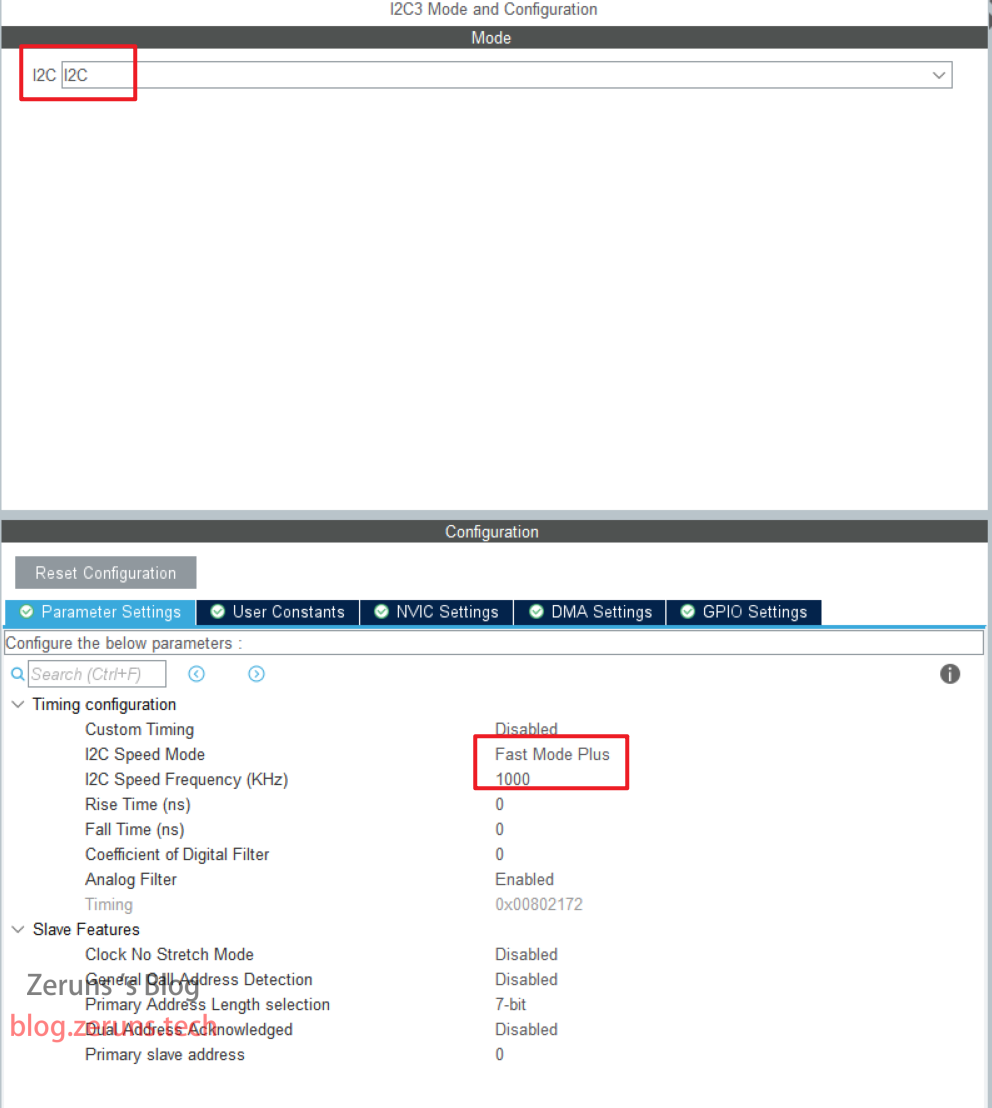
接着配置I2C外设,启用对应的I2C外设,速度模式设置为 Fast Mode Plus,速度改成 1000,其他默认就行。
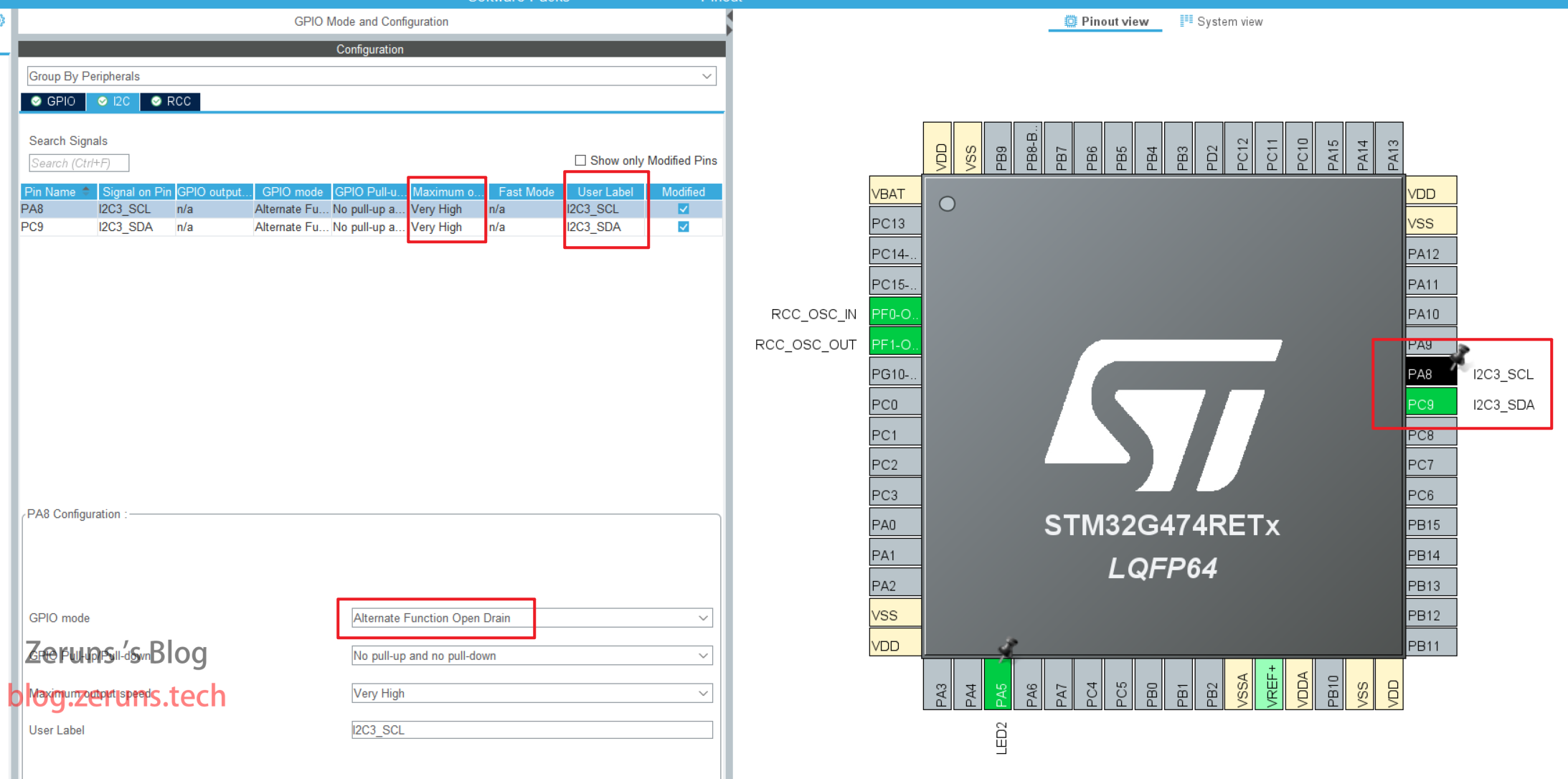
配置GPIO,上面设置完后会自动把那两个引脚配置为复用开漏输出模式,接着只需要把IO输出速度改成 Very High ,还有GPIO标签(User Label)定义分别改成I2C3_SCL和I2C3_SDA就行,如果是用的别的I2C也可以设置成别的值,代码对应处要修改一下。改完后点击生成代码。
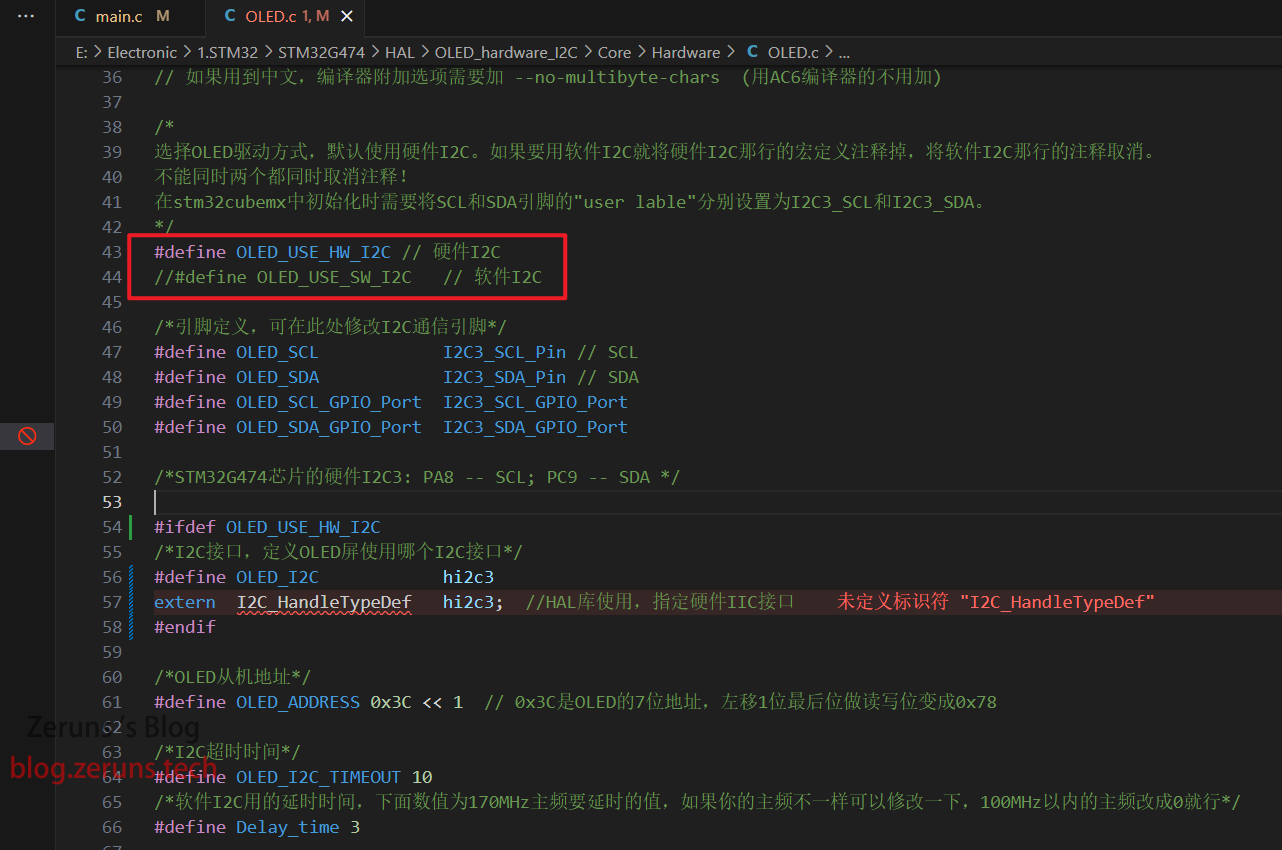
OLED.c文件里,将 #define OLED_USE_SW_I2C 注释掉,将 #define OLED_USE_HW_I2C 取消注释,如果你用的是别的引脚作为I2C引脚,并且定义了别的名字那就将代码里的 I2C3_SCL 和 I2C3_SDA 也改一下。
软件I2C
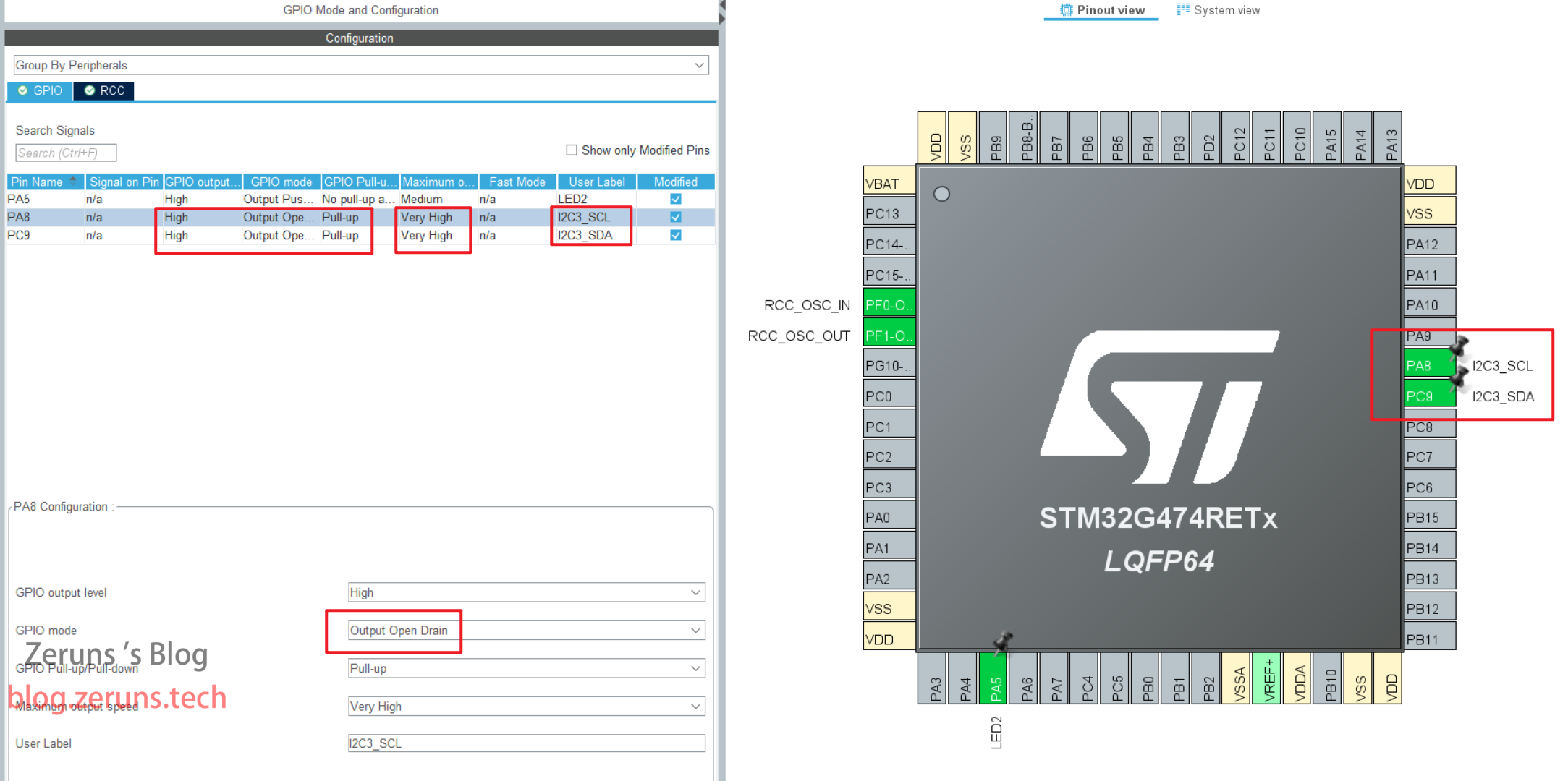
STM32CubeMX配置,设置两个引脚作为I2C的SCL和SDA信号线,修改IO口的 User Lable 分别为I2C3_SCL和I2C3_SDA,如果改成别的需要到代码里修改一下,IO模式设置为开漏输出,默认输出电平高电平,上拉输出,速度设置到最高,如下图所示。改为后点击生成代码。
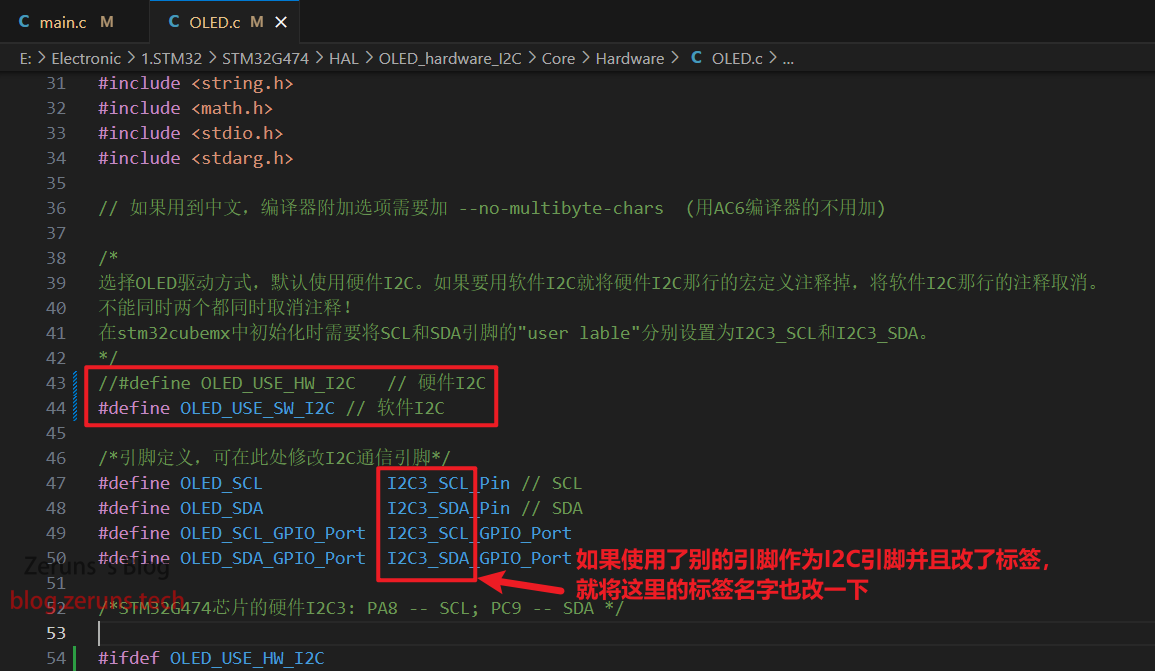
OLED.c文件里,将 #define OLED_USE_HW_I2C 注释掉,将 #define OLED_USE_SW_I2C 取消注释,如果你用的是别的引脚作为I2C引脚,并且定义了别的名字那就将代码里的 I2C3_SCL 和 I2C3_SDA 也改一下。
需要用的元件
- STM32开发板入门套件:https://u.jd.com/fQS0YAe
- STM32G474开发板:https://s.click.taobao.com/8OwQ8vt
- OLED模块:https://s.click.taobao.com/EF0Evwt
- 杜邦线:https://s.click.taobao.com/VMkDvwt
- 面包板:https://s.click.taobao.com/bhg8Txt
- DAPLink(可代替ST-Link,带虚拟串口):https://s.click.taobao.com/QVQ8Txt
江协科技的STM32入门套件:https://s.click.taobao.com/NTn9Txt
程序
完整工程下载地址:
百度网盘:链接: https://url.zeruns.com/0CQJG 提取码: 0169
123网盘(不限速):https://www.123pan.com/s/2Y9Djv-O0cvH.html 提取码:vvDt
Gitee开源地址:https://gitee.com/zeruns/STM32-HAL-OLED-I2C
GitHub开源地址:https://github.com/zeruns/STM32G4-OLED-SSD1306-I2C-HAL
求点个Star
工程使用Keil5创建,用Vscode+EIDE开发,两个软件都可以打开此工程。
工程文件全部使用UTF-8编码,如果打开显示乱码需要修改编辑器编码为UTF-8。
主要文件 OLED.c:
/***************************************************************************************
* 本程序由江协科技创建并免费开源共享
* 你可以任意查看、使用和修改,并应用到自己的项目之中
* 程序版权归江协科技所有,任何人或组织不得将其据为己有
*
* 程序名称: 0.96寸OLED显示屏驱动程序(4针脚I2C接口)
* 程序创建时间: 2023.10.24
* 当前程序版本: V1.1
* 当前版本发布时间: 2023.12.8
*
* 江协科技官方网站: jiangxiekeji.com
* 江协科技官方淘宝店: jiangxiekeji.taobao.com
* 程序介绍及更新动态: jiangxiekeji.com/tutorial/oled.html
*
* 如果你发现程序中的漏洞或者笔误,可通过邮件向我们反馈:[email protected]
* 发送邮件之前,你可以先到更新动态页面查看最新程序,如果此问题已经修改,则无需再发邮件
***************************************************************************************
*/
/*
* 本程序由zeruns二次修改
* 修改内容: 从标准库版改成HAL库版,增加支持硬件I2C,可通过修改宏定义来选择是否启用硬件I2C
* 修改日期: 2024.3.16
* 博客: https://blog.zeruns.com
* B站主页: https://space.bilibili.com/8320520
*/
#include "main.h"
#include "OLED.h"
#include <string.h>
#include <math.h>
#include <stdio.h>
#include <stdarg.h>
// 如果用到中文,编译器附加选项需要加 --no-multibyte-chars (用AC6编译器的不用加)
/*
选择OLED驱动方式,默认使用硬件I2C。如果要用软件I2C就将硬件I2C那行的宏定义注释掉,将软件I2C那行的注释取消。
不能同时两个都同时取消注释!
在stm32cubemx中初始化时需要将SCL和SDA引脚的"user lable"分别设置为I2C3_SCL和I2C3_SDA。
*/
#define OLED_USE_HW_I2C // 硬件I2C
//#define OLED_USE_SW_I2C // 软件I2C
/*引脚定义,可在此处修改I2C通信引脚*/
#define OLED_SCL I2C3_SCL_Pin // SCL
#define OLED_SDA I2C3_SDA_Pin // SDA
#define OLED_SCL_GPIO_Port I2C3_SCL_GPIO_Port
#define OLED_SDA_GPIO_Port I2C3_SDA_GPIO_Port
/*STM32G474芯片的硬件I2C3: PA8 -- SCL; PC9 -- SDA */
#ifdef OLED_USE_HW_I2C
/*I2C接口,定义OLED屏使用哪个I2C接口*/
#define OLED_I2C hi2c3
extern I2C_HandleTypeDef hi2c3; //HAL库使用,指定硬件IIC接口
#endif
/*OLED从机地址*/
#define OLED_ADDRESS 0x3C << 1 // 0x3C是OLED的7位地址,左移1位最后位做读写位变成0x78
/*I2C超时时间*/
#define OLED_I2C_TIMEOUT 10
/*软件I2C用的延时时间,下面数值为170MHz主频要延时的值,如果你的主频不一样可以修改一下,100MHz以内的主频改成0就行*/
#define Delay_time 3
/**
* 数据存储格式:
* 纵向8点,高位在下,先从左到右,再从上到下
* 每一个Bit对应一个像素点
*
* B0 B0 B0 B0
* B1 B1 B1 B1
* B2 B2 B2 B2
* B3 B3 -------------> B3 B3 --
* B4 B4 B4 B4 |
* B5 B5 B5 B5 |
* B6 B6 B6 B6 |
* B7 B7 B7 B7 |
* |
* -----------------------------------
* |
* | B0 B0 B0 B0
* | B1 B1 B1 B1
* | B2 B2 B2 B2
* --> B3 B3 -------------> B3 B3
* B4 B4 B4 B4
* B5 B5 B5 B5
* B6 B6 B6 B6
* B7 B7 B7 B7
*
* 坐标轴定义:
* 左上角为(0, 0)点
* 横向向右为X轴,取值范围:0~127
* 纵向向下为Y轴,取值范围:0~63
*
* 0 X轴 127
* .------------------------------->
* 0 |
* |
* |
* |
* Y轴 |
* |
* |
* |
* 63 |
* v
*
*/
/*全局变量*********************/
/**
* OLED显存数组
* 所有的显示函数,都只是对此显存数组进行读写
* 随后调用OLED_Update函数或OLED_UpdateArea函数
* 才会将显存数组的数据发送到OLED硬件,进行显示
*/
uint8_t OLED_DisplayBuf[8][128];
/*********************全局变量*/
#ifdef OLED_USE_SW_I2C
/**
* @brief 向 OLED_SCL 写高低电平
* 根据 BitValue 的值,将 OLED_SCL 置高电平或低电平。
* @param BitValue 位值,0 或 1
*/
void OLED_W_SCL(uint8_t BitValue)
{
/*根据BitValue的值,将SCL置高电平或者低电平*/
HAL_GPIO_WritePin(OLED_SCL_GPIO_Port, OLED_SCL, (GPIO_PinState)BitValue);
/*如果单片机速度过快,可在此添加适量延时,以避免超出I2C通信的最大速度*/
for (volatile uint16_t i = 0; i < Delay_time; i++){
//for (uint16_t j = 0; j < 10; j++);
}
}
/**
* @brief OLED写SDA高低电平
* @param 要写入SDA的电平值,范围:0/1
* @return 无
* @note 当上层函数需要写SDA时,此函数会被调用
* 用户需要根据参数传入的值,将SDA置为高电平或者低电平
* 当参数传入0时,置SDA为低电平,当参数传入1时,置SDA为高电平
*/
void OLED_W_SDA(uint8_t BitValue)
{
/*根据BitValue的值,将SDA置高电平或者低电平*/
HAL_GPIO_WritePin(OLED_SDA_GPIO_Port, OLED_SDA, (GPIO_PinState)BitValue);
/*如果单片机速度过快,可在此添加适量延时,以避免超出I2C通信的最大速度*/
for (volatile uint16_t i = 0; i < Delay_time; i++){
//for (uint16_t j = 0; j < 10; j++);
}
}
#endif
/**
* @brief OLED引脚初始化
* @param 无
* @retval 无
* @note 当上层函数需要初始化时,此函数会被调用,
* 用户需要将SCL和SDA引脚初始化为开漏模式,并释放引脚
*/
void OLED_GPIO_Init(void)
{
uint32_t i, j;
/*在初始化前,加入适量延时,待OLED供电稳定*/
for (i = 0; i < 1000; i++) {
for (j = 0; j < 1000; j++)
;
}
#ifdef OLED_USE_SW_I2C
__HAL_RCC_GPIOC_CLK_ENABLE(); // 使能GPIOC时钟
__HAL_RCC_GPIOA_CLK_ENABLE(); // 使能GPIOA时钟
GPIO_InitTypeDef GPIO_InitStruct = {0}; // 定义结构体配置GPIO
GPIO_InitStruct.Mode = GPIO_MODE_OUTPUT_OD; // 设置GPIO模式为开漏输出模式
GPIO_InitStruct.Pull = GPIO_PULLUP; // 内部上拉电阻
GPIO_InitStruct.Speed = GPIO_SPEED_FREQ_VERY_HIGH; // 设置GPIO速度为高速
GPIO_InitStruct.Pin = I2C3_SDA_Pin; // 设置引脚
HAL_GPIO_Init(I2C3_SDA_GPIO_Port, &GPIO_InitStruct);// 初始化GPIO
GPIO_InitStruct.Pin = I2C3_SCL_Pin;
HAL_GPIO_Init(I2C3_SCL_GPIO_Port, &GPIO_InitStruct);
/*释放SCL和SDA*/
OLED_W_SCL(1);
OLED_W_SDA(1);
#endif
}
// https://blog.zeruns.com
/*通信协议*********************/
/**
* @brief I2C起始
* @param 无
* @return 无
*/
void OLED_I2C_Start(void)
{
#ifdef OLED_USE_SW_I2C
OLED_W_SDA(1); //释放SDA,确保SDA为高电平
OLED_W_SCL(1); //释放SCL,确保SCL为高电平
OLED_W_SDA(0); //在SCL高电平期间,拉低SDA,产生起始信号
OLED_W_SCL(0); //起始后把SCL也拉低,即为了占用总线,也为了方便总线时序的拼接
#endif
}
/**
* @brief I2C终止
* @param 无
* @return 无
*/
void OLED_I2C_Stop(void)
{
#ifdef OLED_USE_SW_I2C
OLED_W_SDA(0); //拉低SDA,确保SDA为低电平
OLED_W_SCL(1); //释放SCL,使SCL呈现高电平
OLED_W_SDA(1); //在SCL高电平期间,释放SDA,产生终止信号
#endif
}
/**
* @brief I2C发送一个字节
* @param Byte 要发送的一个字节数据,范围:0x00~0xFF
* @return 无
*/
void OLED_I2C_SendByte(uint8_t Byte)
{
#ifdef OLED_USE_SW_I2C
uint8_t i;
/*循环8次,主机依次发送数据的每一位*/
for (i = 0; i < 8; i++)
{
/*使用掩码的方式取出Byte的指定一位数据并写入到SDA线*/
/*两个!的作用是,让所有非零的值变为1*/
OLED_W_SDA(!!(Byte & (0x80 >> i)));
OLED_W_SCL(1); //释放SCL,从机在SCL高电平期间读取SDA
OLED_W_SCL(0); //拉低SCL,主机开始发送下一位数据
}
OLED_W_SCL(1); //额外的一个时钟,不处理应答信号
OLED_W_SCL(0);
#endif
}
/**
* @brief OLED写命令
* @param Command 要写入的命令值,范围:0x00~0xFF
* @return 无
*/
void OLED_WriteCommand(uint8_t Command)
{
#ifdef OLED_USE_SW_I2C
OLED_I2C_Start(); // I2C起始
OLED_I2C_SendByte(0x78); //发送OLED的I2C从机地址
OLED_I2C_SendByte(0x00); //控制字节,给0x00,表示即将写命令
OLED_I2C_SendByte(Command); // 写入指定的命令
OLED_I2C_Stop(); // I2C终止
#elif defined(OLED_USE_HW_I2C)
uint8_t TxData[2] = {0x00, Command};
HAL_I2C_Master_Transmit(&OLED_I2C, OLED_ADDRESS, (uint8_t*)TxData, 2, OLED_I2C_TIMEOUT);
#endif
}
/**
* @brief OLED写数据
* @param Data 要写入数据的起始地址
* @param Count 要写入数据的数量
* @return 无
*/
void OLED_WriteData(uint8_t *Data, uint8_t Count)
{
uint8_t i;
#ifdef OLED_USE_SW_I2C
OLED_I2C_Start(); // I2C起始
OLED_I2C_SendByte(0x78); //发送OLED的I2C从机地址
OLED_I2C_SendByte(0x40); // 控制字节,给0x40,表示即将写数据
/*循环Count次,进行连续的数据写入*/
for (i = 0; i < Count; i++) {
OLED_I2C_SendByte(Data[i]); // 依次发送Data的每一个数据
}
OLED_I2C_Stop(); // I2C终止
#elif defined(OLED_USE_HW_I2C)
uint8_t TxData[Count + 1]; // 分配一个新的数组,大小是Count + 1
TxData[0] = 0x40; // 起始字节
// 将Data指向的数据复制到TxData数组的剩余部分
for (i = 0; i < Count; i++) {
TxData[i + 1] = Data[i];
}
HAL_I2C_Master_Transmit(&OLED_I2C, OLED_ADDRESS, (uint8_t*)TxData, Count + 1, OLED_I2C_TIMEOUT);
#endif
}
/*********************通信协议*/
/*硬件配置*********************/
/**
* @brief OLED初始化
* @param 无
* @return 无
* @note 使用前,需要调用此初始化函数
*/
void OLED_Init(void)
{
OLED_GPIO_Init(); // 先调用底层的端口初始化
/*写入一系列的命令,对OLED进行初始化配置*/
OLED_WriteCommand(0xAE); // 设置显示开启/关闭,0xAE关闭,0xAF开启
OLED_WriteCommand(0xD5); // 设置显示时钟分频比/振荡器频率
OLED_WriteCommand(0x80); // 0x00~0xFF
OLED_WriteCommand(0xA8); // 设置多路复用率
OLED_WriteCommand(0x3F); // 0x0E~0x3F
OLED_WriteCommand(0xD3); // 设置显示偏移
OLED_WriteCommand(0x00); // 0x00~0x7F
OLED_WriteCommand(0x40); // 设置显示开始行,0x40~0x7F
OLED_WriteCommand(0xA1); // 设置左右方向,0xA1正常,0xA0左右反置
OLED_WriteCommand(0xC8); // 设置上下方向,0xC8正常,0xC0上下反置
OLED_WriteCommand(0xDA); // 设置COM引脚硬件配置
OLED_WriteCommand(0x12);
OLED_WriteCommand(0x81); // 设置对比度
OLED_WriteCommand(0xCF); // 0x00~0xFF
OLED_WriteCommand(0xD9); // 设置预充电周期
OLED_WriteCommand(0xF1);
OLED_WriteCommand(0xDB); // 设置VCOMH取消选择级别
OLED_WriteCommand(0x30);
OLED_WriteCommand(0xA4); // 设置整个显示打开/关闭
OLED_WriteCommand(0xA6); // 设置正常/反色显示,0xA6正常,0xA7反色
OLED_WriteCommand(0x8D); // 设置充电泵
OLED_WriteCommand(0x14);
OLED_WriteCommand(0xAF); // 开启显示
OLED_Clear(); // 清空显存数组
OLED_Update(); // 更新显示,清屏,防止初始化后未显示内容时花屏
}
/**
* @brief OLED设置显示光标位置
* @param Page 指定光标所在的页,范围:0-7
* @param X 指定光标所在的X轴坐标,范围:0-127
* @return 无
* @note OLED默认的Y轴,只能8个Bit为一组写入,即1页等于8个Y轴坐标
*/
void OLED_SetCursor(uint8_t Page, uint8_t X)
{
/*如果使用此程序驱动1.3寸的OLED显示屏,则需要解除此注释*/
/*因为1.3寸的OLED驱动芯片(SH1106)有132列*/
/*屏幕的起始列接在了第2列,而不是第0列*/
/*所以需要将X加2,才能正常显示*/
// X += 2;
/*通过指令设置页地址和列地址*/
OLED_WriteCommand(0xB0 | Page); // 设置页位置
OLED_WriteCommand(0x10 | ((X & 0xF0) >> 4)); // 设置X位置高4位
OLED_WriteCommand(0x00 | (X & 0x0F)); // 设置X位置低4位
}
/*********************硬件配置*/
/*工具函数*********************/
/*工具函数仅供内部部分函数使用*/
/**
* @brief 次方函数
* @param X 底数
* @param Y 指数
* @return 等于X的Y次方
*/
uint32_t OLED_Pow(uint32_t X, uint32_t Y)
{
uint32_t Result = 1; // 结果默认为1
while (Y--) // 累乘Y次
{
Result *= X; // 每次把X累乘到结果上
}
return Result;
}
/**
* @brief 判断指定点是否在指定多边形内部
* @param nvert 多边形的顶点数
* @param vertx verty 包含多边形顶点的x和y坐标的数组
* @param testx testy 测试点的X和y坐标
* @return 指定点是否在指定多边形内部,1:在内部,0:不在内部
*/
uint8_t OLED_pnpoly(uint8_t nvert, int16_t *vertx, int16_t *verty, int16_t testx, int16_t testy)
{
int16_t i, j, c = 0;
/*此算法由W. Randolph Franklin提出*/
/*参考链接:https://wrfranklin.org/Research/Short_Notes/pnpoly.html*/
for (i = 0, j = nvert - 1; i < nvert; j = i++) {
if (((verty[i] > testy) != (verty[j] > testy)) &&
(testx < (vertx[j] - vertx[i]) * (testy - verty[i]) / (verty[j] - verty[i]) + vertx[i])) {
c = !c;
}
}
return c;
}
/**
* @brief 判断指定点是否在指定角度内部
* @param X Y 指定点的坐标
* @param StartAngle EndAngle 起始角度和终止角度,范围:-180-180
* 水平向右为0度,水平向左为180度或-180度,下方为正数,上方为负数,顺时针旋转
* @return 指定点是否在指定角度内部,1:在内部,0:不在内部
*/
uint8_t OLED_IsInAngle(int16_t X, int16_t Y, int16_t StartAngle, int16_t EndAngle)
{
int16_t PointAngle;
PointAngle = atan2(Y, X) / 3.14 * 180; // 计算指定点的弧度,并转换为角度表示
if (StartAngle < EndAngle) // 起始角度小于终止角度的情况
{
/*如果指定角度在起始终止角度之间,则判定指定点在指定角度*/
if (PointAngle >= StartAngle && PointAngle <= EndAngle) {
return 1;
}
} else // 起始角度大于于终止角度的情况
{
/*如果指定角度大于起始角度或者小于终止角度,则判定指定点在指定角度*/
if (PointAngle >= StartAngle || PointAngle <= EndAngle) {
return 1;
}
}
return 0; // 不满足以上条件,则判断判定指定点不在指定角度
}
/*********************工具函数*/
/*功能函数*********************/
/**
* @brief 将OLED显存数组更新到OLED屏幕
* @param 无
* @return 无
* @note 所有的显示函数,都只是对OLED显存数组进行读写
* 随后调用OLED_Update函数或OLED_UpdateArea函数
* 才会将显存数组的数据发送到OLED硬件,进行显示
* 故调用显示函数后,要想真正地呈现在屏幕上,还需调用更新函数
*/
void OLED_Update(void)
{
uint8_t j;
/*遍历每一页*/
for (j = 0; j < 8; j++) {
/*设置光标位置为每一页的第一列*/
OLED_SetCursor(j, 0);
/*连续写入128个数据,将显存数组的数据写入到OLED硬件*/
OLED_WriteData(OLED_DisplayBuf[j], 128);
}
}
/**
* @brief 将OLED显存数组部分更新到OLED屏幕
* @param X 指定区域左上角的横坐标,范围:0-127
* @param Y 指定区域左上角的纵坐标,范围:0-63
* @param Width 指定区域的宽度,范围:0-128
* @param Height 指定区域的高度,范围:0-64
* @return 无
* @note 此函数会至少更新参数指定的区域
* 如果更新区域Y轴只包含部分页,则同一页的剩余部分会跟随一起更新
* @note 所有的显示函数,都只是对OLED显存数组进行读写
* 随后调用OLED_Update函数或OLED_UpdateArea函数
* 才会将显存数组的数据发送到OLED硬件,进行显示
* 故调用显示函数后,要想真正地呈现在屏幕上,还需调用更新函数
*/
void OLED_UpdateArea(uint8_t X, uint8_t Y, uint8_t Width, uint8_t Height)
{
uint8_t j;
/*参数检查,保证指定区域不会超出屏幕范围*/
if (X > 127) { return; }
if (Y > 63) { return; }
if (X + Width > 128) { Width = 128 - X; }
if (Y + Height > 64) { Height = 64 - Y; }
/*遍历指定区域涉及的相关页*/
/*(Y + Height - 1) / 8 + 1的目的是(Y + Height) / 8并向上取整*/
for (j = Y / 8; j < (Y + Height - 1) / 8 + 1; j++) {
/*设置光标位置为相关页的指定列*/
OLED_SetCursor(j, X);
/*连续写入Width个数据,将显存数组的数据写入到OLED硬件*/
OLED_WriteData(&OLED_DisplayBuf[j][X], Width);
}
}
/**
* @brief 将OLED显存数组全部清零
* @param 无
* @return 无
* @note 调用此函数后,要想真正地呈现在屏幕上,还需调用更新函数
*/
void OLED_Clear(void)
{
uint8_t i, j;
for (j = 0; j < 8; j++) // 遍历8页
{
for (i = 0; i < 128; i++) // 遍历128列
{
OLED_DisplayBuf[j][i] = 0x00; // 将显存数组数据全部清零
}
}
}
/**
* @brief 将OLED显存数组部分清零
* @param X 指定区域左上角的横坐标,范围:0-127
* @param Y 指定区域左上角的纵坐标,范围:0-63
* @param Width 指定区域的宽度,范围:0-128
* @param Height 指定区域的高度,范围:0-64
* @return 无
* @note 调用此函数后,要想真正地呈现在屏幕上,还需调用更新函数
*/
void OLED_ClearArea(uint8_t X, uint8_t Y, uint8_t Width, uint8_t Height)
{
uint8_t i, j;
/*参数检查,保证指定区域不会超出屏幕范围*/
if (X > 127) { return; }
if (Y > 63) { return; }
if (X + Width > 128) { Width = 128 - X; }
if (Y + Height > 64) { Height = 64 - Y; }
for (j = Y; j < Y + Height; j++) // 遍历指定页
{
for (i = X; i < X + Width; i++) // 遍历指定列
{
OLED_DisplayBuf[j / 8][i] &= ~(0x01 << (j % 8)); // 将显存数组指定数据清零
}
}
}
/**
* @brief 将OLED显存数组全部取反
* @param 无
* @return 无
* @note 调用此函数后,要想真正地呈现在屏幕上,还需调用更新函数
*/
void OLED_Reverse(void)
{
uint8_t i, j;
for (j = 0; j < 8; j++) // 遍历8页
{
for (i = 0; i < 128; i++) // 遍历128列
{
OLED_DisplayBuf[j][i] ^= 0xFF; // 将显存数组数据全部取反
}
}
}
/**
* @brief 将OLED显存数组部分取反
* @param X 指定区域左上角的横坐标,范围:0-127
* @param Y 指定区域左上角的纵坐标,范围:0-63
* @param Width 指定区域的宽度,范围:0-128
* @param Height 指定区域的高度,范围:0-64
* @return 无
* @note 调用此函数后,要想真正地呈现在屏幕上,还需调用更新函数
*/
void OLED_ReverseArea(uint8_t X, uint8_t Y, uint8_t Width, uint8_t Height)
{
uint8_t i, j;
/*参数检查,保证指定区域不会超出屏幕范围*/
if (X > 127) { return; }
if (Y > 63) { return; }
if (X + Width > 128) { Width = 128 - X; }
if (Y + Height > 64) { Height = 64 - Y; }
for (j = Y; j < Y + Height; j++) // 遍历指定页
{
for (i = X; i < X + Width; i++) // 遍历指定列
{
OLED_DisplayBuf[j / 8][i] ^= 0x01 << (j % 8); // 将显存数组指定数据取反
}
}
}
/**
* @brief OLED显示一个字符
* @param X 指定字符左上角的横坐标,范围:0-127
* @param Y 指定字符左上角的纵坐标,范围:0-63
* @param Char 指定要显示的字符,范围:ASCII码可见字符
* @param FontSize 指定字体大小
* 范围:OLED_8X16 宽8像素,高16像素
* OLED_6X8 宽6像素,高8像素
* @return 无
* @note 调用此函数后,要想真正地呈现在屏幕上,还需调用更新函数
*/
void OLED_ShowChar(uint8_t X, uint8_t Y, char Char, uint8_t FontSize)
{
if (FontSize == OLED_8X16) // 字体为宽8像素,高16像素
{
/*将ASCII字模库OLED_F8x16的指定数据以8*16的图像格式显示*/
OLED_ShowImage(X, Y, 8, 16, OLED_F8x16[Char - ' ']);
} else if (FontSize == OLED_6X8) // 字体为宽6像素,高8像素
{
/*将ASCII字模库OLED_F6x8的指定数据以6*8的图像格式显示*/
OLED_ShowImage(X, Y, 6, 8, OLED_F6x8[Char - ' ']);
}
}
/**
* @brief OLED显示字符串
* @param X 指定字符串左上角的横坐标,范围:0-127
* @param Y 指定字符串左上角的纵坐标,范围:0-63
* @param String 指定要显示的字符串,范围:ASCII码可见字符组成的字符串
* @param FontSize 指定字体大小
* 范围:OLED_8X16 宽8像素,高16像素
* OLED_6X8 宽6像素,高8像素
* @return 无
* @note 调用此函数后,要想真正地呈现在屏幕上,还需调用更新函数
*/
void OLED_ShowString(uint8_t X, uint8_t Y, char *String, uint8_t FontSize)
{
uint8_t i;
for (i = 0; String[i] != '\0'; i++) // 遍历字符串的每个字符
{
/*调用OLED_ShowChar函数,依次显示每个字符*/
OLED_ShowChar(X + i * FontSize, Y, String[i], FontSize);
}
}
/**
* @brief OLED显示数字(十进制,正整数)
* @param X 指定数字左上角的横坐标,范围:0-127
* @param Y 指定数字左上角的纵坐标,范围:0-63
* @param Number 指定要显示的数字,范围:0-4294967295
* @param Length 指定数字的长度,范围:0-10
* @param FontSize 指定字体大小
* 范围:OLED_8X16 宽8像素,高16像素
* OLED_6X8 宽6像素,高8像素
* @return 无
* @note 调用此函数后,要想真正地呈现在屏幕上,还需调用更新函数
*/
void OLED_ShowNum(uint8_t X, uint8_t Y, uint32_t Number, uint8_t Length, uint8_t FontSize)
{
uint8_t i;
for (i = 0; i < Length; i++) // 遍历数字的每一位
{
/*调用OLED_ShowChar函数,依次显示每个数字*/
/*Number / OLED_Pow(10, Length - i - 1) % 10 可以十进制提取数字的每一位*/
/*+ '0' 可将数字转换为字符格式*/
OLED_ShowChar(X + i * FontSize, Y, Number / OLED_Pow(10, Length - i - 1) % 10 + '0', FontSize);
}
}
/**
* @brief OLED显示有符号数字(十进制,整数)
* @param X 指定数字左上角的横坐标,范围:0-127
* @param Y 指定数字左上角的纵坐标,范围:0-63
* @param Number 指定要显示的数字,范围:-2147483648-2147483647
* @param Length 指定数字的长度,范围:0-10
* @param FontSize 指定字体大小
* 范围:OLED_8X16 宽8像素,高16像素
* OLED_6X8 宽6像素,高8像素
* @return 无
* @note 调用此函数后,要想真正地呈现在屏幕上,还需调用更新函数
*/
void OLED_ShowSignedNum(uint8_t X, uint8_t Y, int32_t Number, uint8_t Length, uint8_t FontSize)
{
uint8_t i;
uint32_t Number1;
if (Number >= 0) // 数字大于等于0
{
OLED_ShowChar(X, Y, '+', FontSize); // 显示+号
Number1 = Number; // Number1直接等于Number
} else // 数字小于0
{
OLED_ShowChar(X, Y, '-', FontSize); // 显示-号
Number1 = -Number; // Number1等于Number取负
}
for (i = 0; i < Length; i++) // 遍历数字的每一位
{
/*调用OLED_ShowChar函数,依次显示每个数字*/
/*Number1 / OLED_Pow(10, Length - i - 1) % 10 可以十进制提取数字的每一位*/
/*+ '0' 可将数字转换为字符格式*/
OLED_ShowChar(X + (i + 1) * FontSize, Y, Number1 / OLED_Pow(10, Length - i - 1) % 10 + '0', FontSize);
}
}
/**
* @brief OLED显示十六进制数字(十六进制,正整数)
* @param X 指定数字左上角的横坐标,范围:0~127
* @param Y 指定数字左上角的纵坐标,范围:0~63
* @param Number 指定要显示的数字,范围:0x00000000~0xFFFFFFFF
* @param Length 指定数字的长度,范围:0~8
* @param FontSize 指定字体大小
* 范围:OLED_8X16 宽8像素,高16像素
* OLED_6X8 宽6像素,高8像素
* @return 无
* @note 调用此函数后,要想真正地呈现在屏幕上,还需调用更新函数
*/
void OLED_ShowHexNum(uint8_t X, uint8_t Y, uint32_t Number, uint8_t Length, uint8_t FontSize)
{
uint8_t i, SingleNumber;
for (i = 0; i < Length; i++) // 遍历数字的每一位
{
/*以十六进制提取数字的每一位*/
SingleNumber = Number / OLED_Pow(16, Length - i - 1) % 16;
if (SingleNumber < 10) // 单个数字小于10
{
/*调用OLED_ShowChar函数,显示此数字*/
/*+ '0' 可将数字转换为字符格式*/
OLED_ShowChar(X + i * FontSize, Y, SingleNumber + '0', FontSize);
} else // 单个数字大于10
{
/*调用OLED_ShowChar函数,显示此数字*/
/*+ 'A' 可将数字转换为从A开始的十六进制字符*/
OLED_ShowChar(X + i * FontSize, Y, SingleNumber - 10 + 'A', FontSize);
}
}
}
/**
* @brief OLED显示二进制数字(二进制,正整数)
* @param X 指定数字左上角的横坐标,范围:0~127
* @param Y 指定数字左上角的纵坐标,范围:0~63
* @param Number 指定要显示的数字,范围:0x00000000~0xFFFFFFFF
* @param Length 指定数字的长度,范围:0~16
* @param FontSize 指定字体大小
* 范围:OLED_8X16 宽8像素,高16像素
* OLED_6X8 宽6像素,高8像素
* @return 无
* @note 调用此函数后,要想真正地呈现在屏幕上,还需调用更新函数
*/
void OLED_ShowBinNum(uint8_t X, uint8_t Y, uint32_t Number, uint8_t Length, uint8_t FontSize)
{
uint8_t i;
for (i = 0; i < Length; i++) // 遍历数字的每一位
{
/*调用OLED_ShowChar函数,依次显示每个数字*/
/*Number / OLED_Pow(2, Length - i - 1) % 2 可以二进制提取数字的每一位*/
/*+ '0' 可将数字转换为字符格式*/
OLED_ShowChar(X + i * FontSize, Y, Number / OLED_Pow(2, Length - i - 1) % 2 + '0', FontSize);
}
}
/**
* @brief OLED显示浮点数字(十进制,小数)
* @param X 指定数字左上角的横坐标,范围:0-127
* @param Y 指定数字左上角的纵坐标,范围:0-63
* @param Number 指定要显示的数字,范围:-4294967295.0-4294967295.0
* @param IntLength 指定数字的整数位长度,范围:0-10
* @param FraLength 指定数字的小数位长度,范围:0-9,小数进行四舍五入显示
* @param FontSize 指定字体大小
* 范围:OLED_8X16 宽8像素,高16像素
* OLED_6X8 宽6像素,高8像素
* @return 无
* @note 调用此函数后,要想真正地呈现在屏幕上,还需调用更新函数
*/
void OLED_ShowFloatNum(uint8_t X, uint8_t Y, double Number, uint8_t IntLength, uint8_t FraLength, uint8_t FontSize)
{
uint32_t PowNum, IntNum, FraNum;
if (Number >= 0) // 数字大于等于0
{
OLED_ShowChar(X, Y, '+', FontSize); // 显示+号
} else // 数字小于0
{
OLED_ShowChar(X, Y, '-', FontSize); // 显示-号
Number = -Number; // Number取负
}
/*提取整数部分和小数部分*/
IntNum = Number; // 直接赋值给整型变量,提取整数
Number -= IntNum; // 将Number的整数减掉,防止之后将小数乘到整数时因数过大造成错误
PowNum = OLED_Pow(10, FraLength); // 根据指定小数的位数,确定乘数
FraNum = round(Number * PowNum); // 将小数乘到整数,同时四舍五入,避免显示误差
IntNum += FraNum / PowNum; // 若四舍五入造成了进位,则需要再加给整数
/*显示整数部分*/
OLED_ShowNum(X + FontSize, Y, IntNum, IntLength, FontSize);
/*显示小数点*/
OLED_ShowChar(X + (IntLength + 1) * FontSize, Y, '.', FontSize);
/*显示小数部分*/
OLED_ShowNum(X + (IntLength + 2) * FontSize, Y, FraNum, FraLength, FontSize);
}
/**
* @brief OLED显示汉字串
* @param X 指定汉字串左上角的横坐标,范围:0-127
* @param Y 指定汉字串左上角的纵坐标,范围:0-63
* @param Chinese 指定要显示的汉字串,范围:必须全部为汉字或者全角字符,不要加入任何半角字符
* 显示的汉字需要在OLED_Data.c里的OLED_CF16x16数组定义
* 未找到指定汉字时,会显示默认图形(一个方框,内部一个问号)
* @return 无
* @note 调用此函数后,要想真正地呈现在屏幕上,还需调用更新函数
*/
void OLED_ShowChinese(uint8_t X, uint8_t Y, char *Chinese)
{
uint8_t pChinese = 0;
uint8_t pIndex;
uint8_t i;
char SingleChinese[OLED_CHN_CHAR_WIDTH + 1] = {0}; // UTF8编码是3个字节,+1是为了加上\0结束符
for (i = 0; Chinese[i] != '\0'; i++) // 遍历汉字串
{
SingleChinese[pChinese] = Chinese[i]; // 提取汉字串数据到单个汉字数组
pChinese++; // 计次自增
/*当提取次数到达OLED_CHN_CHAR_WIDTH时,即代表提取到了一个完整的汉字*/
if (pChinese >= OLED_CHN_CHAR_WIDTH) {
SingleChinese[pChinese + 1] = '\0'; // 在汉字后面补上空字符串,表示结束
pChinese = 0; // 计次归零
/*遍历整个汉字字模库,寻找匹配的汉字*/
/*如果找到最后一个汉字(定义为空字符串),则表示汉字未在字模库定义,停止寻找*/
for (pIndex = 0; strcmp(OLED_CF16x16[pIndex].Index, "") != 0; pIndex++) {
/*找到匹配的汉字*/
if (strcmp(OLED_CF16x16[pIndex].Index, SingleChinese) == 0) {
break; // 跳出循环,此时pIndex的值为指定汉字的索引
}
}
/*将汉字字模库OLED_CF16x16的指定数据以16*16的图像格式显示*/
OLED_ShowImage(X + ((i + 1) / OLED_CHN_CHAR_WIDTH - 1) * 16, Y, 16, 16, OLED_CF16x16[pIndex].Data);
}
}
}
/**
* @brief OLED显示图像
* @param X 指定图像左上角的横坐标,范围:0-127
* @param Y 指定图像左上角的纵坐标,范围:0-63
* @param Width 指定图像的宽度,范围:0-128
* @param Height 指定图像的高度,范围:0-64
* @param Image 指定要显示的图像
* @return 无
* @note 调用此函数后,要想真正地呈现在屏幕上,还需调用更新函数
*/
void OLED_ShowImage(uint8_t X, uint8_t Y, uint8_t Width, uint8_t Height, const uint8_t *Image)
{
uint8_t i, j;
/*参数检查,保证指定图像不会超出屏幕范围*/
if (X > 127) { return; }
if (Y > 63) { return; }
/*将图像所在区域清空*/
OLED_ClearArea(X, Y, Width, Height);
/*遍历指定图像涉及的相关页*/
/*(Height - 1) / 8 + 1的目的是Height / 8并向上取整*/
for (j = 0; j < (Height - 1) / 8 + 1; j++) {
/*遍历指定图像涉及的相关列*/
for (i = 0; i < Width; i++) {
/*超出边界,则跳过显示*/
if (X + i > 127) { break; }
if (Y / 8 + j > 7) { return; }
/*显示图像在当前页的内容*/
OLED_DisplayBuf[Y / 8 + j][X + i] |= Image[j * Width + i] << (Y % 8);
/*超出边界,则跳过显示*/
/*使用continue的目的是,下一页超出边界时,上一页的后续内容还需要继续显示*/
if (Y / 8 + j + 1 > 7) { continue; }
/*显示图像在下一页的内容*/
OLED_DisplayBuf[Y / 8 + j + 1][X + i] |= Image[j * Width + i] >> (8 - Y % 8);
}
}
}
/**
* @brief OLED使用printf函数打印格式化字符串
* @param X 指定格式化字符串左上角的横坐标,范围:0-127
* @param Y 指定格式化字符串左上角的纵坐标,范围:0-63
* @param FontSize 指定字体大小
* 范围:OLED_8X16 宽8像素,高16像素
* OLED_6X8 宽6像素,高8像素
* @param format 指定要显示的格式化字符串,范围:ASCII码可见字符组成的字符串
* @param ... 格式化字符串参数列表
* @return 无
* @note 调用此函数后,要想真正地呈现在屏幕上,还需调用更新函数
*/
void OLED_Printf(uint8_t X, uint8_t Y, uint8_t FontSize, char *format, ...)
{
char String[30]; // 定义字符数组
va_list arg; // 定义可变参数列表数据类型的变量arg
va_start(arg, format); // 从format开始,接收参数列表到arg变量
vsprintf(String, format, arg); // 使用vsprintf打印格式化字符串和参数列表到字符数组中
va_end(arg); // 结束变量arg
OLED_ShowString(X, Y, String, FontSize); // OLED显示字符数组(字符串)
}
/**
* @brief OLED在指定位置画一个点
* @param X 指定点的横坐标,范围:0-127
* @param Y 指定点的纵坐标,范围:0-63
* @return 无
* @note 调用此函数后,要想真正地呈现在屏幕上,还需调用更新函数
*/
void OLED_DrawPoint(uint8_t X, uint8_t Y)
{
/*参数检查,保证指定位置不会超出屏幕范围*/
if (X > 127) { return; }
if (Y > 63) { return; }
/*将显存数组指定位置的一个Bit数据置1*/
OLED_DisplayBuf[Y / 8][X] |= 0x01 << (Y % 8);
}
/**
* @brief OLED获取指定位置点的值
* @param X 指定点的横坐标,范围:0-127
* @param Y 指定点的纵坐标,范围:0-63
* @return 指定位置点是否处于点亮状态,1:点亮,0:熄灭
*/
uint8_t OLED_GetPoint(uint8_t X, uint8_t Y)
{
/*参数检查,保证指定位置不会超出屏幕范围*/
if (X > 127) { return 0; }
if (Y > 63) { return 0; }
/*判断指定位置的数据*/
if (OLED_DisplayBuf[Y / 8][X] & 0x01 << (Y % 8)) {
return 1; // 为1,返回1
}
return 0; // 否则,返回0
}
/**
* @brief OLED画线
* @param X0 指定一个端点的横坐标,范围:0-127
* @param Y0 指定一个端点的纵坐标,范围:0-63
* @param X1 指定另一个端点的横坐标,范围:0-127
* @param Y1 指定另一个端点的纵坐标,范围:0-63
* @return 无
* @note 调用此函数后,要想真正地呈现在屏幕上,还需调用更新函数
*/
void OLED_DrawLine(uint8_t X0, uint8_t Y0, uint8_t X1, uint8_t Y1)
{
int16_t x, y, dx, dy, d, incrE, incrNE, temp;
int16_t x0 = X0, y0 = Y0, x1 = X1, y1 = Y1;
uint8_t yflag = 0, xyflag = 0;
if (y0 == y1) // 横线单独处理
{
/*0号点X坐标大于1号点X坐标,则交换两点X坐标*/
if (x0 > x1) {
temp = x0;
x0 = x1;
x1 = temp;
}
/*遍历X坐标*/
for (x = x0; x <= x1; x++) {
OLED_DrawPoint(x, y0); // 依次画点
}
} else if (x0 == x1) // 竖线单独处理
{
/*0号点Y坐标大于1号点Y坐标,则交换两点Y坐标*/
if (y0 > y1) {
temp = y0;
y0 = y1;
y1 = temp;
}
/*遍历Y坐标*/
for (y = y0; y <= y1; y++) {
OLED_DrawPoint(x0, y); // 依次画点
}
} else // 斜线
{
/*使用Bresenham算法画直线,可以避免耗时的浮点运算,效率更高*/
/*参考文档:https://www.cs.montana.edu/courses/spring2009/425/dslectures/Bresenham.pdf*/
/*参考教程:https://www.bilibili.com/video/BV1364y1d7Lo*/
if (x0 > x1) // 0号点X坐标大于1号点X坐标
{
/*交换两点坐标*/
/*交换后不影响画线,但是画线方向由第一、二、三、四象限变为第一、四象限*/
temp = x0;
x0 = x1;
x1 = temp;
temp = y0;
y0 = y1;
y1 = temp;
}
if (y0 > y1) // 0号点Y坐标大于1号点Y坐标
{
/*将Y坐标取负*/
/*取负后影响画线,但是画线方向由第一、四象限变为第一象限*/
y0 = -y0;
y1 = -y1;
/*置标志位yflag,记住当前变换,在后续实际画线时,再将坐标换回来*/
yflag = 1;
}
if (y1 - y0 > x1 - x0) // 画线斜率大于1
{
/*将X坐标与Y坐标互换*/
/*互换后影响画线,但是画线方向由第一象限0~90度范围变为第一象限0~45度范围*/
temp = x0;
x0 = y0;
y0 = temp;
temp = x1;
x1 = y1;
y1 = temp;
/*置标志位xyflag,记住当前变换,在后续实际画线时,再将坐标换回来*/
xyflag = 1;
}
/*以下为Bresenham算法画直线*/
/*算法要求,画线方向必须为第一象限0~45度范围*/
dx = x1 - x0;
dy = y1 - y0;
incrE = 2 * dy;
incrNE = 2 * (dy - dx);
d = 2 * dy - dx;
x = x0;
y = y0;
/*画起始点,同时判断标志位,将坐标换回来*/
if (yflag && xyflag) {
OLED_DrawPoint(y, -x);
} else if (yflag) {
OLED_DrawPoint(x, -y);
} else if (xyflag) {
OLED_DrawPoint(y, x);
} else {
OLED_DrawPoint(x, y);
}
while (x < x1) // 遍历X轴的每个点
{
x++;
if (d < 0) // 下一个点在当前点东方
{
d += incrE;
} else // 下一个点在当前点东北方
{
y++;
d += incrNE;
}
/*画每一个点,同时判断标志位,将坐标换回来*/
if (yflag && xyflag) {
OLED_DrawPoint(y, -x);
} else if (yflag) {
OLED_DrawPoint(x, -y);
} else if (xyflag) {
OLED_DrawPoint(y, x);
} else {
OLED_DrawPoint(x, y);
}
}
}
}
/**
* @brief OLED矩形
* @param X 指定矩形左上角的横坐标,范围:0~127
* @param Y 指定矩形左上角的纵坐标,范围:0~63
* @param Width 指定矩形的宽度,范围:0~128
* @param Height 指定矩形的高度,范围:0~64
* @param IsFilled 指定矩形是否填充
* 范围:OLED_UNFILLED 不填充
* OLED_FILLED 填充
* @return 无
* @note 调用此函数后,要想真正地呈现在屏幕上,还需调用更新函数
*/
void OLED_DrawRectangle(uint8_t X, uint8_t Y, uint8_t Width, uint8_t Height, uint8_t IsFilled)
{
uint8_t i, j;
if (!IsFilled) // 指定矩形不填充
{
/*遍历上下X坐标,画矩形上下两条线*/
for (i = X; i < X + Width; i++) {
OLED_DrawPoint(i, Y);
OLED_DrawPoint(i, Y + Height - 1);
}
/*遍历左右Y坐标,画矩形左右两条线*/
for (i = Y; i < Y + Height; i++) {
OLED_DrawPoint(X, i);
OLED_DrawPoint(X + Width - 1, i);
}
} else // 指定矩形填充
{
/*遍历X坐标*/
for (i = X; i < X + Width; i++) {
/*遍历Y坐标*/
for (j = Y; j < Y + Height; j++) {
/*在指定区域画点,填充满矩形*/
OLED_DrawPoint(i, j);
}
}
}
}
/**
* @brief OLED三角形
* @param X0 指定第一个端点的横坐标,范围:0-127
* @param Y0 指定第一个端点的纵坐标,范围:0-63
* @param X1 指定第二个端点的横坐标,范围:0-127
* @param Y1 指定第二个端点的纵坐标,范围:0-63
* @param X2 指定第三个端点的横坐标,范围:0-127
* @param Y2 指定第三个端点的纵坐标,范围:0-63
* @param IsFilled 指定三角形是否填充
* 范围:OLED_UNFILLED 不填充
* OLED_FILLED 填充
* @return 无
* @note 调用此函数后,要想真正地呈现在屏幕上,还需调用更新函数
*/
void OLED_DrawTriangle(uint8_t X0, uint8_t Y0, uint8_t X1, uint8_t Y1, uint8_t X2, uint8_t Y2, uint8_t IsFilled)
{
uint8_t minx = X0, miny = Y0, maxx = X0, maxy = Y0;
uint8_t i, j;
int16_t vx[] = {X0, X1, X2};
int16_t vy[] = {Y0, Y1, Y2};
if (!IsFilled) // 指定三角形不填充
{
/*调用画线函数,将三个点用直线连接*/
OLED_DrawLine(X0, Y0, X1, Y1);
OLED_DrawLine(X0, Y0, X2, Y2);
OLED_DrawLine(X1, Y1, X2, Y2);
} else // 指定三角形填充
{
/*找到三个点最小的X、Y坐标*/
if (X1 < minx) { minx = X1; }
if (X2 < minx) { minx = X2; }
if (Y1 < miny) { miny = Y1; }
if (Y2 < miny) { miny = Y2; }
/*找到三个点最大的X、Y坐标*/
if (X1 > maxx) { maxx = X1; }
if (X2 > maxx) { maxx = X2; }
if (Y1 > maxy) { maxy = Y1; }
if (Y2 > maxy) { maxy = Y2; }
/*最小最大坐标之间的矩形为可能需要填充的区域*/
/*遍历此区域中所有的点*/
/*遍历X坐标*/
for (i = minx; i <= maxx; i++) {
/*遍历Y坐标*/
for (j = miny; j <= maxy; j++) {
/*调用OLED_pnpoly,判断指定点是否在指定三角形之中*/
/*如果在,则画点,如果不在,则不做处理*/
if (OLED_pnpoly(3, vx, vy, i, j)) { OLED_DrawPoint(i, j); }
}
}
}
}
/**
* @brief OLED画圆
* @param X 指定圆的圆心横坐标,范围:0~127
* @param Y 指定圆的圆心纵坐标,范围:0~63
* @param Radius 指定圆的半径,范围:0~255
* @param IsFilled 指定圆是否填充
* 范围:OLED_UNFILLED 不填充
* OLED_FILLED 填充
* @return 无
* @note 调用此函数后,要想真正地呈现在屏幕上,还需调用更新函数
*/
void OLED_DrawCircle(uint8_t X, uint8_t Y, uint8_t Radius, uint8_t IsFilled)
{
int16_t x, y, d, j;
/*使用Bresenham算法画圆,可以避免耗时的浮点运算,效率更高*/
/*参考文档:https://www.cs.montana.edu/courses/spring2009/425/dslectures/Bresenham.pdf*/
/*参考教程:https://www.bilibili.com/video/BV1VM4y1u7wJ*/
d = 1 - Radius;
x = 0;
y = Radius;
/*画每个八分之一圆弧的起始点*/
OLED_DrawPoint(X + x, Y + y);
OLED_DrawPoint(X - x, Y - y);
OLED_DrawPoint(X + y, Y + x);
OLED_DrawPoint(X - y, Y - x);
if (IsFilled) // 指定圆填充
{
/*遍历起始点Y坐标*/
for (j = -y; j < y; j++) {
/*在指定区域画点,填充部分圆*/
OLED_DrawPoint(X, Y + j);
}
}
while (x < y) // 遍历X轴的每个点
{
x++;
if (d < 0) // 下一个点在当前点东方
{
d += 2 * x + 1;
} else // 下一个点在当前点东南方
{
y--;
d += 2 * (x - y) + 1;
}
/*画每个八分之一圆弧的点*/
OLED_DrawPoint(X + x, Y + y);
OLED_DrawPoint(X + y, Y + x);
OLED_DrawPoint(X - x, Y - y);
OLED_DrawPoint(X - y, Y - x);
OLED_DrawPoint(X + x, Y - y);
OLED_DrawPoint(X + y, Y - x);
OLED_DrawPoint(X - x, Y + y);
OLED_DrawPoint(X - y, Y + x);
if (IsFilled) // 指定圆填充
{
/*遍历中间部分*/
for (j = -y; j < y; j++) {
/*在指定区域画点,填充部分圆*/
OLED_DrawPoint(X + x, Y + j);
OLED_DrawPoint(X - x, Y + j);
}
/*遍历两侧部分*/
for (j = -x; j < x; j++) {
/*在指定区域画点,填充部分圆*/
OLED_DrawPoint(X - y, Y + j);
OLED_DrawPoint(X + y, Y + j);
}
}
}
}
/**
* @brief OLED画椭圆
* @param X 指定椭圆的圆心横坐标,范围:0~127
* @param Y 指定椭圆的圆心纵坐标,范围:0~63
* @param A 指定椭圆的横向半轴长度,范围:0~255
* @param B 指定椭圆的纵向半轴长度,范围:0~255
* @param IsFilled 指定椭圆是否填充
* 范围:OLED_UNFILLED 不填充
* OLED_FILLED 填充
* @return 无
* @note 调用此函数后,要想真正地呈现在屏幕上,还需调用更新函数
*/
void OLED_DrawEllipse(uint8_t X, uint8_t Y, uint8_t A, uint8_t B, uint8_t IsFilled)
{
int16_t x, y, j;
int16_t a = A, b = B;
float d1, d2;
/*使用Bresenham算法画椭圆,可以避免部分耗时的浮点运算,效率更高*/
/*参考链接:https://blog.csdn.net/myf_666/article/details/128167392*/
x = 0;
y = b;
d1 = b * b + a * a * (-b + 0.5);
if (IsFilled) // 指定椭圆填充
{
/*遍历起始点Y坐标*/
for (j = -y; j < y; j++) {
/*在指定区域画点,填充部分椭圆*/
OLED_DrawPoint(X, Y + j);
OLED_DrawPoint(X, Y + j);
}
}
/*画椭圆弧的起始点*/
OLED_DrawPoint(X + x, Y + y);
OLED_DrawPoint(X - x, Y - y);
OLED_DrawPoint(X - x, Y + y);
OLED_DrawPoint(X + x, Y - y);
/*画椭圆中间部分*/
while (b * b * (x + 1) < a * a * (y - 0.5)) {
if (d1 <= 0) // 下一个点在当前点东方
{
d1 += b * b * (2 * x + 3);
} else // 下一个点在当前点东南方
{
d1 += b * b * (2 * x + 3) + a * a * (-2 * y + 2);
y--;
}
x++;
if (IsFilled) // 指定椭圆填充
{
/*遍历中间部分*/
for (j = -y; j < y; j++) {
/*在指定区域画点,填充部分椭圆*/
OLED_DrawPoint(X + x, Y + j);
OLED_DrawPoint(X - x, Y + j);
}
}
/*画椭圆中间部分圆弧*/
OLED_DrawPoint(X + x, Y + y);
OLED_DrawPoint(X - x, Y - y);
OLED_DrawPoint(X - x, Y + y);
OLED_DrawPoint(X + x, Y - y);
}
/*画椭圆两侧部分*/
d2 = b * b * (x + 0.5) * (x + 0.5) + a * a * (y - 1) * (y - 1) - a * a * b * b;
while (y > 0) {
if (d2 <= 0) // 下一个点在当前点东方
{
d2 += b * b * (2 * x + 2) + a * a * (-2 * y + 3);
x++;
} else // 下一个点在当前点东南方
{
d2 += a * a * (-2 * y + 3);
}
y--;
if (IsFilled) // 指定椭圆填充
{
/*遍历两侧部分*/
for (j = -y; j < y; j++) {
/*在指定区域画点,填充部分椭圆*/
OLED_DrawPoint(X + x, Y + j);
OLED_DrawPoint(X - x, Y + j);
}
}
/*画椭圆两侧部分圆弧*/
OLED_DrawPoint(X + x, Y + y);
OLED_DrawPoint(X - x, Y - y);
OLED_DrawPoint(X - x, Y + y);
OLED_DrawPoint(X + x, Y - y);
}
}
/**
* @brief OLED画圆弧
* @param X 指定圆弧的圆心横坐标,范围:0~127
* @param Y 指定圆弧的圆心纵坐标,范围:0~63
* @param Radius 指定圆弧的半径,范围:0~255
* @param StartAngle 指定圆弧的起始角度,范围:-180~180
* 水平向右为0度,水平向左为180度或-180度,下方为正数,上方为负数,顺时针旋转
* @param EndAngle 指定圆弧的终止角度,范围:-180~180
* 水平向右为0度,水平向左为180度或-180度,下方为正数,上方为负数,顺时针旋转
* @param IsFilled 指定圆弧是否填充,填充后为扇形
* 范围:OLED_UNFILLED 不填充
* OLED_FILLED 填充
* @return 无
* @note 调用此函数后,要想真正地呈现在屏幕上,还需调用更新函数
*/
void OLED_DrawArc(uint8_t X, uint8_t Y, uint8_t Radius, int16_t StartAngle, int16_t EndAngle, uint8_t IsFilled)
{
int16_t x, y, d, j;
/*此函数借用Bresenham算法画圆的方法*/
d = 1 - Radius;
x = 0;
y = Radius;
/*在画圆的每个点时,判断指定点是否在指定角度内,在,则画点,不在,则不做处理*/
if (OLED_IsInAngle(x, y, StartAngle, EndAngle)) { OLED_DrawPoint(X + x, Y + y); }
if (OLED_IsInAngle(-x, -y, StartAngle, EndAngle)) { OLED_DrawPoint(X - x, Y - y); }
if (OLED_IsInAngle(y, x, StartAngle, EndAngle)) { OLED_DrawPoint(X + y, Y + x); }
if (OLED_IsInAngle(-y, -x, StartAngle, EndAngle)) { OLED_DrawPoint(X - y, Y - x); }
if (IsFilled) // 指定圆弧填充
{
/*遍历起始点Y坐标*/
for (j = -y; j < y; j++) {
/*在填充圆的每个点时,判断指定点是否在指定角度内,在,则画点,不在,则不做处理*/
if (OLED_IsInAngle(0, j, StartAngle, EndAngle)) { OLED_DrawPoint(X, Y + j); }
}
}
while (x < y) // 遍历X轴的每个点
{
x++;
if (d < 0) // 下一个点在当前点东方
{
d += 2 * x + 1;
} else // 下一个点在当前点东南方
{
y--;
d += 2 * (x - y) + 1;
}
/*在画圆的每个点时,判断指定点是否在指定角度内,在,则画点,不在,则不做处理*/
if (OLED_IsInAngle(x, y, StartAngle, EndAngle)) { OLED_DrawPoint(X + x, Y + y); }
if (OLED_IsInAngle(y, x, StartAngle, EndAngle)) { OLED_DrawPoint(X + y, Y + x); }
if (OLED_IsInAngle(-x, -y, StartAngle, EndAngle)) { OLED_DrawPoint(X - x, Y - y); }
if (OLED_IsInAngle(-y, -x, StartAngle, EndAngle)) { OLED_DrawPoint(X - y, Y - x); }
if (OLED_IsInAngle(x, -y, StartAngle, EndAngle)) { OLED_DrawPoint(X + x, Y - y); }
if (OLED_IsInAngle(y, -x, StartAngle, EndAngle)) { OLED_DrawPoint(X + y, Y - x); }
if (OLED_IsInAngle(-x, y, StartAngle, EndAngle)) { OLED_DrawPoint(X - x, Y + y); }
if (OLED_IsInAngle(-y, x, StartAngle, EndAngle)) { OLED_DrawPoint(X - y, Y + x); }
if (IsFilled) // 指定圆弧填充
{
/*遍历中间部分*/
for (j = -y; j < y; j++) {
/*在填充圆的每个点时,判断指定点是否在指定角度内,在,则画点,不在,则不做处理*/
if (OLED_IsInAngle(x, j, StartAngle, EndAngle)) { OLED_DrawPoint(X + x, Y + j); }
if (OLED_IsInAngle(-x, j, StartAngle, EndAngle)) { OLED_DrawPoint(X - x, Y + j); }
}
/*遍历两侧部分*/
for (j = -x; j < x; j++) {
/*在填充圆的每个点时,判断指定点是否在指定角度内,在,则画点,不在,则不做处理*/
if (OLED_IsInAngle(-y, j, StartAngle, EndAngle)) { OLED_DrawPoint(X - y, Y + j); }
if (OLED_IsInAngle(y, j, StartAngle, EndAngle)) { OLED_DrawPoint(X + y, Y + j); }
}
}
}
}
/*********************功能函数*/
/*****************江协科技|版权所有****************/
/*****************jiangxiekeji.com*****************/
推荐阅读
- 高性价比和便宜的VPS/云服务器推荐: https://blog.zeruns.com/archives/383.html
- 做了个三相电量采集器开源出来,可以方便监测家里用电情况:https://blog.zeruns.com/archives/771.html
- 我的世界开服教程:https://blog.zeruns.com/tag/mc/
- 幻兽帕鲁开服教程:https://blog.zeruns.com/tag/PalWorld/
- 睿登RD6012P数控可调电源简单开箱评测,60V 12A数控直流电源:https://blog.zeruns.com/archives/740.html
- 拓竹P1SC 3D打印机开箱体验:https://blog.zeruns.com/archives/770.html
- 不同品牌和种类的电容与电感实测对比(D值、Q值、ESR、X):https://blog.zeruns.com/archives/765.html