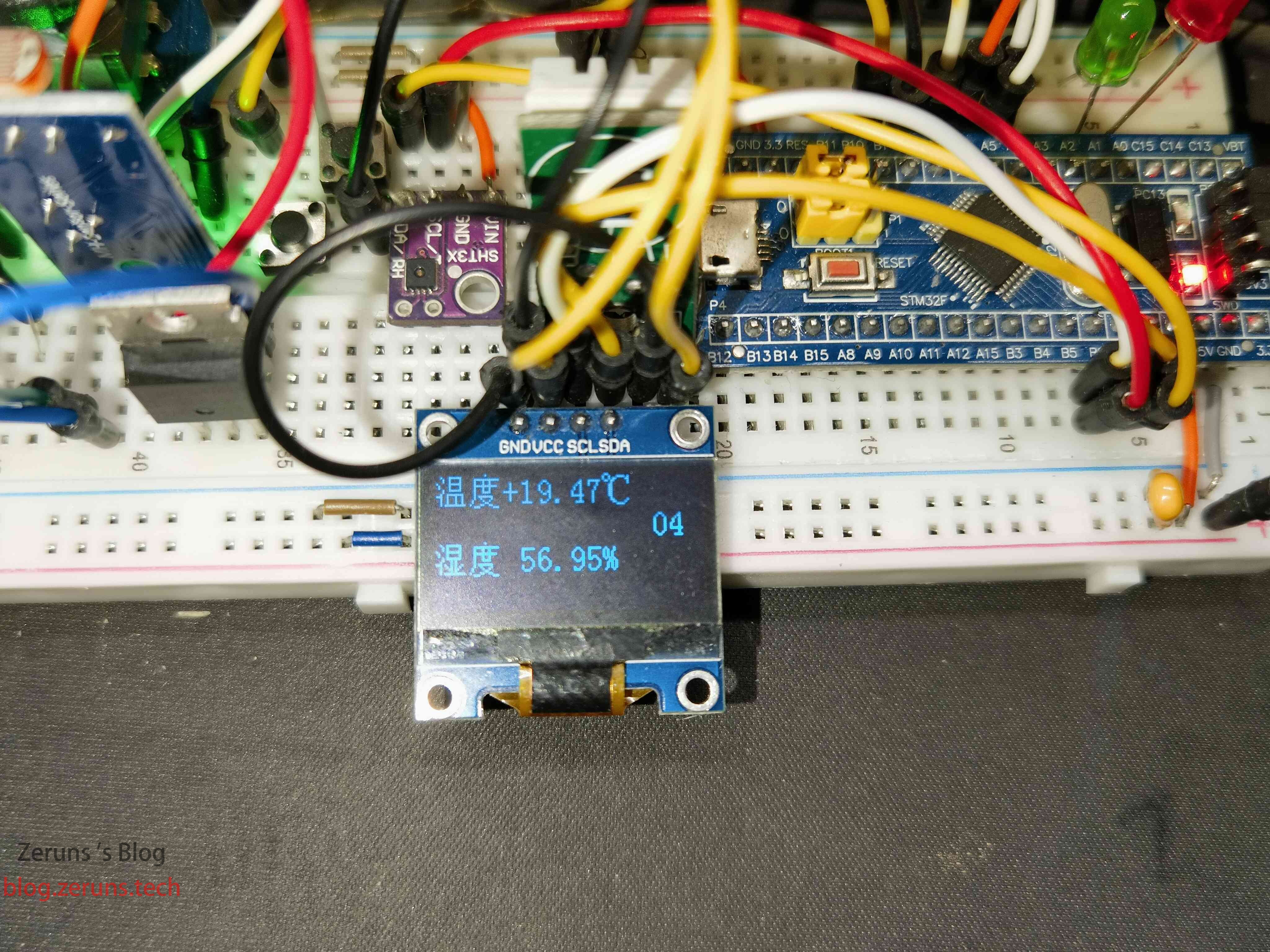
STM32读取SHT3x系列(SHT30、SHT31、SHT35)温湿度传感器的数据并显示在0.96寸OLED屏上。
我下面提供两份代码,一份是标准库使用硬件I2C的,另一份是HAL库使用软件模拟IIC的。
我用的单片机是STM32F103C8T6,温湿度传感器是SHT30。
STM32软件I2C读取AM2320温湿度传感器数据:https://blog.zeruns.com/archives/695.html
STM32使用硬件I2C读取SHTC3温湿度传感器:https://blog.zeruns.com/archives/692.html
STM32单片机读取AHT10温湿度传感器数据:https://blog.zeruns.com/archives/693.html
电子/单片机技术交流群:2169025065
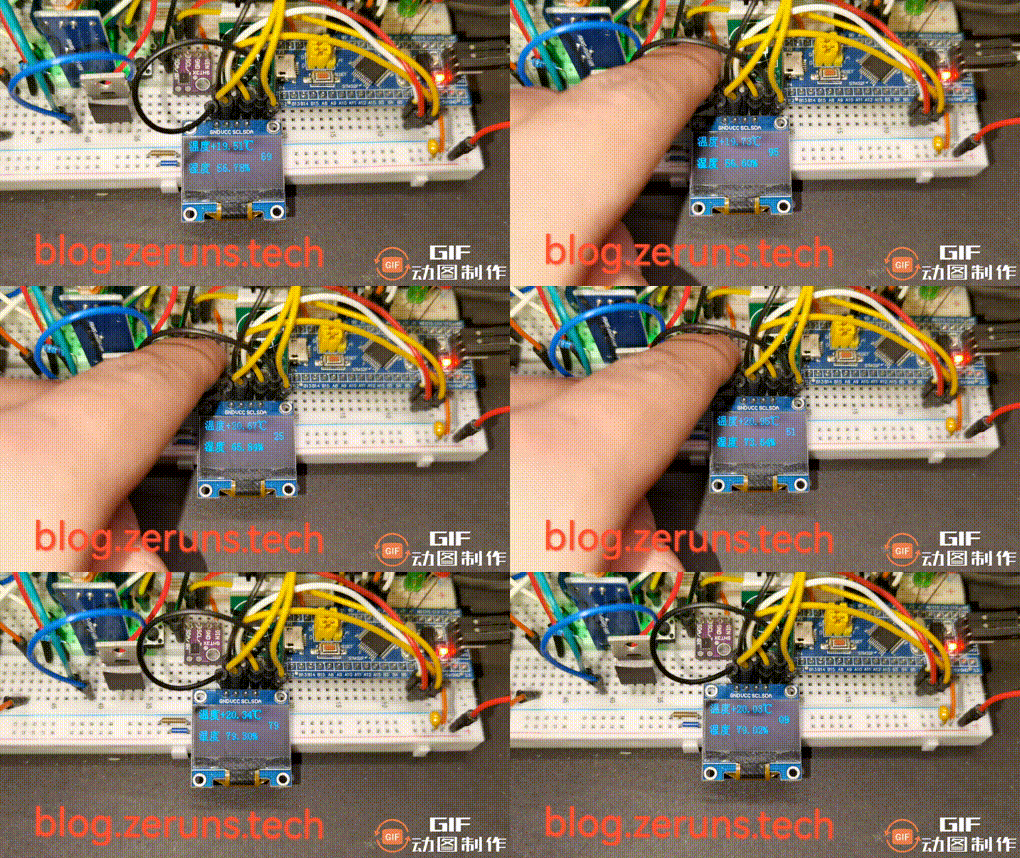
实现效果图
I2C协议简介
I2C 通讯协议(Inter-Integrated Circuit)是由 Phiilps 公司开发的,由于它引脚少,硬件实现简单,可扩展性强,不需要 USART、CAN 等通讯协议的外部收发设备(那些电平转化芯片),现在被广泛地使用在系统内多个集成电路(IC)间的通讯。
I2C只有一跟数据总线 SDA(Serial Data Line),串行数据总线,只能一位一位的发送数据,属于串行通信,采用半双工通信
半双工通信:可以实现双向的通信,但不能在两个方向上同时进行,必须轮流交替进行,其实也可以理解成一种可以切换方向的单工通信,同一时刻必须只能一个方向传输,只需一根数据线.
对于I2C通讯协议把它分为物理层和协议层物理层规定通讯系统中具有机械、电子功能部分的特性(硬件部分),确保原始数据在物理媒体的传输。协议层主要规定通讯逻辑,统一收发双方的数据打包、解包标准(软件层面)。
I2C物理层
I2C 通讯设备之间的常用连接方式
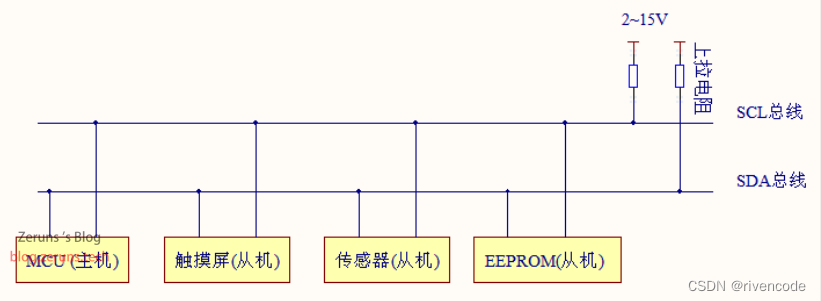
(1) 它是一个支持多设备的总线。“总线”指多个设备共用的信号线。在一个 I2C 通讯总线中,可连接多个 I2C 通讯设备,支持多个通讯主机及多个通讯从机。
(2) 一个 I2C 总线只使用两条总线线路,一条双向串行数据线SDA(Serial Data Line ),一条串行时钟线SCL(Serial Data Line )。数据线即用来表示数据,时钟线用于数据收发同步
(3) 总线通过上拉电阻接到电源。当 I2C 设备空闲时会输出高阻态,而当所有设备都空闲,都输出高阻态时,由上拉电阻把总线拉成高电平。
I2C通信时单片机GPIO口必须设置为开漏输出,否则可能会造成短路。
关于更多STM32的I2C相关信息和使用方法可以看这篇文章:https://url.zeruns.com/JC0Ah
我这里就不详细讲解了。
SHT3x温湿度传感器
SHT3x数据手册下载地址:
原版:https://url.zeruns.com/uWNnP 提取码:icqu
中文版(机翻):https://url.zeruns.com/n9b9t 提取码:vedy
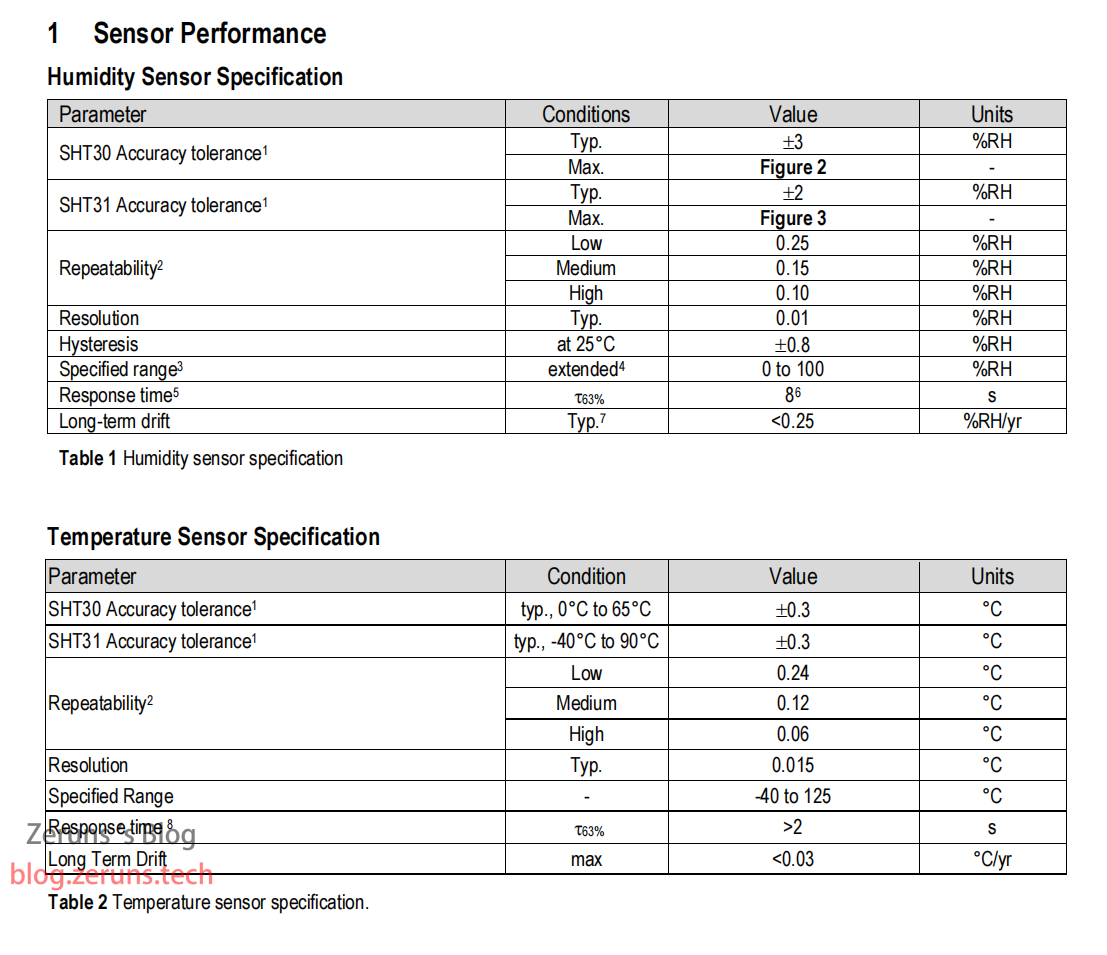
浏览数据手册可以得到一个大概信息,SHT30是一个可以检测温度和湿度的传感器,
温度范围:-40℃~125℃
湿度范围:0%~100%
工作电压:2.4v~5.5v
通讯方式:i2c
时钟频率:0 ~ 1000kHz
找到如下几个关键信息
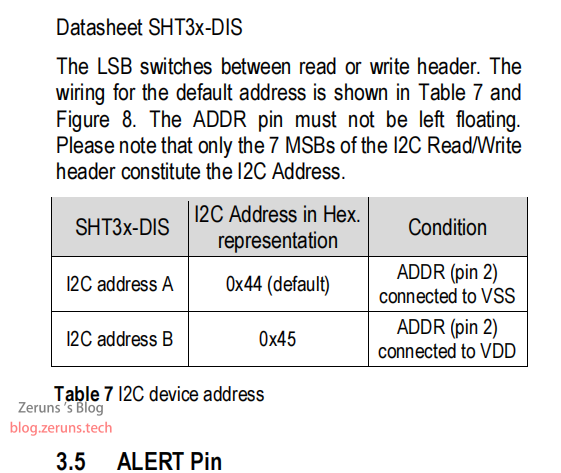
SHT3x设备地址和读写命令
SHT3x的地址可以通过第2个引脚接高或低电平来设置,我在淘宝买的模块的传感器2脚是通过一个电阻接到VCC,也就是默认是0x44。
在实际的使用过程中,SHT3x的设备地址需要与读写数据/命令方向位组成一个字节同时发送,字节的最低位为读写数据/命令方向位,高7位是SHT3x的设备地址。
如果要通过I2C写数据或命令给SHT3x,在I2C起始信号之后,需要发送“1000 1000”,即0x88给SHT3x,除了通过高7位“1000 100”(0x44)的设备地址寻址还通过最低位“0”通知SHT3x接下来是写数据或命令操作。
如果要通过I2C读取SHT3x中的数据,在I2C起始信号之后,需要发送“1000 1001”,即0x89给SHT3x,除了通过高7位“1000 100”的设备地址寻址还通过最低位“1”通知SHT3x接下来是读取数据的操作。
简单来说就是,0x88表示写数据,0x89表示读数据。不过使用STM32硬件I2C时只需要输入0x88就行,最低位标准库会处理的。
读取温湿度数据
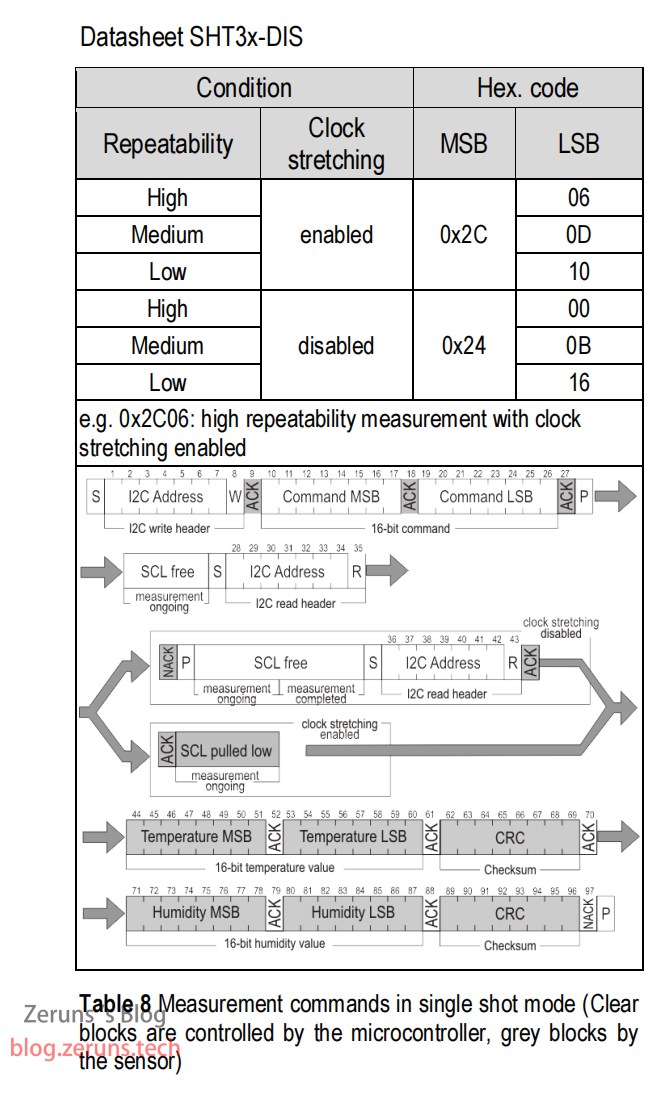
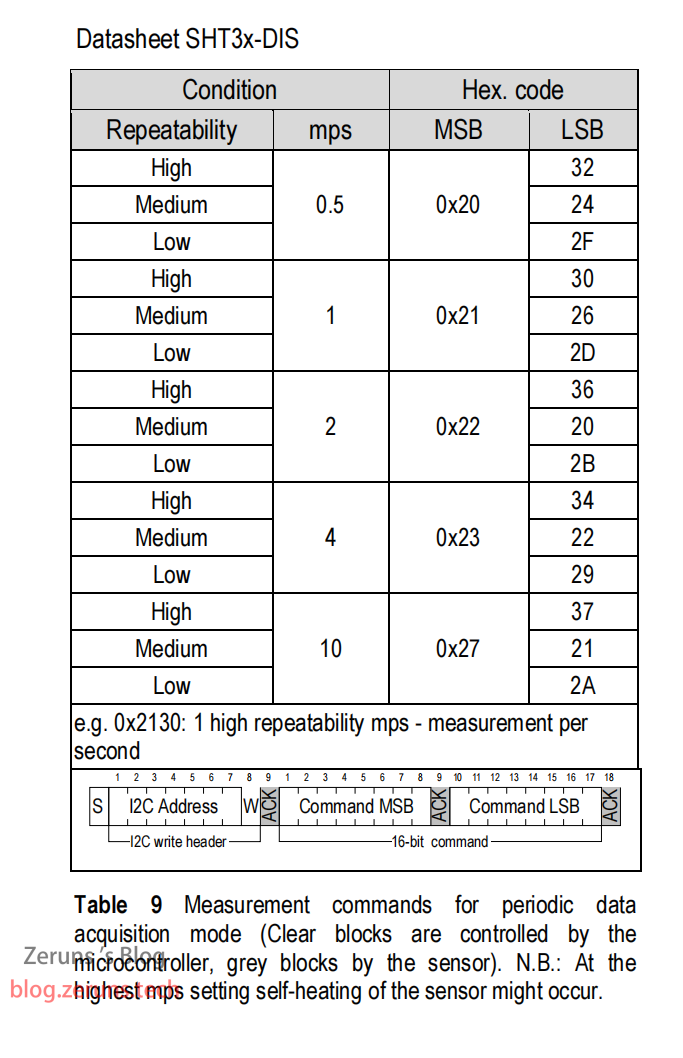
可知,不同的命令,获取的数据方式不一样,有单次测量和周期测量模式,还有一个Clock Stretching Enable 和 Disable的区别。
Clock Stretching是时钟拉伸的意思。如果使用Clock Stretching Enable命令的话,那么发送完测量命令之后,在SHT3x测量温度湿度数据的过程中,SHT3x会拉低I2C的时钟线SCL,通过这样来禁止主机发送命令给SHT3x,只有当SHT3x完成温度湿度数据测量时,SHT3x才会释放时钟线SCL。
如果使用Clock Stretching Disable命令的话,在SHT3x测量数据的过程中,SHT3x并不会拉低I2C的时钟线SCL,只是如果主机在SHT3x测量数据的过程中发送命令或数据的时候,发送读取指令SHT3x是会返回非应答信号的,只有测量完成再发送读取指令才会返回应答信号。
周期测量模式可以让传感器自动测量并保存数据,可以设置每秒测量0.5/1/2/4/10次,然后通过读取指令0xE000可以读取最新的测量结果。
从数据手册可知,一个测量周期包概括2个步骤:
- 发送测量命令
- 读取测量完成之后的数据。
以上测量命令和读取命令可以在数据手册中查询。
总结如下:
- 发送测量命令:先发送写入指令(0x88),再发送唤醒指令高位(0x2C),再发送唤醒指令低位(0x0D)。
- 读取数据并等待测量完成:发送读取指令(0x89),等待从机释放SCL总线。
- 接收数据:连续接收6个字节数据。这6个字节的第1-2个字节就是温度数值,第3个字节是温度校验。第4-5个字节是湿度数值,第6个字节是湿度校验。接收最后一个字节后发送非应答信号。
- 处理数据:对数据进行CRC校验并处理。
数据的计算
由SHT3x数据手册可知
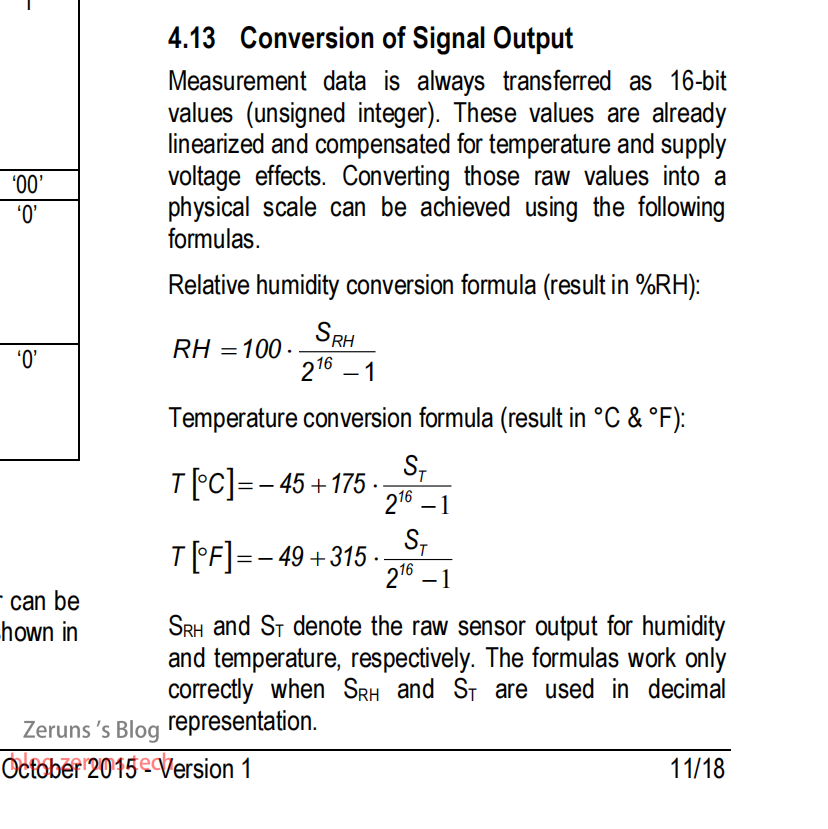
例如:采集到的湿度数值是0x6501,换算成十进制是25857。
则:湿度 = 100 * 25857 / (65536 - 1) = 39.45 (单位:%)
采集到的温度数值是0x6600,换算成十进制是26112。
则:温度 = -45 + 175 * 26112 / (65536 - 1) = 24.72 (单位:℃)
需要用的元件
STM32最小系统板:https://s.click.taobao.com/AJEGiNu
SHT3x模块:https://s.click.taobao.com/55xGiNu
OLED模块:https://s.click.taobao.com/0dlG0Ou
杜邦线:https://s.click.taobao.com/xAkAJRu
面包板:https://s.click.taobao.com/ShJAJRu
ST-LINK V2:https://s.click.taobao.com/C8ftZRu
程序
这里就放出标准库版的main.c、SHT3x.c和oled.c这三个主要的代码,其他的请下载下面链接的压缩包。
标准库版:https://url.zeruns.com/a49EX 提取码:8nn5
HAL库版:https://url.zeruns.com/p3og4 提取码:v9wc
SHT3x和OLED模块的SCL接PB6,SDA接PB7。
使用VSCode代替Keil实现STM32和51单片机的开发:https://blog.zeruns.com/archives/690.html
main.c
#include "stm32f10x.h"                  // Device header
#include "Delay.h"
#include "OLED.h"
#include "IWDG.h"
#include "SHT3x.h"


uint16_t numlen(uint16_t num);

int main(void)
{
	IWDG_Configuration();	//初始化看门狗
	OLED_Init();			//初始化OLED屏
	SHT3x_Init();			//初始化SHT3x

	/*OLED_ShowString(1, 1, "T:");
	OLED_ShowString(3, 1, "H:");*/

	uint8_t Chinese[]={0,1};
  	OLED_ShowChinese(1,1,Chinese,2);//温度
  	uint8_t Chinese1[]={2,3};
	OLED_ShowChinese(3,1,Chinese1,2);//湿度
  	uint8_t Chinese2[]={4};
	OLED_ShowChinese(1,11,Chinese2,1);//℃

	uint32_t a=0;
	uint16_t err_count=0;

	while (1)
	{
		a++;
		OLED_ShowNum(2, 14, a, 2);
		if(a==99)a=0;

		float Temp,Hum;			//声明变量存放温湿度数据

		if(ReadSHT3x(&Hum,&Temp))	//读取温湿度数据
		{
			if(Temp>=0)
			{
				char String[10];
				sprintf(String, "+%.2f", Temp);//格式化字符串输出到字符串变量
				OLED_ShowString(1, 5, String);	//显示温度

				sprintf(String, " %.2f%%", Hum);	//格式化字符串输出到字符串变量
				OLED_ShowString(3, 5, String);	//显示湿度
			}else
			{
				char String[10];
				sprintf(String, "%.2f", Temp);//格式化字符串输出到字符串变量
				OLED_ShowString(1, 5, String);	//显示温度

				sprintf(String, " %.2f%%", Hum);	//格式化字符串输出到字符串变量
				OLED_ShowString(3, 5, String);	//显示湿度
			}
		}
		else
		{
			err_count++;
			OLED_ShowNum(1,14, err_count, 2);	//显示错误次数计数
		}

	/*
	https://blog.zeruns.com
	*/

		Delay_ms(200);	//延时200毫秒

		IWDG_FeedDog();	//喂狗(看门狗,超过1秒没有执行喂狗则自动复位)
	}
}

/**
  * @brief  计算整数长度
  * @param  num 要计算长度的整数
  * @retval 长度值
  */
uint16_t numlen(uint16_t num)
{
    uint16_t len = 0;        // 初始长度为0
    for(; num > 0; ++len)    // 判断num是否大于0,否则长度+1
        num /= 10;	         // 使用除法进行运算,直到num小于1
    return len;              // 返回长度的值
}
SHT3x.c
#include "stm32f10x.h"
#include "Delay.h"

/*SHT3x地址*/
#define SHT3x_ADDRESS 0x44<<1	//从机地址是7位,所以左移一位

/*设置使用哪一个I2C*/
#define I2Cx I2C1

/*
https://blog.zeruns.com
*/

/**
  * @brief  CRC校验,CRC多项式为:x^8+x^5+x^4+1,即0x31
  * @param  DAT 要校验的数据
  * @retval 校验码
  */
uint8_t SHT3x_CRC_CAL(uint16_t DAT)
{
	uint8_t i,t,temp;
	uint8_t CRC_BYTE;

	CRC_BYTE = 0xFF;
	temp = (DAT>>8) & 0xFF;

	for(t = 0; t < 2; t++)
	{
		CRC_BYTE ^= temp;
		for(i = 0;i < 8;i ++)
		{
			if(CRC_BYTE & 0x80)
			{
				CRC_BYTE <<= 1;
				CRC_BYTE ^= 0x31;
			}
			else
			{
				CRC_BYTE <<= 1;
			}
		}

		if(t == 0)
		{
			temp = DAT & 0xFF;
		}
	}

	return CRC_BYTE;
}

/*发送起始信号*/
void SHT3x_I2C_START(){
    while( I2C_GetFlagStatus(I2Cx, I2C_FLAG_BUSY));//等待总线空闲
	I2C_GenerateSTART(I2Cx, ENABLE);//发送起始信号
	while( I2C_CheckEvent(I2Cx,I2C_EVENT_MASTER_MODE_SELECT)==ERROR);//检测EV5事件
}

/*发送停止信号*/
void SHT3x_I2C_STOP(){
    I2C_GenerateSTOP(I2Cx, ENABLE);//发送停止信号
}

/**
  * @brief  发送两个字节数据
  * @param  MSB 高8位
  * @param  LSB 低8位
  * @retval 无
  */
void SHT3x_WriteByte(uint8_t MSB,uint8_t LSB)
{
	SHT3x_I2C_START();  //发送起始信号

	I2C_Send7bitAddress(I2Cx, SHT3x_ADDRESS, I2C_Direction_Transmitter);    //发送设备写地址
	while(I2C_CheckEvent(I2Cx,I2C_EVENT_MASTER_TRANSMITTER_MODE_SELECTED)==ERROR);  //检测EV6事件

    I2C_SendData(I2Cx, MSB);//发送高8位数据
	while (!I2C_CheckEvent(I2Cx, I2C_EVENT_MASTER_BYTE_TRANSMITTED));//检测EV8事件

	I2C_SendData(I2Cx, LSB);//发送低8位数据
	while (!I2C_CheckEvent(I2Cx, I2C_EVENT_MASTER_BYTE_TRANSMITTED));//检测EV8事件

	I2C_GenerateSTOP(I2Cx, ENABLE);//发送停止信号

}

/**
  * @brief  读取数据
  * @retval 读取到的字节数据
  */
uint8_t SHT3x_ReadData()
{
    while (!I2C_CheckEvent(I2Cx,I2C_EVENT_MASTER_BYTE_RECEIVED));//检测EV7事件
	return I2C_ReceiveData(I2Cx);//读取数据并返回
}

/*软件复位SHT3x*/
void SHT3x_SoftReset(void)
{
    SHT3x_WriteByte(0x30,0xA2);    //重新初始化SHT3x
}

/*引脚初始化*/
void SHT3x_Init(void)
{
	RCC_APB1PeriphClockCmd(RCC_APB1Periph_I2C1,ENABLE);	//使能I2C1时钟
	RCC_APB2PeriphClockCmd(RCC_APB2Periph_GPIOB,ENABLE);//使能GPIOB时钟

	/*STM32F103芯片的硬件I2C1: PB6 -- SCL; PB7 -- SDA */
	GPIO_InitTypeDef  GPIO_InitStructure;               //定义结构体配置GPIO
	GPIO_InitStructure.GPIO_Pin =  GPIO_Pin_6 | GPIO_Pin_7;
	GPIO_InitStructure.GPIO_Speed = GPIO_Speed_50MHz;
	GPIO_InitStructure.GPIO_Mode = GPIO_Mode_AF_OD;		//设置输出模式为开漏输出,需接上拉电阻
	GPIO_Init(GPIOB, &GPIO_InitStructure);              //初始化GPIO

	I2C_DeInit(I2Cx);	//将外设I2C寄存器重设为缺省值
	I2C_InitTypeDef  I2C_InitStructure;                 //定义结构体配置I2C
	I2C_InitStructure.I2C_Mode = I2C_Mode_I2C;			//工作模式
	I2C_InitStructure.I2C_DutyCycle = I2C_DutyCycle_2;	//时钟占空比,Tlow/Thigh = 2
	I2C_InitStructure.I2C_OwnAddress1 = 0x30;	//主机的I2C地址,用不到则随便写,无影响
	I2C_InitStructure.I2C_Ack = I2C_Ack_Enable;	//使能应答位
	I2C_InitStructure.I2C_AcknowledgedAddress = I2C_AcknowledgedAddress_7bit;//设置地址长度7位
	I2C_InitStructure.I2C_ClockSpeed = 400000;	//I2C传输速度,400K,根据自己所用芯片手册查看支持的速度。
	I2C_Init(I2Cx, &I2C_InitStructure);         //初始化I2C

	I2C_Cmd(I2Cx, ENABLE);  //启用I2C

	//SHT3x_WriteByte(0X27,0X21); //周期数据采集模式(每秒10次,Medium Repeatability)

	Delay_us(300);//延时300微秒
}

/**
  * @brief  读取SHT3x数据
  * @param  *Hum 湿度
  * @param  *Temp 温度
  * @retval 1 - 读取成功;0 - 读取失败
  */
uint8_t ReadSHT3x(float *Hum,float *Temp)
{
    uint16_t HumData,TempData,HumCRC,TempCRC;//声明变量存放读取的数据

    //SHT3x_WriteByte(0XE0,0X00);   //发送指令,获取数据,周期数据采集模式用

    SHT3x_WriteByte(0X2C,0X0D); //发送单次测量指令(启动时钟延伸,Medium Repeatability)

    SHT3x_I2C_START();//发送起始信号

	I2C_Send7bitAddress(I2Cx,SHT3x_ADDRESS,I2C_Direction_Receiver);//发送设备读地址

	while( I2C_CheckEvent(I2Cx,I2C_EVENT_MASTER_RECEIVER_MODE_SELECTED )==ERROR);//检测EV6事件

    TempData = SHT3x_ReadData();//读取温度高8位数据
    TempData=TempData<<8;       //左移8位
	TempData |= SHT3x_ReadData();//读取温度低8位数据
    TempCRC = SHT3x_ReadData(); //读取温度CRC校验数据

    HumData = SHT3x_ReadData(); //读取湿度高8位数据
    HumData=HumData<<8;         //左移8位
	HumData |= SHT3x_ReadData();//读取湿度低8位数据
    I2C_AcknowledgeConfig(I2Cx,DISABLE);    //关闭应答信号
    HumCRC = SHT3x_ReadData();  //读取湿度CRC校验数据

    SHT3x_I2C_STOP();   //发送停止信号
    I2C_AcknowledgeConfig(I2Cx,ENABLE); //开启应答信号


    if( SHT3x_CRC_CAL(HumData)==HumCRC && SHT3x_CRC_CAL(TempData)==TempCRC ){   //对接收到数据进行CRC校验
       *Hum = (float)HumData*100/(65536-1);        //将接收的16位二进制数据转换为10进制湿度数据
       *Temp = (float)TempData*175/(65536-1)-45;   //将接收的16位二进制数据转换为10进制温度数据
       return 1;
    }
    return 0;
}
oled.c
#include "stm32f10x.h"
#include "OLED_Font.h"

/*OLED屏地址*/
#define OLED_ADDRESS 0x78

/*设置哪一个使用I2C*/
#define I2Cx I2C1

/*
https://blog.zeruns.com
*/

/*引脚初始化*/
void OLED_I2C_Init(void)
{
	RCC_APB1PeriphClockCmd(RCC_APB1Periph_I2C1,ENABLE);	//使能I2C1时钟
	RCC_APB2PeriphClockCmd(RCC_APB2Periph_GPIOB,ENABLE);//使能GPIOB时钟

	/*STM32F103芯片的硬件I2C: PB6 -- SCL; PB7 -- SDA */
	GPIO_InitTypeDef  GPIO_InitStructure;
	GPIO_InitStructure.GPIO_Pin =  GPIO_Pin_6 | GPIO_Pin_7;
	GPIO_InitStructure.GPIO_Speed = GPIO_Speed_50MHz;
	GPIO_InitStructure.GPIO_Mode = GPIO_Mode_AF_OD;		//设置输出模式为开漏输出,需接上拉电阻
	GPIO_Init(GPIOB, &GPIO_InitStructure);

	I2C_DeInit(I2Cx);	//将外设I2C寄存器重设为缺省值
	I2C_InitTypeDef  I2C_InitStructure;
	I2C_InitStructure.I2C_Mode = I2C_Mode_I2C;			//工作模式
	I2C_InitStructure.I2C_DutyCycle = I2C_DutyCycle_2;	//时钟占空比,Tlow/Thigh = 2
	I2C_InitStructure.I2C_OwnAddress1 = 0x30;	//主机的I2C地址,用不到则随便写,无影响
	I2C_InitStructure.I2C_Ack = I2C_Ack_Enable;	//使能应答位
	I2C_InitStructure.I2C_AcknowledgedAddress = I2C_AcknowledgedAddress_7bit;//设置地址长度7位
	I2C_InitStructure.I2C_ClockSpeed = 400000;	//I2C传输速度,400K,根据自己所用芯片手册查看支持的速度。
	I2C_Init(I2Cx, &I2C_InitStructure);

	I2C_Cmd(I2Cx, ENABLE);
}

void I2C_WriteByte(uint8_t addr,uint8_t data)
{

	while( I2C_GetFlagStatus(I2Cx, I2C_FLAG_BUSY));

	//发送起始信号
	I2C_GenerateSTART(I2Cx, ENABLE);
	//检测EV5事件
	while( I2C_CheckEvent(I2Cx,I2C_EVENT_MASTER_MODE_SELECT)==ERROR);
	//发送设备写地址
	I2C_Send7bitAddress(I2Cx, OLED_ADDRESS, I2C_Direction_Transmitter);
	//检测EV6事件
	while( I2C_CheckEvent(I2Cx,I2C_EVENT_MASTER_TRANSMITTER_MODE_SELECTED)==ERROR);

	//发送要操作设备内部的地址
	I2C_SendData(I2Cx, addr);
	//检测EV8_2事件
	while (!I2C_CheckEvent(I2Cx, I2C_EVENT_MASTER_BYTE_TRANSMITTED));

	I2C_SendData(I2Cx, data);//发送数据
	while (!I2C_CheckEvent(I2Cx, I2C_EVENT_MASTER_BYTE_TRANSMITTED));

	//发送停止信号
	I2C_GenerateSTOP(I2Cx, ENABLE);
}

/**
  * @brief  OLED写命令
  * @param  Command 要写入的命令
  * @retval 无
  */
void OLED_WriteCommand(unsigned char Command)//写命令
{
	I2C_WriteByte(0x00, Command);
}

/**
  * @brief  OLED写数据
  * @param  Data 要写入的数据
  * @retval 无
*/
void OLED_WriteData(unsigned char Data)//写数据
{
	I2C_WriteByte(0x40, Data);
}

/**
  * @brief  OLED设置光标位置
  * @param  Y 以左上角为原点,向下方向的坐标,范围:0~7
  * @param  X 以左上角为原点,向右方向的坐标,范围:0~127
  * @retval 无
  */
void OLED_SetCursor(uint8_t Y, uint8_t X)
{
	OLED_WriteCommand(0xB0 | Y);					//设置Y位置
	OLED_WriteCommand(0x10 | ((X & 0xF0) >> 4));	//设置X位置低4位
	OLED_WriteCommand(0x00 | (X & 0x0F));			//设置X位置高4位
}

/**
  * @brief  OLED清屏
  * @param  无
  * @retval 无
  */
void OLED_Clear(void)
{
	uint8_t i, j;
	for (j = 0; j < 8; j++)
	{
		OLED_SetCursor(j, 0);
		for(i = 0; i < 128; i++)
		{
			OLED_WriteData(0x00);
		}
	}
}

/**
  * @brief  OLED部分清屏
  * @param  Line 行位置,范围:1~4
  * @param  start 列开始位置,范围:1~16
  * @param  end 列开始位置,范围:1~16
  * @retval 无
  */
void OLED_Clear_Part(uint8_t Line, uint8_t start, uint8_t end)
{
	uint8_t i,Column;
	for(Column = start; Column <= end; Column++)
	{
		OLED_SetCursor((Line - 1) * 2, (Column - 1) * 8);		//设置光标位置在上半部分
		for (i = 0; i < 8; i++)
		{
			OLED_WriteData(0x00);			//显示上半部分内容
		}
		OLED_SetCursor((Line - 1) * 2 + 1, (Column - 1) * 8);	//设置光标位置在下半部分
		for (i = 0; i < 8; i++)
		{
			OLED_WriteData(0x00);		//显示下半部分内容
		}
	}
}

/**
  * @brief  OLED显示一个字符
  * @param  Line 行位置,范围:1~4
  * @param  Column 列位置,范围:1~16
  * @param  Char 要显示的一个字符,范围:ASCII可见字符
  * @retval 无
  */
void OLED_ShowChar(uint8_t Line, uint8_t Column, char Char)
{
	uint8_t i;
	OLED_SetCursor((Line - 1) * 2, (Column - 1) * 8);		//设置光标位置在上半部分
	for (i = 0; i < 8; i++)
	{
		OLED_WriteData(OLED_F8x16[Char - ' '][i]);			//显示上半部分内容
	}
	OLED_SetCursor((Line - 1) * 2 + 1, (Column - 1) * 8);	//设置光标位置在下半部分
	for (i = 0; i < 8; i++)
	{
		OLED_WriteData(OLED_F8x16[Char - ' '][i + 8]);		//显示下半部分内容
	}
}

/**
  * @brief  OLED显示一个中文字
  * @param  Line 行位置,范围:1~4
  * @param  Column 列位置,范围:1~16
  * @param  Chinese 要显示的中文字在字库数组中的位置
  * @retval 无
  */
void OLED_ShowWord(uint8_t Line, uint8_t Column, uint8_t Chinese)
{
	uint8_t i;
	OLED_SetCursor((Line - 1) * 2, (Column - 1) * 8);
	for (i = 0; i < 8; i++)
	{
		OLED_WriteData(OLED_F16x16[Chinese][i]);
	}
	OLED_SetCursor((Line - 1) * 2, (Column - 1) * 8 + 8);
	for (i = 1; i < 8; i++)
	{
		OLED_WriteData(OLED_F16x16[Chinese][i+8]);
	}
	OLED_SetCursor((Line - 1) * 2 +1, (Column - 1) * 8);
	for (i = 0; i < 8; i++)
	{
		OLED_WriteData(OLED_F16x16[Chinese][i+16]);
	}
	OLED_SetCursor((Line - 1) * 2 +1, (Column - 1) * 8 + 8);
	for (i = 1; i < 8; i++)
	{
		OLED_WriteData(OLED_F16x16[Chinese][i+16+8]);
	}
}

/**
  * @brief  OLED显示一串中文字
  * @param  Line 行位置,范围:1~4
  * @param  Column 列位置,范围:1~16
  * @param  Chinese[] 要显示的中文字在字库数组中的位置,数组里放每个字的位置
  * @param	Length 要显示中文的长度,范围:1~8
  * @retval 无
  */
void OLED_ShowChinese(uint8_t Line, uint8_t Column, uint8_t *Chinese,uint8_t Length)
{
	uint8_t i;
	for (i = 0; i < Length; i++)
	{
		OLED_ShowWord(Line, Column + i*2,Chinese[i]);
	}
}

/**
  * @brief  OLED显示字符串
  * @param  Line 起始行位置,范围:1~4
  * @param  Column 起始列位置,范围:1~16
  * @param  String 要显示的字符串,范围:ASCII可见字符
  * @retval 无
  */
void OLED_ShowString(uint8_t Line, uint8_t Column, char *String)
{
	uint8_t i;
	for (i = 0; String[i] != '\0'; i++)
	{
		OLED_ShowChar(Line, Column + i, String[i]);
	}
}

/**
  * @brief  OLED次方函数
  * @retval 返回值等于X的Y次方
  */
uint32_t OLED_Pow(uint32_t X, uint32_t Y)
{
	uint32_t Result = 1;
	while (Y--)
	{
		Result *= X;
	}
	return Result;
}

/**
  * @brief  OLED显示数字(十进制,正数)
  * @param  Line 起始行位置,范围:1~4
  * @param  Column 起始列位置,范围:1~16
  * @param  Number 要显示的数字,范围:0~4294967295
  * @param  Length 要显示数字的长度,范围:1~10
  * @retval 无
  */
void OLED_ShowNum(uint8_t Line, uint8_t Column, uint32_t Number, uint8_t Length)
{
	uint8_t i;
	for (i = 0; i < Length; i++)
	{
		OLED_ShowChar(Line, Column + i, Number / OLED_Pow(10, Length - i - 1) % 10 + '0');
	}
}

/**
  * @brief  OLED显示数字(十进制,带符号数)
  * @param  Line 起始行位置,范围:1~4
  * @param  Column 起始列位置,范围:1~16
  * @param  Number 要显示的数字,范围:-2147483648~2147483647
  * @param  Length 要显示数字的长度,范围:1~10
  * @retval 无
  */
void OLED_ShowSignedNum(uint8_t Line, uint8_t Column, int32_t Number, uint8_t Length)
{
	uint8_t i;
	uint32_t Number1;
	if (Number >= 0)
	{
		OLED_ShowChar(Line, Column, '+');
		Number1 = Number;
	}
	else
	{
		OLED_ShowChar(Line, Column, '-');
		Number1 = -Number;
	}
	for (i = 0; i < Length; i++)
	{
		OLED_ShowChar(Line, Column + i + 1, Number1 / OLED_Pow(10, Length - i - 1) % 10 + '0');
	}
}

/**
  * @brief  OLED显示数字(十六进制,正数)
  * @param  Line 起始行位置,范围:1~4
  * @param  Column 起始列位置,范围:1~16
  * @param  Number 要显示的数字,范围:0~0xFFFFFFFF
  * @param  Length 要显示数字的长度,范围:1~8
  * @retval 无
  */
void OLED_ShowHexNum(uint8_t Line, uint8_t Column, uint32_t Number, uint8_t Length)
{
	uint8_t i, SingleNumber;
	for (i = 0; i < Length; i++)
	{
		SingleNumber = Number / OLED_Pow(16, Length - i - 1) % 16;
		if (SingleNumber < 10)
		{
			OLED_ShowChar(Line, Column + i, SingleNumber + '0');
		}
		else
		{
			OLED_ShowChar(Line, Column + i, SingleNumber - 10 + 'A');
		}
	}
}

/**
  * @brief  OLED显示数字(二进制,正数)
  * @param  Line 起始行位置,范围:1~4
  * @param  Column 起始列位置,范围:1~16
  * @param  Number 要显示的数字,范围:0~1111 1111 1111 1111
  * @param  Length 要显示数字的长度,范围:1~16
  * @retval 无
  */
void OLED_ShowBinNum(uint8_t Line, uint8_t Column, uint32_t Number, uint8_t Length)
{
	uint8_t i;
	for (i = 0; i < Length; i++)
	{
		OLED_ShowChar(Line, Column + i, Number / OLED_Pow(2, Length - i - 1) % 2 + '0');
	}
}

/**
  * @brief  OLED初始化
  * @param  无
  * @retval 无
  */
void OLED_Init(void)
{
	uint32_t i, j;

	for (i = 0; i < 1000; i++)			//上电延时
	{
		for (j = 0; j < 1000; j++);
	}

	OLED_I2C_Init();			//端口初始化

	OLED_WriteCommand(0xAE);	//关闭显示

	OLED_WriteCommand(0xD5);	//设置显示时钟分频比/振荡器频率
	OLED_WriteCommand(0x80);

	OLED_WriteCommand(0xA8);	//设置多路复用率
	OLED_WriteCommand(0x3F);

	OLED_WriteCommand(0xD3);	//设置显示偏移
	OLED_WriteCommand(0x00);

	OLED_WriteCommand(0x40);	//设置显示开始行

	OLED_WriteCommand(0xA1);	//设置左右方向,0xA1正常 0xA0左右反置

	OLED_WriteCommand(0xC8);	//设置上下方向,0xC8正常 0xC0上下反置

	OLED_WriteCommand(0xDA);	//设置COM引脚硬件配置
	OLED_WriteCommand(0x12);

	OLED_WriteCommand(0x81);	//设置对比度控制
	OLED_WriteCommand(0xCF);

	OLED_WriteCommand(0xD9);	//设置预充电周期
	OLED_WriteCommand(0xF1);

	OLED_WriteCommand(0xDB);	//设置VCOMH取消选择级别
	OLED_WriteCommand(0x30);

	OLED_WriteCommand(0xA4);	//设置整个显示打开/关闭

	OLED_WriteCommand(0xA6);	//设置正常/倒转显示

	OLED_WriteCommand(0x8D);	//设置充电泵
	OLED_WriteCommand(0x14);

	OLED_WriteCommand(0xAF);	//开启显示

	OLED_Clear();				//OLED清屏
}
推荐阅读
- 高性价比和便宜的VPS/云服务器推荐: https://blog.vpszj.cn/archives/41.html
- 使用NPS搭建内网穿透服务器,带Web面板:https://blog.vpszj.cn/archives/748.html
- Linux搭建网站教程,建站教程:https://blog.vpszj.cn/archives/1094.html
- 我的世界服务器搭建教程:https://blog.vpszj.cn/archives/tag/minecraft
- 基于STM32和HC-SR04模块实现超声波测距功能:https://blog.zeruns.com/archives/680.html
- ESP8266开发环境搭建及项目演示:https://blog.zeruns.com/archives/526.html