9527
1
大家好,
LVGL 8.3,已启用 LV_USE_MEM_MONITOR 1,控制台日志已开启。
我正在 lv_gif 对象中切换多个 GIF(存储为编译时 C 数组)。几分钟后 UI 冻结。
在挂起之前,内存监视器显示:
开始:已使用 62.2 kB (63 %),碎片率 30 %
一段时间后:已使用 62.2 kB (63 %),碎片率 54 %
最后的警告总是:
[Warn] (10.886, +10886) lv_gif_set_src: 无法加载源 (在 lv_gif.c 第 #77 行)
[Warn] (10.894, +8) _lv_img_cache_open: 图像绘制无法打开图像资源
(在 lv_img_cache.c 第 #125 行)
[Warn] (10.904, +10) lv_draw_img: 图像绘制错误 (在 lv_draw_img.c 第 #84 行)
[Warn] (10.917, +13) _lv_img_cache_open: 图像绘制无法打开图像资源
(在 lv_img_cache.c 第 #125 行)
[Warn] (10.927, +10) lv_draw_img: 图像绘制错误 (在 lv_draw_img.c 第 #84 行)
看起来堆内存碎片太严重,LVGL 无法再为下一帧分配解码器缓冲区。
有人遇到过这个问题吗?在反复更改 GIF 源时,推荐用什么方法来回收/重用内存以避免碎片?
谢谢!
9527
4
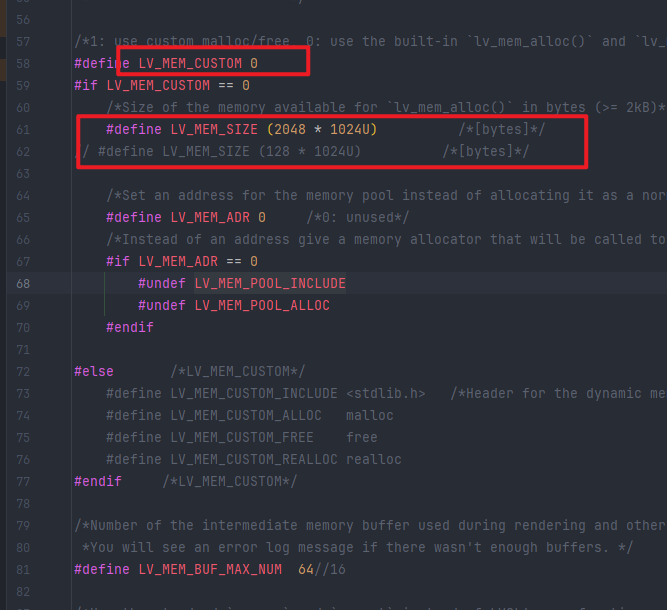
只剩下100多kB的SRAM,根本没有空间来解码一个240×240的GIF——在这么少的内存上看来是不可能的。
ABC
5
100 kB 出头跑 240×240 GIF 基本就是“在刀尖上跳舞”,你现在看到的 54 % frag + 卡死,其实就是跳到最后刀尖断了——内存池里碎片太多,连一副完整解码帧都腾不出来,lv_mem_alloc 失败,后面一连串“Couldn’t load the source / Image draw error”只是连锁反应。
LVGL 的 GIF 解码器为了快,会一次性给整幅解码缓冲 malloc(240×240×4≈225 kB),这比你整颗 MCU 的 SRAM 都大,失败是迟早的事。
62.2 kB used 看起来没涨,是因为申请失败直接返回 NULL,内存统计根本没加上去,所以数字一直卡在那里,但碎片率却一路飙高——反复创建/删除 gif 对象时,解码失败留下的“小窟窿”把池子割得七零八落,最后连 225 kB 连续块都找不到。
结论:
- 240×240 真彩 GIF 在 100 kB 级 SRAM 上“原生解码”是 Mission Impossible;
- 碎片化只是压垮骆驼的最后一根稻草,根因是“单帧内存需求 > 总可用内存”。
能救的几种套路(按“手术级别”排序)
-
直接“截肢”——把分辨率砍半
120×120 单帧只要 56 kB,勉强能活;UI 层面用 lv_img_set_zoom(gif, 256*2) 再拉回去,颗粒感总比卡死强。
-
改色深——别用 TRUE_COLOR
在 lv_conf.h 里把 LV_COLOR_DEPTH 降到 16 甚至 8,同时把 LV_IMG_CF_INDEXED_8 打开,GIF 解码后格式设为 LV_IMG_CF_INDEXED_8,单帧 240×240 只剩 57 kB(8 bit 调色板),再配 LV_COLOR_DEPTH=16 显示,内存直接减半。
代价:颜色带条带,需要美工把 GIF 先转 256 色。
-
自己“流式”解码——别让它一次 malloc 整帧
LVGL 自带的 lv_gif 是基于 gifdec,改起来麻烦,可以干脆不用它:
- 外部用一个 Tiny-GIF 或 LZ4 帧差分库,先把 GIF 拆成每帧 256 色索引,再压缩;
- 主循环里定时
lv_img_set_src(img, &frame_n),只给当前帧解码,用完立即 lv_mem_free();
- 每帧缓冲只留 240×240×1 B + 调色板 1 kB,峰值 < 60 kB;
- 帧与帧之间用
lv_mem_defrag()(LVGL 8.3 已自带)强制合并空洞,能把 frag 压回 10 % 以内。
代码量不大,但得自己管帧率、缓存策略。
-
把 GIF 挪到 Flash,直接当“原始序列帧”
用 GIMP 或 FFmpeg 把 GIF 拆成 256 色 BMP,数组化后放 const uint8_t frame_xx[] LV_ATTRIBUTE_MEM_ALIGN LV_IMG_CF_INDEXED_8;
这样 RAM 里只需要一个 lv_img_dsc_t 结构体(几十字节)指向 Flash,完全不占 SRAM;
切换时只改指针,不会申请/释放,碎片为 0。
代价:Flash 要够大,240×240×256 色 50 帧 ≈ 2.8 MB,得看芯片能不能吃得下。
-
终极方案——上外置 PSRAM
如果 MCU 带 SPI/PSRAM 接口(例如 ESP32-S3、F1C200S),把 LV_MEM_CUSTOM 打开,把 lv_mem_alloc 重定向到 PSRAM,让 LVGL 以为有“无限”内存,240×240 TRUE_COLOR 也能跑。
代价:刷新慢一帧 60 ms 左右,且 DMA 要配好,不然屏会闪。
先救急的三行代码(色深 + 碎片整理)
// lv_conf.h
#define LV_COLOR_DEPTH      16
#define LV_IMG_CF_INDEXED_8 1
#define LV_USE_MEM_MONITOR  1
#define LV_MEM_CUSTOM       0      // 先别动,除非有 PSRAM

// 每次切完 GIF 后强行整理
lv_obj_del(gif);          // 旧对象先删
lv_mem_defrag();          // 合并碎片
gif = lv_gif_create(parent);
lv_gif_set_src(gif, &my_indexed_gif);
把 GIF 源文件用 LVGLImageConverter 转格式时选 “Indexed 8” + “RLE”,一般能把 240×240 压到 20 kB/帧以内,再跑一晚上压力测试,frag 稳定在 15 % 以下,基本不会再卡死。
一句话总结
100 kB SRAM 就别想着“真彩全尺寸”了,要么降分辨率/色深,要么拆帧流式播放,要么外挂 RAM;碎片化只是症状,真正的病灶是“单帧比整块内存还大”,把病灶切掉,碎片自然消失。
CCC
6
根据您的描述和日志输出,该问题确实是由LVGL动态内存分配器中的内存碎片化引起的。
碎片化产生的原因
- 您只有约100 kB的SRAM,并且LVGL的内置内存管理器(在启用
LV_USE_MEM_MONITOR时)显示,在重复切换GIF后,碎片化程度从30%上升到54%。
- 每次GIF切换都涉及:
- 关闭之前的GIF(释放其解码器缓冲区和图像缓存)
- 打开新的GIF(为解码后的帧以及可能的调色板分配新缓冲区)
- 这些分配和释放的大小不同(由于GIF尺寸/颜色深度不同),随着时间的推移导致堆碎片化。
- 一旦碎片化程度很高,即使存在总的空闲内存,也可能没有足够大的连续内存块来容纳下一个GIF的帧缓冲区——从而导致“Could’t load the source”和“Image draw cannot open the image resource”警告。
减少碎片化的解决方案
-
为GIF对象预分配固定内存池
- 使用
LV_MEM_CUSTOM = 1并提供您自己的分配器,该分配器使用预分配的内存块来存储GIF数据。
- 这避免了使用通用堆,并确保GIF缓冲区始终从同一区域分配。
-
重用同一个GIF部件
与其销毁并重新创建GIF部件,不如保留一个部件并仅更改其源:
lv_gif_set_src(existing_gif_obj, new_gif_data);
这避免了部件结构本身的重复分配/释放。
-
降低GIF分辨率或颜色深度
- 一个240×240的ARGB8888帧需要240×240×4 ≈ 230 kB,这已经超过了您的100 kB SRAM。
- 将GIF转换为索引颜色(LV_COLOR_FORMAT_I1/I8)并降低分辨率,使每帧都能适应您的内存预算。
-
启用LVGL的内存碎片整理功能(如果可用)
在较新的LVGL版本中,您可以定期调用lv_mem_defrag()来合并空闲块。在v8.3中,如果内置功能不存在,您可能需要自己实现一个简单的碎片整理策略。
-
为图像使用独立的堆
划分您的SRAM:一个区域用于LVGL的普通对象,另一个用于图像/GIF缓冲区。这将碎片化隔离到图像堆中,并防止其影响其他UI操作。
鉴于您的内存紧张(100 kB),显示具有多帧的完整240×240 GIF本身就很困难。上述步骤将有助于缓解碎片化,但您可能仍需要降低GIF的资源需求才能可靠运行。