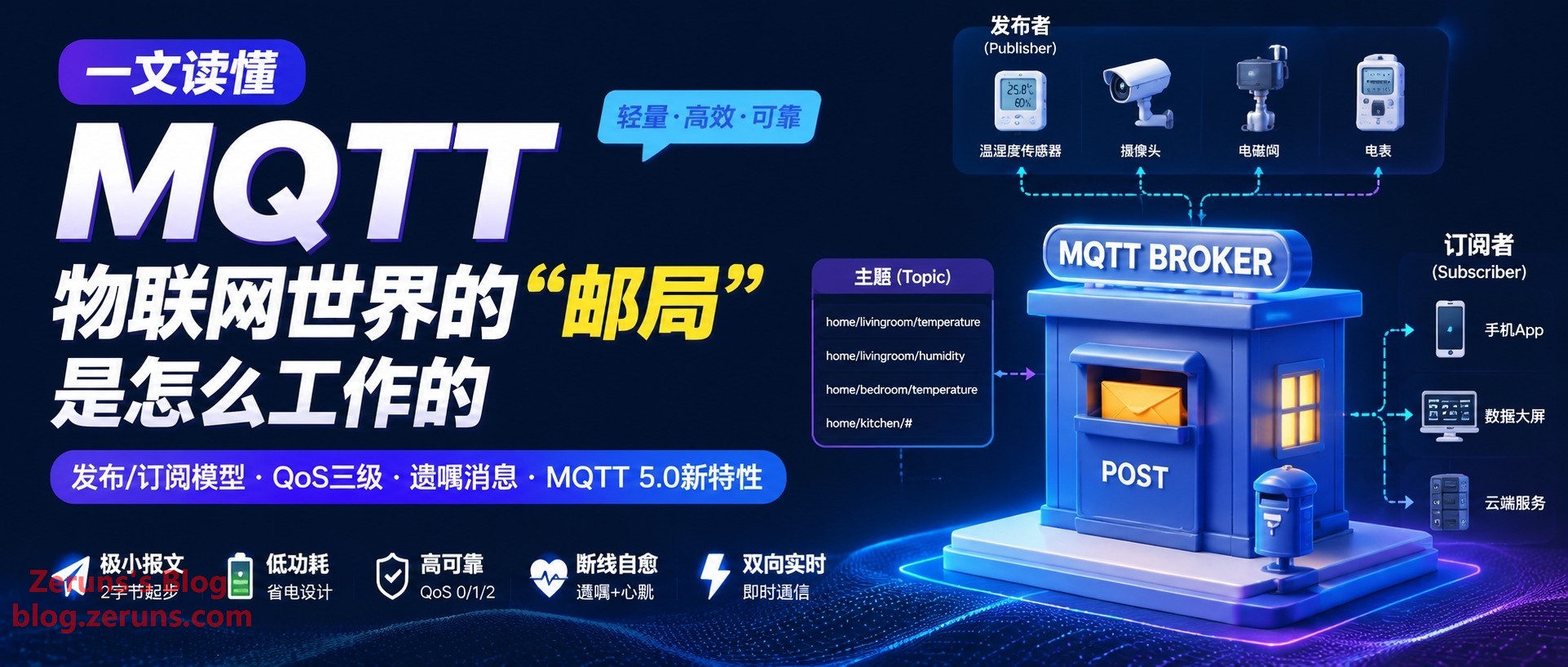
If you’ve worked on an IoT project, you’ve probably come across one term: MQTT. From smart light bulbs at home to soil sensors in the field, from machine tools on production lines to shared bikes by the roadside, billions of devices are communicating with one another using this protocol, which was born in 1999. What makes it the de facto standard for IoT? Where does it really outperform HTTP? In this article, we’ll go from the publish/subscribe model to the three QoS levels, Last Will messages, and the new features of MQTT 5.0, with protocol comparisons and a Python code sample you can run directly, helping you get MQTT sorted out in one go.
1. Start with a Smart Greenhouse: Why IoT Can’t Rely on HTTP Alone
Imagine a typical smart agricultural greenhouse: hundreds of temperature, humidity, light, and soil-moisture sensors are scattered across the field, powered by batteries and solar panels, sending data to the cloud over an intermittent 4G network. The cloud then uses that real-time data to remotely control roller shutters, fans, and irrigation valves.
During solution reviews, the development team’s first reaction is often: “Just use HTTP and POST the data.” That’s not a bad idea in principle, but in real-world scenarios with weak networks, hundreds or thousands of devices, and a need for 24/7 online operation, HTTP’s shortcomings are fully exposed:
- The cloud can’t push proactively. HTTP follows a request/response model. If the cloud wants to send a command such as “turn on the fan to cool down,” it has to wait until the device polls next. If the polling interval is long, command latency is painfully high; if it’s short, thousands of devices polling at once will flood the server and network with useless requests.
- Header overhead is too large. A single HTTP request can have headers of several hundred bytes, while the actual data the device needs to send may be only a dozen bytes or so—such as a temperature value like “26.5”. It’s like using a huge courier box to mail a note.
- Power consumption is unsustainable. Every communication requires a full TCP + TLS handshake. For battery-powered sensors, every extra second the RF module is active is money burned.
This isn’t just a problem in agriculture; it’s a shared challenge across the entire IoT industry: massive numbers of devices, weak networks, low-power constraints, and two-way real-time communication. HTTP was designed for people browsing web pages, not for machines chatting with each other. MQTT, on the other hand, was built exactly for this.
2. What MQTT Is: A Protocol Born to “Save Money”
MQTT was originally an abbreviation for Message Queuing Telemetry Transport. Today, however, it is no longer officially treated as an abbreviation—the protocol does not actually have a traditional message queue, and the name is mostly a historical leftover.
Its origins say a lot. In 1999, Andy Stanford-Clark of IBM and Arlen Nipper of Arcom designed this protocol for a very specific scenario: monitoring oil pipelines across the wilderness over satellite links. Satellite communication was billed by data volume, bandwidth was extremely narrow, latency was high, and the monitoring devices along the route were battery-powered. So the design goals were very simple: messages had to be small, the protocol had to save power, and it had to withstand network interruptions.
These three simple goals shaped MQTT’s DNA, which continues to this day:
- Extremely small packets: The fixed header can be as small as 2 bytes, compared with HTTP’s text headers, which often run to hundreds of bytes.
- Lightweight: It runs over TCP (default port 1883, or 8883 with TLS encryption), and a microcontroller with only tens of KB of memory can run an MQTT client.
- Designed for unstable networks: It includes a full set of “stay safe when disconnected” mechanisms, such as heartbeats, Last Will messages, and tiered QoS.
Around 2013, IBM submitted MQTT to the OASIS standards organization. In 2014, MQTT 3.1.1 became an official OASIS standard and was later adopted as an ISO international standard (ISO/IEC 20922). The current mainstream versions are MQTT 3.1.1 and MQTT 5.0 (released in 2019). Version 5.0 is now the recommended version, and we’ll discuss it in detail later.
eeClub - Electronic Engineers Community: https://bbs.eeclub.top/
Electronics/Microcontroller Technical Discussion QQ Group: 2169025065
3. Core Architecture: Not “Making a Phone Call,” but “Subscribing to a Newspaper”
To understand MQTT, the most important thing is to understand its communication model: the publish/subscribe model.
HTTP’s request/response model is like making a phone call: you dial the other party’s number and talk directly. Both sides must be online at the same time and know each other’s “number.”
The publish/subscribe model, by contrast, is like subscribing to a newspaper: the newspaper office (the publisher) prints the newspaper and sends it to the post office (the Broker). You (the subscriber) register in advance with the post office: “I subscribe to the technology section.” Each day when the newspaper arrives, the post office delivers it according to the registration list. The publisher doesn’t know who the readers are, and the readers don’t need to know the publisher’s phone number—the two sides are completely decoupled, and the post office is the only hub.
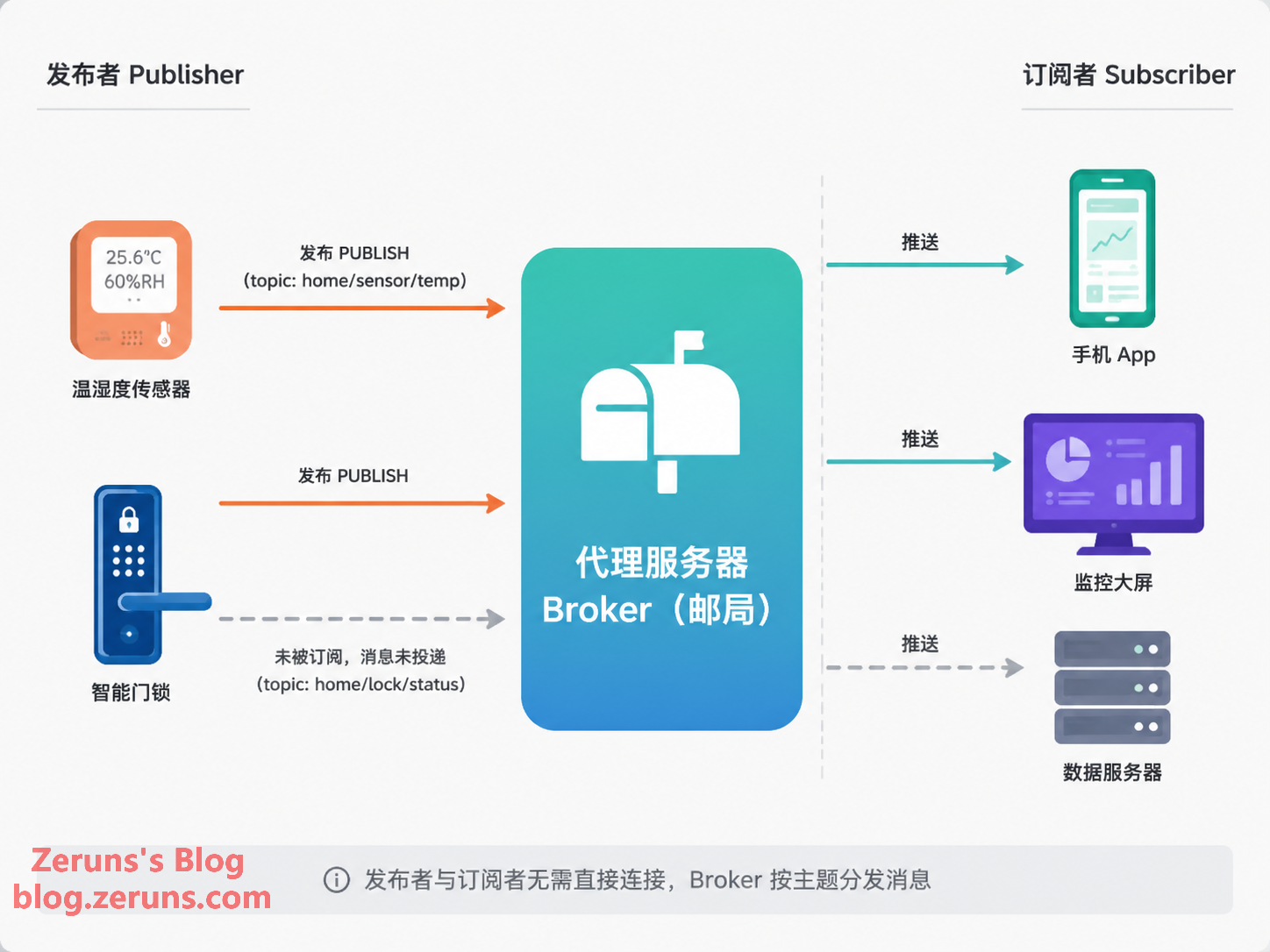
This model has three core roles:
- Publisher: A device or program that produces messages, such as a sensor reporting temperature.
- Broker: The system’s “post office.” It receives messages, distributes them to all subscribers by topic, and also handles connections, sessions, retained messages, and other housekeeping. It is the only component that needs to be publicly reachable.
- Subscriber: A device or program interested in certain messages, such as a mobile app or a data dashboard.
It’s worth noting that publishers and subscribers are logical roles. The same device can play both roles: a camera can publish alerts to the cloud while also subscribing to control commands sent by the cloud. Also, because devices only need to actively connect outward to the Broker, they do not need their own public IP addresses or any open inbound ports. This naturally avoids many NAT and firewall headaches. This is also an important reason MQTT is more popular than approaches where “devices open ports and wait for connections.”
Topic: The “Mailbox Number” at the Post Office
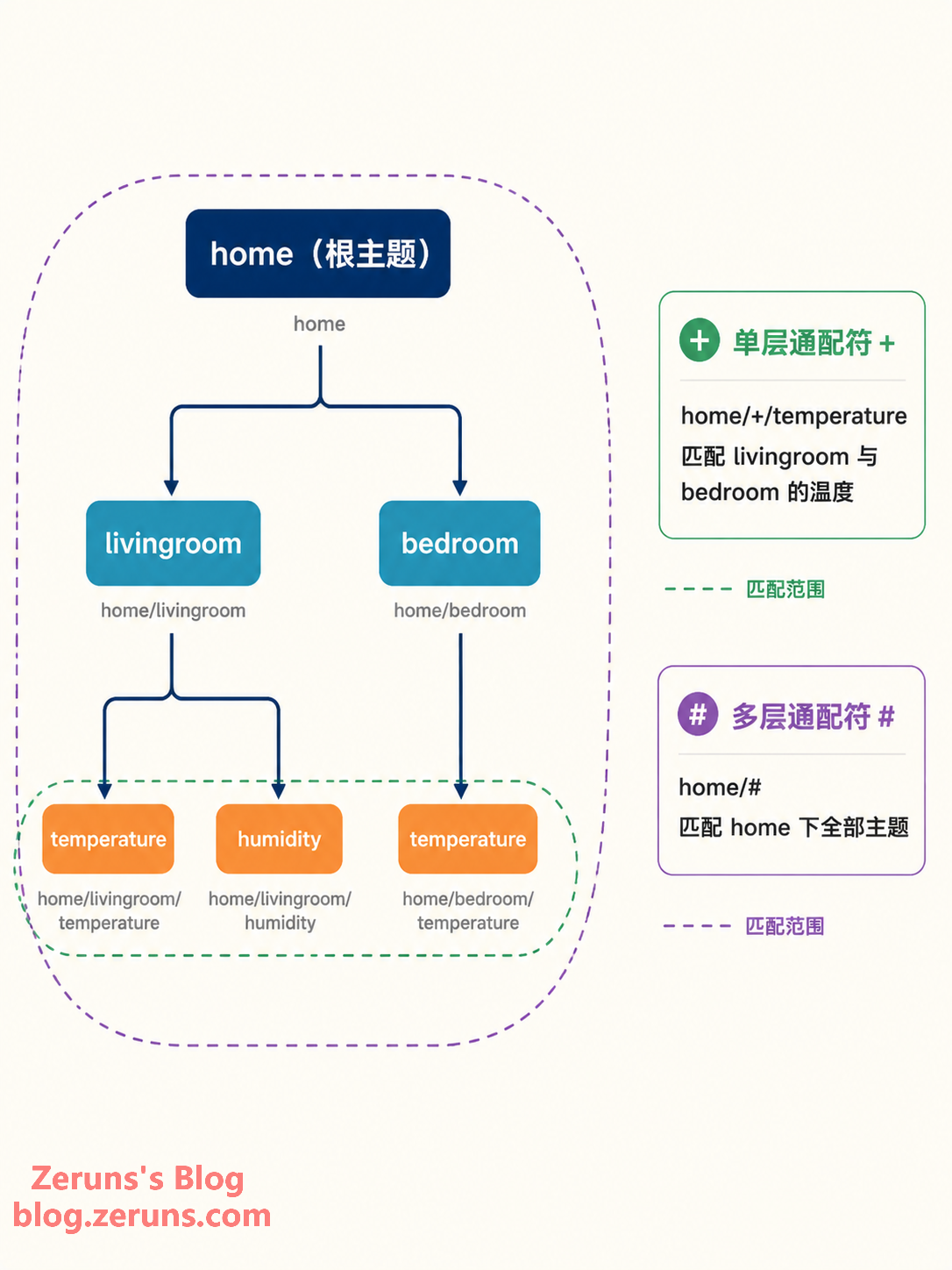
How are messages distributed? By Topic. A topic is a UTF-8 string organized into levels with /, looking like a file path:
home/livingroom/temperature
home/livingroom/humidity
home/bedroom/temperature
When subscribing, you can use two types of wildcards:
+single-level wildcard: Matches exactly one level. For example,home/+/temperaturereceives temperatures from both the living room and bedroom.#multi-level wildcard: Matches any number of levels after it, and can only appear at the end. For example,home/#receives all messages underhome.
4. Key Features Explained One by One
MQTT can stand firm in weak-network environments thanks to a set of carefully designed mechanisms. The following features are among the most common interview and real-world topics.
1. QoS: Three “Courier Services” for Message Delivery
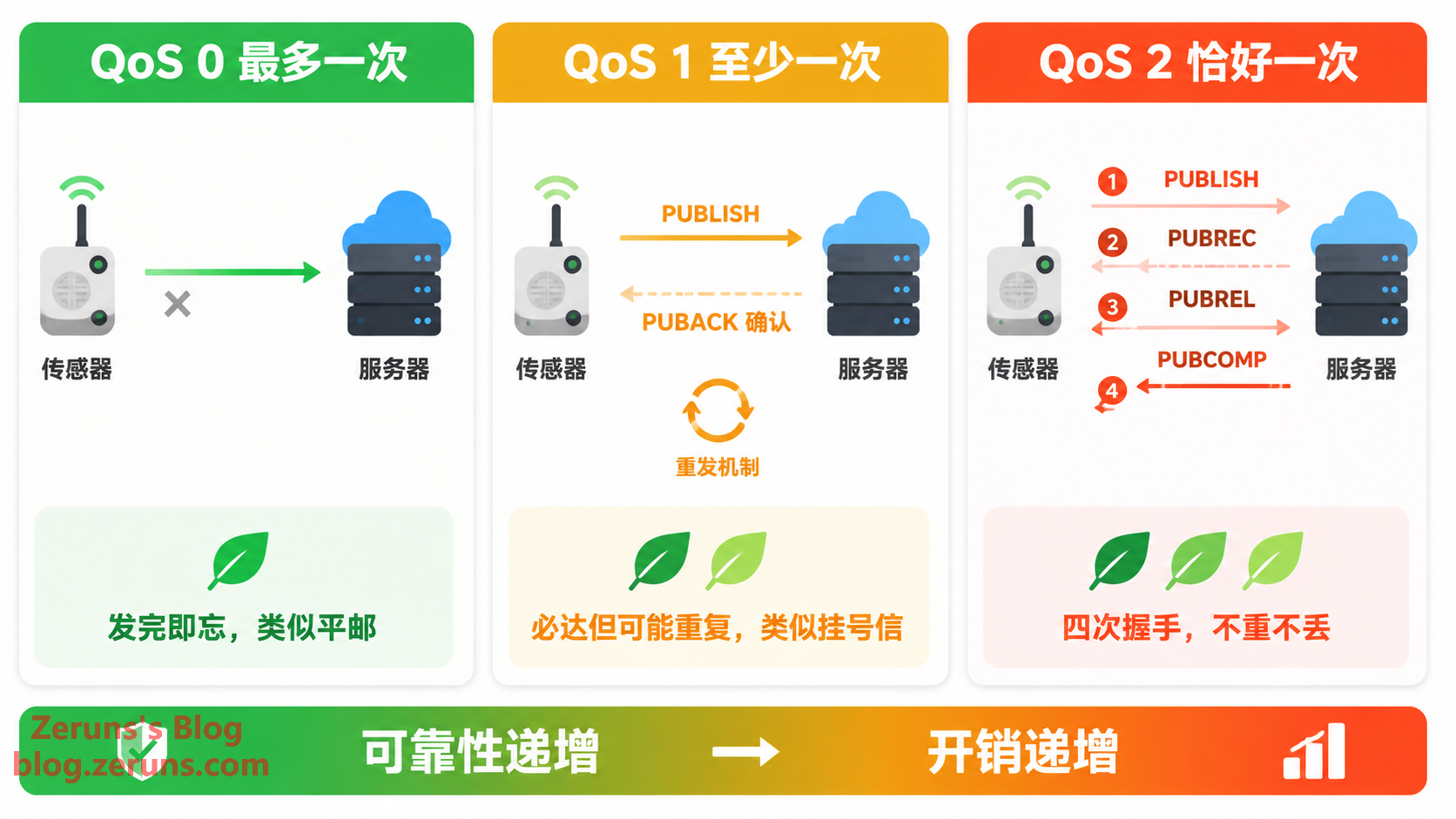
MQTT divides message delivery quality (Quality of Service) into three levels, which can be understood as three courier services:
- QoS 0 — At most once: Like regular mail: once it’s sent, that’s it. There is no acknowledgment and no retransmission. It may be lost, but it will never be duplicated. Suitable for high-frequency data where loss doesn’t matter, such as real-time values reported once per second—if this frame is lost, there will be a new one next second.
- QoS 1 — At least once: Like registered mail. The receiver must reply with a PUBACK acknowledgment; if the sender doesn’t receive it, it resends. Delivery is guaranteed, but duplicates are possible—if the acknowledgment packet is lost in transit, the sender will mail another copy. Suitable for alerts, state changes, and other messages where “duplicates are better than loss.” The receiver needs to handle idempotency.
- QoS 2 — Exactly once: Like a dedicated courier requiring signatures from both sides. It uses a four-step handshake—PUBREC, PUBREL, and PUBCOMP—to guarantee no duplicates and no loss, at the cost of the highest overhead and slowest speed. Suitable for scenarios such as billing, where “overcharging by even one dollar is an incident.”
The rule is simple: the higher the QoS, the stronger the reliability, but also the greater the overhead and latency. In engineering practice, defaulting to QoS 1 is often the most cost-effective compromise.
There’s another easy-to-miss detail: QoS is declared separately by the publisher and subscriber, and when the Broker actually delivers the message, it takes the lower of the two values. If the publisher uses QoS 2 but the subscriber only subscribes at QoS 0, the message is ultimately delivered at QoS 0. So when troubleshooting issues like “why did my high-QoS message get lost?”, remember to check both ends.
2. Retained Messages: The Note Stuck on the Mailbox
Ordinary messages are “burned after reading”: if the subscriber is offline, the message disappears after being sent. But if the Retain flag is set when publishing, the Broker saves the last retained message for that topic. Later, any new subscriber to that topic immediately receives it.
A typical use case: after a device comes online, it publishes its status—such as “online” or its current switch state—using Retain. This way, no matter when the app is opened, it can immediately see the device’s latest status instead of waiting for the next report. Note that only one retained message is stored per topic, and a new one overwrites the old one. To clear the retained message for a topic, publish a retained message with an empty payload to that topic.
3. Last Will Messages: The Device’s “Last Words”
Last Will and Testament is one of MQTT’s most human touches. When a client connects to the Broker, it can register in advance: “If I die mysteriously—disconnect abnormally—please send this message for me.”
For example, when a camera connects, it registers a Last Will message: camera/01/status = "offline" (Retained). Once the device loses power or network connectivity and the connection drops abnormally, the Broker publishes the Last Will message on its behalf, and all subscribers immediately know that “this device is down.” Combined with Retain, users who open the app later can also see the offline status.
4. Keep Alive: Heartbeats to Confirm Both Sides Are Still Alive
TCP is slow to detect that the other end is “dead but still connected,” so MQTT adds heartbeats at the application layer. When the client connects, it agrees on a Keep Alive interval with the Broker, such as 60 seconds. When idle, it sends a tiny PINGREQ packet, and the Broker replies with PINGRESP. If the Broker receives no message from the client within 1.5 times the Keep Alive interval, it declares the client dead, disconnects it, and triggers the Last Will message.
5. Clean Session: After Reconnect, Do You Still Remember Me?
The client uses the Clean Session flag to tell the Broker whether to keep the session. When set to 0 (persistent session), the Broker remembers the client’s subscriptions, as well as missed QoS 1/2 messages while it was offline, and resends them after it reconnects. When set to 1, everything starts from scratch after reconnecting.
MQTT 5.0 splits this mechanism into Clean Start (whether to start fresh) and Session Expiry Interval (session expiration time), making the semantics more precise—for example, keeping a session for 24 hours rather than simply choosing between “forever” and “not at all.”
6. Packet Structure: Extreme Compression Starting at 2 Bytes
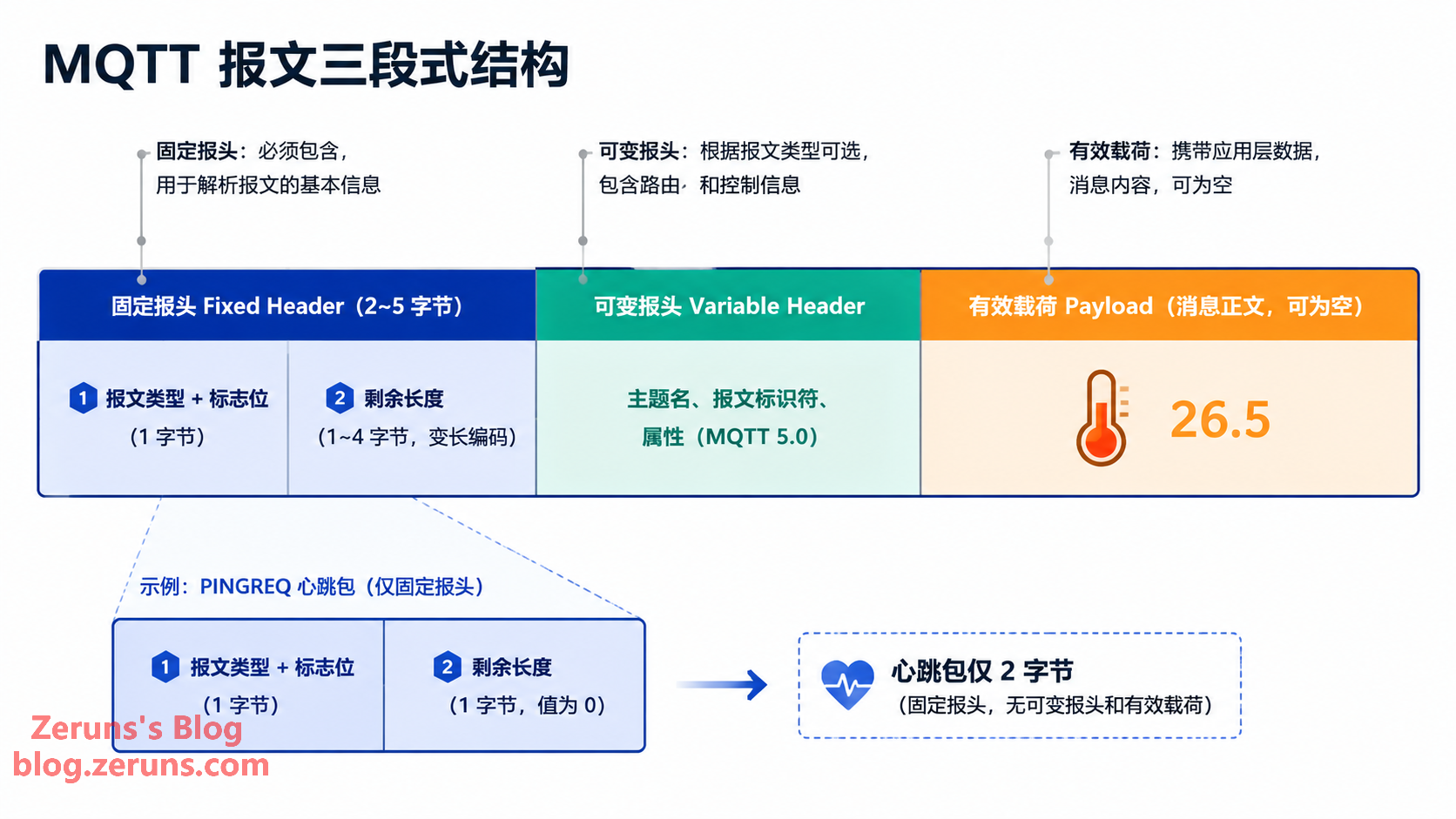
An MQTT packet consists of three parts: fixed header + variable header + payload. The high 4 bits of the first byte of the fixed header indicate the packet type (CONNECT, PUBLISH, SUBSCRIBE, PINGREQ, etc.—14 types in total), and the low 4 bits are flags. This is followed by the variable-length “Remaining Length” field, which can be as small as 1 byte. In other words, a heartbeat packet is only 2 bytes in total—this is the foundation of MQTT’s “lightness.”
5. MQTT 5.0: A Sincere and Substantial Upgrade
Released in 2019, MQTT 5.0 preserves MQTT’s lightweight nature while addressing many engineering shortcomings:
- Reason Code: Almost all response packets now carry standardized reason codes. A rejected connection or failed subscription is no longer a vague “failure”; it clearly tells you why.
- Properties: Packets can carry flexible metadata key-value pairs, and many new capabilities are built on this mechanism.
- Shared Subscriptions: Multiple subscribers form a consumer group, such as
$share/group1/topic, and each message is delivered to only one member of the group, naturally achieving load balancing—something that required a lot of workarounds in the 3.1.1 era. - Message Expiry: A validity period can be set for messages at publish time. Expired offline messages are no longer resent, preventing devices from being bombarded with outdated commands when they come back online.
- Other Improvements: Topic aliases (using short numbers instead of long topic names to save bandwidth), Receive Maximum flow control, server-initiated disconnect notifications, and support for request/response patterns based on Response Topic.
In one sentence: 3.1.1 is enough, 5.0 is better, and new projects should go straight to 5.0.
6. Side-by-Side Comparison: MQTT vs HTTP vs CoAP vs WebSocket
It’s not enough to say MQTT is good; comparing it with other protocols makes its positioning much clearer:
| Dimension | MQTT | HTTP | CoAP | WebSocket |
|---|---|---|---|---|
| Communication model | Publish/subscribe | Request/response | Request/response (REST-like) | Full-duplex data stream |
| Transport layer | TCP | TCP | UDP | TCP |
| Minimum packet overhead | 2 bytes | Headers of hundreds of bytes | 4 bytes | Frame header starts at 2 bytes |
| Cloud-initiated push | Native support | Not supported (requires polling modifications) | Requires Observe | Supported |
| Message reliability mechanism | Built-in three-level QoS | Depends on TCP | Optional acknowledgment/retransmission | None; must be implemented separately |
| Low-power suitability | Excellent | Poor | Excellent (UDP saves more power) | Average |
| Typical use cases | Device-to-cloud, telemetry, remote control | Web pages, public APIs, file transfer | Extremely constrained sensor networks | Real-time web interaction, chat rooms |
In one sentence: HTTP is for people, WebSocket is for browsers, CoAP is for extremely constrained devices, and MQTT is for scenarios involving “massive devices + weak networks + two-way real-time communication.”
7. Typical Application Scenarios: You May Be Using Them Every Day
- Smart home: MQTT’s largest base. In the open-source platform Home Assistant, many devices connect through MQTT; the lights, sockets, and temperature/humidity sensors in your home may very well be maintaining a long connection with a Broker right now.
- Industrial IoT (IIoT): PLCs, machine tools, and instruments on production lines report data to plant-level Brokers, while MES systems and monitoring dashboards subscribe as needed. Cloud platforms such as Alibaba Cloud IoT and AWS IoT Core use MQTT as the main protocol at the device access layer.
- Connected vehicles: Fleet management platforms use MQTT to send commands to and collect vehicle status from tens of thousands of vehicles. Tiered QoS fits differentiated requirements such as “location reports can be lost, remote locking must arrive.”
- Environmental and agricultural monitoring: Soil sensors in the fields and water-quality monitoring stations by reservoirs run on batteries and solar power, where MQTT’s low power consumption and disconnected-message buffering capabilities are essential.

8. Getting Started: Run Your First MQTT Message in Ten Minutes
Paper knowledge only gets you so far, and the barrier to hands-on practice is actually very low.
Choose a Broker
- EMQX: A domestic open-source broker with powerful performance and Chinese-friendly documentation. It also offers the public online test Broker
broker.emqx.io, making it a top choice for practice. - Mosquitto: An Eclipse Foundation project written in C. It’s extremely lightweight, can run even on a Raspberry Pi, and is suitable for local debugging.
- HiveMQ: A Java-based enterprise solution with comprehensive commercial support.
Choose a Client Tool
- MQTTX: A cross-platform desktop client from EMQ (also available as CLI and web versions), with an intuitive interface and essential for protocol tuning.
- mqtt-cli / mosquitto_pub, mosquitto_sub: Handy tools for command-line users.
A Python Example You Can Run
Install the dependency: pip install paho-mqtt
Subscriber (subscriber.py):
import paho.mqtt.client as mqtt

def on_connect(client, userdata, flags, reason_code, properties):
    print("Connected:", reason_code)
    client.subscribe("home/livingroom/temperature", qos=1)

def on_message(client, userdata, msg):
    print(f"Received [{msg.topic}] {msg.payload.decode()}")

client = mqtt.Client(mqtt.CallbackAPIVersion.VERSION2)
client.on_connect = on_connect
client.on_message = on_message
client.connect("broker.emqx.io", 1883, 60)
client.loop_forever()
Publisher (publisher.py):
import paho.mqtt.client as mqtt

client = mqtt.Client(mqtt.CallbackAPIVersion.VERSION2)
client.connect("broker.emqx.io", 1883, 60)
client.publish("home/livingroom/temperature", "26.5", qos=1)
client.disconnect()
print("Sent")
Run the subscriber first, then the publisher, and you’ll see that “26.5” in the subscriber’s terminal. That is the smallest possible “heartbeat” in the IoT world.
One final reminder: public test Brokers are shared by everyone, so never send any sensitive data to them. For production projects, build or buy your own Broker service, and be sure to enable TLS encryption and account authentication.
9. Summary
MQTT’s success doesn’t come from being especially advanced. It comes from being extremely restrained: small packets, low power consumption, and resilience under weak-network conditions, all forced into existence by harsh environments like “oil pipelines + satellite links,” happen to hit the core needs of massive numbers of IoT devices. Its decoupled publish/subscribe model, flexible reliability through three QoS levels, and practical designs like Last Will and retained messages—built around the reality that devices will disconnect—have made it today’s de facto standard protocol for IoT.
If you’re working on smart hardware or backend development, my advice is: first use a public broker and MQTTX to run through publish/subscribe, then carefully read about QoS and session mechanisms. Once you’ve really mastered those two areas, you’ll have grasped about 80% of MQTT.
Thirty years ago, that oil pipeline stretching across the wilderness probably never imagined that the small protocol designed for it would today be running on billions of devices. The vitality of technology often lies in this kind of “just right” design.
Further Learning Resources
- Official MQTT Specification (OASIS): https://docs.oasis-open.org/mqtt/mqtt/v5.0/mqtt-v5.0.html
- MQTT Official Website and Beginner Tutorials: https://mqtt.org/
- HiveMQ MQTT Essentials Tutorial Series (English, comprehensive and well-structured): https://www.hivemq.com/mqtt/
- Electronics/Embedded Systems Forum: https://bbs.eeclub.top/

Recommended Reading
- Recommendations for High-Value, Low-Cost VPS/Cloud Servers: https://blog.zeruns.com/archives/383.html
- Recommendations and Introductions to Major AI Model API Platforms: https://blog.zeruns.com/archives/947.html
- Tutorial for Setting Up a Minecraft Server: https://blog.zeruns.com/tag/mc/
- Complete Guide to Deploying Hermes Agent, with Step-by-Step Instructions for Building Your First AI Assistant: https://blog.zeruns.com/archives/939.html
- Unboxing, Review, and Teardown of the Ugreen DXP4800Pro NAS: https://blog.zeruns.com/archives/949.html
- Beginner’s Guide to Operational Amplifiers (Op-Amps): From Principles to Practice: https://blog.zeruns.com/archives/938.html
English Version of the Article: https://blog.zeruns.top/archives/96.html