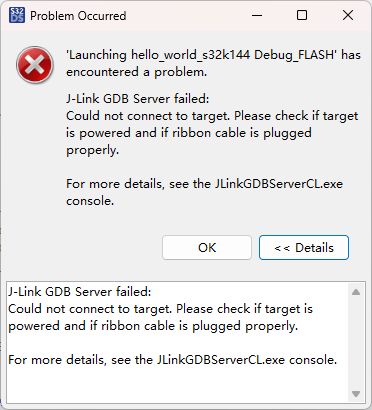
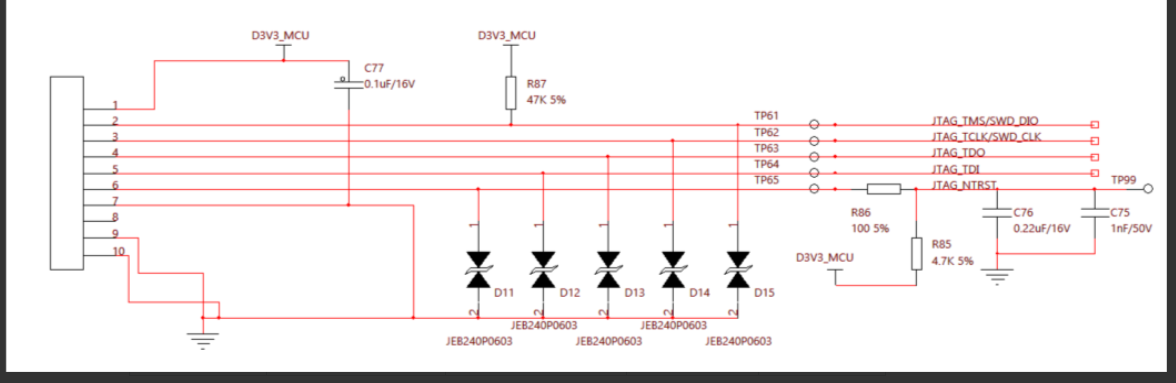
新的板子来了,但是这次无法烧录了,下面是日志
SEGGER J-Link GDB Server V9.72 Command Line Version
JLinkARM.dll V9.72 (DLL compiled Aug 26 2026 14:38:37)
WARNING: Unknown command line parameter -RestoreRAMOnDownload found.
WARNING: Unknown command line parameter 0 found.
Command line: -if swd -device S32K144 -endian little -speed 500 -port 2331 -swoport 2332 -telnetport 2333 -vd -ir -localhostonly 1 -singlerun -timeout 0 -nogui -RestoreRAMOnDownload 0
-----GDB Server start settings-----
GDBInit file: none
GDB Server Listening port: 2331
SWO raw output listening port: 2332
Terminal I/O port: 2333
Accept remote connection: localhost only
Generate logfile: off
Verify download: on
Init regs on start: on
Silent mode: off
Single run mode: on
Target connection timeout: 0 ms
------J-Link related settings------
J-Link Host interface: USB
J-Link script: none
J-Link settings file: none
------Target related settings------
Target device: S32K144
Target device parameters: none
Target interface: SWD
Target interface speed: 500kHz
Target endian: little
Connecting to J-Link…
J-Link is connected.
Firmware: J-Link LPCXpresso V2 compiled May 2 2023 17:39:56
Hardware: V1.00
S/N: 724304970
Checking target voltage…
Target voltage: 3.30 V
Listening on TCP/IP port 2331
Connecting to target…
ERROR: J-Link script file function InitTarget() returned with error code -1
ERROR: Could not connect to target.
Target connection failed. GDBServer will be closed…Restoring target state and closing J-Link connection…
Shutting down…
Could not connect to target.
Please check power, connection and settings.
Type “connect” to establish a target connection, ‘?’ for help
J-Link>connect
Please specify device / core. : S32K144
Type ‘?’ for selection dialog
Device>
Please specify target interface:
J) JTAG (Default)
S) SWD
T) cJTAG
TIF>S
Specify target interface speed [kHz]. : 4000 kHz
Speed>
Device “S32K144” selected.
Connecting to target via SWD
ConfigTargetSettings() start
ConfigTargetSettings() end - Took 15us
InitTarget() start
SWD selected. Executing JTAG → SWD switching sequence.
Connect Under Reset
SWD selected. Executing JTAG → SWD switching sequence.
Communication error while accessing MDM-AP.
Connect Under Reset
InitTarget() end - Took 409ms
Connect failed. Resetting via Reset pin and trying again.
ConfigTargetSettings() start
ConfigTargetSettings() end - Took 13us
InitTarget() start
SWD selected. Executing JTAG → SWD switching sequence.
Connect Under Reset
SWD selected. Executing JTAG → SWD switching sequence.
Communication error while accessing MDM-AP.
Connect Under Reset
InitTarget() end - Took 406ms
****** Error: J-Link script file function InitTarget() returned with error code -1
Error occurred: Could not connect to the target device.
For troubleshooting steps visit: https://kb.segger.com/J-Link_Troubleshooting