本文章讲解使用NodeMcu开发板读取DHT11、DHT22、SHTC3这三个温湿度传感器的数据并发送至串口。各传感器我都写了使用第三方库和不用第三方库的例程。
ESP8266开发环境搭建教程:https://blog.zeruns.com/archives/526.html
文中所用到传感器购买地址在文章最下面。
DHT11
DHT11是一款有已校准数字信号输出的温湿度传感器。 其精度湿度±5%RH, 温度±2℃,量程湿度20-90%RH, 温度0~ 50℃。精度不高,但价格低廉。 DHT11使用单总线通信。供电电压3.3~5V。
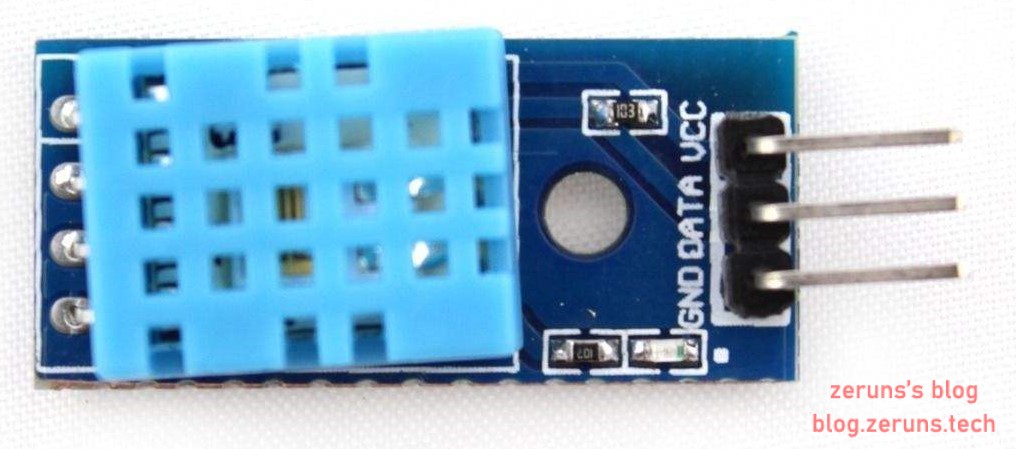
使用DHT库
使用 DHT sensor library库(需自己安装,安装教程在上面的ESP8266开发环境搭建教程中)来直接读取DHT11的数据。
#include <DHT.h>        //调用DHT库

DHT dht(D1,DHT11);      //设置Data引脚所接IO口和传感器类型

void setup(){ //初始化函数,只在程序开始时运行一次
  Serial.begin(115200);   //设置串口波特率
  dht.begin();
}
//https://blog.zeruns.com
void loop() {
  delay(1000);                  //延时1000毫秒
  float RH = dht.readHumidity();   //读取湿度数据
  float T = dht.readTemperature();//读取温度数据
  Serial.print("Humidity:");  //向串口打印 Humidity:
  Serial.print(RH);           //向串口打印湿度数据
  Serial.print("%");
  Serial.print("  Temperature:");
  Serial.print(T);            //向串口打印温度数据
  Serial.println("C");
  Serial.println("https://blog.zeruns.com");
}
不使用库
通过阅读DHT11的数据手册自己编写程序读取数据。
DHT11数据手册:http://go.zeruns.com/G
#define data D1   //DHT11的Data引脚(2Pin)接到NodeMcu开发板的D1引脚

unsigned char i;  //无符号8位整型变量
float RH,T;       //单精度浮点数(32位长度)
byte RH_H,RH_L,T_H,T_L,sum,check;  //字节变量,二进制数

void setup() {    //初始化函数,只在程序开始时运行一次
  Serial.begin(115200);   //设置串口波特率
}

void loop() {     //循环函数,运行完初始化函数后不断循环运行这个函数
  delay(1000);    //延时1000毫秒
  DHT11();        //获取温湿度数据
  Serial.print("Humidity:");  //向串口打印 Humidity:
  Serial.print(RH);           //向串口打印湿度数据
  Serial.print("%");
  Serial.print("  Temperature:");
  Serial.print(T);            //向串口打印温度数据
  Serial.println("C");
  Serial.println("https://blog.zeruns.com");
}

void DHT11()
{
  RH_H=0,RH_L=0,T_H=0,T_L=0,sum=0,check=0;
  pinMode(data,OUTPUT);   //设置IO口为输出模式
  digitalWrite(data,1);   //设置IO口输出高电平
  delay(10);              //延时10毫秒
  digitalWrite(data,0);   //设置IO口输出低电平
  delay(25);              //延时25毫秒
  digitalWrite(data,1);   //设置IO口输出高电平
  pinMode(data,INPUT);    //设置IO口为输入模式
  delayMicroseconds(30);  //延时30微秒
  if(!digitalRead(data))  //判断IO口输入电平是否低电平
  {//https://blog.zeruns.com
    while(!digitalRead(data));  //一直循环至输入为高电平
    while(digitalRead(data));   //一直循环至输入为低电平
    for(i=0;i<8;i++)            //循环执行8次
    {
      while(!digitalRead(data));//一直循环至输入为高电平
      delayMicroseconds(28);    //延时28微秒
      if(digitalRead(data)){    //判断IO口输入电平是否高电平
        bitWrite(RH_H, 7-i, 1); //在二进制变量RH_H的第7-i位(从右数起)写入1
        while(digitalRead(data));
      }
    }
    for(i=0;i<8;i++)
    {
      while(!digitalRead(data));
      delayMicroseconds(28);
      if(digitalRead(data)){
        bitWrite(RH_L, 7-i, 1);
        while(digitalRead(data));
      }
    }
    for(i=0;i<8;i++)
    {
      while(!digitalRead(data));
      delayMicroseconds(28);
      if(digitalRead(data)){
        bitWrite(T_H, 7-i, 1);
        while(digitalRead(data));
      }
    }
    for(i=0;i<8;i++)
    {
      while(!digitalRead(data));
      delayMicroseconds(28);
      if(digitalRead(data)){
        bitWrite(T_L, 7-i, 1);
        while(digitalRead(data));
      }
    }
    for(i=0;i<8;i++)
    {
      while(!digitalRead(data));
      delayMicroseconds(28);
      if(digitalRead(data)){
        bitWrite(check, 7-i, 1);
        while(digitalRead(data));
      }
    }
   }
  sum=RH_H + RH_L + T_H + T_L;
  byte sum_temp=0;
  //读取sum的末8位写入sum_temp
  for(i=0;i<8;i++){
    bitWrite(sum_temp,i,bitRead(sum,i));
  }//https://blog.zeruns.com
  if(check==sum_temp){  //校验数据
    RH=RH_H+float(RH_L)/10;
    T=T_H+float(T_L)/10;
  }
}
效果图
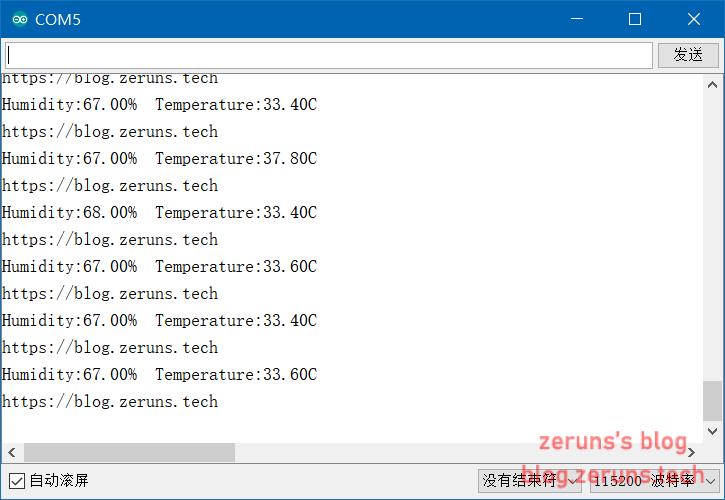
DHT22(AM2302)
DHT22(AM2302)是一款有已校准数字信号输出的温湿度传感器。 其精度湿度±2%RH, 温度±0.5℃,量程湿度0-100%RH, 温度-40~ 80℃,分辨率都为0.1。精度较高,且价格不贵。 DHT22使用单总线通信。供电电压3.3~5V。
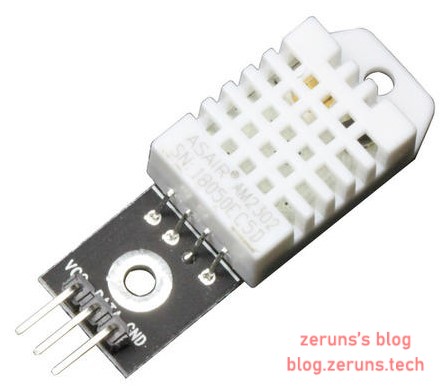
使用DHT库
使用 DHT sensor library库来直接读取DHT22的数据。
#include <DHT.h>        //调用DHT库

DHT dht(D1,DHT22);      //设置Data引脚所接IO口和传感器类型

void setup(){ //初始化函数,只在程序开始时运行一次
  Serial.begin(115200);   //设置串口波特率
  dht.begin();
}
//https://blog.zeruns.com
void loop() {
  delay(1000);                  //延时1000毫秒
  float RH = dht.readHumidity();   //读取湿度数据
  float T = dht.readTemperature();//读取温度数据
  Serial.print("Humidity:");  //向串口打印 Humidity:
  Serial.print(RH);           //向串口打印湿度数据
  Serial.print("%");
  Serial.print("  Temperature:");
  Serial.print(T);            //向串口打印温度数据
  Serial.println("C");
  Serial.println("https://blog.zeruns.com");
}
不使用库
通过阅读DHT22的数据手册自己编写程序读取数据。
DHT22数据手册:http://go.zeruns.com/H
#define data D1   //DHT22的Data引脚(2Pin)接到NodeMcu开发板的D1引脚

unsigned char i;  //无符号8位整型变量
float RH,T;       //单精度浮点数(32位长度)
byte RH_H,RH_L,T_H,T_L,sum,check;  //字节变量,二进制数

void setup() {    //初始化函数,只在程序开始时运行一次
  Serial.begin(115200);   //设置串口波特率
}

void loop() {     //循环函数,运行完初始化函数后不断循环运行这个函数
  delay(1000);    //延时1000毫秒
  DHT11();        //获取温湿度数据
  Serial.print("Humidity:");  //向串口打印 Humidity:
  Serial.print(RH);           //向串口打印湿度数据
  Serial.print("%");
  Serial.print("  Temperature:");
  Serial.print(T);            //向串口打印温度数据
  Serial.println("C");
  Serial.println("https://blog.zeruns.com");
}

void DHT11()
{
  RH_H=0,RH_L=0,T_H=0,T_L=0,sum=0,check=0;
  pinMode(data,OUTPUT);   //设置IO口为输出模式
  digitalWrite(data,1);   //设置IO口输出高电平
  delay(10);              //延时10毫秒
  digitalWrite(data,0);   //设置IO口输出低电平
  delay(25);              //延时25毫秒
  digitalWrite(data,1);   //设置IO口输出高电平
  pinMode(data,INPUT);    //设置IO口为输入模式
  delayMicroseconds(30);  //延时30微秒
  if(!digitalRead(data))  //判断IO口输入电平是否低电平
  {//https://blog.zeruns.com
    while(!digitalRead(data));  //一直循环至输入为高电平
    while(digitalRead(data));   //一直循环至输入为低电平
    for(i=0;i<8;i++)            //循环执行8次
    {
      while(!digitalRead(data));//一直循环至输入为高电平
      delayMicroseconds(28);    //延时28微秒
      if(digitalRead(data)){    //判断IO口输入电平是否高电平
        bitWrite(RH_H, 7-i, 1); //在二进制变量RH_H的第7-i位(从右数起)写入1
        while(digitalRead(data));
      }
    }
    for(i=0;i<8;i++)
    {
      while(!digitalRead(data));
      delayMicroseconds(28);
      if(digitalRead(data)){
        bitWrite(RH_L, 7-i, 1);
        while(digitalRead(data));
      }
    }
    for(i=0;i<8;i++)
    {
      while(!digitalRead(data));
      delayMicroseconds(28);
      if(digitalRead(data)){
        bitWrite(T_H, 7-i, 1);
        while(digitalRead(data));
      }
    }
    for(i=0;i<8;i++)
    {
      while(!digitalRead(data));
      delayMicroseconds(28);
      if(digitalRead(data)){
        bitWrite(T_L, 7-i, 1);
        while(digitalRead(data));
      }
    }
    for(i=0;i<8;i++)
    {
      while(!digitalRead(data));
      delayMicroseconds(28);
      if(digitalRead(data)){
        bitWrite(check, 7-i, 1);
        while(digitalRead(data));
      }
    }
   }
  sum=RH_H + RH_L + T_H + T_L;
  byte sum_temp=0;
  //读取sum的末8位写入sum_temp
  for(i=0;i<8;i++){
    bitWrite(sum_temp,i,bitRead(sum,i));
  }//https://blog.zeruns.com
  if(check==sum_temp){
    if(bitRead(RH_H,7)==1){ //判断温度是否零下
      T=-(float(T_H<<8)+float(T_L))/10;
    }else{
      T=(float(T_H<<8)+float(T_L))/10;
    }
    RH=(float(RH_H<<8)+float(RH_L))/10;
  }
}
效果图
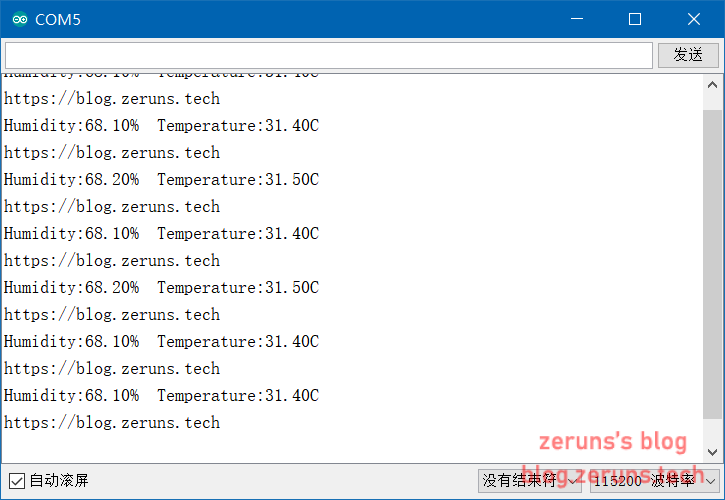
SHTC3
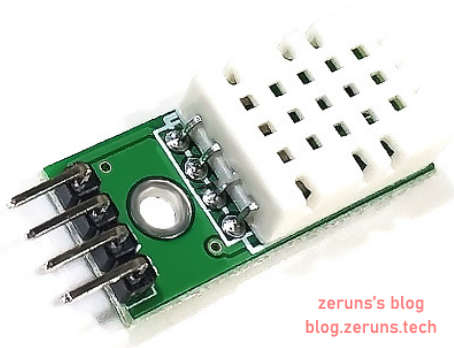
SHTC3是一款有已校准数字信号输出的温湿度传感器。 其精度湿度±2%RH, 温度±0.2℃,量程湿度0-100%RH, 温度-40~ 125℃,分辨率都为0.01。精度高,且价格也较便宜,但资料太少了。 SHTC3使用I2C(IIC)通信。供电电压1.62~3.6V。
SHTC3数据手册:http://go.zeruns.com/I
使用Wire(I2C)库
使用Wire库来与SHTC3通信读取数据。
/* https://blog.zeruns.com
 * 连接方式
 * SHTC3    开发板
 * SCL      SCL(NodeMcu开发板是D1)
 * SDA      SDA(NodeMcu开发板是D2)
 */
#include <Wire.h>

#define SHTC3_ADDRESS 0x70  //定义SHTC3的I2C器件地址为0x70
float T,RH;

void setup() {    //初始化函数,只在程序开始时运行一次
  Serial.begin(115200);   //设置串口波特率
  Wire.begin();   //初始化为I2C主机
}

void loop() {     //循环函数,运行完初始化函数后不断循环运行这个函数
  delay(1000);    //延时1000毫秒
  SHTC3();        //获取温湿度数据
  Serial.print("Humidity:");  //向串口打印 Humidity:
  Serial.print(RH);           //向串口打印湿度数据
  Serial.print("%");
  Serial.print("  Temperature:");
  Serial.print(T);            //向串口打印温度数据
  Serial.println("C");
  Serial.println("https://blog.zeruns.com");
}

void SHTC3(){   //获取温湿度数据
  Wire.beginTransmission(SHTC3_ADDRESS); //根据地址0x70,开始向I2C的从机进行传输。
  Wire.write(byte(0xE0));       //发送写入指令
  Wire.endTransmission();       //停止向从机传输
  Wire.beginTransmission(SHTC3_ADDRESS);
  Wire.write(byte(0x35));       //发送唤醒指令的高位部分
  Wire.write(byte(0x17));       //发送唤醒指令的低位部分
  Wire.endTransmission();
  delayMicroseconds(300);       //延时300微秒
  Wire.beginTransmission(SHTC3_ADDRESS);
  Wire.write(byte(0xE0));
  Wire.endTransmission();
  Wire.beginTransmission(SHTC3_ADDRESS);
  Wire.write(byte(0x7C));       //发送采集指令的高位部分
  Wire.write(byte(0xA2));       //发送采集指令的低位部分
  Wire.endTransmission();
  Wire.beginTransmission(SHTC3_ADDRESS);
  Wire.write(byte(0xE1));       //发送读取指令
  Wire.endTransmission();
  Wire.requestFrom(SHTC3_ADDRESS,6);     //向从机请求数据
  uint16_t T_temp,RH_temp,T_CRC,RH_CRC;
  if (2 <= Wire.available()) {
    T_temp = Wire.read();     //接收温度高位数据
    T_temp = T_temp << 8;     //左移8位
    T_temp |= Wire.read();    //左移8位后的温度高位数据与接收到的温度低位数据进行按位或运算
    T_CRC = Wire.read();      //接收CRC校验码
    if(SHTC3_CRC_CHECK(T_temp,T_CRC)){  //校验数据
      T =float(T_temp) * 175 / 65536 - 45;  //计算出温度
    }
  }//https://blog.zeruns.com
  if (2 <= Wire.available()) {
    RH_temp = Wire.read();     //接收湿度高位数据
    RH_temp = RH_temp << 8;     //左移8位
    RH_temp |= Wire.read();    //左移8位后的湿度高位数据与接收到的湿度低位数据进行按位或运算
    RH_CRC = Wire.read();
    if(SHTC3_CRC_CHECK(RH_temp,RH_CRC)){
      RH =float(RH_temp) * 100 / 65536;
    }
  }
}
//https://blog.zeruns.com
uint8_t SHTC3_CRC_CHECK(uint16_t DAT,uint8_t CRC_DAT) //SHTC3的CRC校验
{
    uint8_t i,t,temp;
    uint8_t CRC_BYTE;
    CRC_BYTE = 0xFF;
    temp = (DAT>>8) & 0xFF;
    for(t = 0;t < 2;t ++)
    {
        CRC_BYTE ^= temp;
        for(i = 0;i < 8;i ++)
        {
            if(CRC_BYTE & 0x80)
            {
                CRC_BYTE <<= 1;
                CRC_BYTE ^= 0x31;
            }else{
                CRC_BYTE <<= 1;
            }
        }
        if(t == 0)
        {
            temp = DAT & 0xFF;
        }
    }//https://blog.zeruns.com
    if(CRC_BYTE == CRC_DAT)
    {
        temp = 1;
    }else{
        temp = 0;
    }
    return temp;
}
使用SHTC3库
先安装 SparkFun SHTC3库。
/* https://blog.zeruns.com
 * 连接方式
 * SHTC3    开发板
 * SCL      SCL(NodeMcu开发板是D1)
 * SDA      SDA(NodeMcu开发板是D2)
 */

#include <SparkFun_SHTC3.h>

SHTC3 mySHTC3;

void setup(){ //初始化函数,只在程序开始时运行一次
  Serial.begin(115200);   //设置串口波特率
  while(Serial == false){};   //等待串行连接启动
  Wire.begin();           //初始化Wire(IIC)库
  unsigned char i=0;
  errorDecoder(mySHTC3.begin());// To start the sensor you must call "begin()", the default settings use Wire (default Arduino I2C port)
}
//https://blog.zeruns.com
void loop() {
  float RH,T;
  delay(1000);                  //延时1000毫秒
  SHTC3_Status_TypeDef result = mySHTC3.update();
  if(mySHTC3.lastStatus == SHTC3_Status_Nominal)   //判断SHTC3状态是否正常
  {
    RH = mySHTC3.toPercent();   //读取湿度数据
    T = mySHTC3.toDegC();       //读取温度数据
  }else{
    Serial.print("Update failed, error: ");
    errorDecoder(mySHTC3.lastStatus); //输出错误原因
    Serial.println();
  }
  Serial.print("Humidity:");  //向串口打印 Humidity:
  Serial.print(RH);           //向串口打印湿度数据
  Serial.print("%");
  Serial.print("  Temperature:");
  Serial.print(T);            //向串口打印温度数据
  Serial.println("C");
  Serial.println("https://blog.zeruns.com");
}

void errorDecoder(SHTC3_Status_TypeDef message) // The errorDecoder function prints "SHTC3_Status_TypeDef" resultsin a human-friendly way
{
  switch(message)
  {
    case SHTC3_Status_Nominal : Serial.print("Nominal"); break;
    case SHTC3_Status_Error : Serial.print("Error"); break;
    case SHTC3_Status_CRC_Fail : Serial.print("CRC Fail"); break;
    default : Serial.print("Unknown return code"); break;
  }
}
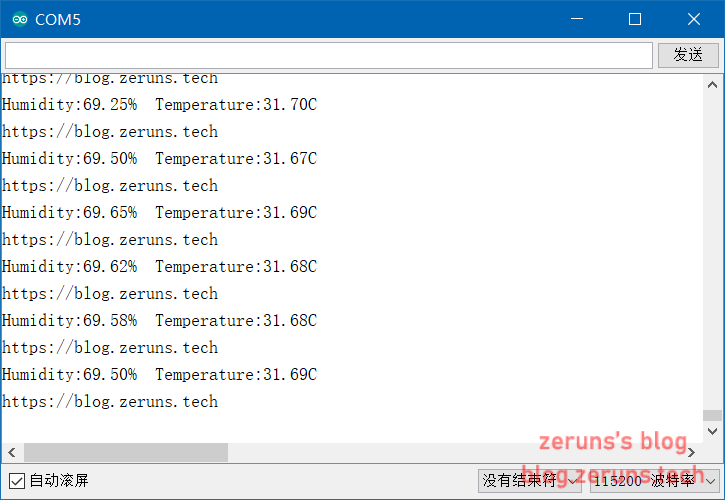
效果图
传感器购买
DHT11: 复制 $Lk3h1Mx8UTO$打开手机淘宝立即下单
DHT22: 复制 $kr2T1MxkUKY$打开手机淘宝立即下单
SHTC3: 复制 $UD4D1Mx6N3R$打开手机淘宝立即下单
推荐阅读:
- 高性价比和便宜的VPS/云服务器推荐:https://blog.zeruns.com/archives/383.html
- 搭建内网穿透服务器,带Web面板:https://blog.zeruns.com/archives/397.html
- 使用Cloudreve自建网盘:https://blog.zeruns.com/archives/515.html
- 怎样搭建个人博客:https://blog.zeruns.com/archives/218.html
- 学生优惠权益大全:https://blog.zeruns.com/archives/321.html
- 分享个能赚钱的小游戏给大家:https://blog.zeruns.com/archives/472.html