基于合宙Air700E的4G环境监测节点(温度、湿度、气压等数据),通过MQTT上传阿里云物联网平台。
介绍
合宙Air700E 4G模块读取传感器(温湿度、气压等)数据并通过MQTT协议上传阿里云物联网平台,数据也会同时显示在0.96寸的OLED屏幕上,使用了U8g2图形库。
ESP32C3 WiFi模块通过MQTT协议订阅4G节点上传的数据并显示在LCD屏上,使用了LVGL图形库。
这是我的一个课程设计,随便做做的,不是很完善。
题目要求:设计并制作无线通信系统,结合上学期所学知识,将本地采集的温、湿度/超声波测量距离通过无线收发的方式,发送到主机/接收端,并在接收端利用 LCD显示相关信息,具体要求如下:
⑴ 蓝牙无线传输系统设计实现
⑵ WiFi 无线传输系统设计及实现
⑶ ZigBee 无线传输系统设计及实现
⑷ GPRS/GSM 无线传输系统设计及实现
(5) 4G 无线传输系统设计及实现
(6) NBIoT/LoRa 无线传输系统设计及实现
提示:可用 8/16/32 处理器作为主控制器,按照本小组选定的综合部分内容来进行选型,至少完成 2 个小项,其中(1)(2)(3)选 1 个完成,(4)(5)(6)选 1 个完成。
Air700E和ESP32C3我都是使用LuatOS系统+Lua脚本的开发方式来开发的。
LuatOS固件是我使用合宙的云编译生成的。
ESP32C3上自带的4MByte的flash被我换成了8MByte的了,固件也是大于4MB的,因为加了LVGL图形库以及几种字体。
阿里云学生优惠地址:https://www.aliyun.com/daily-act/ecs/activity_share?userCode=jdjc69nf
注意: 由于阿里云物联网平台不同设备间不能订阅对方的主题,只能订阅本设备的主题,所以需要在 消息转发→云产品流转 那里添加一条规则,将4G节点设备的发布的消息转发到WiFi节点设备的一个主题。
立创开源平台开源链接:https://oshwhub.com/zeruns/wen-shi-du-cai-ji-4g-shang-chuan
电子/单片机技术交流群:2169025065
合宙Air700E介绍
Air700E 是合宙通信推出的 LTE Cat.1 bis通信模块,采用移芯EC618平台,支持 LTE 3GPP Rel.13 技术。该模块仅保留 LTE TDD 频段,适配中国移动运营主流频段,具有超小封装和极致成本,满足小型化和低成本需求。
主要特性包括:
- 支持单1.8/3.3V USIM接口
- 支持1.8/3.3V可配置串口
- 支持USB 2.0
- 支持远程OTA固件升级
- 支持PSM数字语音接口
- 支持多种开发方式,如USB上网、标准AT开发, open CPU二次开发(LuatOS,C-SDK)等
Air700E 内置丰富的网络协议,集成多个工业标准接口,并支持多种驱动和软件功能(如Windows 7/8/8.1/10,Linux,Android等操作系统下的 USB 驱动等),极大地拓展了其在 M2M 领域的应用范围,如CPE、路由器、数据卡、平板电脑、车载、安防以及工业级 PDA 等。
Air700E的技术规格如下:
LTE-TDD频段: B34/B38/B39/B40/B41
LTE-TDD数据速率:
- 上下行配比2时,最大8Mbps(DL)/最大2Mbps(UL)
- 上下行配比1时,最大6Mbps(DL)/最大4Mbps(UL)
接口:
- 1个USB 2.0高速接口(最高达480Mbps)
- 1个1.8V/3.0V (U)SIM卡接口
- 1个NETLIGHT接口 (NET_STATUS)
- 1路数字I2S接口,支持外置codec
- 3个UART接口(主串口,通用串口,调试串口)
- PWRKEY(低电平有效)
- 2路ADC接口
- 13个通用GPIO + 2路中断输入
- 1路I2C接口
合宙ESP32-C3介绍
CORE ESP32核心板是基于乐鑫ESP32-C3进行设计的一款核心板,尺寸仅有21mm*51mm,板边采用邮票孔设计,方便开发者在不同场景下的使用。核心板支持UART、GPIO、SPI、I2C、ADC、PWM等接口,可根据实际需要选择。
硬件资源:
- 尺寸长宽 21mm*51mm
- 1路SPI FLASH,板载4MB,支持最高 16MB
- 2路UART接口,UART0~UART1,其中下载口为UART0
- 5 路 12 比特 ADC,最高采样率 100KSPS
- 1路低速SPI接口,支持主模式
- 1路IIC控制器
- 4路PWM接口,可使用任意GPIO
- GPIO外部管脚15路,可复用
- 2路贴片LED指示灯
- 1路复位按键+1路BOOT按键
- 1路USB转TTL下载调试口
- 2.4G PCB板载天线
实物图
演示视频: https://www.bilibili.com/video/BV1MH4y1B7Df/
整体图
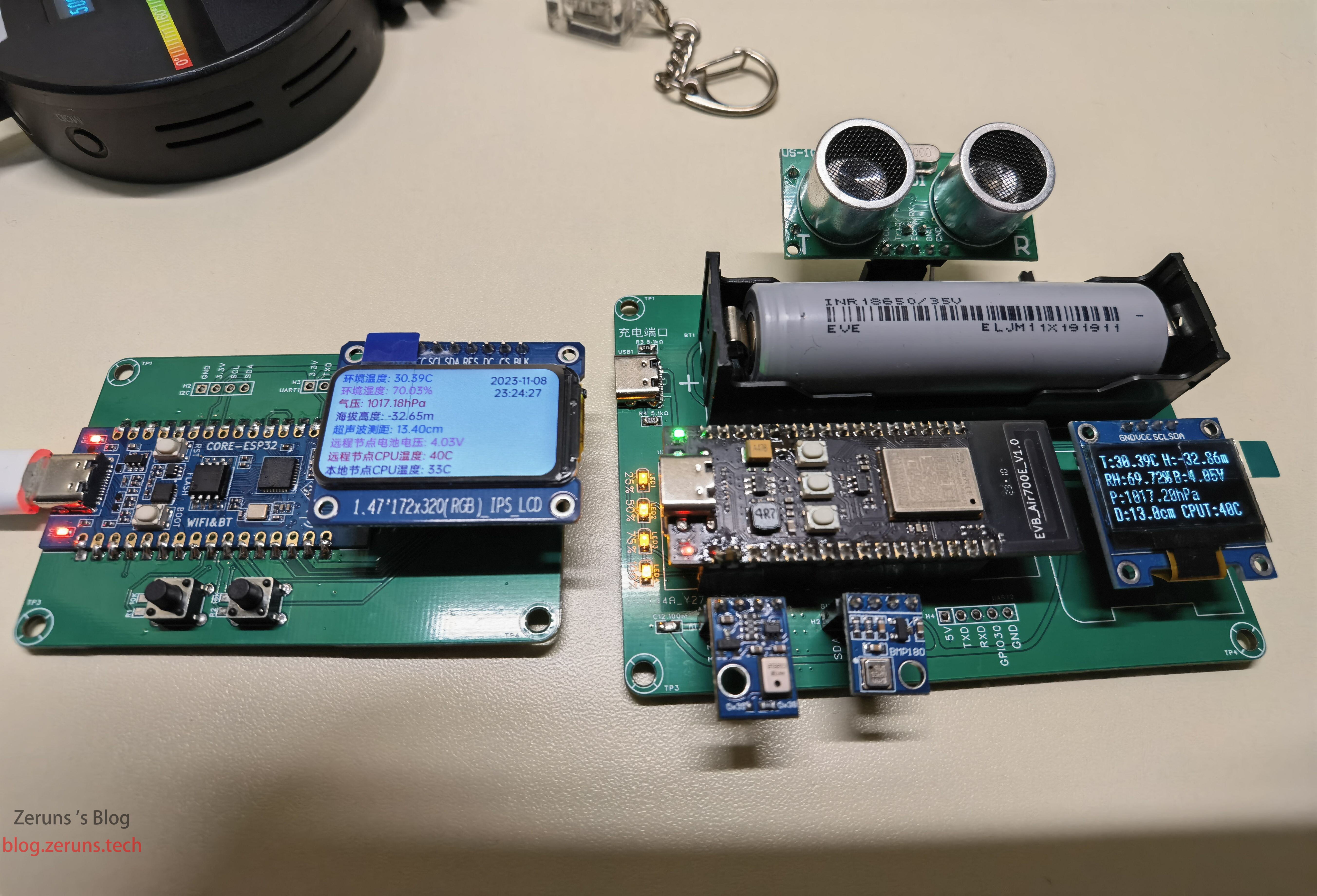
4G节点
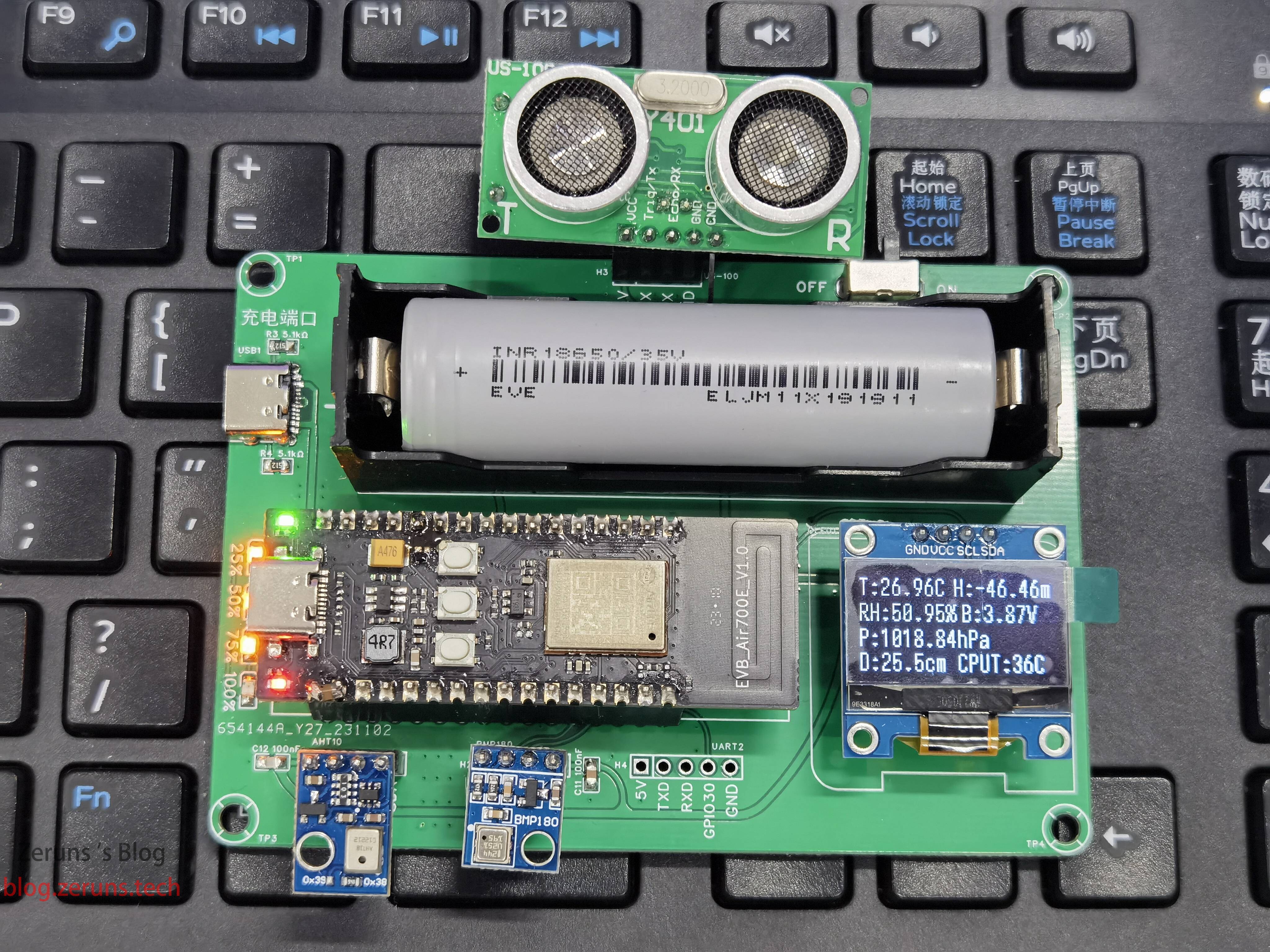
WiFi节点
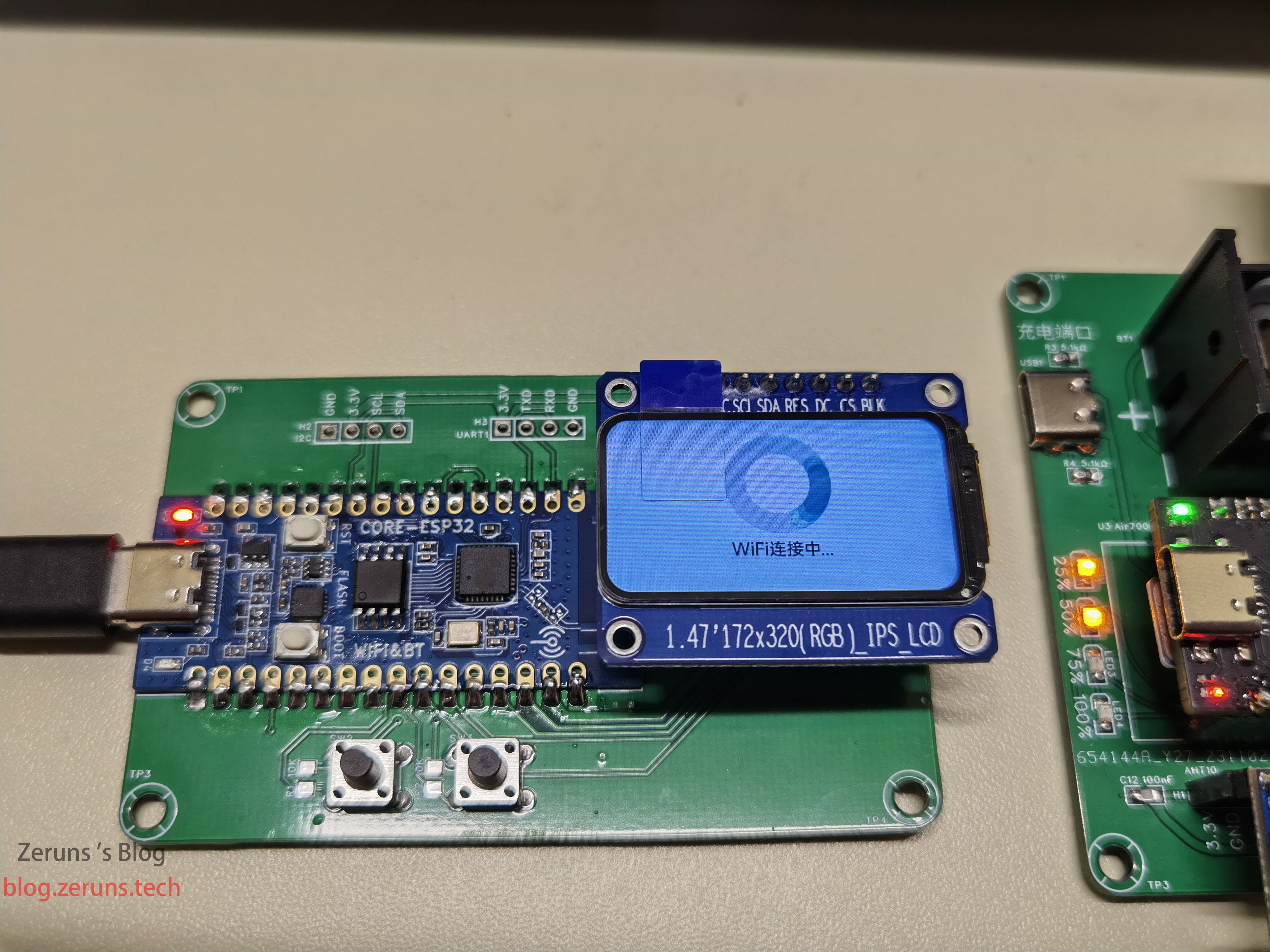
WiFi连接时:
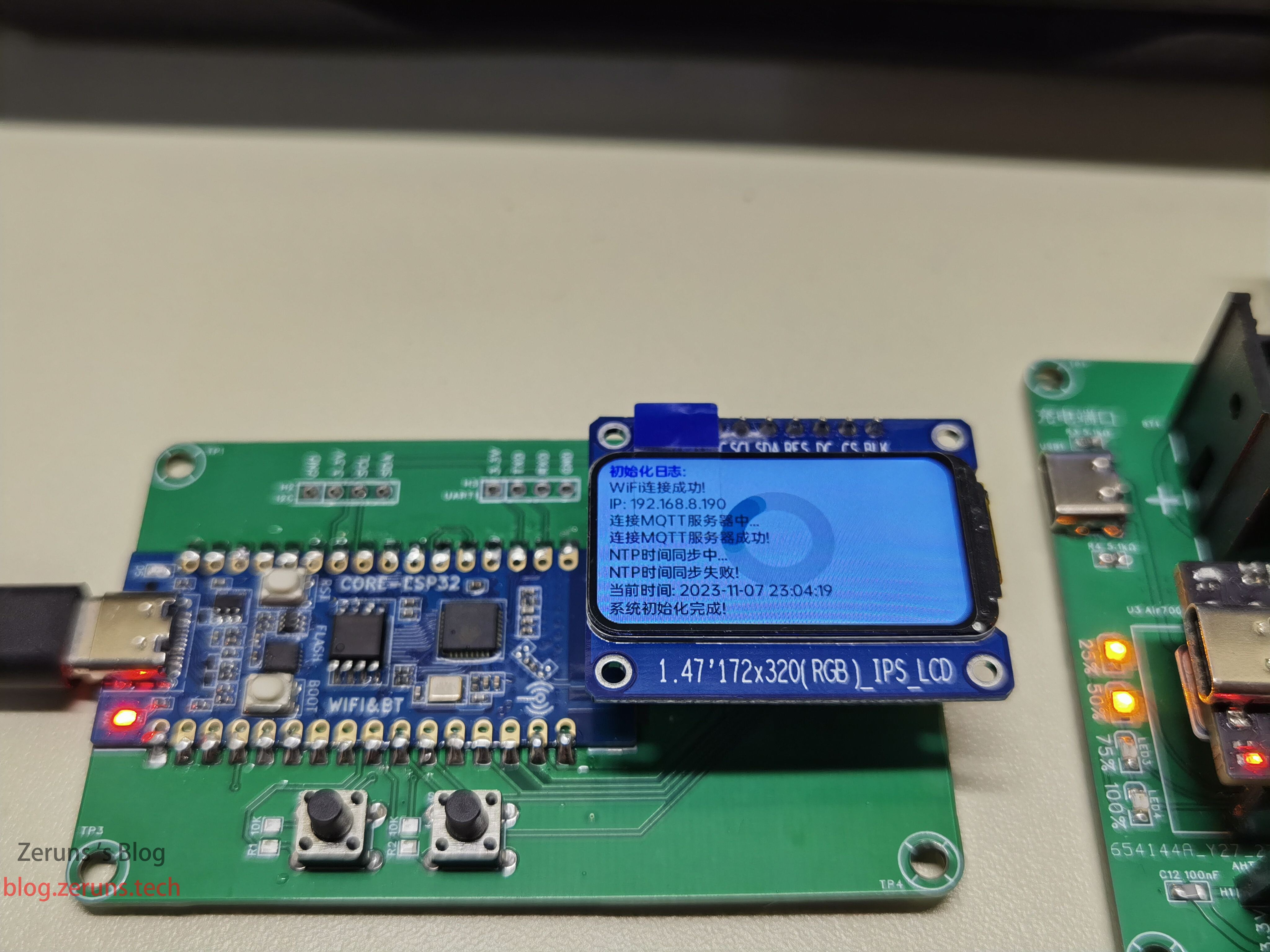
连接上WiFi后开始连接MQTT服务器和NTP时间同步:
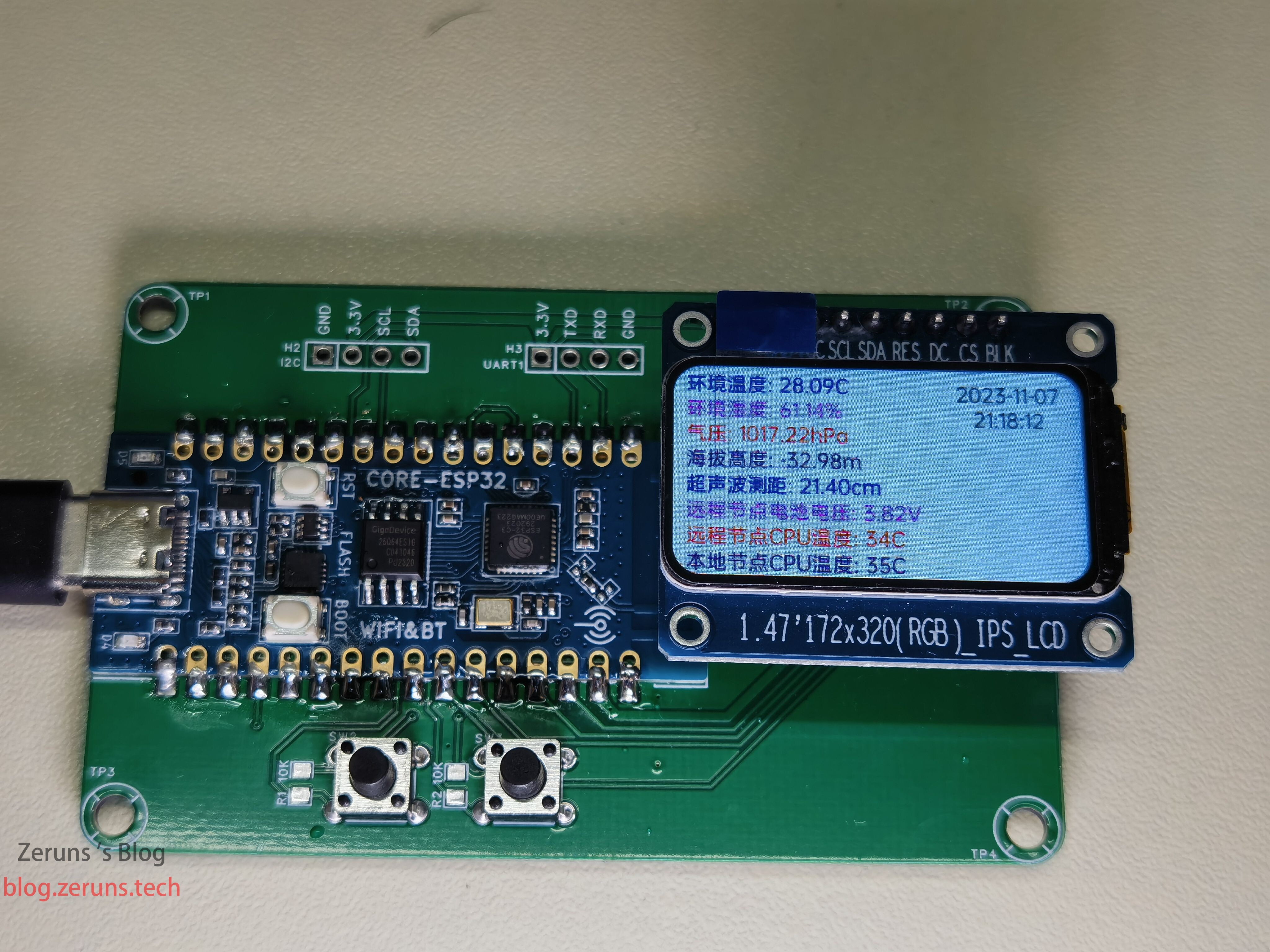
显示4G节点采集到的数据:
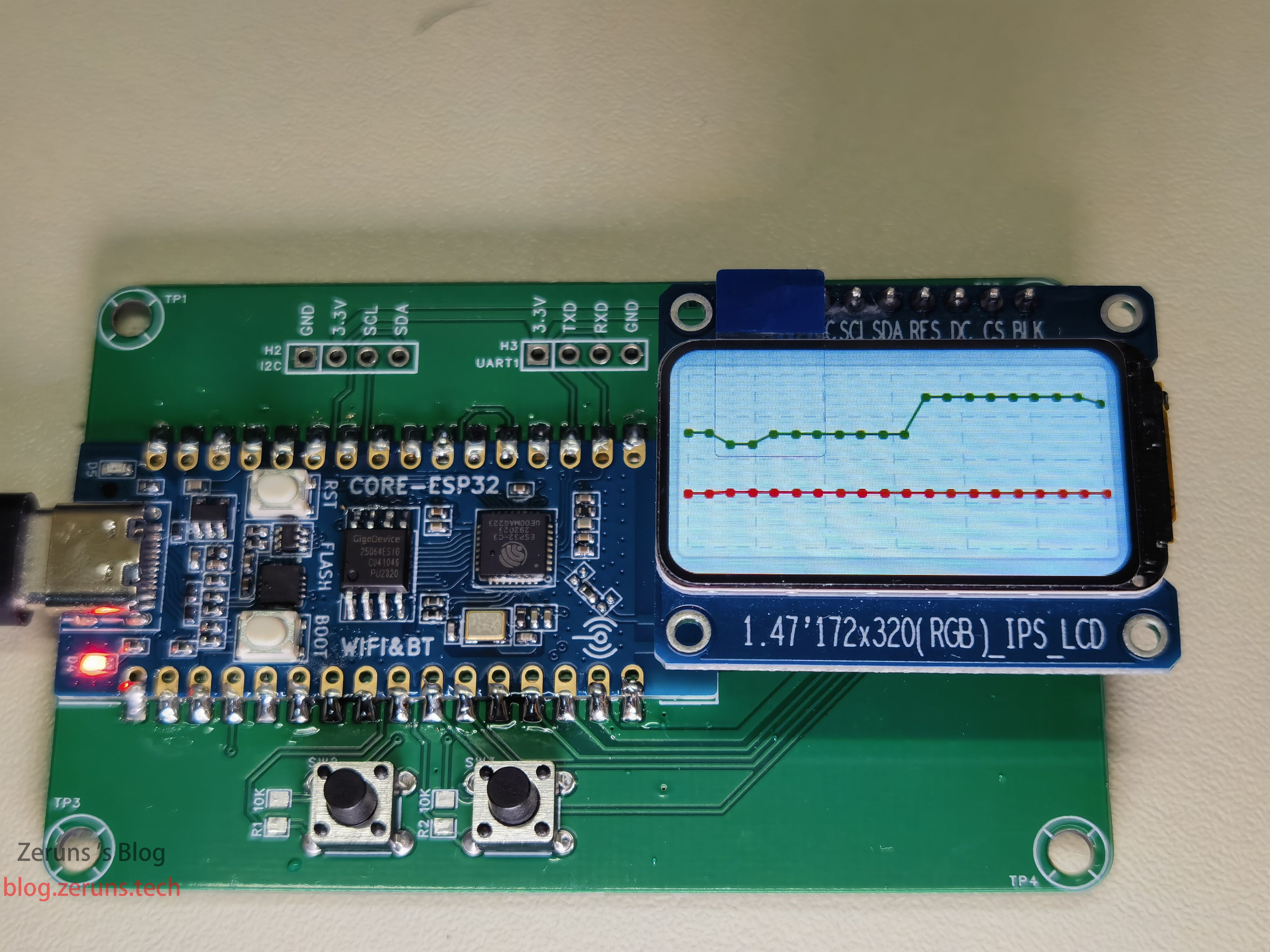
显示温湿度变化曲线:
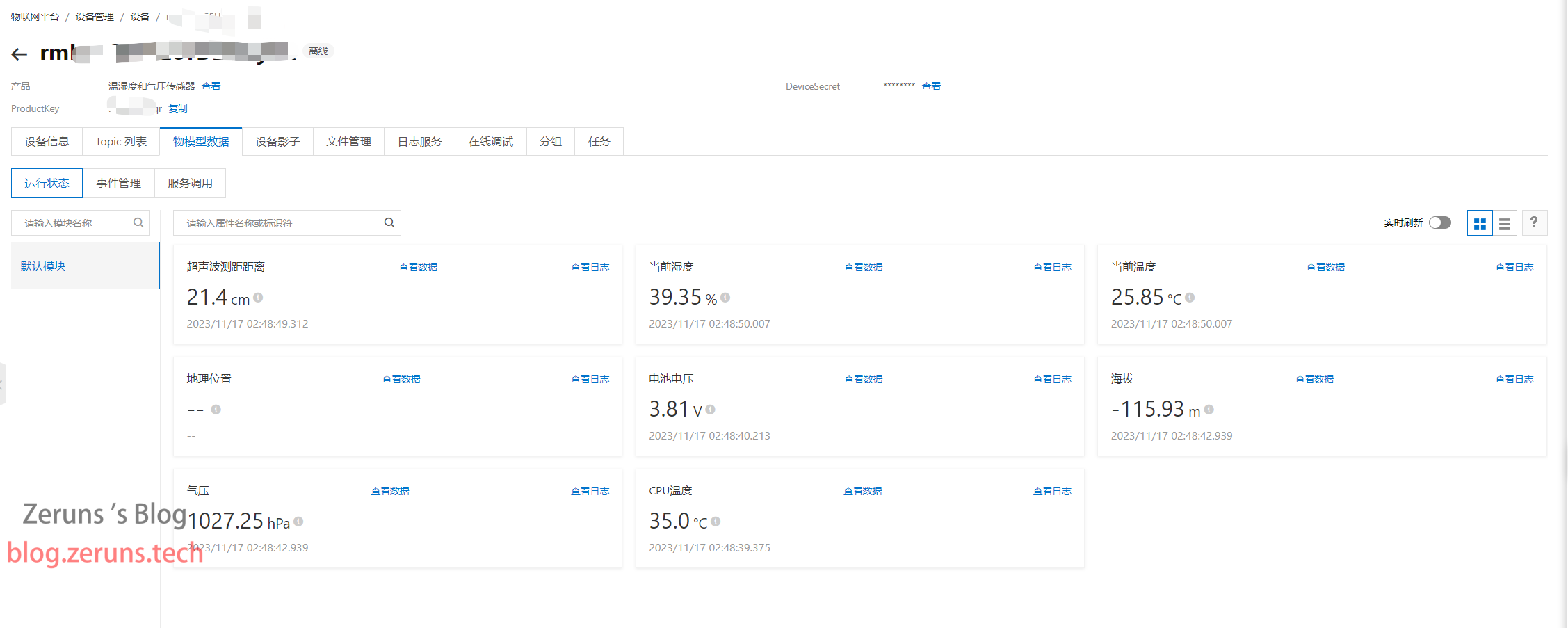
物联网平台
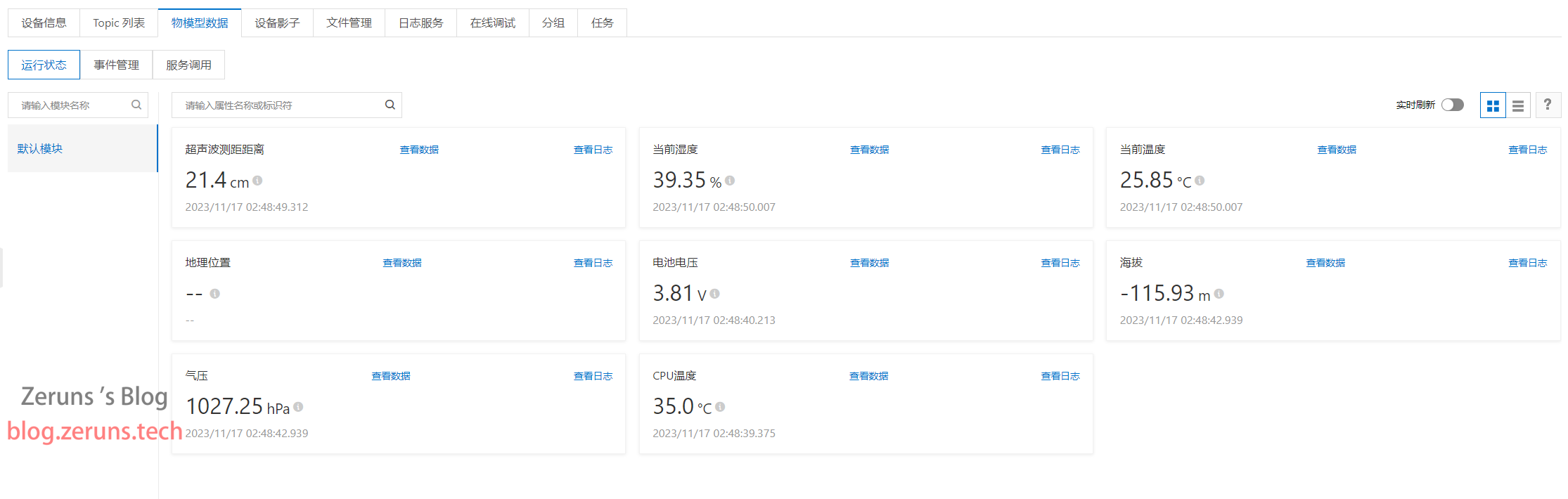
阿里云物联网平台上显示的数据:
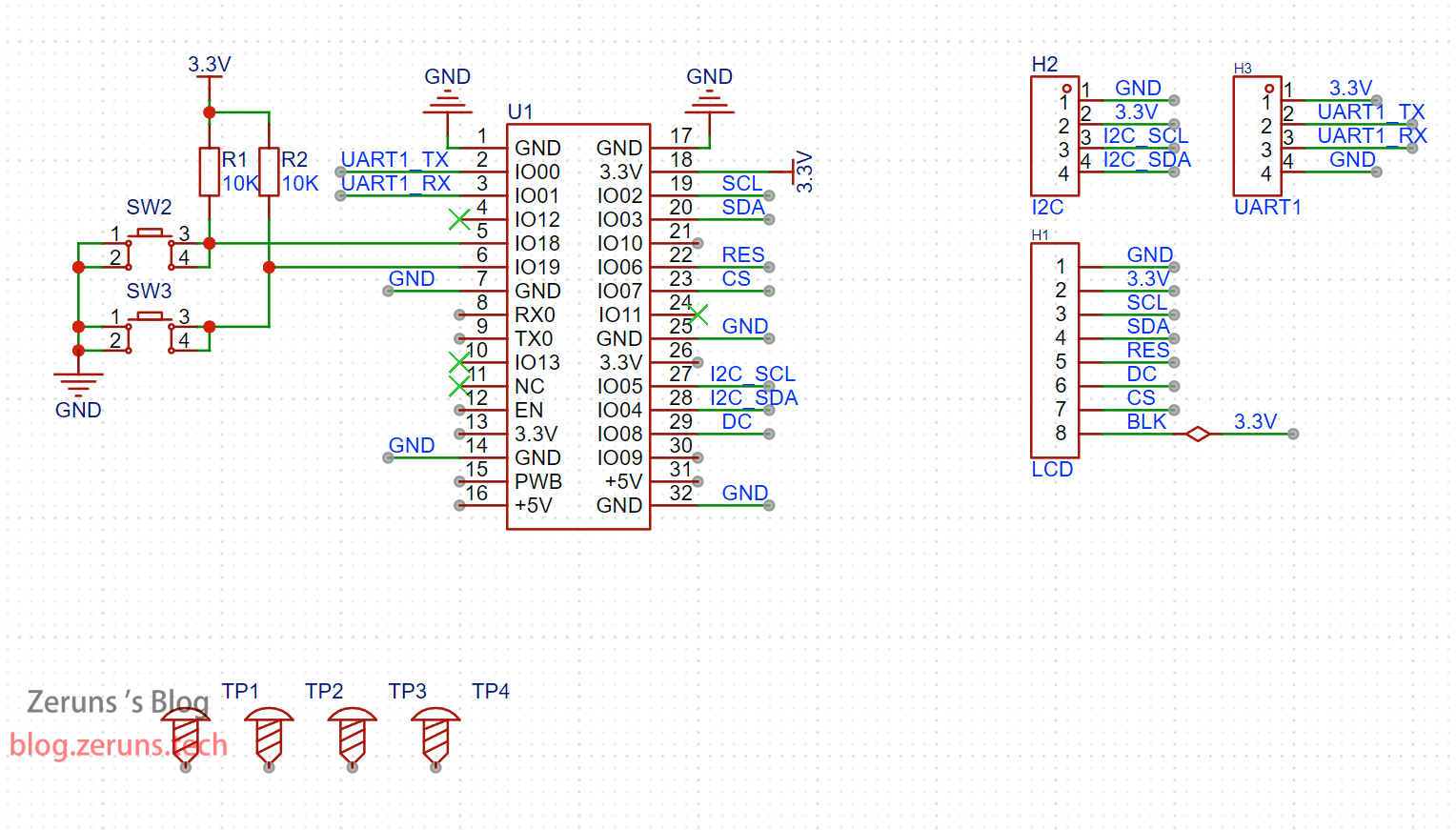
原理图
4G节点
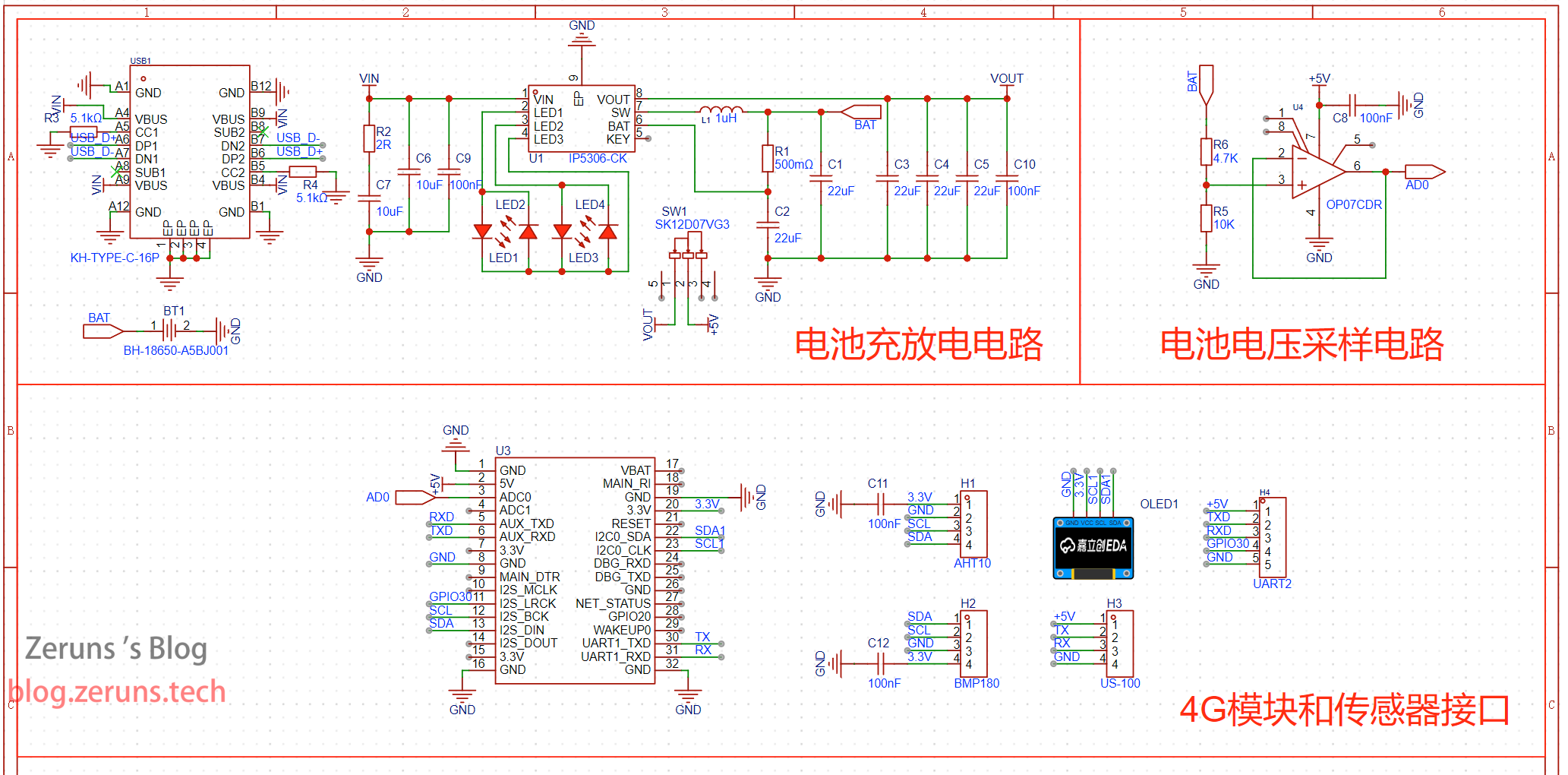
WiFi节点
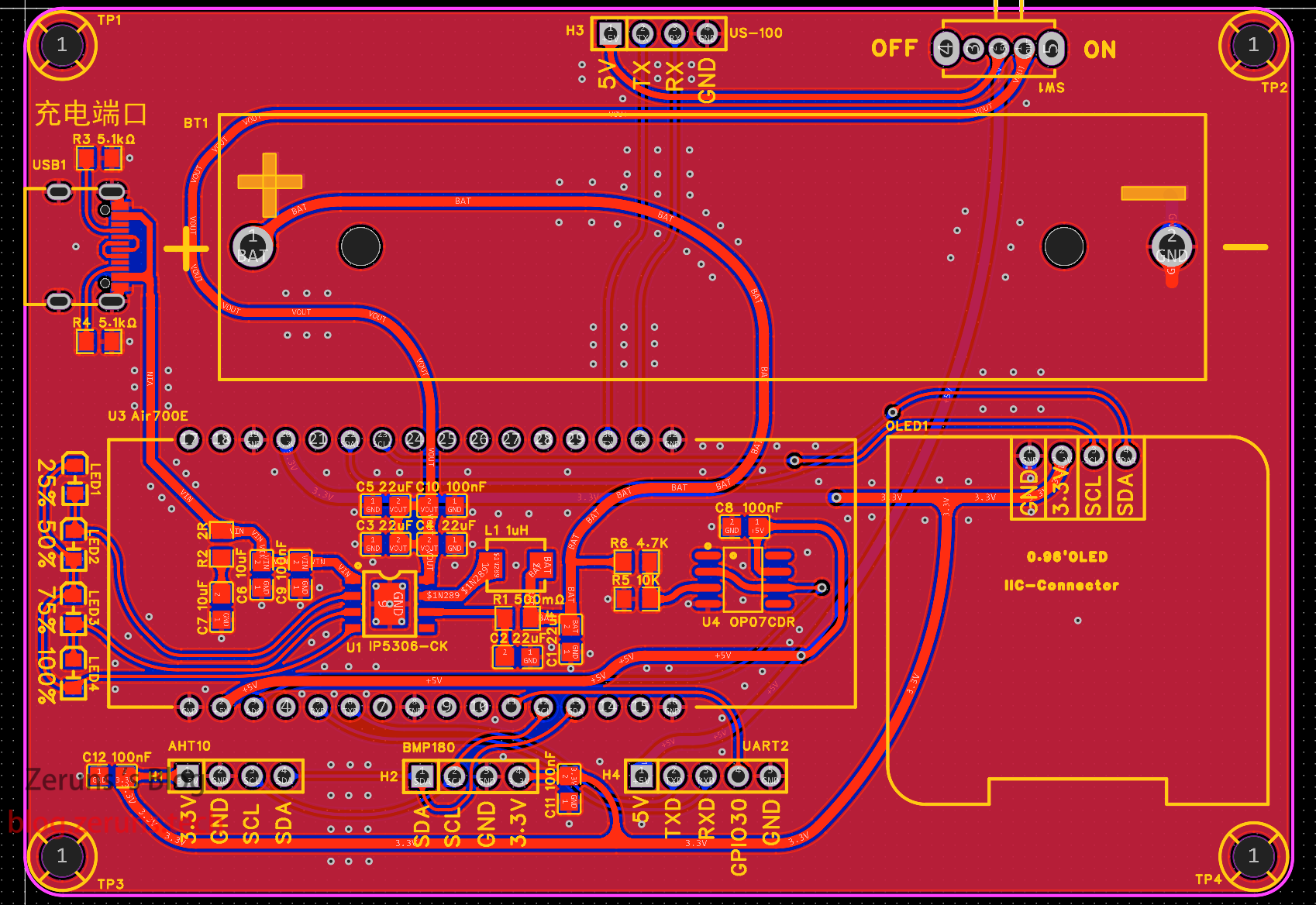
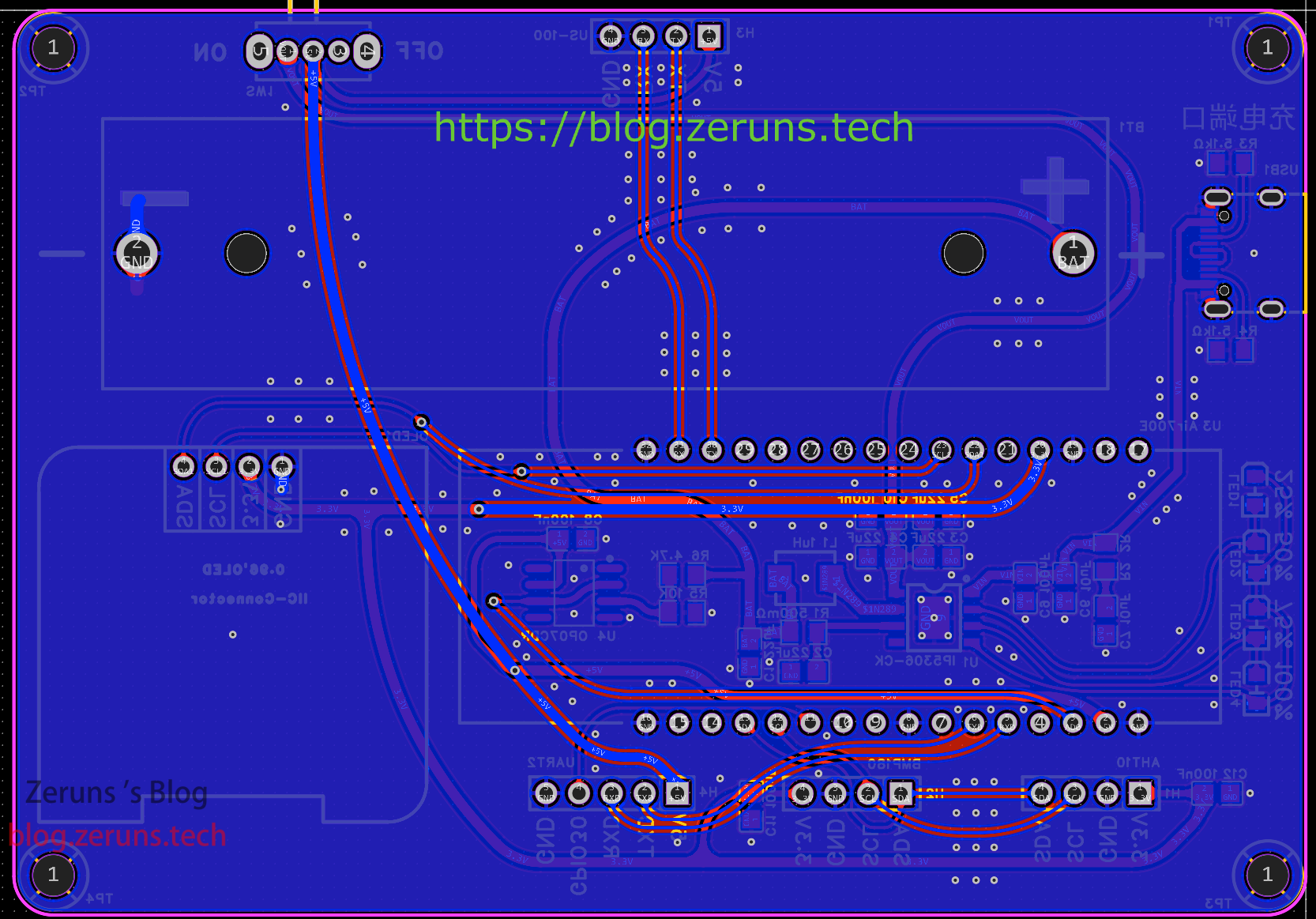
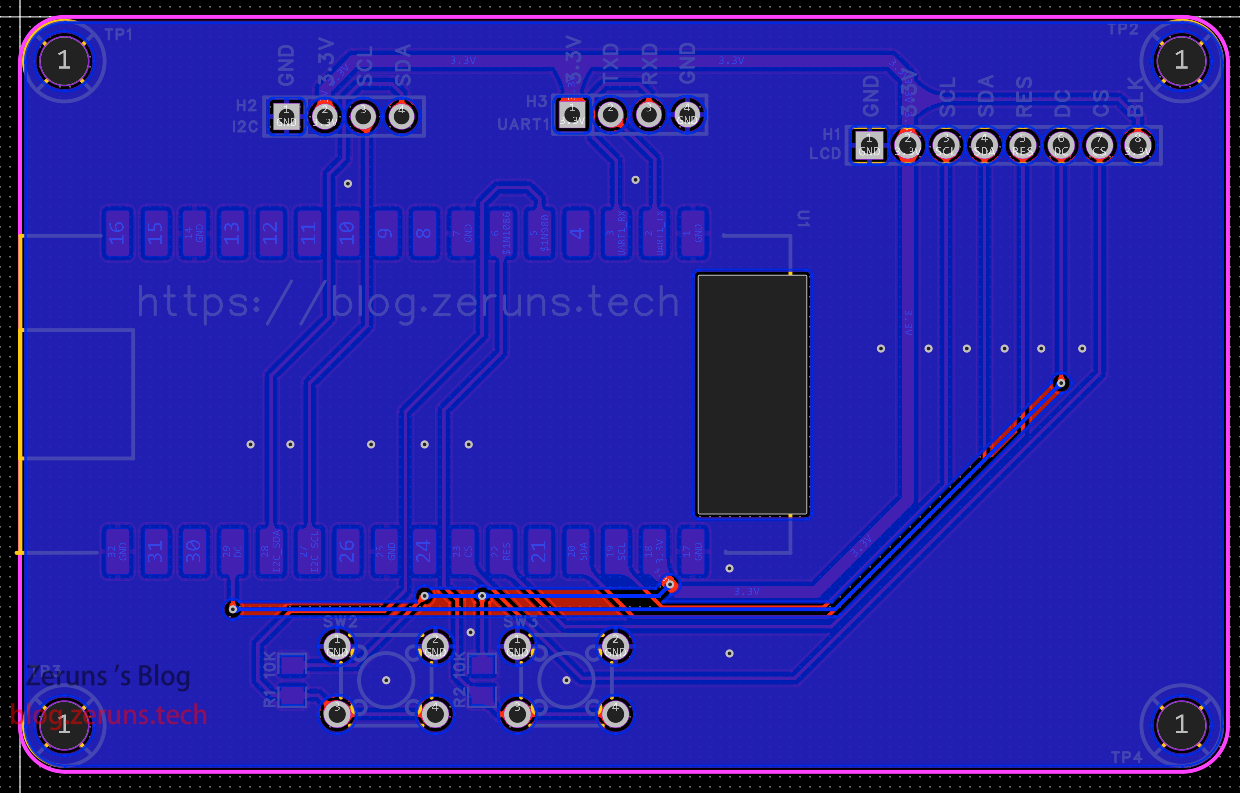
PCB
4G节点
这个4G模块的封装不太对的。
顶层:
底层:
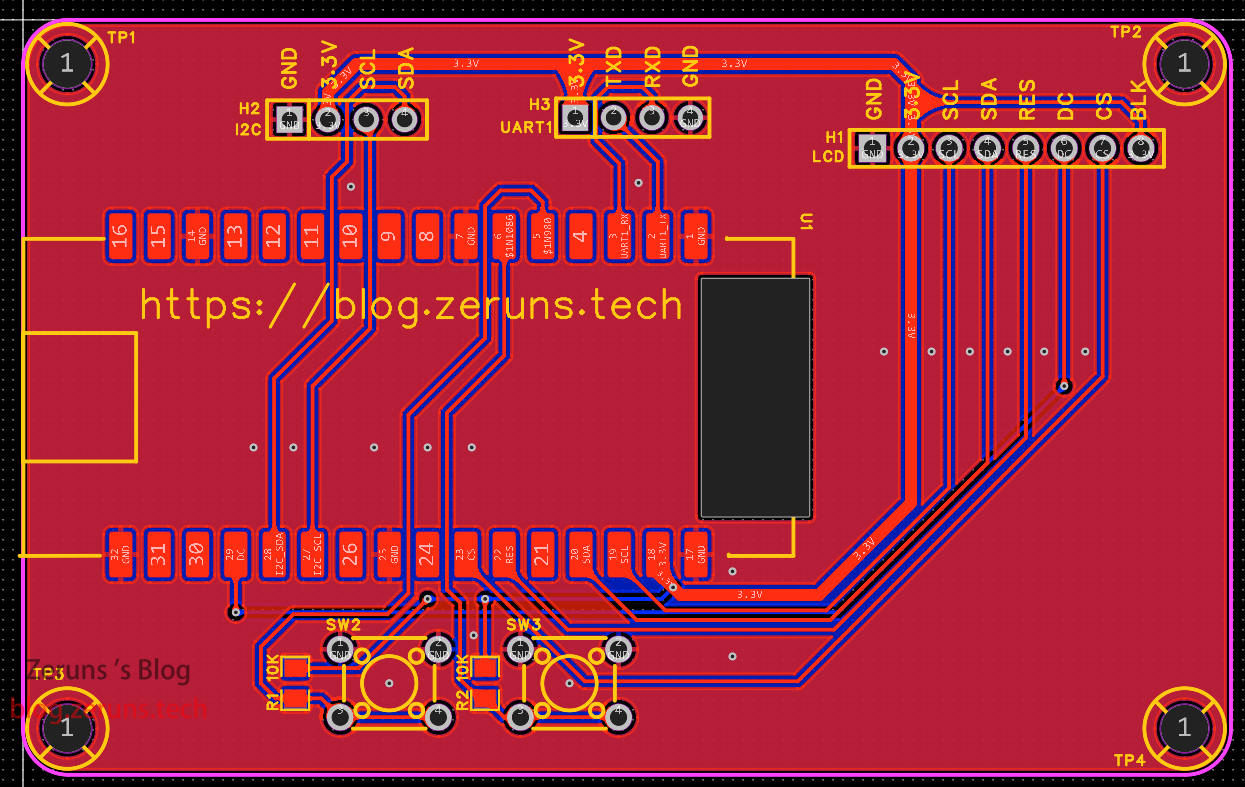
WiFi节点
顶层:
底层:
代码
具体怎么下载代码我就不细说了,自行查看官方文档。
Air700E文档:https://doc.openluat.com/wiki/44?wiki_page_id=4730
LVGL for LuatOS 手册:https://url.zeruns.com/7z7fN
ESP32-C3文档:https://url.zeruns.com/497AP
Lua教程:https://url.zeruns.com/Pc4PA
4G节点
固件下载地址:https://url.zeruns.com/2G3K7
main.lua文件:
-- LuaTools需要PROJECT和VERSION这两个信息
PROJECT = "环境监测节点"
VERSION = "1.1.0"

-- 引入必要的库文件(lua编写), 内部库不需要require
sys = require("sys")
aht10 = require "aht10"
bmx = require "bmx"

--添加硬狗防止程序卡死
if wdt then
    wdt.init(9000)--初始化watchdog设置为9s
    sys.timerLoopStart(wdt.feed, 3000)--3s喂一次狗
end

print(_VERSION)

log.info(mobile.ipv6(true)) --开启ipv6

local ProductKey= "xxxxxx"                         --产品key
local DeviceName= "xxxxxx"                --改为你自己的设备名
local DeviceSecret = "xxxxxx" --改为你自己的设备密钥
local client_id, user_name, password = iotauth.aliyun(ProductKey, DeviceName ,DeviceSecret) --生成MQTT三元组
log.info("MQTT参数", client_id, user_name, password)

local softI2C = i2c.createSoft(29, 31, 2)   --初始化软件I2C
local aht10_data,bmx_data
local RH,Temp,Press,High,distance,BAT_Voltage,CPU_T = 0,0,0,0,0,0,0                 --平均值,湿度、温度、气压、海拔、距离、电池电压、CPU温度
local RH_C,Temp_C,Press_C,High_C,distance_C,BAT_Voltage_C,CPU_T_C = 0,0,0,0,0,0,0   --当前值
local AHT10_flag,BMP180_flag,US100_flag,BAT_Voltage_flag,CPU_T_flag = false,false,false,false,false
all_data = {params = {CurrentVoltage = 0,CurrentTemperature = 0, CurrentHumidity = 0,Atmosphere = 0, Altitude = 0,DetectDistance = 0,CPUTemperature = 0}}

function US_100()   --US-100超声波测距模块读取数据
    uart.write(1, string.char(0x55))  --发送16进制0x55
    sys.wait(50)    --延时50毫秒
    local hData,lData  = string.byte(uart.read(1, 2),1,2)   --串口接收2字节
    uart.rxClear(1) --清空接收缓存
    if hData and lData then --判断是否接收到数据
        local Distance_mm = tonumber((hData * 256 ) + lData)    --将高8位左移8位后和低8位数据相加
        if Distance_mm > 4500 then  --判断是否超出测量范围
            Distance_mm = 4500
        end
        --log.info("超声波:"..Distance_mm.."mm")     --日志输出距离
        return (Distance_mm / 10)                  --算出cm并返回
    end
end
-- https://blog.zeruns.com
sys.taskInit(function() -- 创建一个线程,读取各个传感器数据

    sys.wait(500)       -- 延时500毫秒
    aht10.init(softI2C) -- 初始化AHT10,传入i2c_id
    bmx.init(softI2C)   -- 初始化BMP180,传入i2c_id
    uart.setup(1, 9600, 8, 1, uart.NONE)    --初始化串口1
    adc.open(0)         -- 打开adc通道0,并读取
    adc.open(adc.CH_CPU)-- 打开ADC通道-CPU内部温度通道
    --adc.setRange(adc.ADC_RANGE_3_8) -- 开启ADC0,1分压电阻,范围0~3.8V
    sys.wait(500)       -- 延时500毫秒

    local RH_sum, Temp_sum, Press_sum, High_sum, distance_sum,BAT_Voltage_sum,CPU_T_sum = 0,0,0,0,0,0,0 --总和,求平均值用
    local avg_count, avg_count2,avg_count3,avg_count4,avg_count5 = 0,0,0,0,0

    while 1 do
        aht10_data = aht10.get_data()   --读取AHT10的数据
        bmx_data = bmx.get_data()       --读取BMP10的数据
        distance_C = US_100()           --读取US-100的数据
        -- 电池电压采样,分压电阻比例:4.7K/10K
        BAT_Voltage_C = ((adc.get(0) / 1000 / 1007) * 1473) -- 读取AD0电压值,计算电池电压
        CPU_T_C = adc.get(adc.CH_CPU) / 1000                -- 读取CPU温度

        -- AHT10温湿度平均值计算
        if aht10_data.RH and aht10_data.T then  --判断AHT10是否读取到数据
            all_data.params.CurrentTemperature = aht10_data.T
            all_data.params.CurrentHumidity = aht10_data.RH*100
            if avg_count < 6 then       --判断是否小于3,累加计平均值
                RH_C,Temp_C = aht10_data.RH*100, aht10_data.T   --读取温度和湿度的当前值
                RH_sum = RH_C + RH_sum
                Temp_sum = Temp_C + Temp_sum
                avg_count = avg_count + 1
            elseif avg_count == 6 then
                RH = RH_sum / 6         -- 算出湿度平均值
                Temp = Temp_sum / 6     -- 算出温度平均值
                log.info("AHT10_data.RH: "..(string.format("%.2f", RH)).." %"," AHT10_data.T: "..(string.format("%.2f", Temp)).." ℃")    --日志输出
                AHT10_flag = true       -- 标志位置位,数据采集完毕
                sys.publish("MQTT_P")   -- 发布消息,数据采集计算完毕,MQTT可以上报了
                avg_count,RH_sum,Temp_sum = 0,0,0   --计数值和总和清零
            end
        end

        --BMP180气压和高度平均值计算
        if bmx_data.press and bmx_data.high then
            all_data.params.Atmosphere = bmx_data.press
            all_data.params.Altitude = bmx_data.high
            if avg_count2 < 10 then       --判断是否小于10,累加计平均值
                Press_C,High_C = bmx_data.press, bmx_data.high  --读取气压和高度的当前值
                Press_sum = Press_C + Press_sum
                High_sum = High_C + High_sum
                avg_count2 = avg_count2 + 1
            elseif avg_count2 == 10 then
                Press = Press_sum / 10
                High = High_sum / 10
                log.info("BMP180_data.press: "..(string.format("%.2f", Press)).." hPa"," BMP180_data.high: "..(string.format("%.2f", High)).." m")
                BMP180_flag = true
                sys.publish("MQTT_P")
                avg_count2,Press_sum,High_sum=0,0,0
            end
        end

        -- US-100超声波测距 距离平均值计算
        if distance_C then    --判断是否读取到数据
            all_data.params.DetectDistance = distance_C
            if avg_count3 < 3 then
                distance_sum = distance_C + distance_sum
                avg_count3 = avg_count3 + 1
            elseif avg_count3 == 3 then
                distance = distance_sum / 3
                log.info("US-100: "..(string.format("%.1f", distance)).." cm")
                US100_flag = true
                sys.publish("MQTT_P")
                avg_count3,distance_sum = 0,0
            end
        end

        -- 电池电压
        if BAT_Voltage_C then    --判断是否读取到数据
            all_data.params.CurrentVoltage = BAT_Voltage_C
            if avg_count4 < 20 then
                BAT_Voltage_sum = BAT_Voltage_C + BAT_Voltage_sum
                avg_count4 = avg_count4 + 1
            elseif avg_count4 == 20 then
                BAT_Voltage = BAT_Voltage_sum / 20
                log.info("BAT_Voltage: "..(string.format("%.2f", BAT_Voltage)).." V")
                BAT_Voltage_flag = true
                sys.publish("MQTT_P")
                avg_count4,BAT_Voltage_sum = 0,0
            end
        end

        -- CPU温度
        if CPU_T_C then    --判断是否读取到数据
            all_data.params.CPUTemperature = CPU_T_C
            if avg_count5 < 20 then
                CPU_T_sum = CPU_T_C + CPU_T_sum
                avg_count5 = avg_count4 + 1
            elseif avg_count5 == 20 then
                CPU_T = CPU_T_sum / 20
                log.info("CPU_T: "..(string.format("%.2f", CPU_T)).." ℃")
                CPU_T_flag = true
                sys.publish("MQTT_P")
                avg_count5,CPU_T_sum = 0,0
            end
        end

        sys.wait(500)
    end
end)

--[[sys.taskInit(function() --创建一个任务,超声波测距,1.5秒一次
    uart.setup(1, 9600, 8, 1, uart.NONE)    --初始化串口1
    sys.wait(1000)
    while 1 do
        distance = US_100() --读取US-100的数据
        if distance then    --判断是否读取到数据
            log.info("US-100: "..(string.format("%.1f", distance)).." cm")
            US100_flag = true
            sys.publish("MQTT_P")
        end
        sys.wait(1500)
    end
end)]]

sys.taskInit(function() --创建一个线程,MQTT初始化和数据上报
    mqttc = mqtt.create(nil, "a1sJbDQiEqr.iot-as-mqtt.cn-shanghai.aliyuncs.com", 1883,true,true)
    mqttc:auth(client_id, user_name, password)
    mqttc:keepalive(120) -- 默认值240s
    mqttc:autoreconn(true, 3000) -- 自动重连机制
    mqttc:on(function(mqtt_client, event, data, payload)
        if event == "conack" then
            sys.publish("mqtt_conack")
            log.info("mqtt", "mqtt已连接")
            mqtt_client:subscribe("/sys/"..ProductKey.."/"..DeviceName.."/thing/service/property/set")
        elseif event == "recv" then
            log.info("mqtt", "收到消息", data, payload)
            local mqtt_date = json.decode(payload)
        elseif event == "sent" then
            log.info("mqtt", "sent", "pkgid", data)
        end
    end)
    mqttc:connect()
    while true do
        sys.waitUntil("MQTT_P", 3000)
        if AHT10_flag then
            local json_str = json.encode({params = {CurrentTemperature = Temp, CurrentHumidity = RH}}, "2f") -- 数据改成JSON格式,保留2位小数
            mqttc:publish("/sys/"..ProductKey.."/".. DeviceName.."/thing/event/property/post", json_str)  -- MQTT上报属性
            mqttc:publish("/"..ProductKey.."/".. DeviceName.."/user/update", json.encode(all_data,"2f"))  -- MQTT上报属性
            AHT10_flag = false
        end
        if BMP180_flag then
            local json_str = json.encode({params = {Atmosphere = Press, Altitude = High}}, "2f") -- 数据改成JSON格式,保留2位小数
            mqttc:publish("/sys/"..ProductKey.."/"..DeviceName.."/thing/event/property/post", json_str)  -- MQTT上报属性
            mqttc:publish("/"..ProductKey.."/".. DeviceName.."/user/update", json.encode(all_data,"2f"))  -- MQTT上报属性
            BMP180_flag = false
        end
        if US100_flag then
            local json_str = json.encode({params = {DetectDistance = distance}}, "1f") -- 数据改成JSON格式,保留2位小数
            mqttc:publish("/sys/"..ProductKey.."/"..DeviceName.."/thing/event/property/post", json_str)  -- MQTT上报属性
            mqttc:publish("/"..ProductKey.."/".. DeviceName.."/user/update", json.encode(all_data,"2f"))  -- MQTT上报属性
            US100_flag = false
        end
        if BAT_Voltage_flag then
            local json_str = json.encode({params = {CurrentVoltage = BAT_Voltage}}, "2f") -- 数据改成JSON格式,保留2位小数
            mqttc:publish("/sys/"..ProductKey.."/"..DeviceName.."/thing/event/property/post", json_str)  -- MQTT上报属性
            mqttc:publish("/"..ProductKey.."/".. DeviceName.."/user/update", json.encode(all_data,"2f"))  -- MQTT上报属性
            BAT_Voltage_flag = false
        end
        if CPU_T_flag then
            local json_str = json.encode({params = {CPUTemperature = CPU_T}}, "2f") -- 数据改成JSON格式
            mqttc:publish("/sys/"..ProductKey.."/"..DeviceName.."/thing/event/property/post", json_str)  -- MQTT上报属性
            mqttc:publish("/"..ProductKey.."/".. DeviceName.."/user/update", json.encode(all_data,"2f"))  -- MQTT上报属性
            CPU_T_flag = false
        end
    end
end)


-- https://blog.zeruns.com
sys.taskInit(function()
    u8g2.begin({ic = "ssd1306",direction = 0,mode="i2c_hw",i2c_id=1,i2c_speed = i2c.FAST}) -- direction 可选0 90 180 270
    u8g2.ClearBuffer()  --清屏
    u8g2.SetFont(u8g2.font_opposansm10)  --切换字体
    u8g2.DrawUTF8("IMEI:", 0, 16)
    u8g2.DrawUTF8(mobile.imei(), 0, 32)
    u8g2.SendBuffer()

    --ntp同步时间
    --socket.sntp()
    socket.sntp({"ntp.aliyun.com","ntp1.aliyun.com","ntp2.aliyun.com"}) --sntp自定义服务器地址
    --socket.sntp(nil, socket.ETH0) --sntp自定义适配器序号
    sys.subscribe("NTP_UPDATE", function()
        log.info("sntp", "time", os.date())
        sys.publish("NTP_OK")
    end)
    sys.subscribe("NTP_ERROR", function()
        log.info("socket", "sntp error")
        socket.sntp()
    end)

    sys.wait(1000)

    sys.waitUntil("NTP_OK", 3000)
    u8g2.ClearBuffer()  --清屏
    u8g2.SetFont(u8g2.font_opposansm10)  --切换字体
    u8g2.DrawUTF8(os.date("%Y-%m-%d"), 0, 16) --显示时间
    u8g2.DrawUTF8(os.date("%H:%M:%S"), 0, 32) --显示时间
    local IP = socket.localIP()     --显示IP地址
    if IP then
        u8g2.DrawUTF8("IP:"..IP, 0, 63)
    end
    u8g2.SendBuffer()
    sys.wait(2500)

    while true do
        u8g2.ClearBuffer()  --清屏
        u8g2.SetFont(u8g2.font_sarasa_m10_ascii)
        if Temp_C then
            u8g2.DrawUTF8("T:"..(string.format("%.2f", Temp_C)).."°C", 0, 16)
        end
        if RH_C then
            u8g2.DrawUTF8("RH:"..(string.format("%.2f", RH_C)).."%", 0, 32)
        end
        if Press_C then
            u8g2.DrawUTF8("P:"..(string.format("%.2f", Press_C)).."hPa", 0, 48)
        end
        if distance_C then
            u8g2.DrawUTF8("D:"..(string.format("%.1f", distance_C)).."cm", 0, 63)
        end
        if High_C then
            u8g2.DrawUTF8("H:"..(string.format("%.2f", High_C)).."m", 61, 16)
        end
        if BAT_Voltage_C then
            u8g2.DrawUTF8("B:"..(string.format("%.2f", BAT_Voltage_C)).."V", 66, 32)
        end
        if CPU_T_C then
            u8g2.DrawUTF8("CPUT:"..(string.format("%d", CPU_T_C)).."°C", 63, 63)
        end
        u8g2.SendBuffer()   --显示数据更新到屏幕
        sys.wait(200)
    end
end)

sys.taskInit(function() --创建一个线程,500毫秒闪一次LED
    gpio.setup(27, 0)   -- 设置gpio27为输出,且初始化电平为低,使用硬件默认上下拉配置
    while true do
        gpio.toggle(27) --gpio翻转电平
        sys.wait(500)
    end
end)

--[[
    支持字体
    ["unifont_t_symbols","open_iconic_weather_6x_t","opposansm8","opposansm10","opposansm12","opposansm16","opposansm20",
    "opposansm24","opposansm32","sarasa_m8_ascii","sarasa_m10_ascii","sarasa_m12_ascii","sarasa_m14_ascii",
    "sarasa_m16_ascii","sarasa_m18_ascii","sarasa_m20_ascii","sarasa_m22_ascii"]
]]
-- 用户代码已结束---------------------------------------------
-- 结尾总是这一句
sys.run()
-- sys.run()之后后面不要加任何语句!!!!!
WiFi节点
固件下载地址:https://url.zeruns.com/a7eXJ
main.lua文件:
-- LuaTools需要PROJECT和VERSION这两个信息
PROJECT = "数据显示节点"
VERSION = "1.0.5"

-- sys库是标配
_G.sys = require("sys")
require("sysplus")

--添加硬狗防止程序卡死
wdt.init(9000)--初始化watchdog设置为6s
wdt_timer_id = sys.timerLoopStart(function()
    wdt.feed()
end, 2000)  --2s喂一次狗

local ProductKey= "xxxxxx"                         --产品key
local DeviceName= "xxxxxx"                --改为你自己的设备名
local DeviceSecret = "xxxxxx" --改为你自己的设备密钥
local client_id, user_name, password = iotauth.aliyun(ProductKey, DeviceName ,DeviceSecret) --生成MQTT三元组
log.info("MQTT参数", client_id, user_name, password)

local local_CPU_T_C = 0;
local all_data = {params = {CurrentVoltage = 0,CurrentTemperature = 0, CurrentHumidity = 0,
Atmosphere = 0, Altitude = 0,DetectDistance = 0,CPUTemperature = 0}};
local key1_flag,key2_flag = false,false

sys.taskInit(function() -- 创建一个线程

    log.info("wlan", "wlan_init:", wlan.init()) -- 初始化wlan
    wlan.setMode(wlan.STATION)                  -- 设置wlan模式为STATION
    wlan.connect("Mate 40 Pro", "123456789", 1)     -- 连接wlan网络
    local result, data = sys.waitUntil("IP_READY",6000)-- 等待IP_READY事件
    log.info("wlan", "IP_READY", result, data)  -- 打印IP_READY事件的结果和数据
    if result then
        socket.setDNS(socket.STA, 1, "114.114.114.114")
        log.info("wlan", "info", json.encode(wlan.getInfo()))   -- 打印wlan网络的详细信息
        sys.publish("WiFi_connected_OK",data)   -- 发布消息,WiFi连接成功
        --ntp同步时间
        --socket.sntp()
        socket.sntp({"ntp.aliyun.com","time.windows.com","ntp.tencent.com","ntp2.aliyun.com"}, socket.STA) --sntp自定义服务器地址
        --socket.sntp(nil, socket.STA) --sntp自定义适配器序号
        -- 订阅NTP_UPDATE事件
        sys.subscribe("NTP_UPDATE", function()
            sys.publish("NTP_OK")   -- 发布消息,NTP同步时间成功
            log.info("sntp", "time", os.date()) -- 打印系统时间
        end)
        sys.subscribe("NTP_ERROR", function()
            log.info("socket", "sntp error")
            socket.sntp()
        end)
    else
        while true do
            sys.wait(1000)
        end
    end

    adc.open(adc.CH_CPU)-- 打开ADC通道-CPU内部温度通道
    local CH_CPU = adc.get(adc.CH_CPU) / 1000    -- 读取CPU温度
    if CH_CPU then  -- 判断数据是否有效
        local_CPU_T_C = CH_CPU
    end

    mqttc = mqtt.create(nil, "a1sJbDQiEqr.iot-as-mqtt.cn-shanghai.aliyuncs.com", 1883,true)    -- 创建MQTT客户端
    mqttc:auth(client_id, user_name, password)  -- 进行MQTT身份验证
    mqttc:keepalive(60)                        -- 设置MQTT保活时间,默认值为60秒
    mqttc:autoreconn(true, 3000)                -- 开启自动重连机制
    mqttc:on(function(mqtt_client, event, data, payload)-- 定义MQTT事件回调函数
        if event == "conack" then               -- 当收到连接确认事件(conack)时
            sys.publish("mqtt_conack")          -- 发布一个mqtt_conack消息
            log.info("mqtt", "mqtt已连接")       -- 打印连接成功信息
            mqtt_client:subscribe("/sys/"..ProductKey.."/"..DeviceName.."/thing/service/property/set")  -- 订阅指定主题
            mqtt_client:subscribe("/"..ProductKey.."/"..DeviceName.."/user/get")
        elseif event == "recv" then             -- 当收到消息事件(recv)时
            if data == "/"..ProductKey.."/"..DeviceName.."/user/get" then   -- 判断接收主题
                all_data = json.decode(payload)             -- 解析消息内容为JSON格式
                mqttc:publish("/sys/"..ProductKey.."/"..DeviceName.."/thing/event/property/post", payload)  -- MQTT上报属性
            else
                log.info("mqtt", "收到消息", data, payload) -- 打印接收消息信息
                local mqtt_date = json.decode(payload)      -- 解析消息内容为JSON格式
            end
        elseif event == "sent" then             -- 当发送消息事件(sent)时
            --log.info("mqtt", "sent", "pkgid", data)-- 打印发送消息信息
        end
    end)
    mqttc:connect()

    while true do
        local CH_CPU = adc.get(adc.CH_CPU) / 1000    -- 读取CPU温度
        if CH_CPU then  -- 判断数据是否有效
            CPU_T_C = CH_CPU
        end

        gpio.toggle(12) --gpio翻转电平
        sys.wait(500)
    end
end)

sys.taskInit(function() -- 创建一个线程
    spi.setup(2, 7, 0, 0, 8, 80 * 1000 * 1000, spi.MSB, 1, 1)   -- 初始化SPI
    log.info("lcd.init", lcd.init("st7789",{
        port = 2,           -- spi端口
        -- pin_cs = 7,         -- SPI片选
        pin_dc = 8,         -- lcd数据/命令选择引脚
        -- pin_pwr = 18,       -- lcd背光引脚 可选项,可不设置
        pin_rst = 6,        -- lcd复位引脚
        direction = 2,      -- lcd屏幕方向 0:0° 1:180° 2:270° 3:90°
        w = 320,            -- lcd 水平分辨率
        h = 172,            -- lcd 垂直分辨率
        xoffset = 0,        -- x偏移(不同屏幕ic 不同屏幕方向会有差异)
        yoffset = 34;       -- y偏移(不同屏幕ic 不同屏幕方向会有差异)
    }))

    log.info("lvgl", lvgl.init())   --- 初始化LVGL

    local style_screen_label_main = lvgl.style_create()         -- 创建一个名为 style_screen_label_main 的样式对象
    lvgl.style_set_text_font(style_screen_label_main, lvgl.STATE_DEFAULT, lvgl.font_get("opposans_m_16")) -- 设置标签的默认字体

    local Init_scr = lvgl.obj_create(nil, nil) -- 创建一个屏幕对象
    lvgl.scr_load(Init_scr)  -- 加载屏幕对象,显示在显示器上
    local spinner = lvgl.spinner_create(Init_scr, nil) -- 创建一个旋转图标对象
    lvgl.obj_set_size(spinner, 100, 100) -- 设置旋转图标对象的大小
    lvgl.obj_align(spinner, nil, lvgl.ALIGN_CENTER, 0, -20) -- 将旋转图标对象居中对齐
    local label_WiFiConnecting = lvgl.label_create(Init_scr, nil) -- 创建一个标签对象
    lvgl.label_set_recolor(label_WiFiConnecting, true) -- 开启标签的重新上色功能,即当文本内容发生变化时自动更新颜色
    lvgl.obj_add_style(label_WiFiConnecting, lvgl.LABEL_PART_MAIN, style_screen_label_main) -- 将样式对象分配给标签对象的main部分
    lvgl.label_set_text(label_WiFiConnecting, "WiFi连接中...") -- 设置标签对象的文本内容
    lvgl.label_set_align(label_WiFiConnecting, lvgl.LABEL_ALIGN_CENTER) -- 设置标签对象的文本对齐方式为居中对齐
    lvgl.obj_align(label_WiFiConnecting, nil, lvgl.ALIGN_CENTER, 0, 46) -- 将标签对象居中对齐
    local result, ip_data = sys.waitUntil("WiFi_connected_OK", 5000)    -- 等待WiFi连接成功的消息,超时5秒
    if result == false then
        lvgl.label_set_text(label_WiFiConnecting, "#ff0000 WiFi连接失败!#\n请重启设备,或检查网络") -- 设置标签对象的文本内容(显示WiFi连接失败)
        lvgl.label_set_align(label_WiFiConnecting, lvgl.LABEL_ALIGN_CENTER) -- 设置标签对象的文本对齐方式为居中对齐
        lvgl.obj_align(label_WiFiConnecting, nil, lvgl.ALIGN_CENTER, 0, 51) -- 将标签对象居中对齐
        while true do
            sys.wait(1000) -- 循环等待,防止程序继续执行
        end
    end
    lvgl.label_set_text(label_WiFiConnecting, "WiFi连接成功!") -- 设置标签对象的文本内容(显示WiFi连接成功)
    lvgl.label_set_align(label_WiFiConnecting, lvgl.LABEL_ALIGN_CENTER) -- 设置标签对象的文本对齐方式为居中对齐
    lvgl.obj_align(label_WiFiConnecting, nil, lvgl.ALIGN_CENTER, 0, 51) -- 将标签对象居中对齐
    sys.wait(500) -- 等待500毫秒
    lvgl.obj_del(label_WiFiConnecting) -- 删除标签对象
    lvgl.obj_align(spinner, nil, lvgl.ALIGN_CENTER, 0, 0) -- 将旋转图标对象居中对齐
    local label_Init_log = lvgl.label_create(Init_scr, nil) -- 创建一个标签对象
    lvgl.label_set_recolor(label_Init_log, true) -- 开启标签的重新上色功能,即当文本内容发生变化时自动更新颜色
    lvgl.label_set_align(label_Init_log, lvgl.LABEL_ALIGN_LEFT) -- 设置标签对象的文本对齐方式为左对齐
    lvgl.obj_align(label_Init_log, nil, lvgl.ALIGN_IN_TOP_LEFT, 10, 5) -- 将标签对象对齐到屏幕的左上角
    local Init_log = "#0000ff 初始化日志: #\nWiFi连接成功!\n" -- 初始化日志信息
    lvgl.label_set_text(label_Init_log, Init_log) -- 设置标签对象的文本内容
    Init_log = Init_log.."IP: "..ip_data.."\n连接MQTT服务器中...\n" -- 更新日志信息
    lvgl.label_set_text(label_Init_log, Init_log) -- 设置标签对象的文本内容
    if sys.waitUntil("mqtt_conack", 10000) == false then
        Init_log = Init_log.."#ff0000 连接MQTT服务器失败!\n请重启设备!#\n" -- 更新日志信息(显示MQTT连接失败)
        lvgl.label_set_text(label_Init_log, Init_log) -- 设置标签对象的文本内容
        mqttc:disconnect() -- 断开MQTT连接
        mqttc:close() -- 关闭MQTT连接
        while true do
            sys.wait(1000) -- 循环等待,防止程序继续执行
        end
    end
    Init_log = Init_log.."连接MQTT服务器成功!\n" -- 更新日志信息(显示MQTT连接成功)
    lvgl.label_set_text(label_Init_log, Init_log) -- 设置标签对象的文本内容
    Init_log = Init_log.."NTP时间同步中...\n" -- 更新日志信息
    lvgl.label_set_text(label_Init_log, Init_log) -- 设置标签对象的文本内容
    local result = sys.waitUntil("NTP_OK", 3500) -- 等待NTP时间同步成功的消息,超时3秒
    if result then
        Init_log = Init_log.."NTP时间同步成功!\n" -- 更新日志信息(显示NTP时间同步成功)
        lvgl.label_set_text(label_Init_log, Init_log) -- 设置标签对象的文本内容
    else
        Init_log = Init_log.."NTP时间同步失败!\n" -- 更新日志信息(显示NTP时间同步失败)
        lvgl.label_set_text(label_Init_log, Init_log) -- 设置标签对象的文本内容
    end
    Init_log = Init_log.."当前时间: "..(os.date("%Y-%m-%d %H:%M:%S")).."\n" -- 更新日志信息(显示当前时间)
    lvgl.label_set_text(label_Init_log, Init_log) -- 设置标签对象的文本内容
    Init_log = Init_log.."系统初始化完成!\n" -- 更新日志信息(显示系统初始化完成)
    lvgl.label_set_text(label_Init_log, Init_log) -- 设置标签对象的文本内容

    sys.wait(2000)

    local alldata_scr = lvgl.obj_create(nil, nil)               -- 创建一个屏幕对象用于显示所有数据,没有父对象和样式
    lvgl.scr_load(alldata_scr)                                  -- 加载屏幕对象,显示在显示器上

    local label_alldata = lvgl.label_create(alldata_scr, nil)   -- 创建一个 Label 对象,用于显示所有数据
    lvgl.label_set_recolor(label_alldata, true)                 -- 开启标签的重新上色功能,即当文本内容发生变化时自动更新颜色
    lvgl.label_set_align(label_alldata, lvgl.LABEL_ALIGN_LEFT)  -- 设置标签的对齐方式为左对齐
    lvgl.obj_align(label_alldata, nil, lvgl.ALIGN_IN_TOP_LEFT, 10, 5)   -- 将标签对齐到屏幕的左上角,距离左边距 10 像素,上边距 5 像素
    lvgl.obj_add_style(label_alldata, lvgl.LABEL_PART_MAIN, style_screen_label_main)-- 将样式对象分配给 label_alldata 标签的 main 部分

    local label_time = lvgl.label_create(alldata_scr, nil)      -- 创建一个 Label 对象,用于显示当前时间
    lvgl.label_set_text(label_time, os.date("%Y-%m-%d").."\n"..os.date("%H:%M:%S"))
    lvgl.label_set_align(label_time, lvgl.LABEL_ALIGN_CENTER)   -- 设置标签的对齐方式为居中对齐
    lvgl.obj_align(label_time, nil, lvgl.ALIGN_IN_TOP_RIGHT, -25, 10)-- 将标签对齐到屏幕的有上角,距离左边距 10 像素,上边距 5 像素
    lvgl.obj_add_style(label_time, lvgl.LABEL_PART_MAIN, style_screen_label_main)

    lvgl.obj_del(Init_scr)

    local chart_scr = lvgl.obj_create(nil, nil)               -- 创建一个屏幕对象用于显示图表,没有父对象和样式

    local chart = lvgl.chart_create(chart_scr, nil);
    lvgl.obj_set_size(chart, 310, 150);
    lvgl.obj_align(chart, nil, lvgl.ALIGN_CENTER, 0, 0);
    lvgl.chart_set_type(chart, lvgl.CHART_TYPE_LINE);   --Show lines and points too*/
    lvgl.chart_set_point_count(chart, 20)
    lvgl.chart_set_y_range(chart, lvgl.CHART_AXIS_PRIMARY_Y, 0, 100)

    local ser1 = lvgl.chart_add_series(chart, lvgl.color_make(0xFF, 0x00, 0x00));
    local ser2 = lvgl.chart_add_series(chart, lvgl.color_make(0x00, 0x80, 0x00));


    -- 打印内存占用
    log.info("mem.lua", rtos.meminfo())
    log.info("mem.sys", rtos.meminfo("sys"))

    while true do
        lvgl.label_set_text(label_alldata, string.format([[#0000ff 环境温度: %.2f°C#
        #ff00ff 环境湿度: %.2f%%#
        #ff0000 气压: %.2fhPa#
        #800080 海拔高度: %.2fm#
        #0000ff 超声波测距: %.2fcm#
        #ff00ff 远程节点电池电压: %.2fV#
        #ff0000 远程节点CPU温度: %.0f°C#
        #800080 本地节点CPU温度: %.0f°C#
        ]],all_data.params.CurrentTemperature,all_data.params.CurrentHumidity,all_data.params.Atmosphere,
        all_data.params.Altitude,all_data.params.DetectDistance,all_data.params.CurrentVoltage,
        all_data.params.CPUTemperature,local_CPU_T_C)); -- 设置标签文本
        lvgl.label_set_text(label_time, os.date("%Y-%m-%d").."\n"..os.date("%H:%M:%S"))

        lvgl.chart_set_next(chart, ser1, all_data.params.CurrentTemperature);
        lvgl.chart_set_next(chart, ser2, all_data.params.CurrentHumidity);
        lvgl.chart_refresh(chart);

        if key1_flag then
            lvgl.scr_load(chart_scr)
            key1_flag = false
        end
        if key2_flag then
            lvgl.scr_load(alldata_scr)
            key2_flag = false
        end
        gpio.toggle(12) --gpio翻转电平
        sys.wait(300)
    end
end)

sys.taskInit(function() --创建一个线程,500毫秒闪一次LED
    gpio.setup(13, 0)   -- 设置gpio13为输出,且初始化电平为低,使用硬件默认上下拉配置
    gpio.setup(12, 0)   -- 设置gpio12为输出,且初始化电平为低,使用硬件默认上下拉配置
    while true do
        gpio.toggle(13) --gpio翻转电平
        sys.wait(500)
    end
end)

sys.taskInit(function() --创建一个线程,按键扫描
    gpio.setup(18, nil, gpio.PULLUP)
    gpio.setup(19, nil, gpio.PULLUP)
    while true do
        if gpio.get(18) == 0 then
            sys.wait(20)
            if gpio.get(18) == 0 then
                key1_flag = true
            end
        end
        if gpio.get(19) == 0 then
            sys.wait(20)
            if gpio.get(19) == 0 then
                key2_flag = true
            end
        end
        sys.wait(50)
    end
end)


--[[
    支持的字体 ["sarasa_m8_ascii","sarasa_m10_ascii","sarasa_m12_ascii",
    "sarasa_m14_ascii","sarasa_m16_ascii","sarasa_m18_ascii","sarasa_m20_ascii","sarasa_m22_ascii"]
]]

-- 用户代码已结束---------------------------------------------
-- 结尾总是这一句
sys.run()
-- sys.run()之后后面不要加任何语句!!!!!
用到的硬件
用到的硬件模块和购买地址:
- 4G模块:Air700E,https://s.click.taobao.com/gMXE14u
- WiFi模块:ESP32-C3,https://s.click.taobao.com/VU6E14u
- 温湿度传感器:AHT10,https://s.click.taobao.com/0bmD14u
- 气压传感器:BMP180,https://s.click.taobao.com/lj5E14u
- 超声波测距模块:US-100(用串口通信模式),https://s.click.taobao.com/K0o5X3u
- LCD屏幕:1.47寸的ST7789,分辨率172*320,https://s.click.taobao.com/qalD14u
- OLED屏幕:0.96寸的SSD1306,I2C接口,https://s.click.taobao.com/otWD14u
- 电池充放电芯片:IP5306-CK(注意要买CK版本的,普通版本的放电电流太小时会自动关断输出,不适合单片机用),https://s.click.taobao.com/eu85X3u
- 电池:亿纬35V-18650,3500mAh,https://s.click.taobao.com/uUc5X3u
元器件购买推荐立创商城,优惠注册链接:https://activity.szlcsc.com/invite/D03E5B9CEAAE70A4.html
板上所有元器件都可以在立创商城买到,在开源链接里的BOM表那点立即到立创商城下单可将用到的元器件一键导入到购物车。
物联网平台设置说明
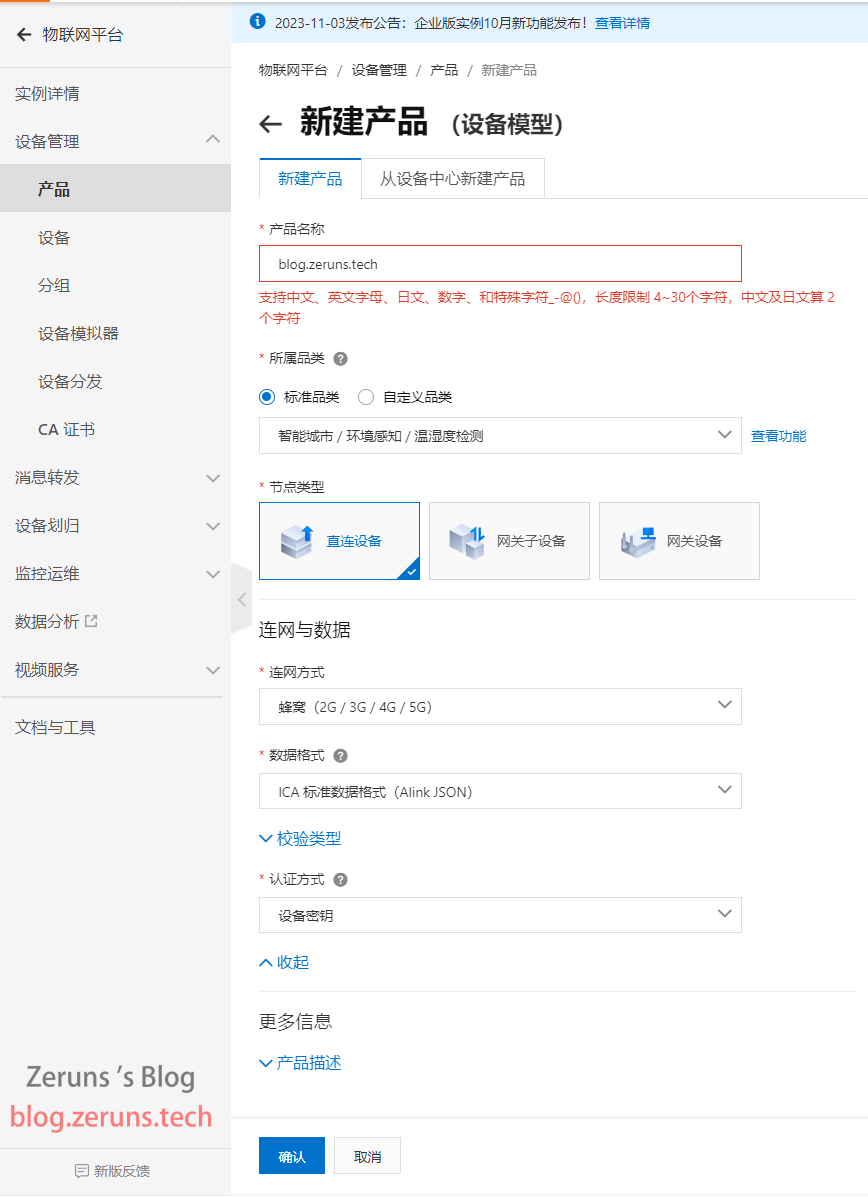
首先到阿里云物联网平台新建产品,节点类型选直连设备。
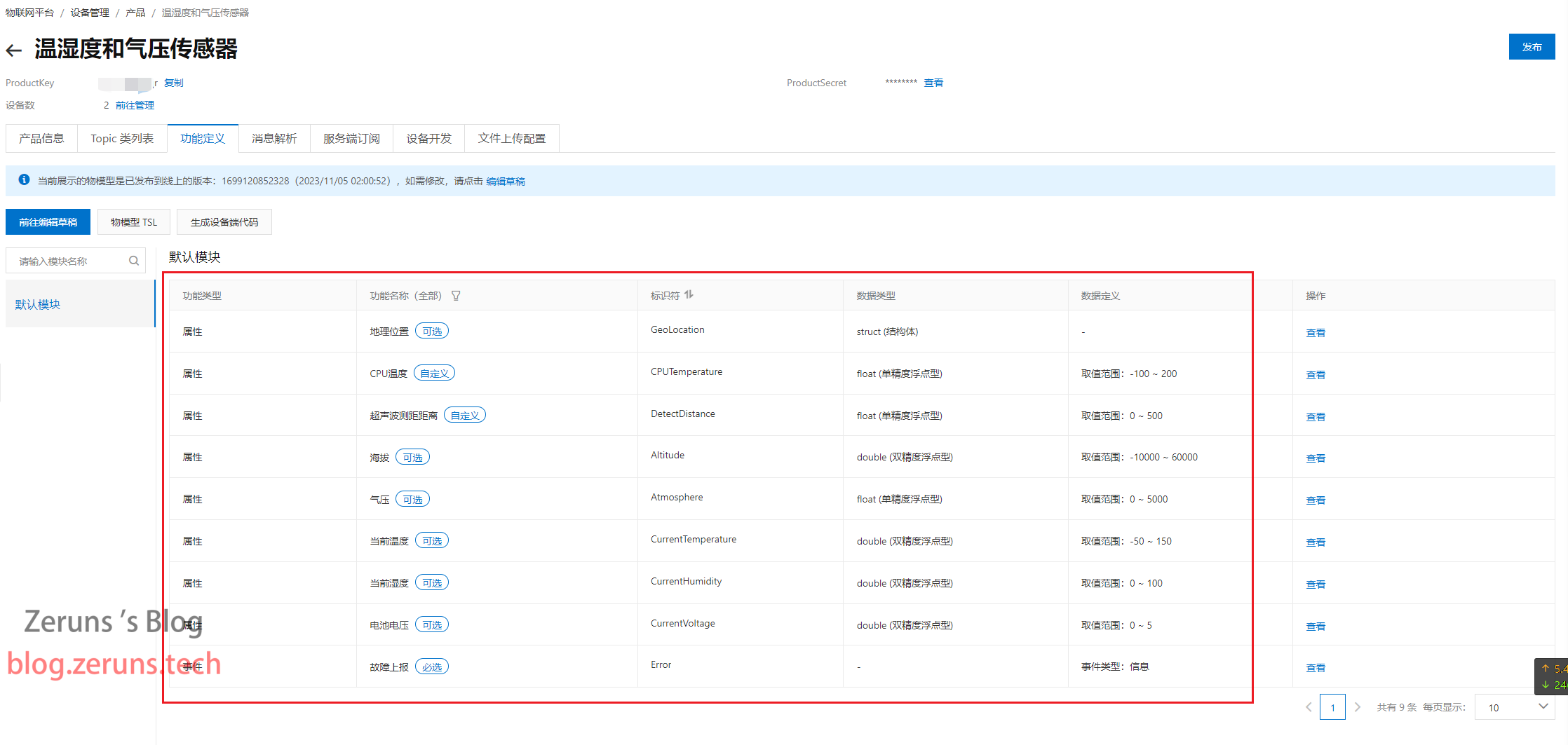
设置功能定义:
接着添加两个设备
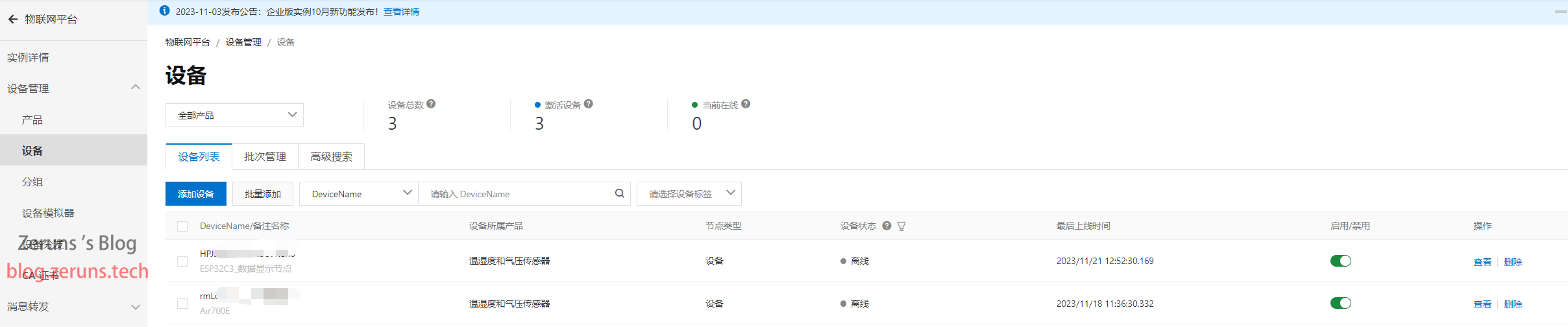
修改好脚本中的产品密钥等参数,然后将固件和脚本下载到Air700E中,看看设备能不能正常上线并上传数据。
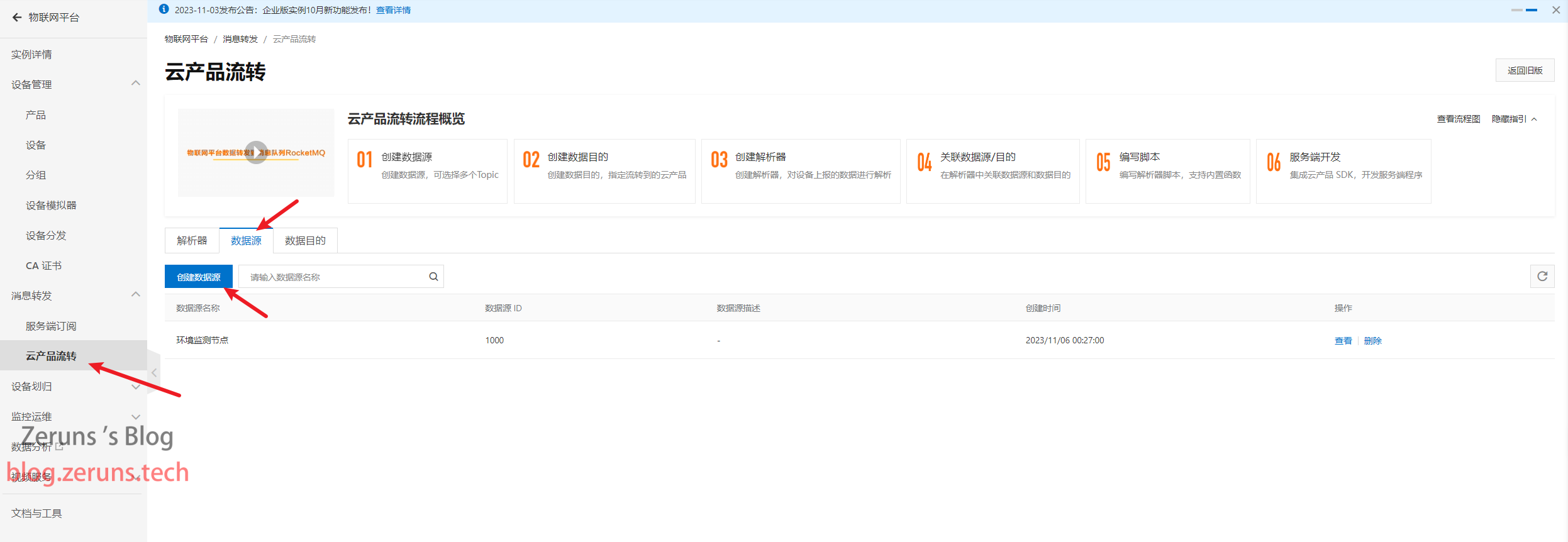
到 消息转发→云产品流转 那里创建数据源:
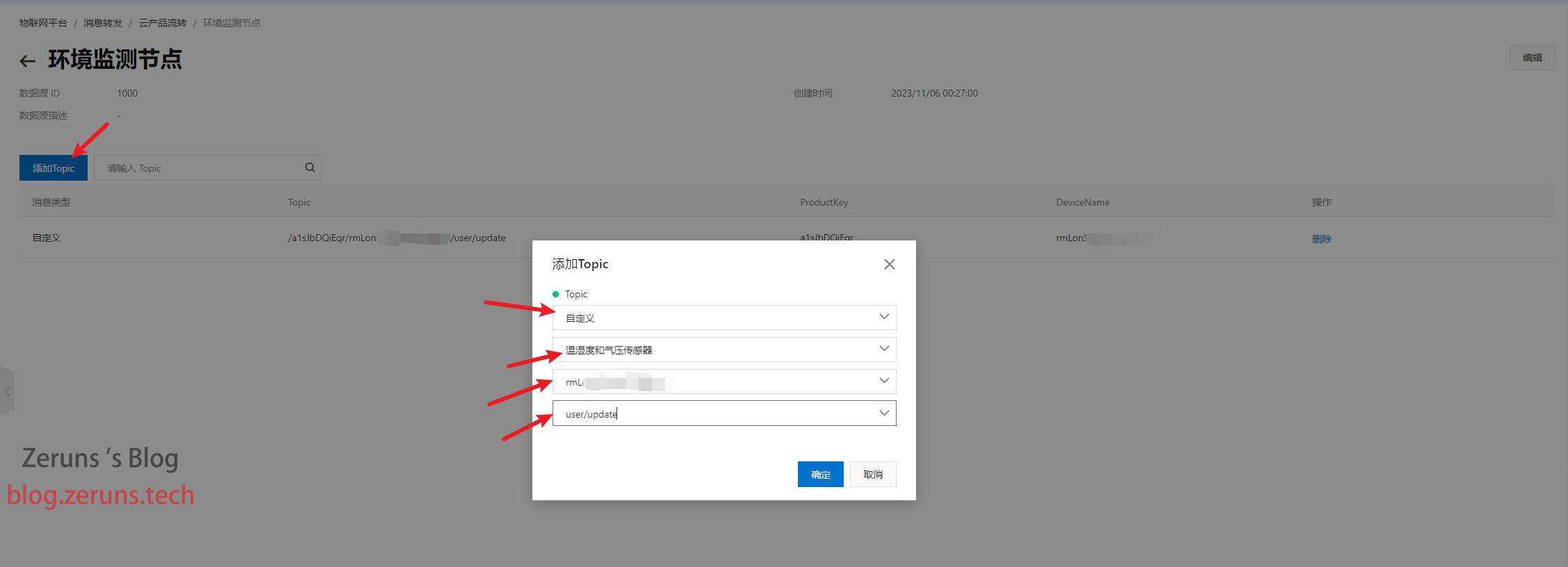
点击刚创建的数据源右边的查看,然后添加Topic,第一个选择自定义,第二个选择你创建的产品,第三个选择你的4G节点的设备,第四个选择user/update
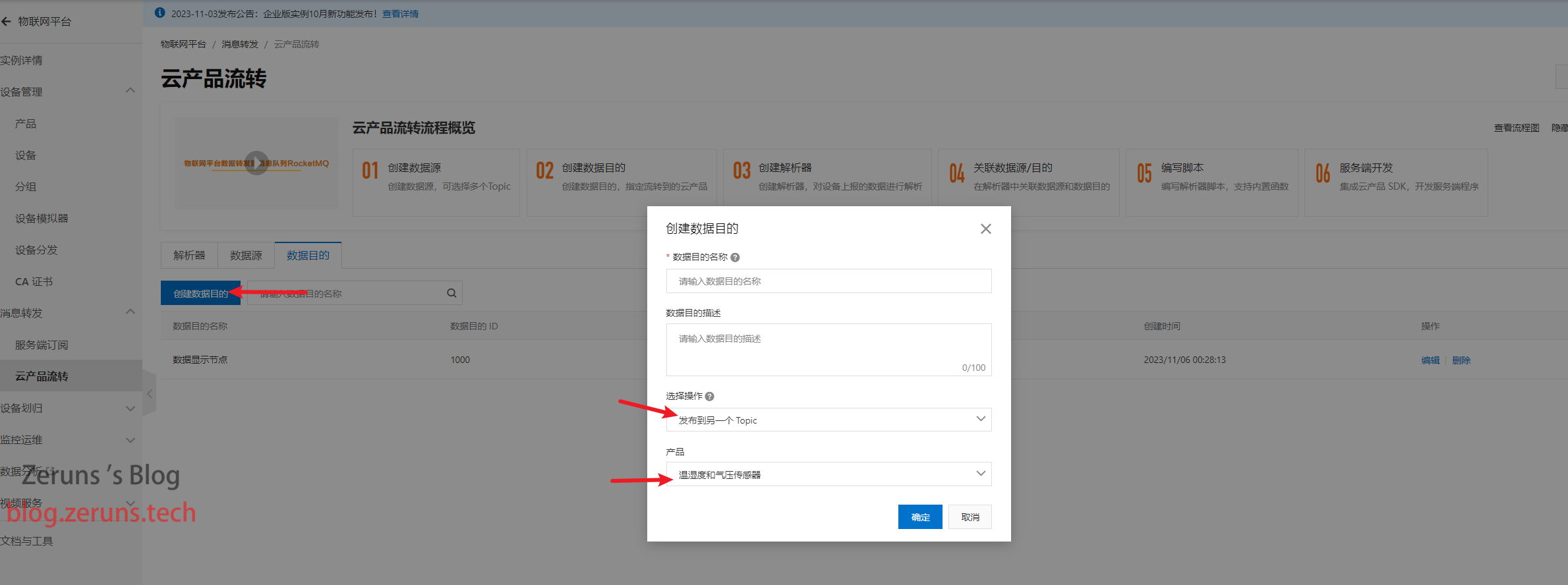
创建数据目的地,选择操作选发布到另一个 Topic,产品也是选你上面创建的产品。
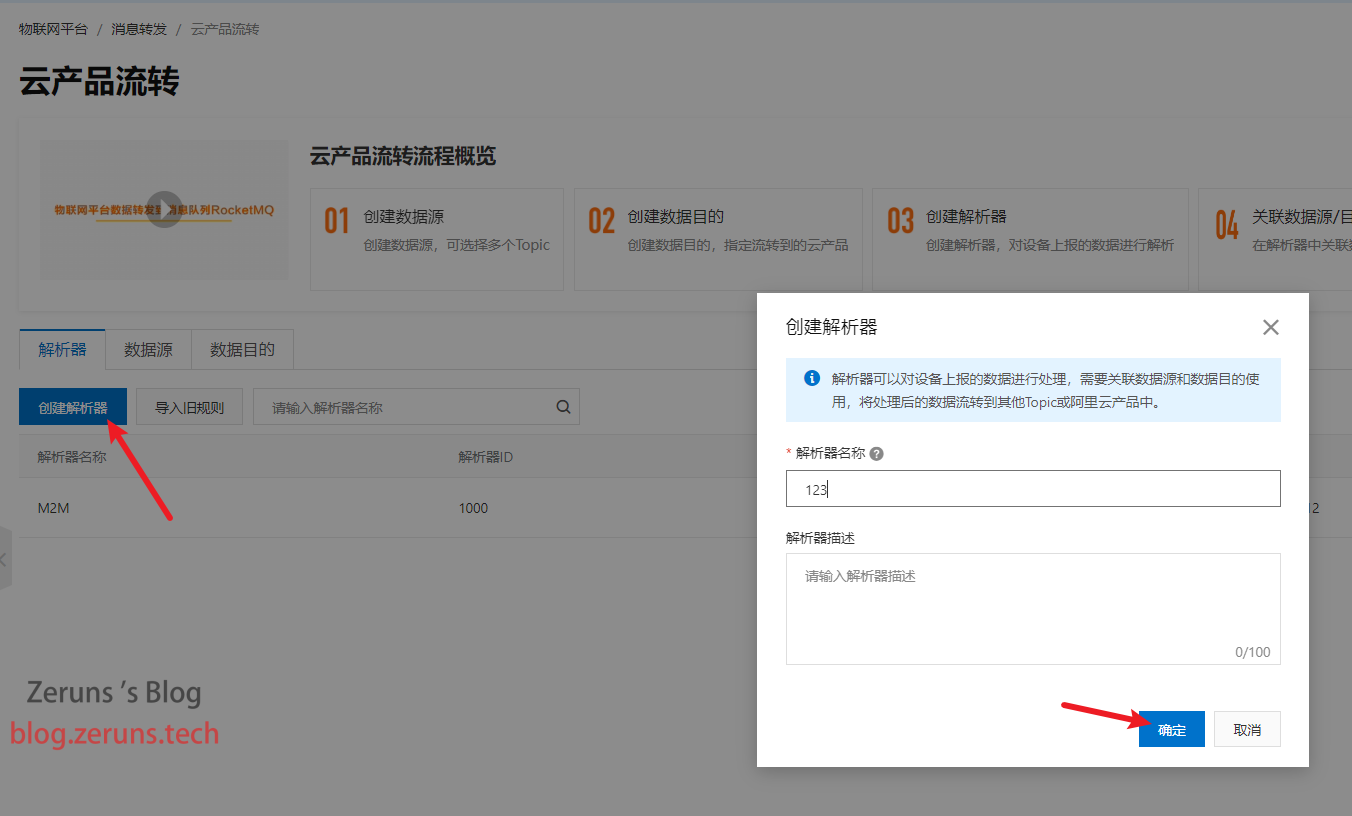
创建解析器,然后点击前往编辑,或者点击右边的查看。
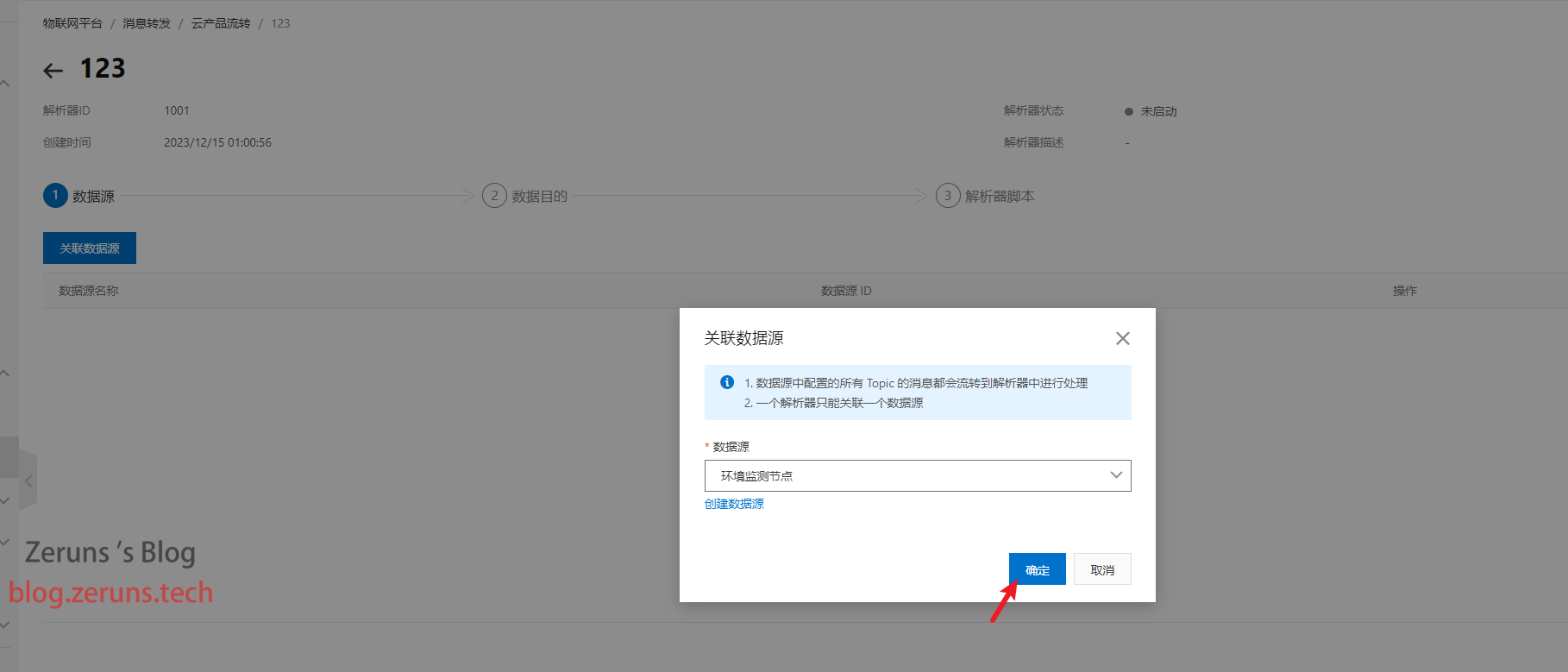
关联数据源选你刚刚创建的数据源:
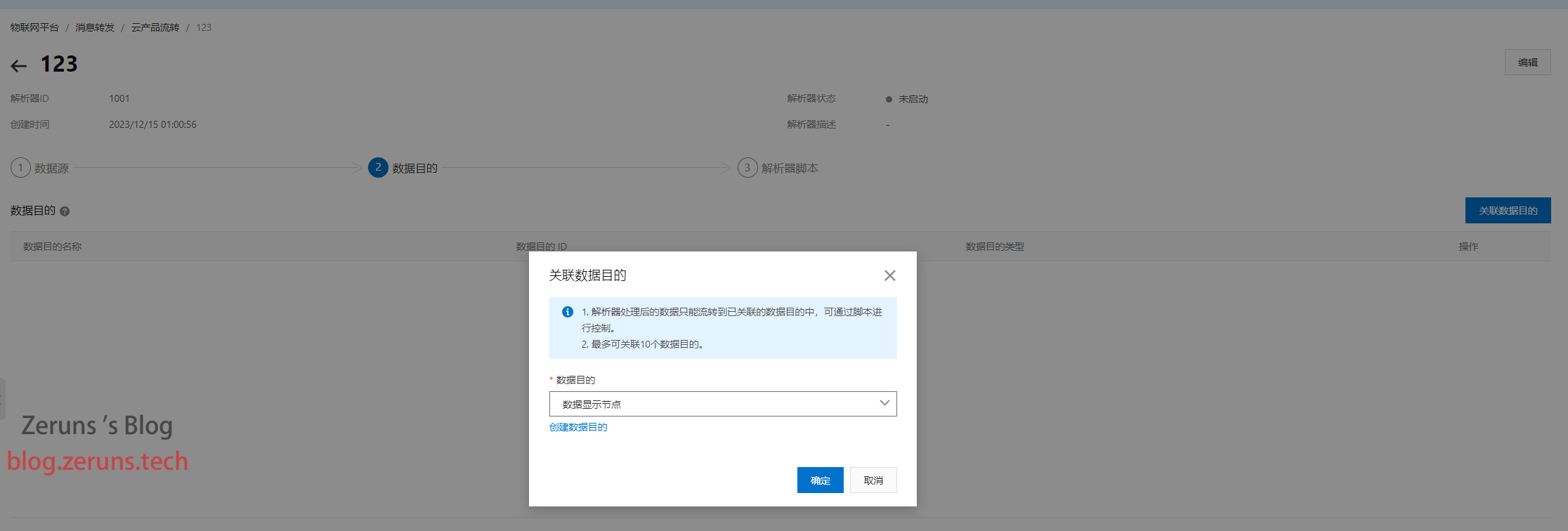
关联数据目的选你刚刚创建的数据目的地
到解析器脚本这里,将deviceName()改成你WiFi节点的设备名,如下图所示。
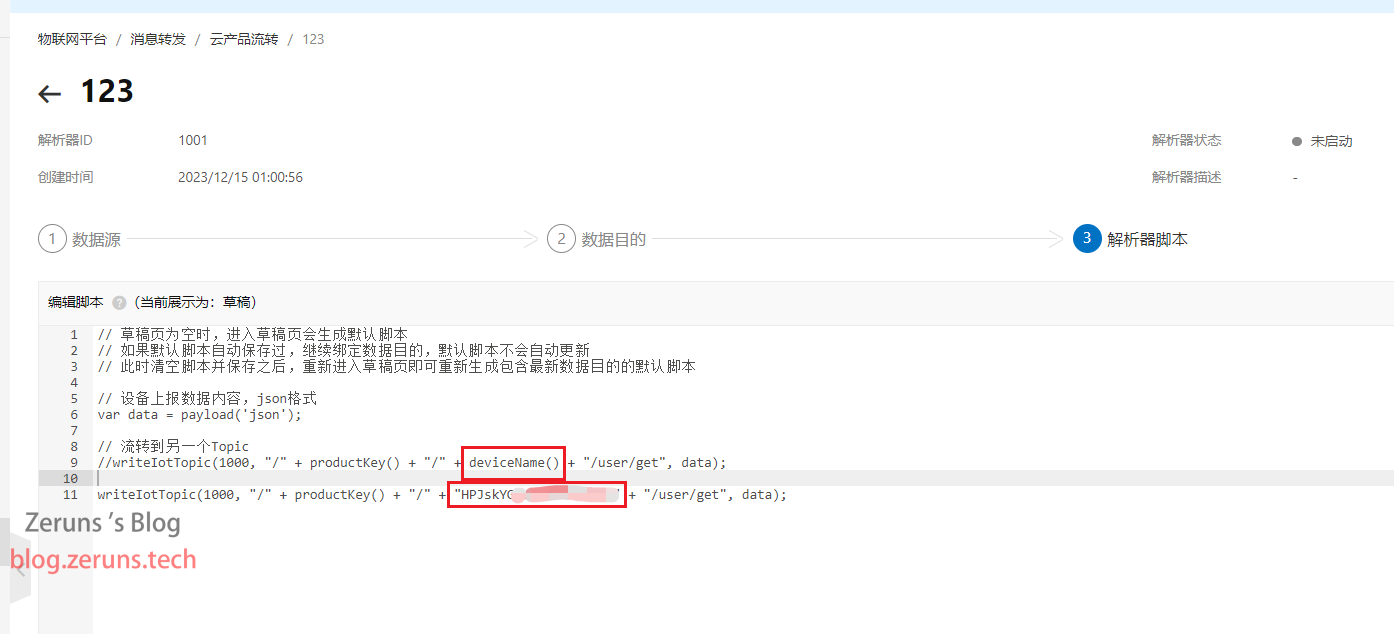
编辑完后点发布,然后启动即可,接着就会自动把 /ProductKey/DeviceName/user/update 主题的数据转发到 /ProductKey/DeviceName/user/get 主题了。
其他开源项目推荐
- STM32F030C8T6最小系统板和流水灯(原理图和PCB):https://blog.zeruns.com/archives/715.html
- 画了个 MSP430F149的最小系统板 开源出来了:https://blog.zeruns.com/archives/713.html
- 2007年电赛电源题:30到36V可调升压DCDC模块(UC3843):https://oshwhub.com/zeruns/36v-sheng-ya-dcdc-mo-kuai-uc3842
- STC12C5A60S2最小系统板/51单片机温度显示和温度控制风扇:https://blog.zeruns.com/archives/721.html
- 移植好U8g2图形库的STM32F407标准库工程模板:https://blog.zeruns.com/archives/722.html
- 沁恒CH32V307VCT6最小系统板开源:https://blog.zeruns.com/archives/726.html
- LM25118自动升降压可调DCDC电源模块:https://blog.zeruns.com/archives/727.html
- EG1164大功率同步整流升压模块开源,最高效率97%:https://blog.zeruns.com/archives/730.html
推荐文章
- 高性价比和便宜的VPS/云服务器推荐: https://blog.zeruns.com/archives/383.html
- 我的世界服务器搭建教程:https://blog.zeruns.com/tag/mc/
- 分享一下我家网络机柜,家庭网络设备推荐:https://blog.zeruns.com/archives/732.html
- 香橙派 Orange Pi 3B(RK3566)开发板 开箱测评:https://blog.zeruns.com/archives/729.html
- 给自己电脑升级了一下,换了显卡,盈通RTX3070:https://blog.zeruns.com/archives/746.html