I combined the initialization functions for the IO port and ADC together. No matter whether the IO port function comes first or the ADC function comes first, the latter one always throws an error and Keil fails to recognize it (as shown in the image). However, when I separate them into two individual functions, everything works fine. What’s wrong here? Need help!
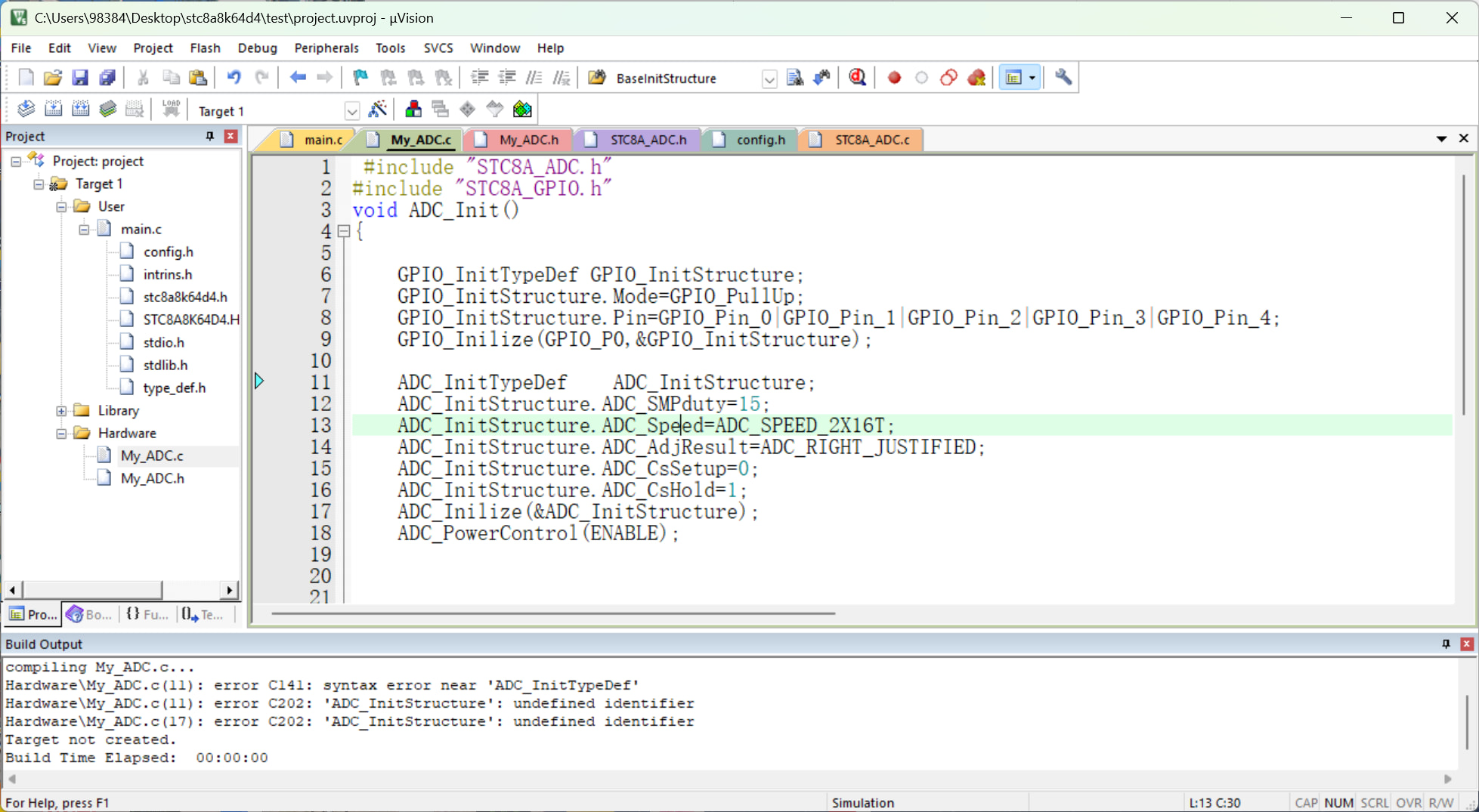
Copy and paste all the code here, as a screenshot won’t show whether it’s a symbol issue (there’s a difference between Chinese and English symbols).
This is a very classic and frustrating C language standard issue, frequently encountered when using Keil (especially C51 or older compiler versions).
Root Cause: Limitations of the C89 Standard
The error occurs because: In the C89 standard (which many embedded compilers default to), all variable declarations must appear at the beginning of a function block—before any executable statements.
Looking at your code (as shown below):
- You first declare
GPIO_InitStructure(this is a declaration, so it’s fine). - Then you execute
GPIO_InitStructure.Mode = ...and callGPIO_Inilize(...)(these are executable statements). - Later on line 11, you attempt to declare
ADC_InitTypeDef ADC_InitStructure;.
Since this declaration on line 11 appears after a function call on line 10, the compiler does not recognize it, resulting in a syntax error and subsequent undefined identifier errors.
Solutions
Method 1: Move All Variable Declarations to the Top of the Function (Recommended)
This is the most reliable fix—place all InitTypeDef structure declarations at the very start of the function.
void ADC_Init()
{
    // 1. Declare all variables first
    GPIO_InitTypeDef GPIO_InitStructure;
    ADC_InitTypeDef  ADC_InitStructure;

    // 2. Then write the logic and initialization code
    GPIO_InitStructure.Mode = GPIO_PullUp;
    // ... other GPIO settings
    GPIO_Inilize(GPIO_P0, &GPIO_InitStructure);

    ADC_InitStructure.ADC_SMPduty = 15;
    // ... other ADC settings
    ADC_Inilize(&ADC_InitStructure);

    ADC_PowerControl(ENABLE);
}
Method 2: Enable C99 Mode
If you prefer to declare variables as needed (like in modern C++ or Java), you can enable C99 mode in Keil:
- Click the magic wand icon (Options for Target).
- Go to the C/C++ tab.
- Check C99 Mode.
Note: Some 8051 compilers (e.g., older C51 versions) may not support C99. If enabling this causes more errors, revert to Method 1.
Why Does Splitting into Separate Functions Work?
When you split the code into two separate functions, each function starts with variable declarations—complying with the rule that “declarations must precede executable statements.” Thus, the compiler accepts them without issues.
A small note:
The spelling GPIO_Inilize (with an extra ‘i’) appears to be a quirk specific to the STC library—it might look odd, but make sure it matches exactly what’s defined in your header files.
Wow, I’ve fallen into this exact trap before! 
Keil C51 is such an old compiler—it defaults to the C89 standard, which requires all variables to be declared at the very beginning of a function. You can’t insert variable declarations in the middle of code; otherwise, it throws a syntax error. I once got stuck for nearly half an hour before realizing what was going on.
Looking at your code: you first define a GPIO structure, then call GPIO_Initialize, and only afterward try to define an ADC structure. That’s when the compiler completely freaks out, thinking you’re writing gibberish. The fix is super simple: move the declarations of ADC_InitTypeDef and GPIO_InitTypeDef to the top of the function. Define all your variables first, then write the executable statements—problem solved instantly.
It looks like you’ve run into a classic “C89” headache! While modern programming languages (and newer C standards like C99 or C11) let you declare variables anywhere, the Keil C51 compiler (used for STC microcontrollers) is often configured to follow the older ANSI C (C89) standard.
The Culprit: “Declarations Before Statements”
In the C89 standard, all variable declarations must appear at the very beginning of a code block (like a function), before any executable code (assignments, function calls, etc.).
Looking at your code:
- You declared
GPIO_InitStructure(Declaration - OK). - You set
GPIO_InitStructure.Mode = ...(Statement - OK). - You then tried to declare
ADC_InitTypeDef ADC_InitStructure;(Declaration after a Statement - Error!).
The compiler gets confused because it expects more logic/math after line 10, not a brand-new variable definition.
The Fix: Move Declarations to the Top
To fix this, you just need to “stack” your variable definitions at the top of the ADC_Init() function.
void ADC_Init()
{
    // 1. All declarations go here first
    GPIO_InitTypeDef GPIO_InitStructure;
    ADC_InitTypeDef  ADC_InitStructure;

    // 2. Now you can run your initialization logic
    GPIO_InitStructure.Mode = GPIO_PullUp;
    GPIO_InitStructure.Pin = GPIO_Pin_0 | GPIO_Pin_1 | ...;
    GPIO_Inilize(GPIO_P0, &GPIO_InitStructure);

    ADC_InitStructure.ADC_SMPduty = 15;
    ADC_InitStructure.ADC_Speed = ADC_SPEED_2X16T;
    // ... and so on
    ADC_Inilize(&ADC_InitStructure);
    ADC_PowerControl(ENABLE);
}
Why did separating them work?
When you put them in individual functions, each variable was at the top of its own function block. Since no executable code preceded them in their respective functions, the compiler was perfectly happy.
Pro-Tip: Changing Keil Settings
If you want to avoid this in the future and write more “modern” looking C, you can try to enable C99 mode in Keil:
- Right-click your Target or Project folder.
- Select Options for Target.
- Go to the C51 (or C/C++) tab.
- Look for a checkbox labeled C99 Mode and check it.
Note: Not all versions of the C51 compiler support C99 fully, so the “move to top” method is the most reliable way to ensure your code remains portable for 8051-based chips.